

These cases are covered on other pages:
- You use claude.ai chat or Cowork and not Claude Code: see Plugins on claude.ai and in Cowork
- You built an MCP server and want it in Anthropic’s directory: see Publish to the directory
- You want Claude Code inside VS Code or a JetBrains IDE: that’s the VS Code extension or the JetBrains plugin, not a Claude Code plugin. See Use Claude Code in VS Code or JetBrains IDEs
/plugin in a Claude Code terminal session and install one from the Discover tab, which lists the plugins from your marketplaces. From there:
- Install and manage plugins: the full install steps, scopes, and other surfaces
- Create a plugin: build your own
- Decide whether you need a plugin: whether a plugin is the right tool for what you want
Understand what a plugin is
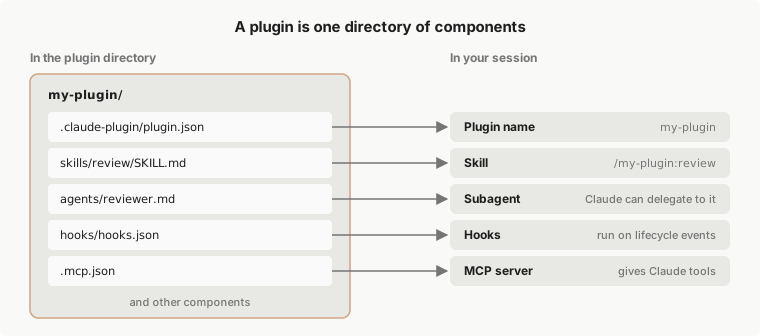
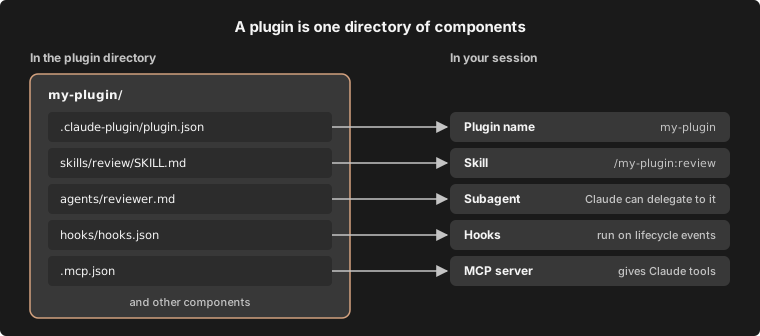
A plugin is a directory of components, usually with a manifest. The manifest, a JSON file at.claude-plugin/plugin.json, gives the plugin its name and can add a version, a description, and other metadata. The components are what the plugin adds to Claude Code, such as:
- Skills:
SKILL.mdinstructions Claude loads when relevant, and that you can also run as a command - Agents: subagent definitions Claude can delegate to
- Hooks: commands Claude Code runs at points in its lifecycle, such as after every edit
- A hooks module: hooks written as JavaScript functions, which can also draw panes and add commands. A plugin that has one is called a mod. Some mods are built into Claude Code.
- MCP servers: tool servers Claude Code connects to while the plugin is enabled
my-plugin that holds a skill, an agent, hooks, and an MCP server, and what you get from each file once the plugin loads.
Decide whether you need a plugin
Skills, subagents, hooks, and MCP servers all work on their own, without a plugin. A skill you save in~/.claude/skills/, for example, is available in every project on your machine. To set one up on its own, see Skills, Subagents, Hooks, or MCP.
Use a plugin when you want several skills, subagents, hooks, or MCP servers packaged as one unit. Install one to get a setup someone else built, with one command and updates from its marketplace. Make one to give your own setup to teammates, install it in many projects, or publish versioned releases.
What an enabled plugin adds to your sessions
An enabled plugin is part of every session, not only the sessions where you use it. That has a few consequences worth knowing before you install one:- Context and usage: for each skill, agent, and command that Claude can invoke on its own, the name and description are in Claude’s context on every turn so that Claude knows it exists. Those tokens count toward your usage and leave less room in the context window even in sessions where nothing from the plugin runs. The full text of a skill or agent loads only when it’s used. What the plugin’s MCP servers add per turn follows MCP tool search.
- Processes: MCP servers the plugin defines run alongside each session where it’s enabled, and its hooks fire at their events.
- Permissions: what the plugin runs, it runs as you. See Plugin security and trust for what to review first.
- Before you install: open the plugin from the Marketplaces tab in
/plugin. Plugins in Anthropic’s official marketplace show a Context cost estimate there. - After you install: Measure what a plugin costs shows how to read a plugin’s footprint, and the Installed tab’s Not used recently group lists plugins you could turn off.
- To stop it without uninstalling: disable the plugin with
/pluginor, in your shell,claude plugin disable. See Manage installed plugins.
Get plugins from a marketplace
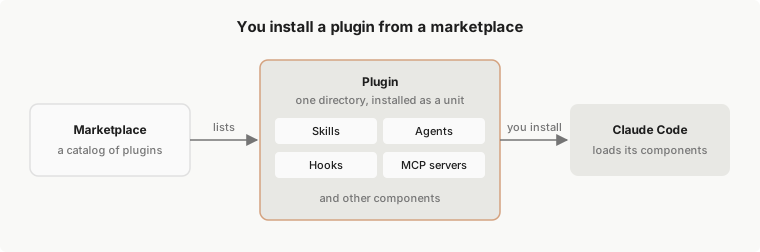
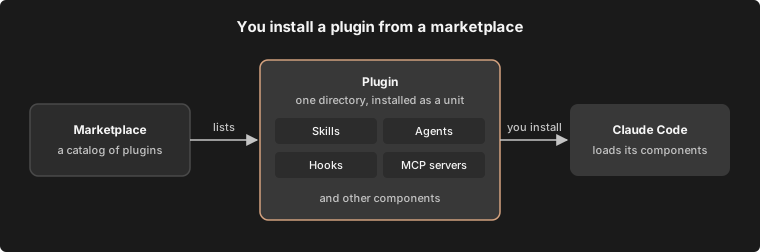
A marketplace is a repository or directory with a.claude-plugin/marketplace.json file that lists plugins and where to fetch each one. It’s a catalog, not a hosted store. You add a marketplace once, then install plugins from it by name, such as commit-commands@claude-plugins-official.
A plugin marketplace isn’t Claude Marketplace. Claude Marketplace is the website at claude.com/marketplace where you browse plugins, connectors, partner products, and service partners. It isn’t a marketplace you add with
/plugin marketplace add./plugin in a session or browse Claude Marketplace.
This diagram shows the path from a marketplace to your session. A marketplace lists a plugin, you install that plugin, and Claude Code loads its components.
--plugin-dir, as Develop without a marketplace shows.
Make an installed plugin available in your session
Before a plugin you installed gives you a skill you can run, it has to be present at each of these layers:- Settings: your settings list the marketplaces you’ve added and the plugins that are enabled.
- Disk:
~/.claude/plugins/holds what Claude Code has fetched and installed. - Session: plugins load at startup, or when you reload plugins.
Tell Anthropic’s marketplaces from third-party ones
A marketplace’s name places it in one of three tiers. Claude Code accepts the official and community names only for marketplaces sourced fromgithub.com/anthropics/ repositories:
- Official: marketplaces with one of Anthropic’s official marketplace names, including
claude-plugins-officialand the demo marketplaceclaude-code-plugins. - Community: marketplaces with one of Anthropic’s community names, such as
claude-community. Identify Anthropic’s marketplaces by name lists them. - Third-party: every other marketplace. A marketplace your coworker or your organization publishes is third-party.
Understand install scopes
When you install a plugin, you pick a scope, and the scope decides who the plugin is enabled for:- User scope: enabled for you in every project on this computer
- Project scope: enabled for everyone who works in this repository, through the committed
.claude/settings.json. Each collaborator still installs it on their own machine - Local scope: enabled for you in this repository only
The same plugin format also installs on claude.ai and in Cowork, where a different set of components loads. For those surfaces, see Plugins on claude.ai and in Cowork on claude.com and its component support table.
Next steps
Most people start by installing a plugin from Anthropic’s official marketplace, which Claude Code adds the first time you start an interactive terminal session. Run/plugin in a terminal session to browse it, or follow Install and manage plugins, which also covers the desktop app and VS Code. To see what’s in that marketplace before you open Claude Code, browse Claude Marketplace on the web.
To build your own, Create a plugin starts with an empty directory and ends with a working plugin.
Once you’ve installed or built a plugin, these pages cover what comes next:
- Share what you built: Publish and distribute a plugin, through your own marketplace or Anthropic’s directory
- Check whether it works and is used: Test plugins with evals and Measure plugin cost and usage
- Run a marketplace for your team: Create a marketplace, then Host and maintain a marketplace
- Set plugin policy for an organization: Manage plugins for your organization
- Fix a problem: Troubleshoot plugins
