Six Z-Wave 800 sticks are worth buying for Home Assistant right now, and the choice between them is simpler than the spec sheets make it look. All six use the same generation of Silicon Labs chip and all six support Z-Wave Long Range. What actually separates them is the antenna, how the stick connects to your server, whether you also want Zigbee on it, and one easy-to-miss detail: whether your sensors were sold for the same radio region as your controller.
This guide compares the officially recommended Home Assistant Connect ZWA-2, the value Zooz ZST39, the SONOFF Dongle Plus with its external antenna, the network-attached SONOFF Dongle Max, the dual-radio Aeotec Z-Stick 10 Pro, and the HomeSeer SmartStick G8. It also covers what a Z-Wave controller actually is, what changed between the 700 and 800 series, and a straight ZWA-2 vs Zooz 800 comparison, since that is the decision most people end up making.
Current as of September 2026.
The quick picks
Best overall: the Home Assistant Connect ZWA-2. Nabu Casa built it specifically for Home Assistant, the long external antenna reaches further, one model covers every region, and it runs a classic mesh and a Long Range network at the same time. If you only pick one, pick this.
Best value: the Zooz ZST39. Same 800 chip, same Long Range support, about $30 less than the ZWA-2. It is tiny, it disappears behind the server, and it does everything most homes need.
Best budget stick with an external antenna: the SONOFF Z-Wave 800 Dongle Plus. Zooz money, but with an adjustable 2 dBi antenna and a USB extension cable in the box.
Best if Home Assistant runs in a VM or a rack: the SONOFF Z-Wave 800 PoE Dongle Max. It connects over Ethernet with PoE power, so the radio can sit in the middle of the house while the server stays in the closet, and there is no USB passthrough to fight.
Best if you want Z-Wave and Zigbee in one stick: the Aeotec Z-Stick 10 Pro. It carries an 800-series Z-Wave radio and a Zigbee 3.0 radio in a single dongle, so one USB port covers both protocols.
What is a Z-Wave controller, and do you need a hub?
Every Z-Wave network has exactly one primary controller. It holds the network’s security keys, adds and removes devices, and is the point every command flows back to. On a commercial hub such as SmartThings or Hubitat the controller radio is built into the box. With Home Assistant you supply it yourself: a USB stick (or a network adapter) is the radio, and the Z-Wave JS software that runs alongside Home Assistant is the brain. Together they make a full Z-Wave controller, so a separate hub is not needed.
That is why “best Z-Wave controller” and “best Z-Wave stick” are really the same question for a Home Assistant user. Home Assistant can also use a third-party hub such as Fibaro, SmartThings, or Z-Wave.Me Z-Way as the controller, but its own documentation recommends plugging an adapter in directly for the best experience, and that is what every pick below does.
How we picked
This is a spec and documentation comparison, and it is honest to say so up front. No stick here was put through a month-long range test in the same house, so you will not find invented distance numbers below. What this guide does is pull every spec from the manufacturer pages, then cross-check the things that actually decide the purchase against primary sources: which chip generation each stick uses, which firmware it ships, whether Home Assistant lists it as confirmed working, and how Z-Wave Long Range and regional frequencies really work.
Those facts come straight from Silicon Labs (who make the chip), the Home Assistant supported-adapter list, and each maker’s own firmware notes. Prices are from a 27 September 2026 check and move often, so treat them as a guide.
Z-Wave 700 vs 800 series: what actually changed
The 800 series is built on the Silicon Labs ZG23 chip and its ZGM230S module, and it is the current generation. The 700 series is still sold, often at the same price, so it is fair to ask whether the upgrade matters. For a controller it does, though not always for the reasons the marketing gives.
| Spec | Z-Wave 800 | Z-Wave 700 | Z-Wave 500 |
|---|---|---|---|
| Chip family | ZG23 / ZGM230S | EFR32ZG14 (controllers) | ZM5101 and similar |
| Rated maximum range | 1.5+ miles (2,400 m) | About 1 mile (1,600 m) | About 600 m |
| Flash / RAM | 512 KB / 64 KB | 256 KB / 32 KB | 128 KB / 16 KB |
| Coin cell battery life | Up to 10 years | Up to 10 years | Up to 1.5 years |
| Security | S2 plus Secure Vault | S2 | S2 |
| Long Range | Yes, standard | Yes, on later firmware | No |
| Home Assistant stance | Recommended | “Not recommended” for new setups | Legacy, works |
Three things are worth knowing from that table. First, the range figures are Silicon Labs’ line-of-sight ratings for the radio, which is why they sound enormous; indoors you will see a fraction of that. Second, battery life gains mostly show up in end devices such as door sensors, not in the controller, which is powered over USB. Silicon Labs rates the 800 radio at up to 50 percent longer battery life than 700 hardware, largely thanks to lower transmit and receive current. Third, S2 security is not new: the 700 series already had it, and the 800 adds Secure Vault hardware key protection on top.
The practical reason to buy 800 for a new network is simpler. Home Assistant’s own adapter page says 700-series adapters are “in general” not recommended, says 800-series sticks have the best RF performance and the longest runway, and is candid that both generations have had firmware bugs. Long Range also arrived partway through the 700 series’ life, while every 800 stick ships with it. With prices now level, there is no reason to start on 700.
The region trap, and how Long Range fits in
Z-Wave runs on a sub-gigahertz band that is different in every region. In North America classic Z-Wave lives at 908.42 MHz; in Europe and the UK it is 868.42 MHz; Australia and New Zealand use 921.42 MHz. A US sensor and an EU sensor cannot hear each other, so the one rule that never bends is to buy end devices for the country you live in.
Controllers are more forgiving than they used to be. Most older 500 and 700 sticks shipped locked to one region. Many 800 controllers can switch region in software: the ZWA-2 is a single model for the whole world, and Home Assistant sets its region automatically from your location settings. Others, including the Zooz and Aeotec sticks, are still sold as separate regional versions, so check that the listing matches your country before you order.
Long Range adds a wrinkle on top of the region rule. It runs on its own dedicated channels, not the classic mesh frequency: 912 and 920 MHz in North America, and 864 and 866 MHz in Europe. Long Range started as a North America feature; the European version was standardized in 2024 and reached controllers through 2025 firmware, though the pool of Long-Range-capable devices is still larger in North America. It always needs both a Long-Range-capable controller and Long-Range-capable end devices.
Long Range changes the network shape. Classic Z-Wave is a mesh that tops out at 232 nodes and relies on mains-powered devices to relay signal. Long Range is a star topology: each device talks directly back to the controller, the network scales into the thousands of nodes, and range grows well beyond the usual 25 to 30 metres of a single classic hop indoors. Nabu Casa reports 50 to 100 metres horizontally indoors in its own ZWA-2 testing, and 1.5 km with clear line of sight. The two networks run side by side, so your existing mesh keeps working while far-flung sensors join over Long Range.
Z-Wave 800 sticks compared
Here is how all six stack up on the specs that change the decision.
| Stick | Connection | Antenna | Radios | On HA confirmed list | Price (Sept 2026) |
|---|---|---|---|---|---|
| HA Connect ZWA-2 | USB-C | External, 31 cm | Z-Wave + LR | Yes, officially recommended | $69 MSRP, via retail partners |
| Zooz ZST39 | USB-A | Internal | Z-Wave + LR | Yes | About $40 |
| SONOFF Dongle Plus (PZG23) | USB-A | External, 2 dBi | Z-Wave + LR | Not yet | About $40 |
| SONOFF Dongle Max (MZG23) | Ethernet (PoE), Wi-Fi, USB-C | External, adjustable | Z-Wave + LR | Not yet | About $45 |
| Aeotec Z-Stick 10 Pro | USB-A | Internal | Z-Wave + LR + Zigbee 3.0 | Not yet | About $60 |
| HomeSeer SmartStick G8 | USB-A | Internal | Z-Wave + LR | Yes | About $40 |
“Not yet” does not mean a stick fails. Home Assistant’s list only records adapters that users have reported working on recommended firmware, and SONOFF and Aeotec both document Z-Wave JS setup. It does mean the ZWA-2, Zooz, and HomeSeer have more real-world mileage with Home Assistant behind them.
ZWA-2 vs Zooz 800 (ZST39): which one?
This is the comparison most people are really making, so here it is on its own.
| HA Connect ZWA-2 | Zooz ZST39 | |
|---|---|---|
| Chip | Silicon Labs ZG23 (800) + ESP32-S3 USB bridge | Silicon Labs 800 series |
| Antenna | 31 cm external, 3.38 dBi, on a weighted base | Internal, inside the stick |
| Region | One model worldwide, region set by Home Assistant | Sold as regional versions |
| Classic mesh + Long Range at once | Yes | Yes |
| Firmware updates | One click inside Home Assistant | Over-the-wire, from Home Assistant or Silicon Labs PC Controller |
| Placement | Sits on a shelf with its own 1.5 m cable | Needs a short extension cable to clear the host |
| Price | $69 | About $40 |
My read: if your devices are spread across a normal house and a few of them are mains-powered switches or plugs that repeat signal, the Zooz does the job and the $30 is better spent on sensors. If you have a large or multi-storey home, masonry walls, a detached garage, or you want the adapter Home Assistant itself is built around, the ZWA-2’s antenna is the single biggest range upgrade you can buy short of adding repeaters. It is also the easier pick if you live outside North America, because there is no regional version to get wrong.
1. Home Assistant Connect ZWA-2
Nabu Casa, the company behind Home Assistant, designed this one from scratch for the platform, and it is the only adapter Home Assistant lists as officially recommended. The giveaway is the antenna: instead of a postage-stamp antenna inside a USB stick, the ZWA-2 stands 31 centimetres tall on a weighted base, tuned to Z-Wave’s wavelength.
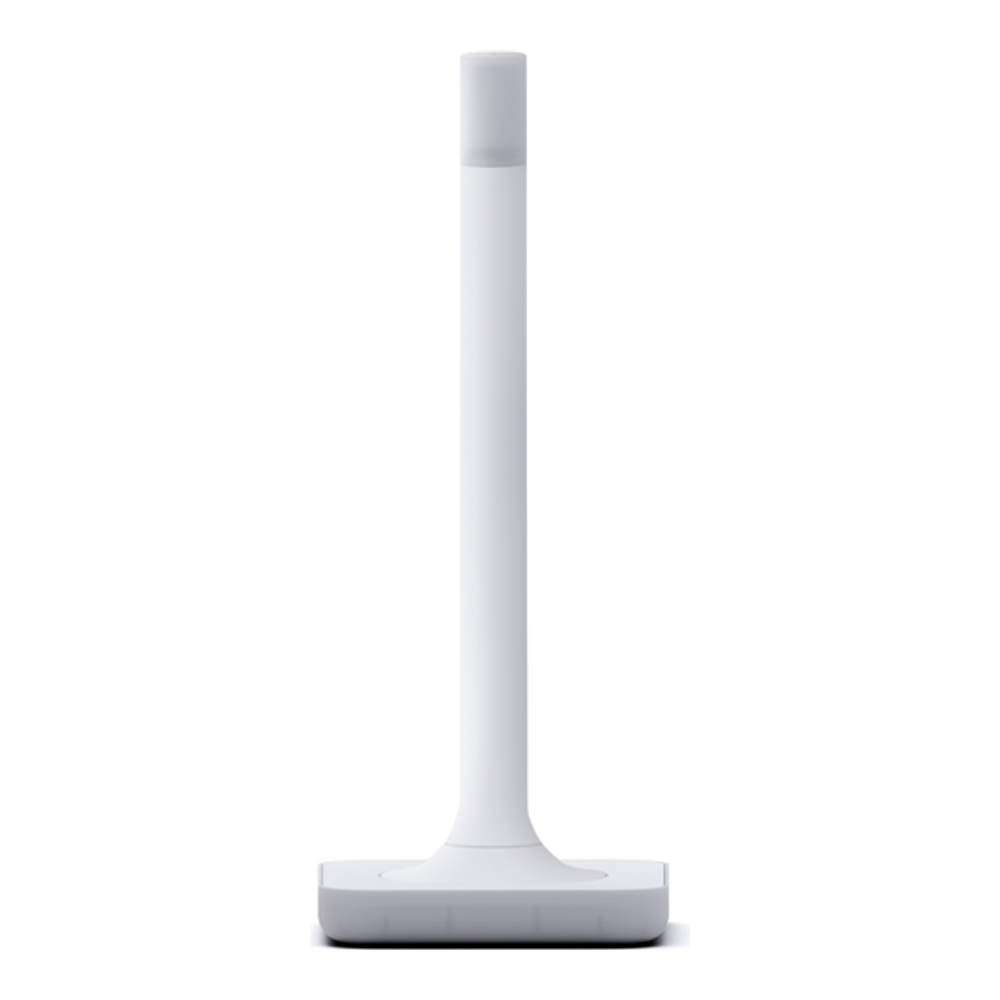
Under the antenna it pairs a Silicon Labs ZG23 Z-Wave radio with an ESP32-S3 acting as the USB bridge, connects over USB-C, and runs a standard Z-Wave mesh and a Z-Wave Long Range network at the same time. Home Assistant picks it up with a setup wizard, can migrate an existing network from most modern sticks automatically, and pushes firmware updates in one click. It ships defaulted to the European region and Home Assistant switches it to match your location.
Who it is for: anyone building or rebuilding a Z-Wave network who wants the best range and the safest long-term bet, and does not mind a device that sits out on a shelf rather than hiding behind the server.
Skip it if: you are tight on space or budget and your devices are all within normal mesh range. The antenna is the reason to buy it, and if you do not need the reach you are paying about $30 extra for nothing. It is sold through Home Assistant’s retail partners rather than Amazon; the Amazon listing was showing unavailable on our last check.
2. Zooz ZST39
The Zooz ZST39 is the stick most people should buy. It has the same 800-series chip and the same Long Range support as the ZWA-2, in a plain USB-A dongle for around $40. Home Assistant lists it explicitly as a confirmed 800 adapter, and it runs on the same Z-Wave JS driver with no special handling.
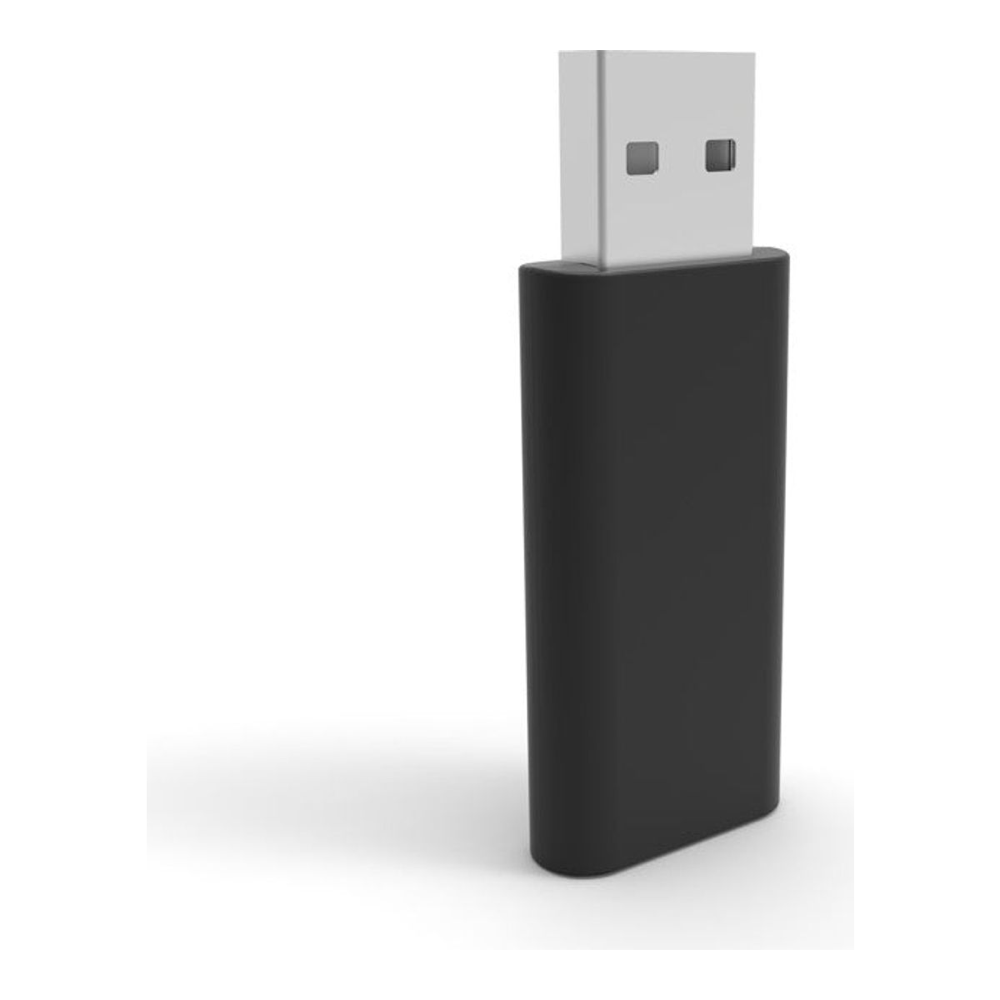
Zooz keeps the firmware moving. Version 1.60 (June 2025) moved it to Silicon Labs SDK 7.23.2 and added European Long Range, and version 1.70 (April 2026) moved it to SDK 7.24.2. Both install over the wire, including from inside Home Assistant. Units in the channel can still ship on older firmware, so update before you pair anything. What you give up versus the ZWA-2 is the external antenna, and the internal one sits right at the USB port where host interference is worst. A short extension cable fixes most of that. Zooz backs it with a five-year warranty once you register.
Who it is for: the default choice for most homes. If you are not chasing maximum range and you want to spend your money on actual sensors instead of the controller, this is it.
Skip it if: you have a large or multi-storey house where the extra reach of an external antenna would save you buying repeaters, or you also want Zigbee on the same stick.
3. SONOFF Z-Wave 800 Dongle Plus (Dongle-PZG23)
SONOFF’s Zigbee dongles became a default in Home Assistant setups, and the Dongle Plus PZG23 is the Z-Wave version of that formula. It uses the same Silicon Labs EFR32ZG23 800-series chip as everything else here, supports S2 and Long Range, and costs about the same as the Zooz. The difference is an adjustable 2 dBi external antenna and a USB extension cable in the box, which covers the two placement problems that trip up internal-antenna sticks.

SONOFF says it ships preloaded with current firmware and works with most regional Z-Wave frequencies. Two caveats: SONOFF only supports flashing its own firmware builds, so updates arrive on SONOFF’s schedule rather than straight from Silicon Labs, and it is new enough that it has not yet been added to Home Assistant’s confirmed adapter list. SONOFF does publish a step-by-step Z-Wave JS guide for it.
Who it is for: someone who wants an external antenna without paying ZWA-2 money, or who already runs a SONOFF Zigbee dongle and likes the matching hardware.
Skip it if: you want the adapter with the longest confirmed track record in Home Assistant. The Zooz and HomeSeer have more mileage.
4. SONOFF Z-Wave 800 PoE Dongle Max (Dongle-MZG23)
The Dongle Max solves a problem the USB sticks cannot: Home Assistant running somewhere the radio should not be. If your server is a Proxmox box in a basement rack, a USB stick either lives in the basement too, which is the worst spot for coverage, or needs a long USB run plus USB passthrough into the VM. The Dongle Max connects over Ethernet instead, takes its power from a PoE switch, and can go wherever the house needs coverage.

Inside is the same EFR32ZG23 Z-Wave chip paired with an ESP32 that handles networking. It connects over Ethernet with PoE, over Wi-Fi, or over plain USB-C, and has its own local web console for status and firmware updates, plus MQTT, webhooks, and a WireGuard VPN option. In Home Assistant you point the Z-Wave JS UI add-on at the device’s address on TCP port 6638 rather than at a USB serial path. As with the Dongle Plus, only SONOFF’s own firmware is supported and Home Assistant has not yet added it to its confirmed list. Wired Ethernet with PoE is the mode to use; a Z-Wave controller over Wi-Fi adds a failure point you do not need.
Who it is for: homelab setups where Home Assistant runs as a VM or container on a server in a rack or closet, and anyone who has already been burned by USB passthrough dropping after a host reboot.
Skip it if: Home Assistant runs on a small box in a central spot. A USB stick on a short extension is simpler and has one less thing on the network to maintain.
5. Aeotec Z-Stick 10 Pro
The Z-Stick 10 Pro is the one to buy when you want Z-Wave and Zigbee from a single USB port. Aeotec put an 800-series Z-Wave radio and a Zigbee 3.0 radio in one dongle, so it can run your Z-Wave network through Z-Wave JS and your Zigbee network through Zigbee2MQTT or ZHA at the same time. For a homelab mini PC or Raspberry Pi with limited USB ports, that is genuinely useful.
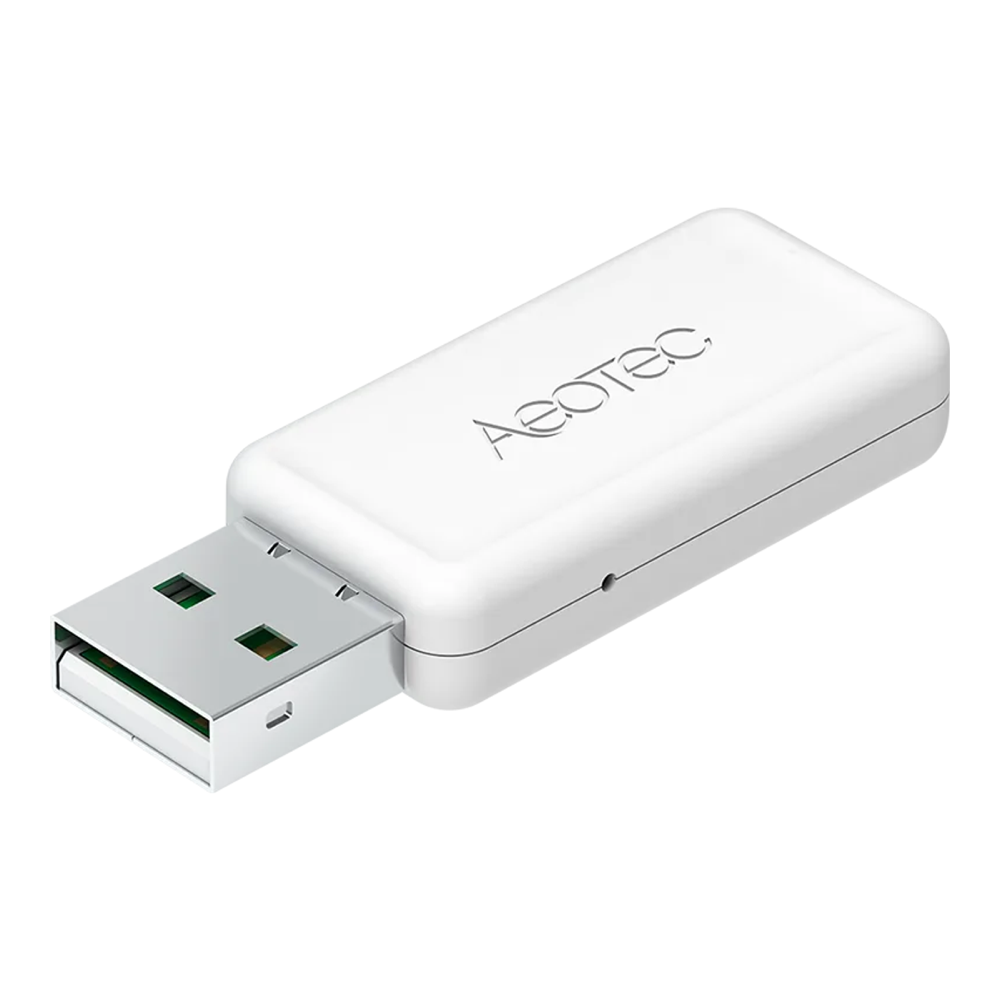
On the Z-Wave side it is a full 800-series controller with Long Range, SmartStart pairing by QR code, and native S2 security. Aeotec rates the Long Range reach at more than 100 metres indoors and up to 1000 metres outdoors. It ships in region variants (the ZWA060-A is the 908.42 MHz North America model, with separate EU and Australia versions), so the buy-your-region rule applies here. It is not yet on Home Assistant’s confirmed 800 list. Home Assistant’s docs also flag Linux USB quirks on Aeotec Z-Sticks; in our reading that note predates this model, but it is worth knowing if the stick misbehaves on a Pi.
Who it is for: people running both Z-Wave and Zigbee who would rather manage one dongle than two, especially on a small host with few USB ports.
Skip it if: you only run Z-Wave, or you want to be able to replace one radio without touching the other. Aeotec’s own Amazon listing sells it for about $60, a little less than a separate Z-Wave stick and Zigbee coordinator bought together, so you save a USB port and a few dollars, not much more. Buy from the Aeotec Official storefront; third-party listings for the same stick have been asking close to three times that.
6. HomeSeer SmartStick G8
The SmartStick G8 is the quiet alternative to the Zooz. It is one of only three 800-series adapters on Home Assistant’s confirmed list, alongside the ZWA-2 and ZST39, and it sells for the same money. HomeSeer rates it at 300 feet for classic Z-Wave and up to a mile for Long Range, runs mesh and Long Range devices at the same time, and says it supports global Z-Wave frequencies.

Who it is for: anyone who wants a confirmed-working stick when the Zooz is out of stock, and people moving from HomeSeer’s own software who want familiar hardware.
Skip it if: the Zooz is in stock at the same price. Zooz publishes a detailed firmware changelog with the SDK version for every release and offers a five-year registered warranty, which makes it the easier stick to keep healthy.
Update the firmware before you pair anything
This is the step people skip, and it is the one that causes the “my Z-Wave network randomly stops responding” threads. Home Assistant’s documentation is blunt that some 800-series firmware has bugs which destabilize the mesh or make the adapter unresponsive, and that no version is known to be completely fixed. Its guidance for 800 sticks is based on the Silicon Labs SDK version the firmware is built on:
- Prefer SDK 7.23.x and newer.
- SDK 7.22.x, and 7.17.2 to 7.19.x, are okay.
- Avoid anything before 7.17.2, and avoid 7.20 to 7.21.3.
The SDK version is not the same as the stick’s own firmware number, which is why Zooz’s changelog listing both is so useful. The ZWA-2 handles this for you with one-click updates. For the others, update first and pair second: a firmware update on a stick with 40 devices already on it is a far more nervous job than one on an empty network.
What to check before you buy
- Buy end devices for your region. 908.42 MHz for North America, 868.42 MHz for Europe and the UK, 921.42 MHz for Australia and New Zealand. If your controller is sold in regional versions, match that too.
- Use a short USB 2.0 extension cable. Plugging any Z-Wave stick straight into the back of a mini PC puts its radio next to USB 3.0 ports and a metal case, which are noisy. A cheap 30-centimetre extension gets it into clear air. SONOFF includes one; for the rest, add one to the order.
- Pick 800 over 700. They cost about the same now, and Home Assistant recommends 800. Do not start a new network on a 500-series stick such as the GoControl HUSBZB-1.
- Long Range needs both ends. The controller is only half of it. You also need Long-Range-capable sensors and switches to benefit, and your existing classic devices keep running on the mesh either way.
- Prefer USB to a GPIO module. Modules such as the Zooz ZAC93 for Home Assistant Yellow or a Raspberry Pi work, but Home Assistant advises a USB adapter because passing a module through to Docker is more awkward.
- Migrating from an old stick is painless. Z-Wave JS can back up and restore your network, so moving from a 700 stick to one of these keeps your paired devices, as long as the region matches.
Whichever stick you land on, it plugs into the same Z-Wave JS integration. If you are still standing the server up, our guides on installing Home Assistant on Ubuntu and running it in Docker both cover the base setup, and the best mini PC for Home Assistant is the box to run it on. If you also run Zigbee, the companion Zigbee coordinator guide covers that half of the radio question.
Which one to pick
For most people the Zooz ZST39 is the right call: it is the cheapest confirmed way onto the 800 series with Long Range, and paired with a short extension cable it covers a normal house without complaint. Step up to the Home Assistant Connect ZWA-2 if range is your problem, if you live outside North America, or if you are building a network you want to leave alone for years. Pick the SONOFF Dongle Max when Home Assistant lives in a VM or a rack, and the Aeotec Z-Stick 10 Pro only when you want Z-Wave and Zigbee sharing one dongle. Update the firmware before pairing, buy sensors for your region, and any of these will run a serious smart home for years.