Text Embeddings, Classification, and Semantic Search
An introduction with example Python code
This article is part of a larger series on using large language models (LLMs) in practice. In the previous post, we saw how to improve an LLM via retrieval-augmented generation (i.e. RAG). A key part of RAG was using text embeddings to retrieve relevant information from a knowledge base automatically. Here, I will discuss text embeddings more deeply and share two simple (yet powerful) applications: text classification and semantic search.

ChatGPT captured the world's imagination regarding AI and its potential. A key contributor to this impact was ChatGPT's chat interface, which made the power of AI more accessible than ever before.
While this unlocked a new level of AI hype and awareness, all the excitement around this "chatbot paradigm" left another key innovation (largely) unnoticed.
LLMs brought major innovations in text embeddings. Here, I'll explain these and how we can use them for simple yet high-value use cases.
Text embeddings
Text embeddings translate words into numbers. However, these aren't just any numbers. They are numbers that capture the meaning of the underlying text.
This is important because numbers are (much) easier to analyze than words.
For example, if you are at a networking event and want to know the typical height of people in the room, you can measure everyone's height and compute the average using Microsoft Excel. However, if you want to know the typical job title of the people in the room, there's no Excel function to help you.
This is where text embeddings can help. If we have a good way to turn text into numbers, we unlock a massive toolbox of existing statistical and machine-learning techniques to investigate textual data.
Text embeddings (Visually Explained)
Let's look at a visual example to better understand what it means to "translate text into numbers" [1].
Consider the following set of text: tree, lotus flower, daisy, sun, Saturn, Jupiter, satellite, space shuttle, basketball, and baseball.
While this may seem like a random assortment of words, some of these concepts are more similar than others. We can convey these similarities (and differences) in the following way.
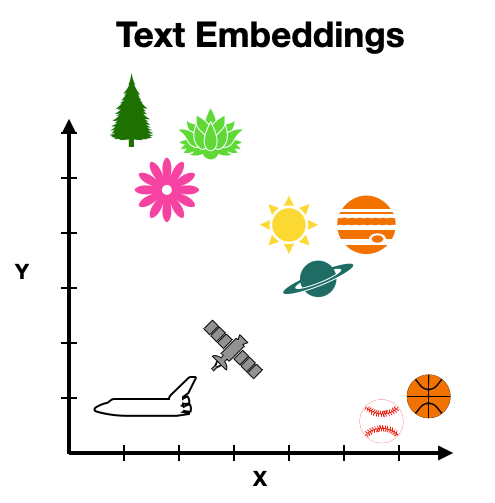
The above visualization intuitively organizes the concepts. Similar items (e.g., tree, daisy, and lotus flower) tend to be close together, while dissimilar items (e.g., tree and baseball) tend to be far apart.
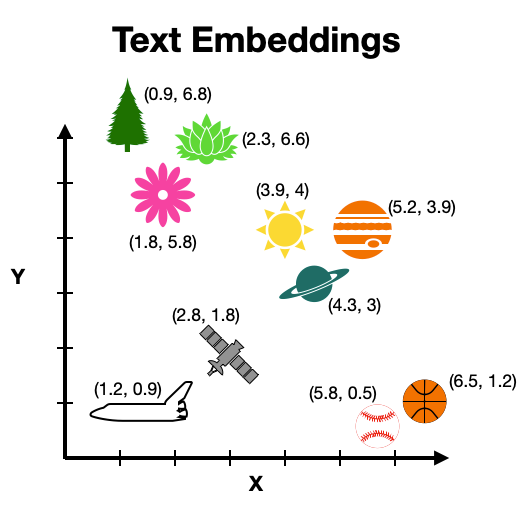
Numbers fit into this picture because we can assign coordinates to each word based on its location in the plot above. These coordinates (i.e. numbers) can then be used to analyze the underlying text.
Where do they come from?
Turning text into numbers to make it more computable is not a new idea. Researchers have explored this since the early days of computing (circa 1950) [2].
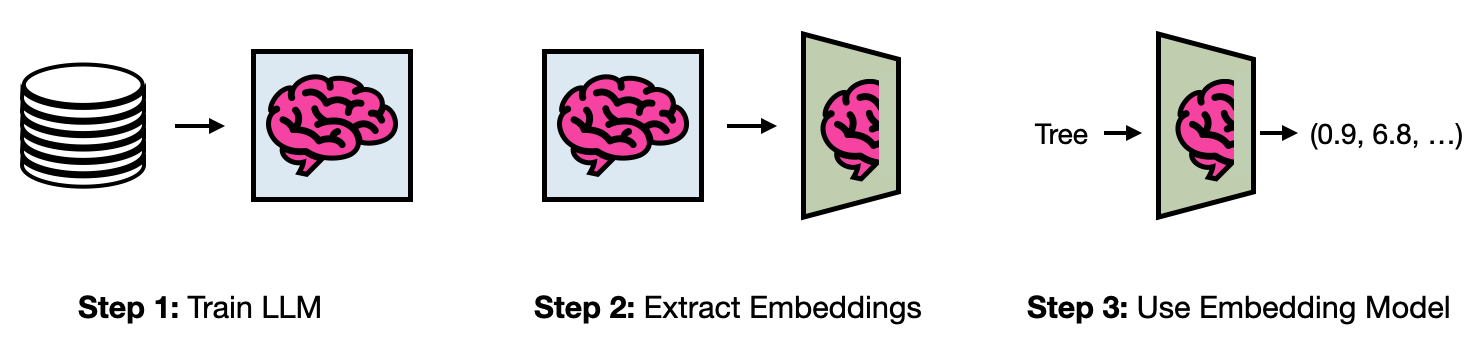
While there are countless ways people have done this over the years [2], these days, state-of-the-art text representations are derived from large language models (LLMs).
This works because LLMs learn (very) good numerical representations of text during their training. The layers that generate these representations can be dissected from the model and used in a stand-alone way. The result of this process is a text embedding model.
Can't I just use ChatGPT?
Before moving on to the example use cases, you might think, "Shaw, why should I care about these text embedding things? Can't I just make a custom ChatGPT to analyze the text for me?"
Of course, one can use techniques like RAG or Fine-tuning to build an AI agent tailored to their specific problem set. However, it's still the early days for these systems, which makes building a robust AI agent (i.e. not a prototype) an expensive and non-trivial engineering problem (e.g. major computational costs, LLM security risks, unpredictable responses, and hallucinations)
On the other hand, text embeddings have been around for decades, are lightweight, and non-stochastic (i.e. predictable). Thus, building AI systems with them is much simpler and cheaper than building an AI agent (while still capturing much of the value - if not more).
Use Case 1: Text Classification
With a basic understanding of text embeddings, let's see how we can use them to help solve real-world problems.
First, we will discuss text classification. This consists of assigning a label to a given text. For example, labeling an email as spam or not spam, a credit application as high risk or low risk, or a security alert as the real deal or a false alarm.
In this example, I will use text embeddings to classify resumes as "Data Scientist" or "Not Data Scientist," which may be relevant for recruiters trying to navigate an ocean of job candidates.
To avoid privacy issues, I created a synthetic dataset of resumes using gpt-3.5-turbo. While using synthetic data requires us to take the results with a grain of salt, this example still provides an instructive demonstration of how to use text embeddings to classify.
The example code and data are freely available at the GitHub repository.
Imports
We start by importing dependencies. In this example, I use a text embedding model from OpenAI, which requires an API key. If you are unfamiliar with the OpenAI API, I give a beginner-friendly primer in a previous article of this series. Here, my API key is stored in a separate file called sk.py.
Next, we read our synthetic training dataset as a Pandas dataframe. The data comes from a .csv file with two columns consisting of resume text and the associated role.
Generate Embeddings
To translate the resumes into embeddings, we can make a simple API call to the OpenAI API. This is done by the function below.
We can now apply this function to each resume in our dataframe and store the result in a list.
Store Embeddings in Dataframe
Next, we'll create a new dataframe to store the text embeddings and our target variable for model training.
Model Training
With our training data prepared we can now train our classification model in one line of code. Here, I use a Random Forest classifier, which I discussed in a past article.
Model Evaluation
To get a quick sense of the model's performance we can evaluate it on the training data. Here, I compute the mean accuracy and area under the ROC (i.e., AUC).
The accuracy and AUC values of 1 indicate perfect performance on the training dataset, which is suspicious. So let's evaluate it on a testing dataset the model has never seen before.
Resolving overfitting
Although the model performs well when applied to the testing data, it is still likely overfitting for two reasons.
One, we have 1537 predictors and only 100 resumes to predict, so it wouldn't be hard for the model to "memorize" every example in the training data. Two, the training and testing data were generated from gpt-3.5-turbo in a similar way. Thus, they share many characteristics, which makes the classification task easier than if applied to real data.
There are many tricks we can employ to overcome the overfitting problem, e.g., reducing predictor count using predictor importance ranking, increasing the minimum number of samples in a leaf node, or using a simpler classification technique like logistic regression. However, if our goal is to use this model in a practical setting, the best option would be to gather more data and use resumes from the real world.
Use Case 2: Semantic Search
Next, let's look at semantic search. In contrast to keyword-based search, semantic search generates results based on the meaning of a user's query rather than the particular words or phrases used.
For example, keyword-based searches may not provide great results for the query "I need someone to build out my data infrastructure" since it doesn't specifically mention the role that builds data infrastructure (i.e., a data engineer). However, this is not a concern for semantic search since it can match the query to candidates with experience like "Proficient in data modeling, ETL processes, and data warehousing."
Here, we will use text embeddings to enable this type of search over the same dataset as in the previous use case. Example code is (again) available at the GitHub repo.
Imports
We start by importing dependencies and the synthetic dataset.
Generate Embeddings
Next, we'll generate the text embeddings. Instead of using the OpenAI API, we will use an open-source model from the Sentence Transformers Python library. This model was specifically fine-tuned for semantic search.
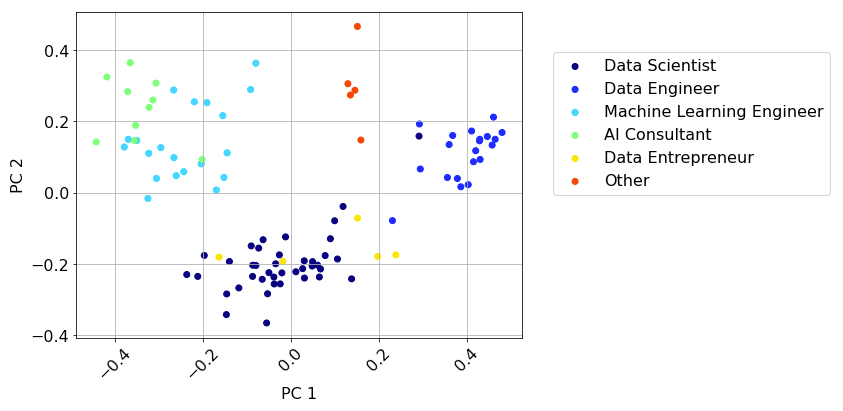
To see the different resumes in the dataset and their relative locations in concept space, we can use PCA to reduce the dimensionality of the embedding vectors and visualize the data on a 2D plot (code is on GitHub).
From this view we see the resumes for a given role tend to clump together.
Semantic Search
Now, to do a semantic search over these resumes, we can take a user query, translate it into a text embedding, and then return the nearest resumes in the embedding space. Here's what that looks like in code.
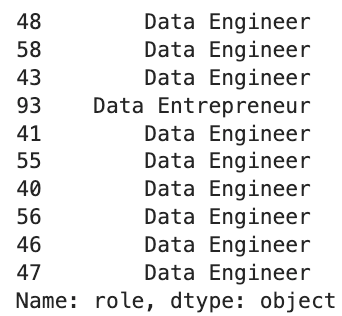
Printing the roles of the top 10 results, we see almost all are data engineers, which is a good sign.
Let's look at the resume of the top search results.
Although this is a made-up resume, the candidate likely has all the necessary skills and experience to fulfill the user's needs.
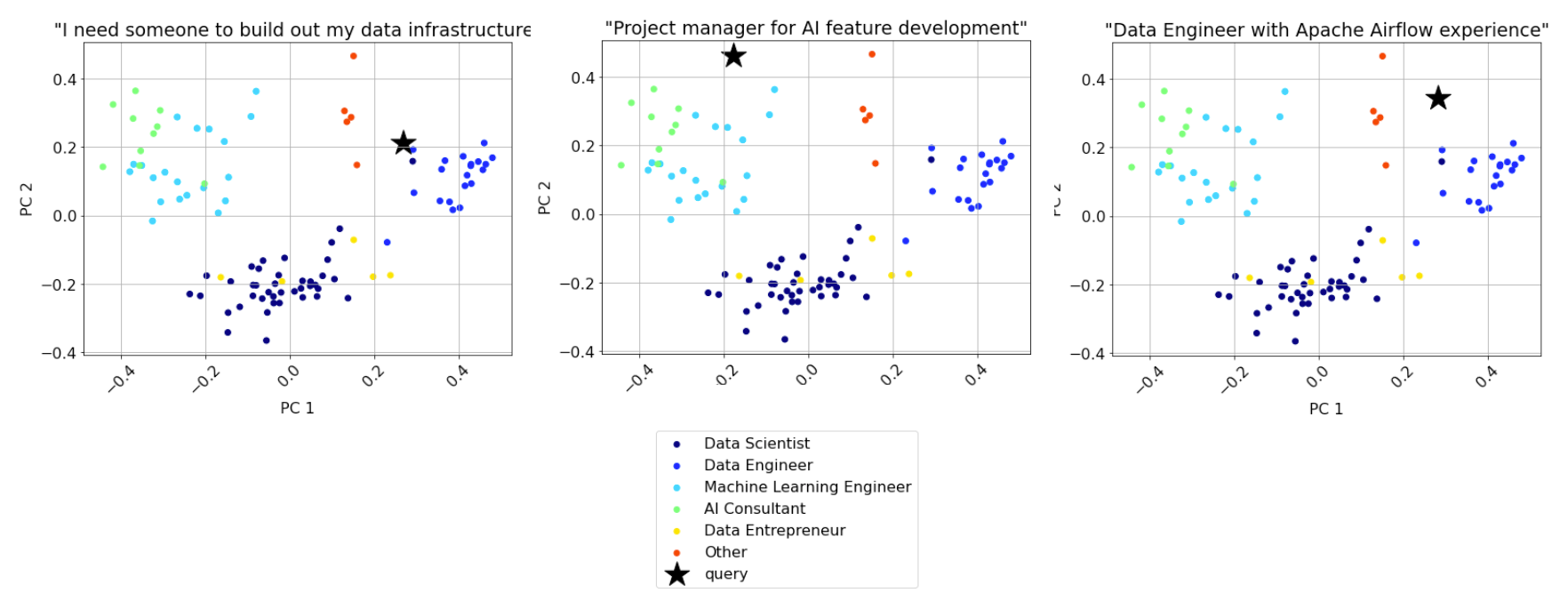
Another way to look at the search results is via the 2D plot from before. Here's what that looks like for a few queries (see plot titles).
Improving search
While this simple search example does a good job of matching particular candidates to a given query, it is not perfect. One shortcoming is when the user query includes a specific skill. For example, in the query "Data Engineer with Apache Airflow experience," only 1 of the top 5 results have Airflow experience.
This highlights that semantic search is not better than keyword-based search in all situations. Each has its strengths and weaknesses.
Thus, a robust search system will employ so-called hybrid search, which combines the best of both techniques. While there are many ways to design such a system, a simple approach is applying keyword-based search to filter down results, followed by semantic search.
Two additional strategies for improving search are using a Reranker and fine-tuning text embeddings.
A Reranker is a model that directly compares two pieces of text. In other words, instead of computing the similarity between pieces of text via a distance metric in the embedding space, a Reranker computes such a similarity score directly.
Rerankers are commonly used to refine search results. For example, one can return the top 25 results using semantic search and then refine to the top 5 with a Reranker.
Fine-tuning text embeddings involves adapting an embedding model for a particular domain. This is a powerful approach because most embedding models are based on a broad collection of text and knowledge. Thus, they may not optimally organize concepts for a specific industry, e.g. data science and AI.
YouTube-Blog/LLMs/text-embeddings at main · ShawhinT/YouTube-Blog
Conclusion
Although everyone seems focused on the potential for AI agents and assistants, recent innovations in text-embedding models have unlocked countless opportunities for simple yet high-value ML use cases.
Here, we reviewed two widely applicable use cases: text classification and semantic search. Text embeddings enable simpler and cheaper alternatives to LLM-based methods while still capturing much of the value.
More on LLMs 👇
Resources
Connect: My website | Book a call
Socials: YouTube 🎥 | LinkedIn | Instagram
Support: Buy me a coffee ☕️
[1] https://youtu.be/A8HEPBdKVMA?si=PA4kCnfgd3nx24LR
[2] R. Patil, S. Boit, V. Gudivada and J. Nandigam, "A Survey of Text Representation and Embedding Techniques in NLP," in IEEE Access, vol. 11, pp. 36120–36146, 2023, doi: 10.1109/ACCESS.2023.3266377.