

ResponseEntity is a class from the org.springframework.http package that represents the entire HTTP response, including the status code, headers, and body. When a controller method returns a ResponseEntity, Spring uses the information provided to construct the final HTTP response sent to the client.
It allows developers to:
- Define HTTP status codes (e.g., 200 OK, 404 Not Found, 500 Internal Server Error)
- Set custom headers (e.g., Content-Type, Cache-Control, Authorization)
- Include a response body (JSON, XML, plain text, etc.)
Components of ResponseEntity
1. HTTP Status Code
Indicates the outcome of an HTTP request. Some commonly used codes are:
- 200 OK: Request processed successfully
- 201 Created: A new resource has been created
- 204 No Content: Request successful, no response body
- 400 Bad Request: Invalid or malformed request
- 404 Not Found: Requested resource not found
- 500 Internal Server Error: Server failed to process the request
2. HTTP Headers
Headers provide metadata about the response. Common headers include:
- Content-Type: Defines the format of the response (e.g., application/json)
- Authorization: Used to send credentials for authentication
- Custom Headers: Developers can define custom headers (e.g., X-Custom-Header)
Example:
.header("Custom-Header", "CustomValue")
3. Response Body
The body contains the main content of the response. It can be:
- A JSON object representing requested data
- A plain text message describing the operation result
- HTML content if returning a page
- Empty if no response content is required
Implementation: Using ResponseEntity in Spring Boot
Step 1: Create a Spring Boot Project
Create a new Spring Boot project using IntelliJ IDEA or Spring Initializr.
- Name: response-entity-example
- Language: Java
- Type: Maven
- Packaging: Jar

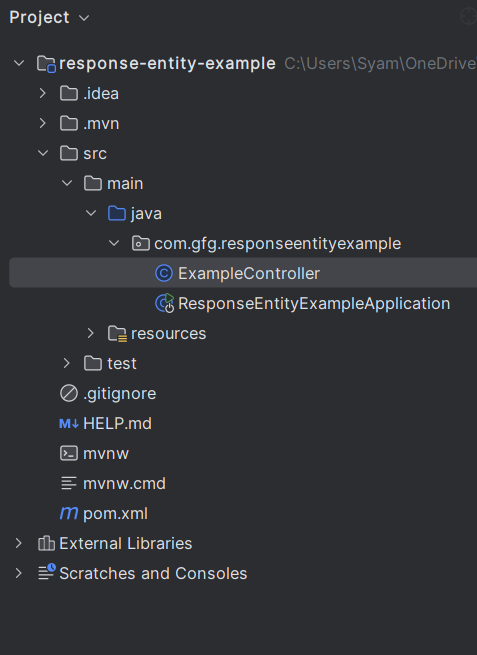
Project Structure:
Step 2: Add Dependencies
Add the required dependencies in the pom.xml file.
<dependencies>
<dependency>
<groupId>org.springframework.boot</groupId>
<artifactId>spring-boot-starter-web</artifactId>
</dependency>
<dependency>
<groupId>org.springframework.boot</groupId>
<artifactId>spring-boot-devtools</artifactId>
<scope>runtime</scope>
<optional>true</optional>
</dependency>
<dependency>
<groupId>org.projectlombok</groupId>
<artifactId>lombok</artifactId>
<optional>true</optional>
</dependency>
<dependency>
<groupId>org.springframework.boot</groupId>
<artifactId>spring-boot-starter-test</artifactId>
<scope>test</scope>
</dependency>
</dependencies>
Step 3: Create the Controller Class
Example Controller:
package com.gfg.responseentityexample;

import org.springframework.http.HttpStatus;
import org.springframework.http.ResponseEntity;
import org.springframework.web.bind.annotation.GetMapping;
import org.springframework.web.bind.annotation.RequestMapping;
import org.springframework.web.bind.annotation.RestController;

@RestController
@RequestMapping("/api")
public class ExampleController {

    @GetMapping("/success")
    public ResponseEntity<String> successResponse() {
        String responseBody = "Request was successful!";
        return new ResponseEntity<>(responseBody, HttpStatus.OK);
    }

    @GetMapping("/notfound")
    public ResponseEntity<String> notFoundResponse() {
        String responseBody = "Resource not found!";
        return new ResponseEntity<>(responseBody, HttpStatus.NOT_FOUND);
    }

    @GetMapping("/customheader")
    public ResponseEntity<String> customHeaderResponse() {
        String responseBody = "Response with custom header!";
        return ResponseEntity
                .status(HttpStatus.OK)
                .header("Custom-Header", "CustomValue")
                .body(responseBody);
    }
}
- successResponse(): Returns HTTP 200 OK with a success message.
- notFoundResponse(): Returns HTTP 404 Not Found when the resource is unavailable.
- customHeaderResponse(): Returns HTTP 200 OK with a custom header added to the response.
Step 4: Main Application Class
package com.gfg.responseentityexample;

import org.springframework.boot.SpringApplication;
import org.springframework.boot.autoconfigure.SpringBootApplication;

@SpringBootApplication
public class ResponseEntityExampleApplication {

    public static void main(String[] args) {
        SpringApplication.run(ResponseEntityExampleApplication.class, args);
    }
}
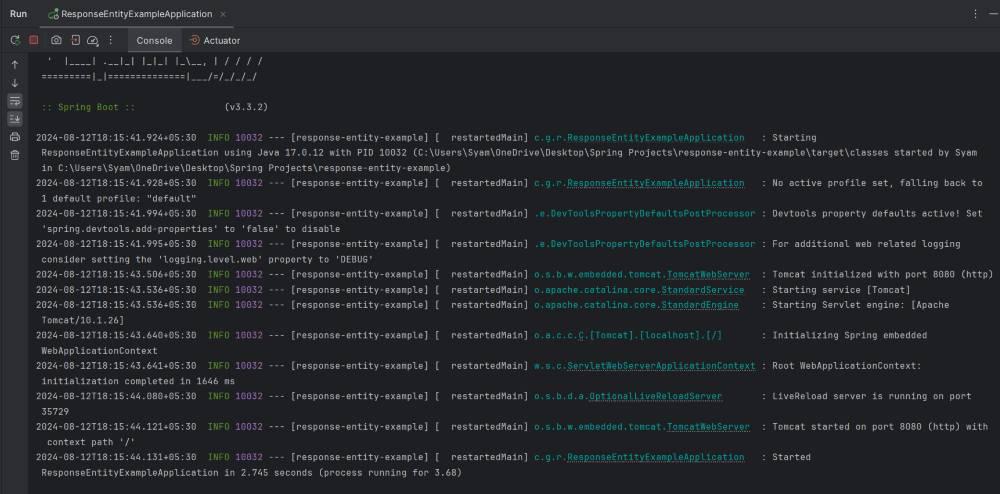
Step 5: Run the application
Run the project. By default, it will start on port 8080.
Step 6: Test the Endpoints
1. /api/success
GET http://localhost:8080/api/success
Response:

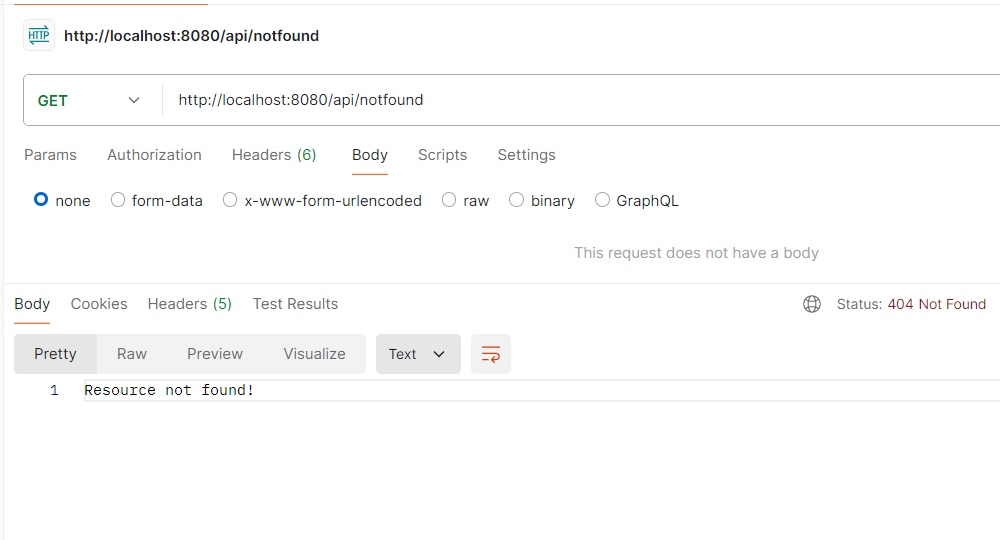
2. /api/notfound
GET http://localhost:8080/api/notfound
Response:
3. /api/customheader
GET http://localhost:8080/api/customheader
Response:

