

React and Spring Boot are commonly used together to build modern full-stack web applications. React handles the frontend user interface, while Spring Boot manages REST APIs, business logic, and backend operations.
- React communicates with Spring Boot using HTTP requests and REST APIs.
- Spring Boot processes requests and returns data, usually in JSON format, which React displays in the browser.
How React and Spring Boot Work Together
React and Spring Boot typically run as separate applications during development. React sends HTTP requests to Spring Boot endpoints, and Spring Boot sends responses back to React.
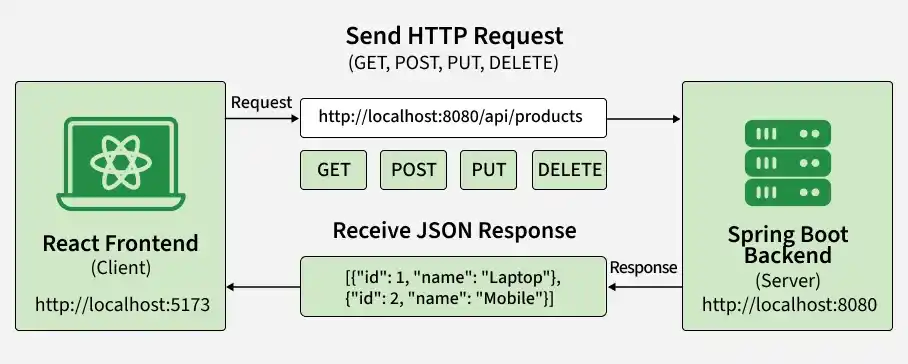
For example, when a product page loads, React sends a GET request to Spring Boot. Spring Boot retrieves the products and returns them as JSON. React then renders those products on the page.
What We Will Build
We will create a simple Product Management Application using React and Spring Boot.
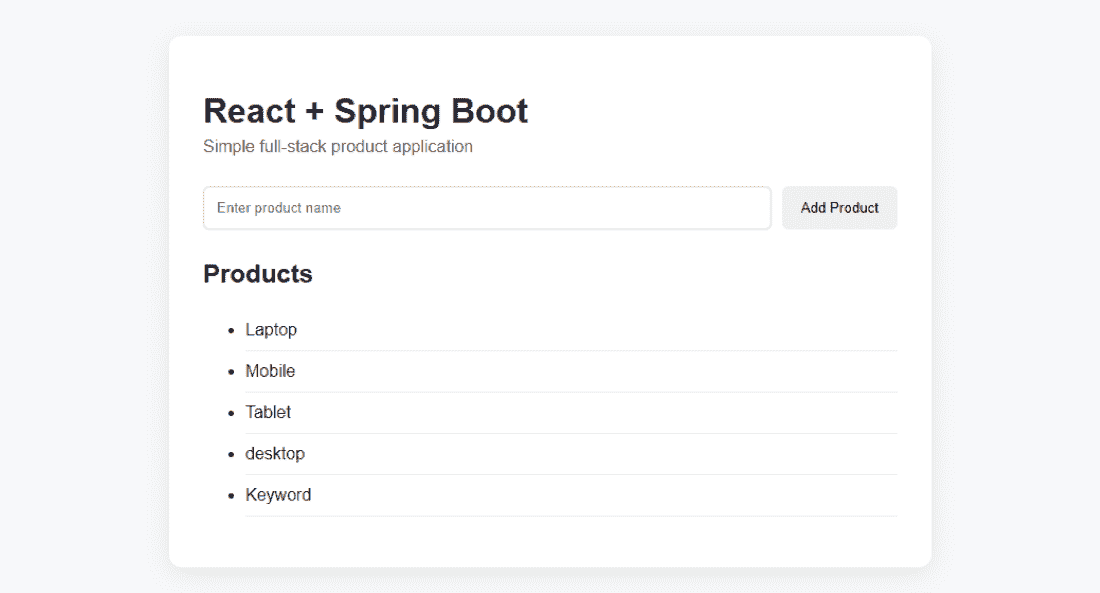
The application will allow users to:
- View products received from the Spring Boot backend.
- Add a new product from the React frontend.
- Exchange data between frontend and backend using REST APIs and JSON.
The application uses two API operations:
| HTTP Method | Endpoint | Purpose |
|---|---|---|
| GET | /api/products | Retrieve all products |
| POST | /api/products | Add a new product |
Prerequisites
Before implementing React with Spring Boot, make sure the following are installed:
- Java JDK
- Node.js and npm
- Maven or Maven Wrapper
- IDE such as IntelliJ IDEA or VS Code
- Basic knowledge of Java, Spring Boot, JavaScript, and React
We can verify the installations using:
java -version
node -v
npm -v
mvn -version
Maven does not need to be installed globally if the project uses Maven Wrapper.
Step-by-Step Implementation of React + Spring Boot Integration
We will build a simple Product Application where users can:
- View products from the Spring Boot backend.
- Add a new product from the React frontend.
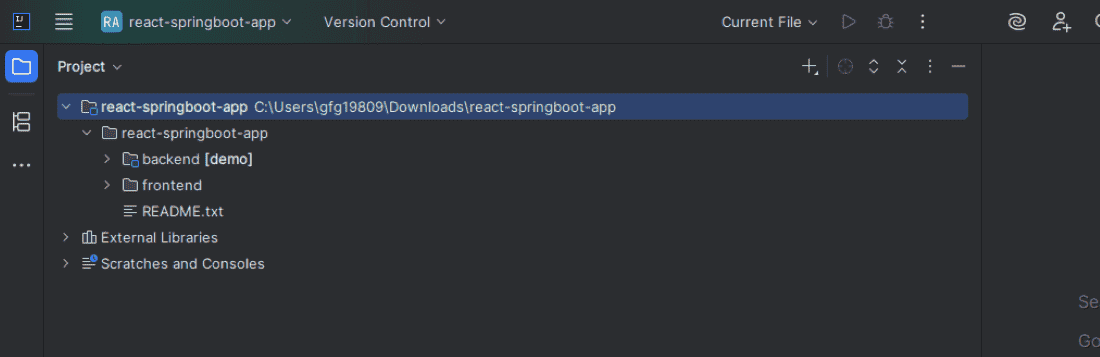
Step 1: Create the Spring Boot Backend
Create a Spring Boot application with the Spring Web dependency.
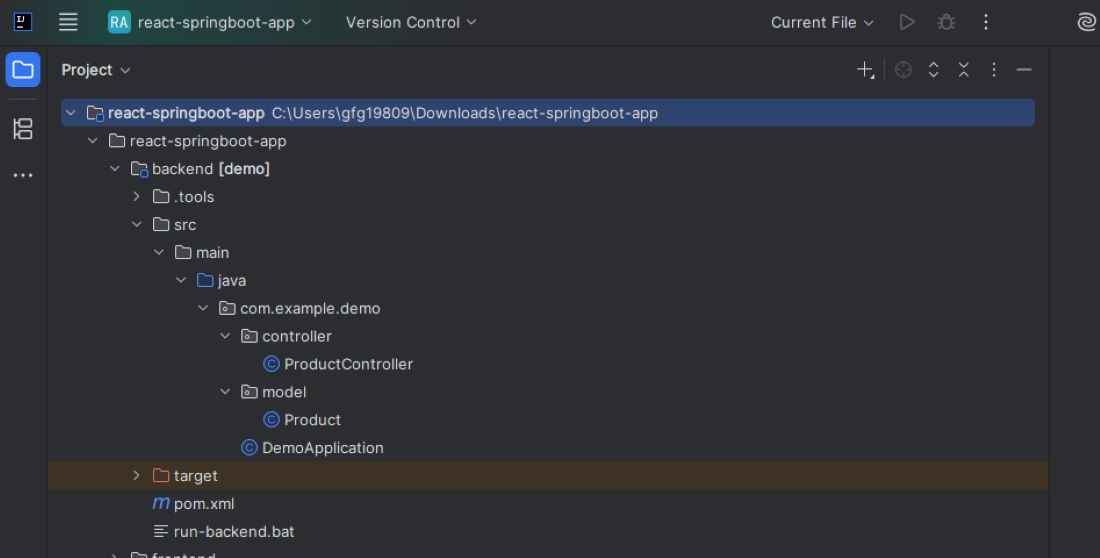
The backend structure can be:
Add Spring Web Dependency
Add the Spring Web starter to pom.xml:
<dependency>
<groupId>org.springframework.boot</groupId>
<artifactId>spring-boot-starter-web</artifactId>
</dependency>
Spring Web provides the components required to build REST APIs and web applications.
Step 2: Create the Spring Boot Main Class
Create DemoApplication.java:
package com.example.demo;

import org.springframework.boot.SpringApplication;
import org.springframework.boot.autoconfigure.SpringBootApplication;

@SpringBootApplication
public class DemoApplication {

    public static void main(String[] args) {
        SpringApplication.run(DemoApplication.class, args);
    }
}
@SpringBootApplication enables Spring Boot auto-configuration and component scanning. When the application starts, Spring Boot launches its embedded web server, which runs on port 8080 by default.
Step 3: Create the Product Model
Create Product.java:
package com.example.demo.model;

public class Product {

    private Long id;
    private String name;

    public Product() {
    }

    public Product(Long id, String name) {
        this.id = id;
        this.name = name;
    }

    public Long getId() {
        return id;
    }

    public void setId(Long id) {
        this.id = id;
    }

    public String getName() {
        return name;
    }

    public void setName(String name) {
        this.name = name;
    }
}
The Product class represents the data transferred between React and Spring Boot. A product will be represented as JSON like:
{
"id": 1,
"name": "Laptop"
}
Step 4: Create the REST Controller
Create ProductController.java:
package com.example.demo.controller;

import com.example.demo.model.Product;
import org.springframework.web.bind.annotation.*;

import java.util.ArrayList;
import java.util.List;
import java.util.concurrent.atomic.AtomicLong;

@RestController
@RequestMapping("/api/products")
@CrossOrigin(origins = {
        "http://localhost:5173",
        "http://127.0.0.1:5173"
})
public class ProductController {

    private final List<Product> products = new ArrayList<>();
    private final AtomicLong idGenerator = new AtomicLong(3);

    public ProductController() {
        products.add(new Product(1L, "Laptop"));
        products.add(new Product(2L, "Mobile"));
        products.add(new Product(3L, "Tablet"));
    }

    @GetMapping
    public List<Product> getProducts() {
        return products;
    }

    @PostMapping
    public Product addProduct(@RequestBody Product product) {
        product.setId(idGenerator.incrementAndGet());
        products.add(product);
        return product;
    }
}
Here:
- @RestController defines a REST controller.
- @RequestMapping defines the base API endpoint.
- @GetMapping handles GET requests.
- @PostMapping handles POST requests.
- @RequestBody converts incoming JSON into a Java object.
- @CrossOrigin allows the React development application to access the backend.
Step 5: Run the Spring Boot Backend
Start the Spring Boot application.
With Maven:
mvn spring-boot:run
The application should start at:
http://localhost:8080
Open the following URL to test the API:
http://localhost:8080/api/products
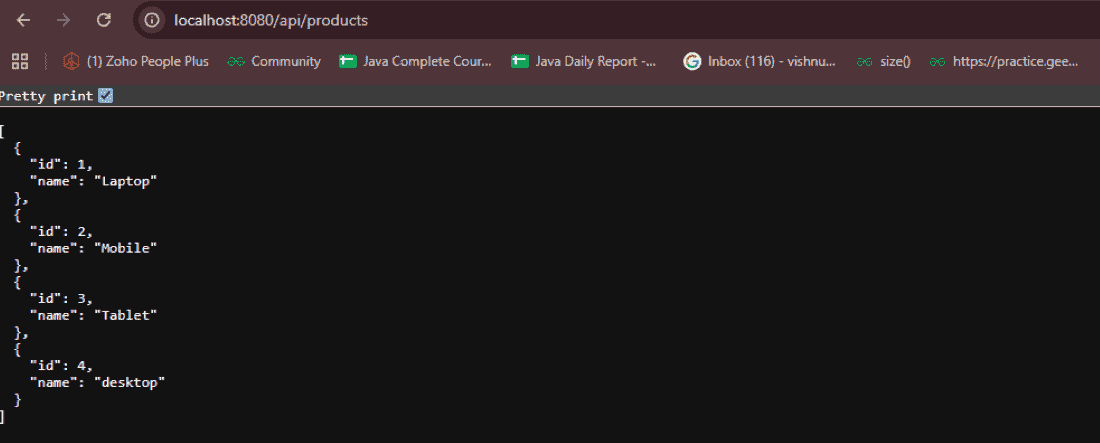
At this point, the backend is working independently of React.
Creating the React Frontend
Step 6: Create a React Application
A React application can be created using Vite:
npm create vite@latest frontend -- --template react
Navigate to the project:
cd frontend
Install the required packages:
npm install
Start the frontend:
npm run dev
Vite normally starts the application at:
http://localhost:5173
The exact port may change if 5173 is already in use.
Step 7: Understand the React Project Structure
The important files are:
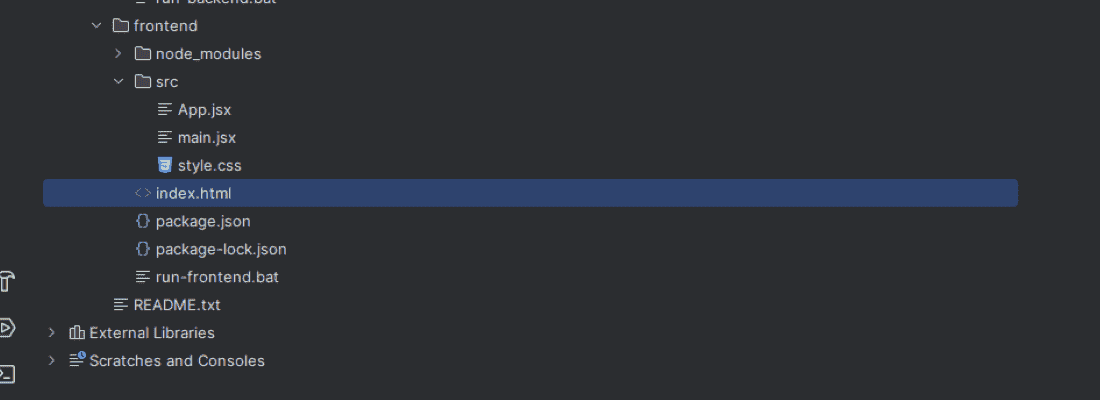
The execution flow is:
index.html -> main.jsx -> <App /> -> App.jsx
Step 8: Configure main.jsx
The main.jsx file is the entry point of the React application.
import React from 'react';
import ReactDOM from 'react-dom/client';
import App from './App.jsx';
import './style.css';

ReactDOM.createRoot(document.getElementById('root')).render(
    <React.StrictMode>
        <App />
    </React.StrictMode>
);
React finds:
<div id="root"></div>
inside index.html and renders the App component inside it.
Step 9: Connect React to Spring Boot
Update App.jsx:
import React, { useEffect, useState } from 'react';

const API = 'http://localhost:8080/api/products';

export default function App() {

    const [products, setProducts] = useState([]);
    const [name, setName] = useState('');
    const [message, setMessage] = useState('Loading...');

    const loadProducts = async () => {
        try {
            const response = await fetch(API);

            if (!response.ok) {
                throw new Error('Backend returned an error');
            }

            const data = await response.json();

            setProducts(data);
            setMessage('');

        } catch (error) {
            setMessage(
                'Cannot connect to Spring Boot. Start the backend first.'
            );
        }
    };

    useEffect(() => {
        loadProducts();
    }, []);

    const addProduct = async (event) => {

        event.preventDefault();

        if (!name.trim()) {
            return;
        }

        try {

            const response = await fetch(API, {
                method: 'POST',
                headers: {
                    'Content-Type': 'application/json'
                },
                body: JSON.stringify({
                    name: name.trim()
                })
            });

            if (!response.ok) {
                throw new Error('Unable to add product');
            }

            setName('');

            await loadProducts();

        } catch (error) {
            setMessage(
                'Unable to add product. Check that the backend is running.'
            );
        }
    };

    return (
        <main className="container">

            <h1>React + Spring Boot</h1>

            <p>Simple Full-Stack Product Application</p>

            <form onSubmit={addProduct}>

                <input
                    value={name}
                    onChange={(event) => setName(event.target.value)}
                    placeholder="Enter product name"
                />

                <button type="submit">
                    Add Product
                </button>

            </form>

            {message && <p>{message}</p>}

            <h2>Products</h2>

            <ul>
                {products.map((product) => (
                    <li key={product.id}>
                        {product.name}
                    </li>
                ))}
            </ul>

        </main>
    );
}
This component performs both GET and POST operations against the Spring Boot API.
How the Integration Works
Step 10: Fetch Products from Spring Boot
When the React component loads, useEffect() executes:
useEffect(() => {
loadProducts();
}, []);
The loadProducts() function sends:
fetch('http://localhost:8080/api/products')
which produces an HTTP request:
GET /api/products
The request reaches:
@GetMapping
public List<Product> getProducts() {
return products;
}
Spring Boot returns the product list as JSON.
Step 11: Store the Response in React
React receives the response:
const data = await response.json();
The JSON is then stored in React state:
setProducts(data);
For example:
[
{
"id": 1,
"name": "Laptop"
},
{
"id": 2,
"name": "Mobile"
},
{
"id": 3,
"name": "Tablet"
}
]
The flow becomes:
JSON Response ---> response.json() ---> data ---> setProducts(data) ---> React State
Step 12: Display Products
React uses map() to render each product:
<ul>
{products.map((product) => (
<li key={product.id}>
{product.name}
</li>
))}
</ul>
The browser displays:
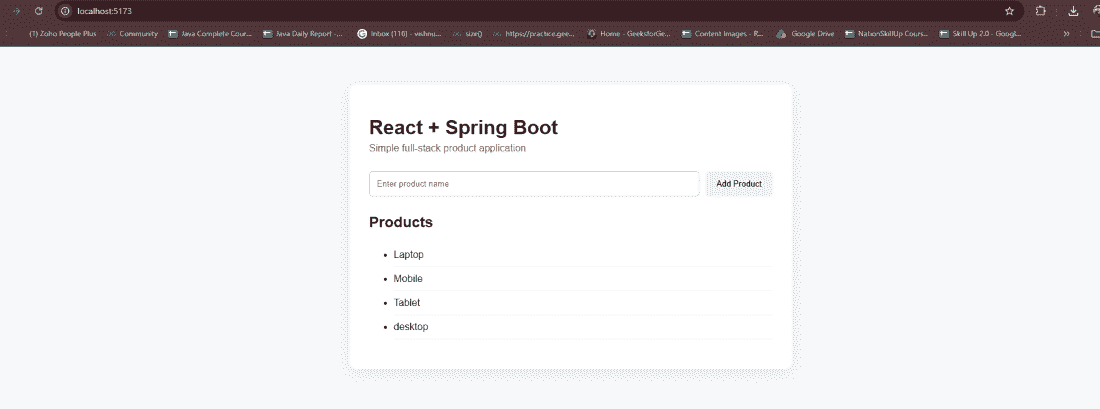
When the products state changes, React automatically re-renders the relevant part of the UI.
Adding Data from React to Spring Boot
Step 13: Enter a Product
Suppose the user enters:
Keyboard
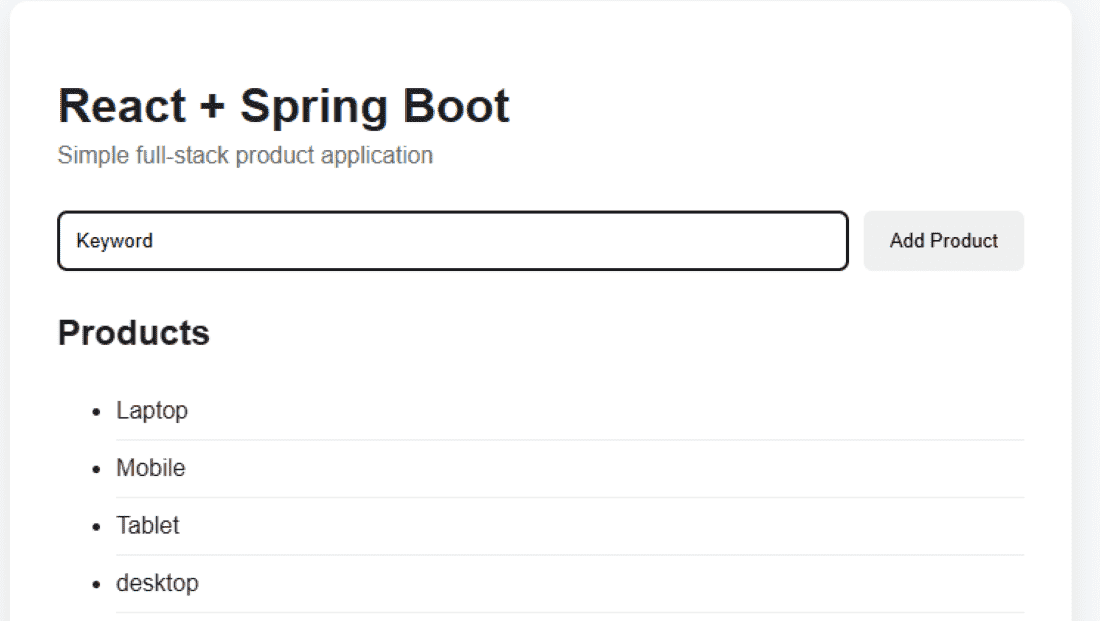
and clicks Add Product.
The form executes:
addProduct()
React then sends a POST request:
const response = await fetch(API, {

    method: 'POST',

    headers: {
        'Content-Type': 'application/json'
    },

    body: JSON.stringify({
        name: name.trim()
    })
});
The HTTP request contains JSON similar to:
{
"name": "Keyboard"
}
Step 14: Process POST Request in Spring Boot
Spring Boot receives the request through:
@PostMapping
public Product addProduct(@RequestBody Product product) {

    product.setId(idGenerator.incrementAndGet());

    products.add(product);

    return product;
}
@RequestBody converts:
Into a Java Product object. Spring Boot generates an ID and stores the product in the list.
The list now becomes:
- 1 -> Laptop
- 2 -> Mobile
- 3 -> Tablet
- 4 -> Keyboard
Step 15: Refresh Product Data
After adding the product, React executes:
await loadProducts();
React sends another GET request:
GET /api/products
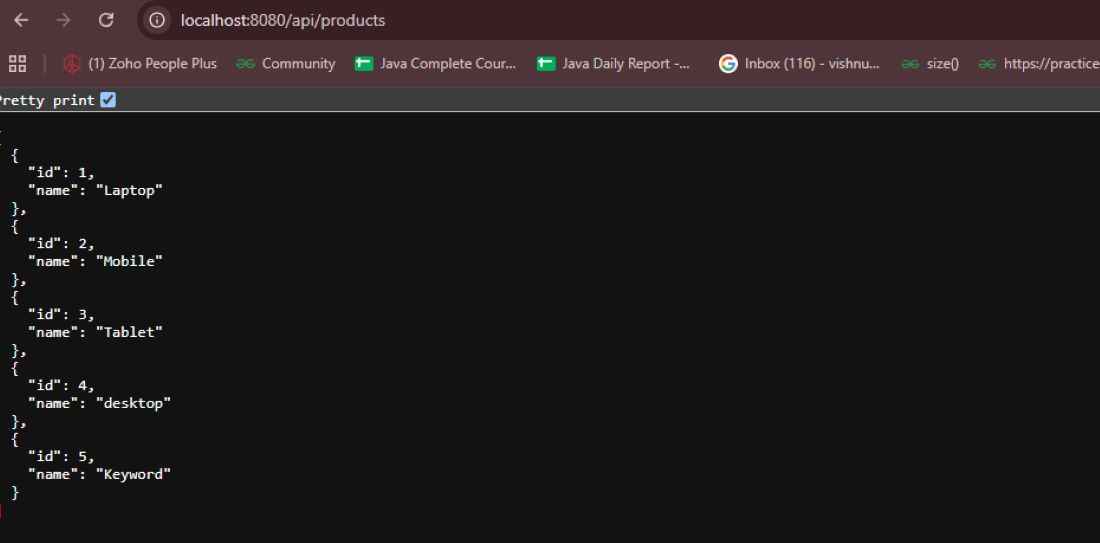
React updates its state and automatically displays the new product.
Why CORS is Required
React and Spring Boot run on different origins during development:
React: http://localhost:5173
Spring Boot: http://localhost:8080
Because the origins differ, browsers apply the same-origin policy. Spring Boot must explicitly allow the React origin.
For this example:
@CrossOrigin(origins = {
"http://localhost:5173",
"http://127.0.0.1:5173"
})
This allows the React application to access the REST API. For larger applications, CORS is generally better configured centrally instead of adding @CrossOrigin to every controller.
