

React and Spring Boot are commonly used together to build full-stack web applications. React handles the frontend user interface, while Spring Boot provides REST APIs for business logic, data processing, and backend operations.
- React sends HTTP requests to Spring Boot REST endpoints.
- Spring Boot processes the request and usually exchanges data with React in JSON format.
How REST API Integration Works
In a React and Spring Boot application, the frontend and backend usually run as separate applications and communicate through HTTP.
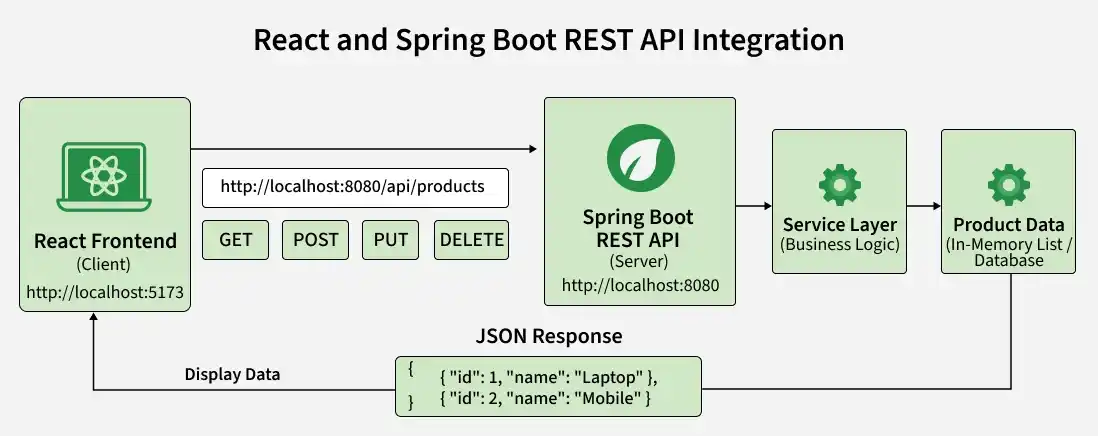
For example, when a React application needs a list of products, it can send a GET request to:
http://localhost:8080/api/products
Spring Boot processes the request and returns a JSON response that React can display on the webpage.
[
{
"id": 1,
"name": "Laptop",
"price": 65000
},
{
"id": 2,
"name": "Smartphone",
"price": 30000
}
]
What We Will Build?
We will create a simple Product Management Application where users can:
- View products provided by the Spring Boot REST API.
- Add a new product from the React frontend.
For this implementation, we will use:
Frontend -> React
Backend -> Spring Boot
Communication -> REST API
Data Format -> JSON
Storage -> In-memory ArrayList
We are using an in-memory list instead of a database so that the implementation remains focused on REST API integration.
Prerequisites
Before starting, make sure the following are installed:
- Java and JDK
- Spring Boot
- Node.js and npm
- React
- An IDE such as IntelliJ IDEA or VS Code
Spring Boot Backend Implementation
First, we will create the Spring Boot application that provides the REST API.
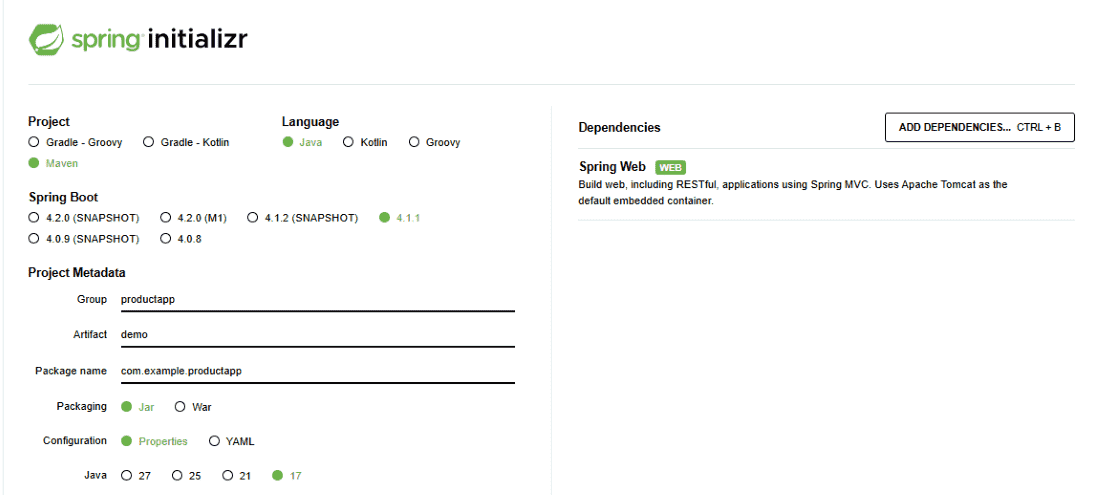
Step 1: Create a Spring Boot Project in Spring Initializr
- Visit Spring Initializr.
- Select Maven as Project and Java as Language.
- Enter com.example as the Group and productapp as the Artifact.
- Set the package name to com.example.productapp.
- Select Jar as Packaging and Java 17 or later.
- Add the Spring Web dependency.
- Click Generate to download the project as a .zip file.
- Extract the downloaded project and open it in your preferred IDE.
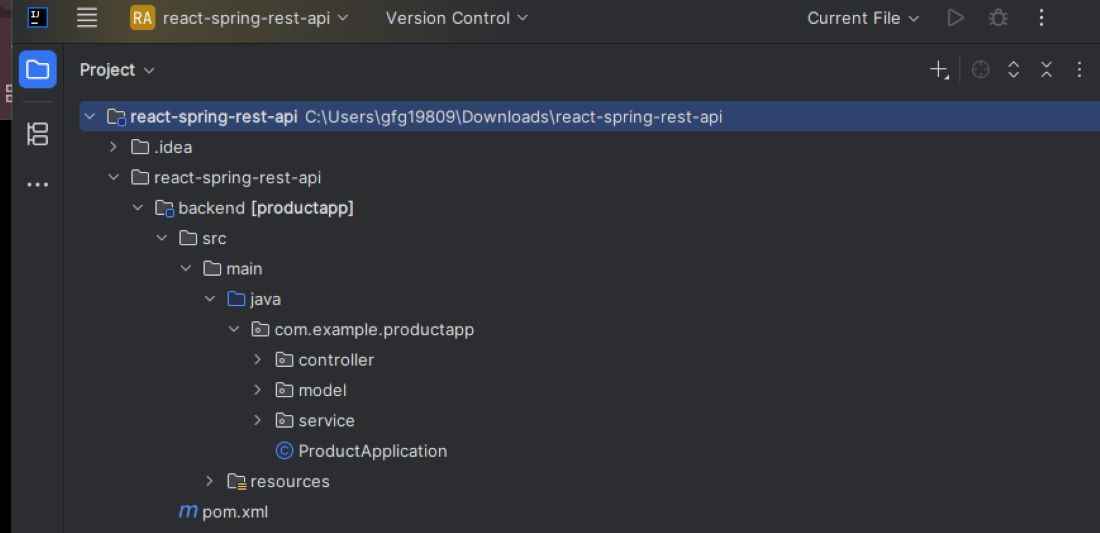
Our backend structure will be:
Step 2: Create the Product Model
Create a model package and add a Product.java class.
package com.example.productapp.model;

public class Product {

    private int id;
    private String name;
    private double price;

    public Product() {
    }

    public Product(int id, String name, double price) {
        this.id = id;
        this.name = name;
        this.price = price;
    }

    public int getId() {
        return id;
    }

    public void setId(int id) {
        this.id = id;
    }

    public String getName() {
        return name;
    }

    public void setName(String name) {
        this.name = name;
    }

    public double getPrice() {
        return price;
    }

    public void setPrice(double price) {
        this.price = price;
    }
}
The Product class represents the product information that will be exchanged between React and Spring Boot.
Step 3: Create the Product Service
Create a service package and add ProductService.java.
package com.example.productapp.service;

import com.example.productapp.model.Product;
import org.springframework.stereotype.Service;

import java.util.ArrayList;
import java.util.List;

@Service
public class ProductService {

    private final List<Product> products = new ArrayList<>();

    public ProductService() {
        products.add(new Product(1, "Laptop", 65000));
        products.add(new Product(2, "Smartphone", 30000));
        products.add(new Product(3, "Headphones", 5000));
    }

    public List<Product> getProducts() {
        return products;
    }

    public Product addProduct(Product product) {
        product.setId(products.size() + 1);
        products.add(product);

        return product;
    }
}
Here, ProductService maintains an in-memory list of products.
It provides two operations:
- getProducts() returns all products.
- addProduct() adds a new product.
Step 4: Create the REST Controller
Create a controller package and add ProductController.java.
package com.example.productapp.controller;

import com.example.productapp.model.Product;
import com.example.productapp.service.ProductService;
import org.springframework.web.bind.annotation.*;

import java.util.List;

@RestController
@RequestMapping("/api/products")
@CrossOrigin(origins = "http://localhost:5173")
public class ProductController {

    private final ProductService productService;

    public ProductController(ProductService productService) {
        this.productService = productService;
    }

    @GetMapping
    public List<Product> getProducts() {
        return productService.getProducts();
    }

    @PostMapping
    public Product addProduct(@RequestBody Product product) {
        return productService.addProduct(product);
    }
}
The controller provides two REST endpoints:
GET /api/products
POST /api/products
@CrossOrigin allows the React development server running on port 5173 to access the Spring Boot API.
Step 5: Run the Spring Boot Application
Run the main Spring Boot application:
package com.example.productapp;

import org.springframework.boot.SpringApplication;
import org.springframework.boot.autoconfigure.SpringBootApplication;

@SpringBootApplication
public class ProductApplication {

    public static void main(String[] args) {
        SpringApplication.run(ProductApplication.class, args);
    }
}
Spring Boot runs on port 8080 by default.
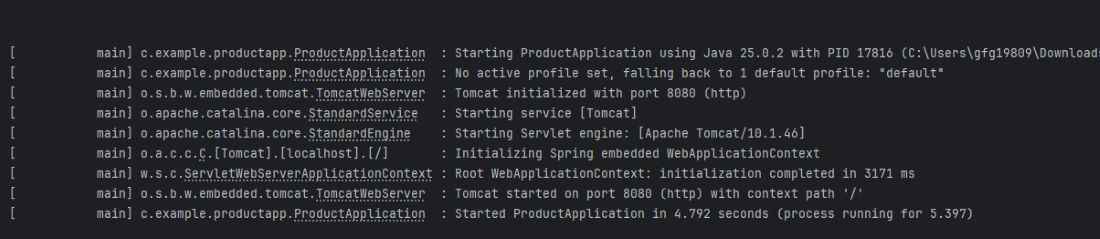
The API endpoint is:
http://localhost:8080/api/products
Opening this endpoint should return:
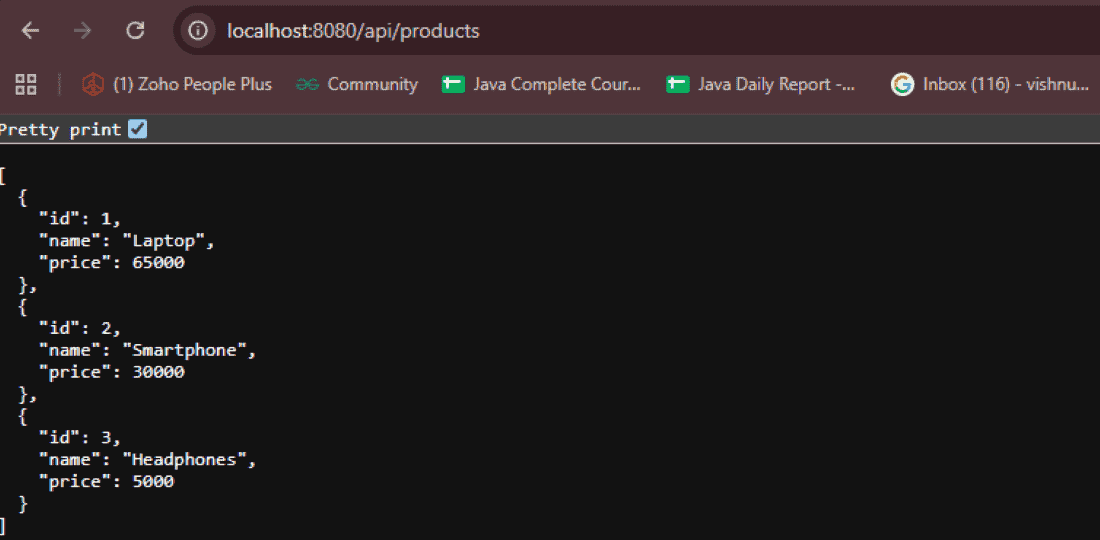
Our Spring Boot REST API is now ready.
React Frontend Implementation
Next, we will create the React application and connect it with the Spring Boot API.
Step 6: Create the React Application
Open another terminal and create a React project using Vite:
npm create vite@latest frontend -- --template react
Move to the project directory:
cd frontend
Install the dependencies:
npm install
Start the React development server:
npm run dev

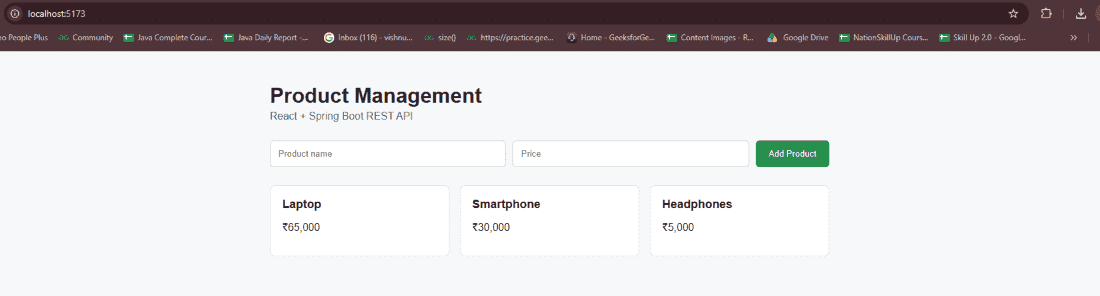
Vite commonly starts the application at:
http://localhost:5173
Step 7: Create an API Service
Instead of placing API requests directly throughout our components, create a separate file for API communication.
Create:
src/services/productService.js
Add:
const API_URL = "http://localhost:8080/api/products";

export const getProducts = async () => {
  const response = await fetch(API_URL);

  if (!response.ok) {
    throw new Error("Failed to fetch products");
  }

  return response.json();
};

export const addProduct = async (product) => {
  const response = await fetch(API_URL, {
    method: "POST",
    headers: {
      "Content-Type": "application/json"
    },
    body: JSON.stringify(product)
  });

  if (!response.ok) {
    throw new Error("Failed to add product");
  }

  return response.json();
};
This service contains the communication logic between React and Spring Boot.
Step 8: Fetch Products from Spring Boot
Update App.jsx:
import { useEffect, useState } from "react";
import { getProducts } from "./services/productService";

function App() {

  const [products, setProducts] = useState([]);
  const [error, setError] = useState("");

  useEffect(() => {

    const loadProducts = async () => {
      try {
        const data = await getProducts();
        setProducts(data);
      } catch (err) {
        setError("Unable to load products.");
      }
    };

    loadProducts();

  }, []);

  return (
    <div>
      <h1>Product Management</h1>

      {error && <p>{error}</p>}

      {products.map((product) => (
        <div key={product.id}>
          <h3>{product.name}</h3>
          <p>Price: ₹{product.price}</p>
        </div>
      ))}
    </div>
  );
}

export default App;
When the component loads, useEffect() calls getProducts(). The following request is sent:
GET http://localhost:8080/api/products
Spring Boot returns the products as JSON, and React stores them in:
setProducts(data);
The component then renders the products on the page.
Step 9: Create a Form to Add Products
Now add a simple form so that users can send data from React to Spring Boot.
Update App.jsx:
import { useEffect, useState } from "react";
import {
  getProducts,
  addProduct
} from "./services/productService";

function App() {

  const [products, setProducts] = useState([]);
  const [name, setName] = useState("");
  const [price, setPrice] = useState("");
  const [error, setError] = useState("");

  const loadProducts = async () => {
    try {
      const data = await getProducts();
      setProducts(data);
      setError("");
    } catch (err) {
      setError("Unable to load products.");
    }
  };

  useEffect(() => {
    loadProducts();
  }, []);

  const handleSubmit = async (event) => {
    event.preventDefault();

    const product = {
      name,
      price: Number(price)
    };

    try {
      const savedProduct = await addProduct(product);

      setProducts((currentProducts) => [
        ...currentProducts,
        savedProduct
      ]);

      setName("");
      setPrice("");
      setError("");
    } catch (err) {
      setError("Unable to add product.");
    }
  };

  return (
    <div>
      <h1>Product Management</h1>

      <form onSubmit={handleSubmit}>

        <input
          type="text"
          placeholder="Product Name"
          value={name}
          onChange={(event) => setName(event.target.value)}
          required
        />

        <input
          type="number"
          placeholder="Price"
          value={price}
          onChange={(event) => setPrice(event.target.value)}
          required
        />

        <button type="submit">
          Add Product
        </button>

      </form>

      {error && <p>{error}</p>}

      <h2>Products</h2>

      {products.map((product) => (
        <div key={product.id}>
          <h3>{product.name}</h3>
          <p>Price: ₹{product.price}</p>
        </div>
      ))}

    </div>
  );
}

export default App;
Now React can both retrieve and send data to the Spring Boot backend.
Step 10: Understand the POST Request
When the user enters:
Product Name: Keyboard
Price: 2500
React creates an object:
{
name: "Keyboard",
price: 2500
}
The addProduct() function converts it into JSON:
body: JSON.stringify(product)
and sends:
POST /api/products
Content-Type: application/json
The Spring Boot controller receives it using:
@PostMapping
public Product addProduct(@RequestBody Product product) {
return productService.addProduct(product);
}
@RequestBody converts the incoming JSON request body into a Java Product object.
Step 11: Final Project Structure
After completing both applications, the overall project structure will look like:
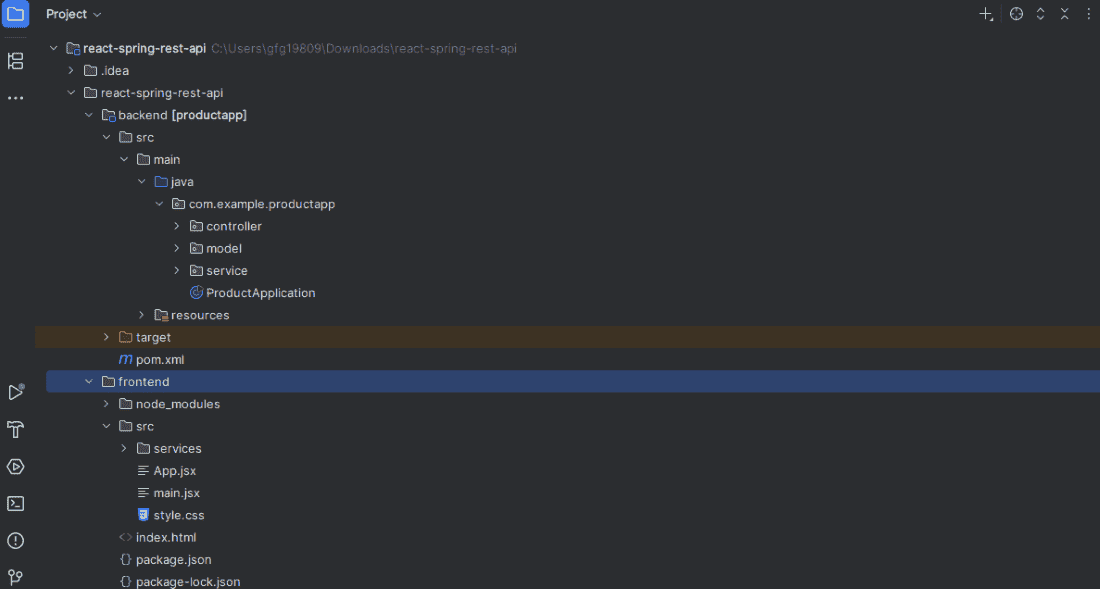
Step 12: Run the Complete Application
First, start the Spring Boot backend.
Backend: http://localhost:8080
Then start React:
npm run dev
Open:
Frontend: http://localhost:5173
The React page displays the products returned by Spring Boot.
Enter a new product, for example:
Product Name: Keyboard
Price: 2500
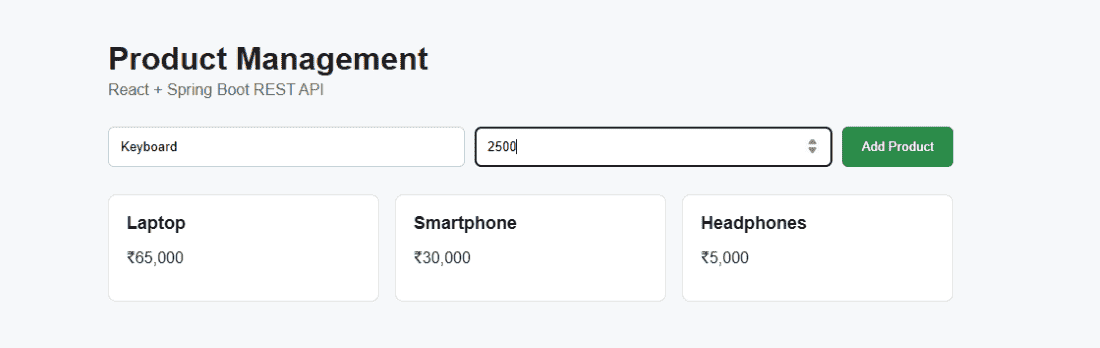
Click Add Product.
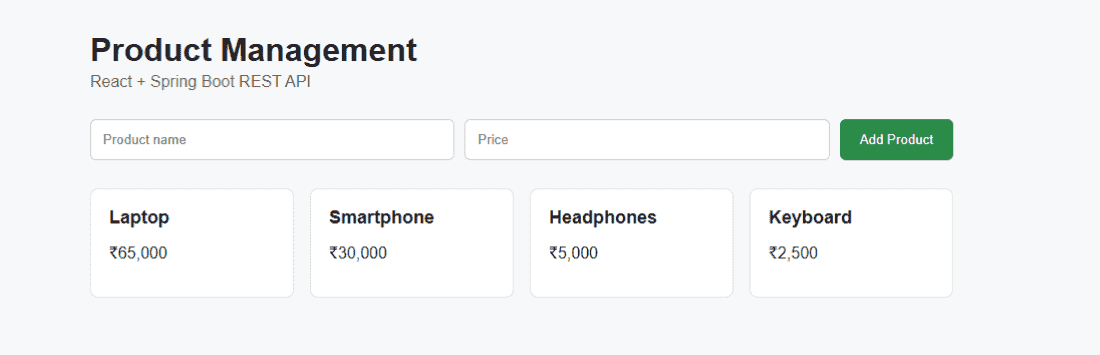
React sends the data to Spring Boot, and the newly created product appears in the product list.
Understanding CORS
During development, the applications run on different origins:
React: http://localhost:5173
Spring Boot: http://localhost:8080
Because the origins are different, browser CORS rules apply.
For this example, we allow the React origin using:
@CrossOrigin(origins = "http://localhost:5173")
For larger applications, CORS configuration can be managed globally instead of adding @CrossOrigin to every controller.
Common Issues
CORS Error
If the browser blocks the API request, verify that the React origin matches the value configured in @CrossOrigin.
Failed to Fetch
Check whether the Spring Boot application is running and whether the API URL is correct.
http://localhost:8080/api/products
React Runs on a Different Port
Vite may select another port if 5173 is already occupied. In that case, update the allowed origin in the Spring Boot CORS configuration.
Invalid JSON Data
Make sure React sends JSON with:
headers: {
"Content-Type": "application/json"
}
and converts the JavaScript object using:
JSON.stringify(product)
Best Practices for REST API Integration
- Keep frontend and backend responsibilities separate.
- Keep API calls in reusable service files as the application grows.
- Use meaningful REST endpoint names.
- Handle unsuccessful HTTP responses.
- Show appropriate loading and error states in the frontend.
- Avoid hardcoding backend URLs in production applications; use environment configuration.
- Configure CORS only for trusted frontend origins.
- Use appropriate HTTP methods for different operations.
- Add authentication and authorization when APIs contain protected resources.
Download the complete runnable project
You can download the complete React + Spring Boot REST API project as a ZIP file and run it directly on your system using the terminal.
