

A syntax error occurs when code does not follow the grammatical rules and structure of a programming language. Such errors prevent the program from being correctly compiled, interpreted, or executed.
- Syntax errors are detected during compilation in compiled languages and during execution in interpreted languages.
- Common causes include missing symbols, incorrect keywords, mismatched brackets, and invalid statement structures.
Types of Syntax Error
Syntax errors can occur due to incorrect use of language rules, symbols, or code structure.
- Missing Parentheses or Brackets: Unclosed parentheses, brackets, or braces can cause syntax errors.
- Missing Semicolons: Omitting semicolons in languages that require them leads to syntax errors.
- Mismatched Quotes: Missing closing quotation marks can make strings invalid.
- Incorrect Indentation: Improper indentation in languages like Python results in syntax errors.
- Misspelled Keywords or Identifiers: Incorrectly written keywords, variables, or function names may not be recognized by the compiler or interpreter.
Identify Syntax Errors
Normally compiler or interpreter detects syntax errors during program execution. The error message not only shows the place where the error happened but also provides some clues about how the problem originated.
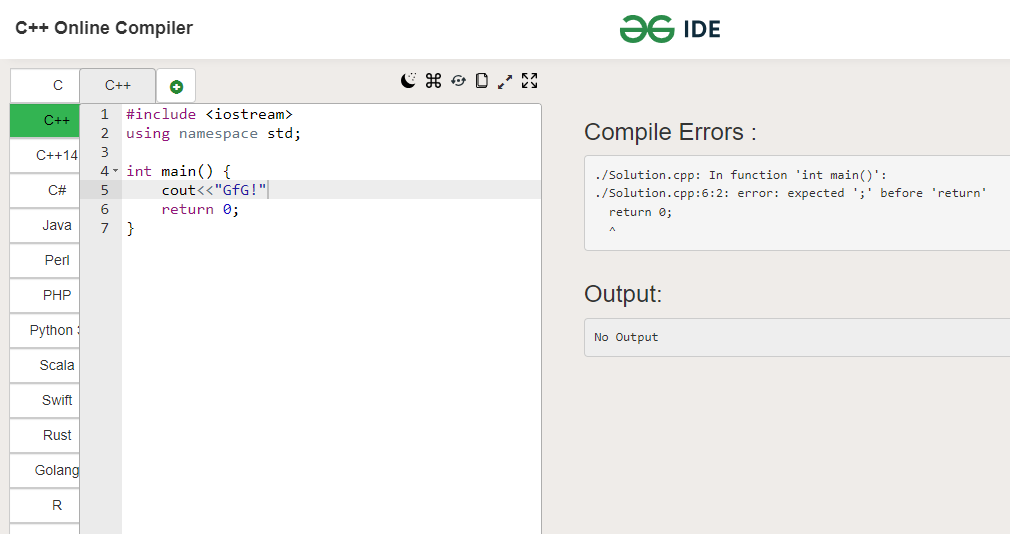
Syntax Error in C++:
Here is the example of syntax error in C++:
#include <iostream>
using namespace std;

int main()
{
    int x = 10
    cout << "The value of x is: " << x << endl;
}
Syntax Error in Java:
Here is the example of syntax error in Java:
public class SyntaxErrorExample {
    public static void main(String[] args) {
        int x = 10
        System.out.println("The value of x is: " + x);
    }
}
Syntax Error in Python:
Here is the example of syntax error in Python:
def syntax_error_example():
    if x == 5
        print("x is equal to 5")
Syntax Error in JavaScript:
Here is the example of syntax error in JavaScript:
let a = 5;
let a = 6;
Ways to Solve Syntax Errors
Fixing syntax errors is all about manually going through the code and correctly finding and fixing the problems. Here are some steps to help you tackle syntax errors effectively:
- Review the Error Message: Read the compiler or interpreter message to understand the error type and location.
- Check Surrounding Code: Examine nearby lines, as the actual issue may be close to the reported position.
- Look for Common Mistakes: Check for missing symbols, mismatched brackets, incorrect indentation, or misspelled keywords.
- Use Debugging Tools: IDEs and code editors can help identify and fix syntax errors more efficiently.
- Consult Documentation: Refer to official documentation to verify the correct syntax and language rules.
Tips to Avoid Syntax Errors
Following good coding practices can help reduce syntax errors and improve code quality.
- Consistent Indentation: Use proper and uniform indentation to maintain code structure and readability.
- Use Syntax Highlighting: Code editors with syntax highlighting can help identify errors while writing code.
- Follow Language Rules: Understand and follow the syntax rules of the programming language being used.
- Test Code Frequently: Run and test code regularly to detect and fix errors at an early stage.
- Break Code into Smaller Parts: Divide complex code into smaller sections to simplify debugging and error detection.
Real world Syntax Error Problems
Syntax errors are not limited to programming languages and can occur in various technologies and tools.
- Configuration Files: Missing tags, commas, or incorrect formatting in XML, JSON, or YAML files can cause syntax errors.
- Markup Languages: Unclosed tags or improper formatting in HTML and Markdown can lead to syntax errors.
- SQL Queries: Missing commas, incorrect aliases, or misplaced keywords can make SQL statements invalid.
- Regular Expressions: Missing escape characters, unmatched parentheses, or invalid patterns can cause errors.
- Command-Line Syntax: Using incorrect options, flags, or argument formats may result in syntax errors.
