

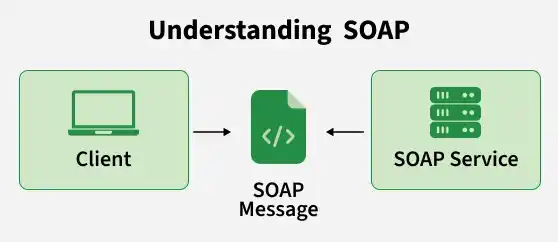
SOAP is an XML-based messaging protocol used to exchange structured information between client and server applications over a network. It is mainly used for web services and supports multiple transport protocols such as HTTP, HTTPS, SMTP, and TCP.
- Provides built-in security using WS-Security.
- Offers reliable messaging and transaction support.
- Uses WSDL to describe web service operations.
Why is SOAP Used?
SOAP is chosen when an application requires a formal, reliable, and feature-rich communication standard, especially in enterprise environments.
- It is suitable for applications that require strict communication rules and standardized service contracts.
- It is preferred when reliable messaging and transaction support are important.
- It fits systems that need advanced security and enterprise-level standards.
- It is useful when integrating large, distributed systems with well-defined operations and contracts.
SOAP Architecture
SOAP architecture consists of a few key components that work together to enable communication between a client and a SOAP service.
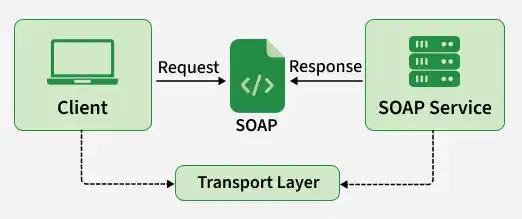
- SOAP Client: Sends requests to the SOAP service.
- SOAP Service: Receives requests, processes them, and returns responses.
- SOAP Message: Carries the request or response between the client and service.
- Transport Protocol: Transfers SOAP messages between applications, commonly using HTTP or HTTPS.
How SOAP Works
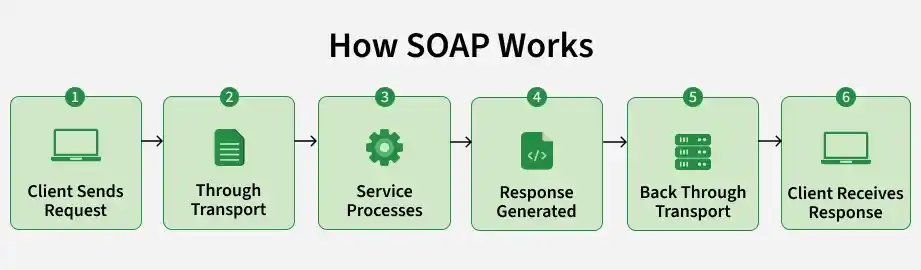
SOAP follows a request-response process in which a client sends a request to a SOAP service, the service processes it, and then returns a response.
Steps in the SOAP Working
- Client Sends a Request: The client initiates communication by requesting a specific operation from the SOAP service.
- Request is Transmitted: The SOAP request is sent to the service through a transport protocol such as HTTP or HTTPS.
- Service Processes the Request: The SOAP service receives the request, validates it, and performs the required business operation.
- Service Generates a Response: After processing the request, the service prepares a response containing the result or an error if the operation cannot be completed.
- Response is Sent Back: The response is sent back to the client through the transport layer.
- Client Receives the Result: The client receives and processes the response according to its requirements.
SOAP Request-Response Example
For Example, a client can request the details of a user with ID 101
SOAP Request :
<soap:Envelope>
    <soap:Body>
        <GetUser>
            <UserId>101</UserId>
        </GetUser>
    </soap:Body>
</soap:Envelope>
SOAP Response :
<soap:Envelope>
    <soap:Body>
        <GetUserResponse>
            <Name>Max</Name>
            <Email>max@gmail.com</Email>
        </GetUserResponse>
    </soap:Body>
</soap:Envelope>
In this example, the client requests user deatils using "GetUser", and the SOAP service returns the user's name and email.
Advantages
- Supports transactional operations, which are useful for processes involving multiple steps.
- Provides built-in error handling through standardized fault messages.
- Supports different communication protocols, allowing flexibility beyond HTTP.
- Allows extensible messaging, making it possible to add additional processing features when required.
- Provides a formal service contract, helping clients understand the operations and data a service supports.
Limitations
- Uses a more complex structure, making it harder to develop and maintain than REST.
- Messages can be larger, which may increase network overhead.
- Requires more processing because of its strict standards and message format.
- Can be slower compared to lightweight API approaches such as REST.
- Often requires more configuration and tooling for development.
Common Use Cases
SOAP is commonly used in systems where security, reliability, and strict communication standards are important.
- Transactions and account services.
- Exchange of patient and medical data.
- Secure transaction processing.
- Integration of business applications.
- Secure data exchange.
