

AWS Cloud Development Kit (AWS CDK) is an open-source framework for defining and provisioning AWS cloud infrastructure using familiar programming languages. It simplifies infrastructure management by allowing developers to define cloud resources as code.
- Helps automate the creation and management of AWS infrastructure.
- Allows infrastructure to be managed alongside application code.
- Supports reusable infrastructure definitions, making deployments more consistent.
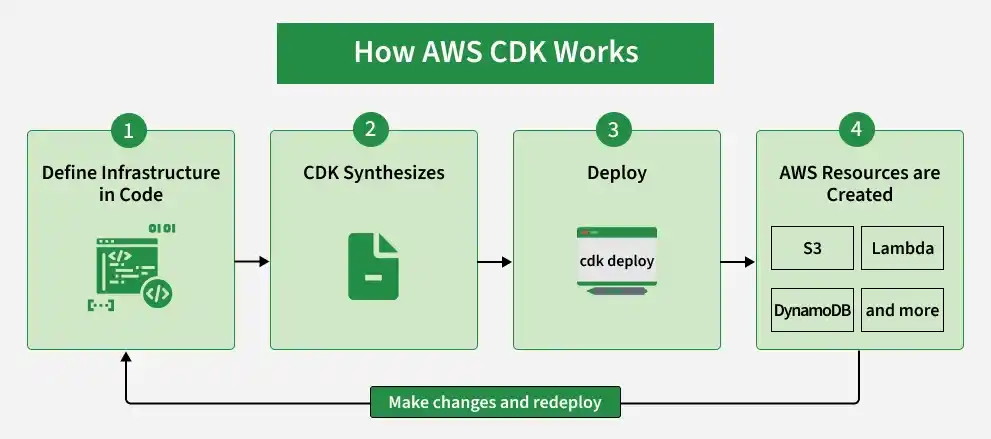
Primary Terminologies
- Constructs: Constructs are components containing configuration, bootstrap code, and logic for running any of the AWS Services
- Infrastructure As A Code (IaaC): Infrastructure as a Code is a model or framework that provides the ability to provision and build a cloud environment with the help of code.
- Cloud Formation: IaaC service provided by AWS for provisioning AWS resources using code.
CDK Constructs
Constructs are further divided into 3 levels L1, L2 and L3
1. L1 Constructs
These constructs represent constructs that are defined by cloud formation. These constructs are generated from cloud formation resource specification.
Below is example for L1 construct for S3 bucket which is CfnBucket in javascript:
const gfgbucket = new s3.CfnBucket(stackname, "gfgbucket", {
  bucketName: gfgbucket";
});
Below is example for L1 construct for Dynamo DB which is CfnTable in javascript
new dynamodb.CfnTable(
   stack name ,
   "gfgtable",
   {
      keySchema: [
         {
            attributeName: props.attributeName,
            keyType: "HASH",
         },
      ],
      attributeDefinitions: [
         {
            attributeName: props.attributeName,
            attributeType: "S",
         },
      ],
   },
);
2. L2 Constructs
These constructs are higher level constructs built over L1 constructs. These include predefined configurations and methods for configuring services reducing complexity and providing more abstraction.
3. L3 Constructs
These constructs are top level constructs which are used to define patterns for multiple resource provisioning or designing higher level architectures using AWS CDK.
Cloud Development Kit Stacks and Apps
1. CDK Apps
- CDK apps are just like components that contain definition of one or more stacks in the aws.
- App is the entry point for CDK application. It is defined as a class in most of the languages.
- The app is initiated first then the stacks are initiated for provisioning the resources.
2. CDK Stacks
- CDK stacks are collections of aws resources that are provisioned together.
- Stacks contain definition for one or more cloud resources in AWS.
- Stacks are also called as unit of deployment.
- Any number of stacks can be defined in an application in CDK.
Setting Up AWS Cloud Development Kit
Now we will see how we can use AWS CDK with javascript.
Step 1: Setup the environment to use AWS CDK
- Install the aws cdk using below command.
npm install aws-cdk-libStep 2: Create the app and initialize with CDK
- First create project folder with the name required.
- Go to the folder and initialize the cdk with below command:
mkdir my-cdk-app && cd my-cdk-app
cdk init app --language javascript
Step 3: Add a Stack and Define Resources
- Once the app is initialized add stack to your app.
- create a new .js file with stack name. let's add s3 bucket configuration in stack.
const cdk = require('aws-cdk-lib');
const s3 = require('aws-cdk-lib/aws-s3');

class GfgCdkStack extends cdk.Stack {
  constructor(scope, id, props) {
    super(scope, id, props);

    new s3.Bucket(this, 'GfgBucket', {
      versioned: true
    });
  }
}

module.exports = { GfgCdkStack }
Step 4: Synthesize an AWS Cloudformation template
- Now synthesize the application using below command.
cdk synthThe output will display the YAML for the resource and .out file will be generated.
Step 5: Deploy the stack
- Finally run below command to deploy the stack.
cdk deployThe command will create a stack in cloud formation and also provision s3 bucket.
Use Cases
- Automate the provisioning and management of AWS resources using code.
- Simplify the deployment of serverless applications using services such as Lambda, API Gateway, and DynamoDB.
- Manage infrastructure consistently across multiple AWS accounts and regions.
- Define and manage infrastructure for development, testing, and production environments.
- Integrate with services such as CodePipeline and CodeBuild to automate infrastructure deployment and updates.
- Configure and scale AWS resources according to application requirements to help control costs.
- Integrate AWS services such as EC2, RDS, S3, and SNS with minimal configuration.
- Extend on-premises infrastructure to AWS to build hybrid cloud environments.
- Define security configurations such as IAM roles and encryption directly in infrastructure code.
- Build scalable data pipelines using services such as Kinesis, Lambda, and DynamoDB for real-time data processing.
Best Practices for Scaling
- A development team must be able to monitor and create resources in their account.
- CI /CD pipelines can be developed to deploy the CDK applications on AWS.
- Multiple accounts can be used for deploying the applications.
- pre-configured, secure, scalable, multi-account AWS environment can be created using best architectures.
AWS CDK vs. Traditional IaC Tools
Feature | AWS CDK | Terraform | CloudFormation |
|---|---|---|---|
Language Support | Multiple (e.g., Python) | HCL | YAML/JSON |
Modular Architecture | Constructs | Modules | Nested Stacks |
Ease of Learning | Developer-Friendly | Moderate | Steeper Learning Curve |
Multi-Cloud Support | No | Yes | No |
AWS CDK is ideal if you’re focused solely on AWS, while Terraform might be better for multi-cloud environments.
When should you use AWS CDK?
- When your team is already familiar with programming languages like TypeScript or Python.
- If you want to speed up the process of creating AWS resources without diving deep into YAML or JSON.
Real-World Scenarios
- Automating serverless setups with Lambda, DynamoDB, and API Gateway.
- Deploying scalable solutions like EC2 instances or RDS databases.
Troubleshooting Common Issues
While AWS CDK is powerful, you might run into some challenges. Here’s how to handle the most common ones:
1. Deployment Errors
Problem: Deployment fails due to permissions or configuration issues.
Solution:
- Ensure your AWS CLI is set up with the correct IAM permissions.
- Run the
cdk bootstrapcommand to prepare the environment:cdk bootstrap aws://ACCOUNT-ID/REGION
2. Stack Update Failures
Problem: You can’t update a stack because of conflicting changes.
Solution:
- Use the
cdk diffcommand to review changes before deploying. - If certain resources (like IAM roles) depend on each other, adjust their configurations to avoid breaking dependencies.
3. Circular Dependencies
Problem: Resources depend on each other in a loop, preventing deployment.
Solution:
- Break large stacks into smaller, independent ones.
- Minimize the use of cross-stack references to reduce complexity.
4. Synthesize Errors
Problem: The cdk synth command throws an error due to invalid code or configurations.
Solution:
- Double-check your code for typos or incorrect parameters.
- Refer to the AWS CDK documentation to confirm construct properties are correct.
5. Resource Deletion Failures
Problem: When deleting a stack, some resources (like S3 buckets) remain.
Solution:
- Use the
removalPolicysetting to ensure resources are automatically deleted:bucket.applyRemovalPolicy(RemovalPolicy.DESTROY);
Tips to avoid issues
- Always test changes in a non-production environment first.
- Run
cdk doctorto identify and resolve environment problems. - Keep your AWS CDK version up to date to access new features and bug fixes.
Benefits
- Constructs in CDK can be used multiple times to create same type of resources. Once written in a programming language construct can be reused as required.
- AWS CDK provides support for multiple languages including JavaScript, Typescript, Python, Java and many more.
- Developer can use IDE for both programming as well infrastructure management. Same code can be used from the IDE.
- Cloud formation integration in AWS CDK provides users with benefits of cloud formation allowing stack management, templating etc.
- With the help of cloud formation the infrastructure can be updated easily.
