

Databricks is a cloud-based data analytics platform built on Apache Spark for processing and analyzing large datasets. It provides a unified workspace for data engineering, analytics, and machine learning and integrates with AWS, Azure, and Google Cloud.
- Supports data engineering, analytics, and ML.
- Uses Apache Spark for large-scale data processing.
- Enables team collaboration through shared tools and notebooks.
- Integrates with AWS, Azure, and Google Cloud.
Architecture
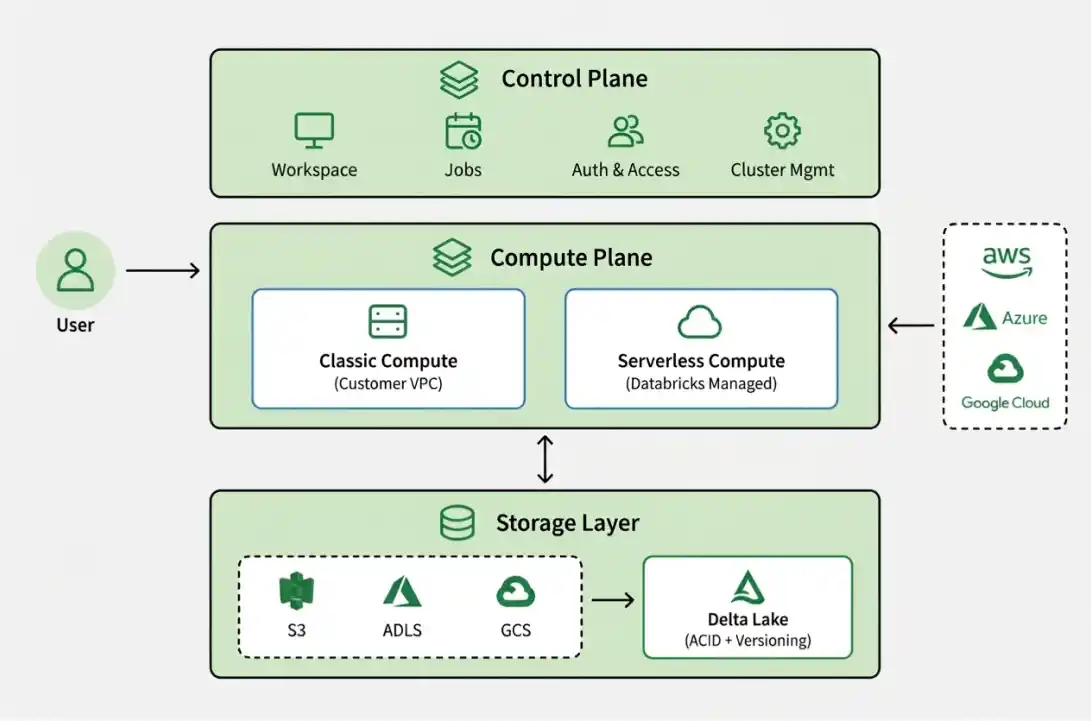
This architecture is based on a separation between the Control Plane and the Compute Plane, allowing secure and scalable data processing.
1. Control Plane
- Managed by Databricks.
- Handles workspace management, authentication, job scheduling, and platform services.
- The Databricks web application runs in the control plane.
2. Compute Plane
- Performs data processing and workload execution.
- Classic Compute: Runs in the customer's AWS, Azure, or GCP environment.
- Serverless Compute: Runs in a Databricks-managed environment, reducing infrastructure management.
3. Storage Layer
- Uses cloud storage such as Amazon S3, Azure Data Lake Storage, and Google Cloud Storage.
- Delta Lake provides reliable tables with ACID transactions, schema enforcement, and versioning.
4. Lakehouse Architecture
Databricks uses a Lakehouse architecture that combines the flexibility of a data lake with the reliability and analytics capabilities of a data warehouse.
- Uses Delta Lake for reliable and transactional data storage.
- Supports data engineering, analytics, BI, and machine learning on one platform.
- Unity Catalog provides centralized governance and security.
Working
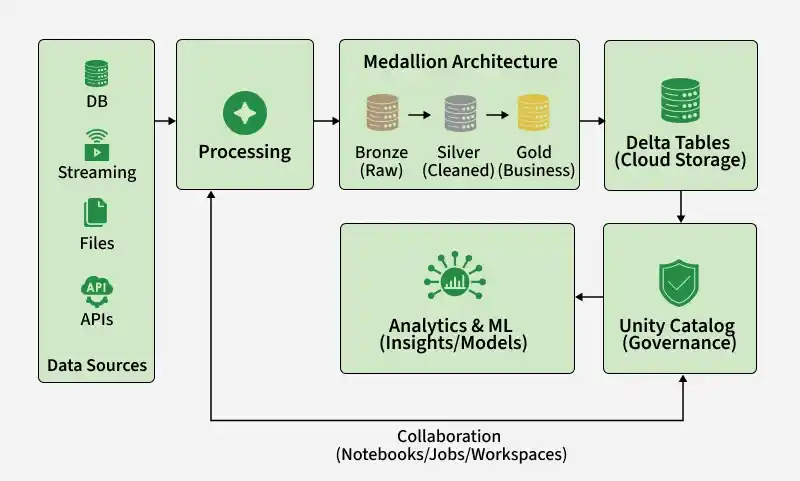
The workflow of Databricks typically follows these stages:
1. Data Ingestion
Data is collected from different sources and brought into the Databricks environment for processing.
- Data can come from relational databases, APIs, applications, data lakes, and streaming platforms.
- Supports both batch and real-time data ingestion.
- Common formats include CSV, JSON, Parquet, and Avro.
2. Data Processing
Apache Spark processes the ingested data and prepares it for analysis.
- Performs data cleaning to remove errors, duplicates, and unwanted records.
- Applies transformations such as filtering, joining, sorting, and formatting.
- Performs aggregations to calculate metrics and summaries.
- Supports ETL and ELT workflows for preparing data.
- Processed data can be written back to Delta Tables for further use.
3. Medallion Architecture
The Medallion Architecture organizes data into multiple layers based on its level of processing.
- Bronze: Stores raw data.
- Silver: Stores cleaned and transformed data.
- Gold: Stores business-ready data for analytics and reporting.
4. Data Storage
Processed data is stored in Delta Tables on cloud storage.
- Delta Lake provides ACID transactions for reliable data operations.
- Supports schema enforcement to maintain data consistency.
- Works with cloud storage such as Amazon S3, Azure Data Lake Storage, and Google Cloud Storage.
5. Data Governance
Unity Catalog provides centralized governance across the Databricks environment.
- Controls who can access data and what actions they can perform.
- Supports fine-grained access control for databases, tables, views, and other data assets.
- Helps users discover and understand available data.
- Tracks data lineage to show where data comes from and how it is transformed.
6. Analytics and Machine Learning
The processed and governed data can be used for analytics, reporting, and machine learning.
- Databricks SQL can be used to query and analyze structured data.
- Teams can create dashboards and reports for business users.
- Gold-layer data can be used to generate business metrics and insights.
- Data scientists can use notebooks and machine learning tools to develop models.
Terminologies related to Databricks
- Cluster: A set of compute resources (e.g., virtual machines or containers) that are used to execute tasks in Databricks.
- Notebook: A web-based interface for interacting with a Databricks cluster. Notebooks allow you to write and run code, as well as document your work using markdown and rich media.
- Spark: An open-source data processing engine used by Databricks to perform distributed data processing tasks.
- Delta Lake: An open-source storage layer that sits on top of cloud storage (e.g., S3 or Azure Blob Storage) and adds ACID transactions, data versioning, and time travel capabilities to Spark.
- Workspace: A web-based interface for organizing and collaborating on Databricks projects.
- Jobs: A way to automate notebook or Python code execution on a schedule or on a trigger (e.g., the arrival of new data).
- Libraries: Pre-packaged code that can be imported into notebooks or jobs to perform common tasks (e.g., reading from a database or performing machine learning).
- Autoscaling: A feature that allows Databricks clusters to automatically scale up or down based on workload demands.
- Security: Databricks provides a number of security features to help protect data and control access to resources, including encryption, authentication, and role-based access control.
- Unity Catalog: A centralized governance layer for managing data and AI assets, including access control, lineage, and auditing.
- Lakehouse: An architecture that combines the flexibility of a data lake with the capabilities of a data warehouse.
- Medallion Architecture: A data organization pattern that divides data into Bronze, Silver, and Gold layers.
- Serverless Compute: Databricks-managed compute that allows users to run workloads without managing the underlying infrastructure.
- Delta Table: A table stored using Delta Lake that provides features such as ACID transactions, schema enforcement, and data versioning.
Features
- Provides one platform for data engineers, scientists, and analysts to collaborate.
- Handles large datasets and supports batch processing, streaming, and machine learning.
- Offers built-in tools for data processing, preparation, analysis, and ML, reducing infrastructure management.
- Provides encryption, access control, and auditing to protect data and meet compliance requirements.
In Short: Databricks simplifies big data processing, analytics, and machine learning on a scalable cloud platform.
Use Cases
Some common Use Cases for Databricks:
- Stores and manages large amounts of data from multiple sources for efficient analysis.
- Clean, transform, and enrich raw data to make it ready for analysis.
- Explore, visualize, and analyze large datasets to identify trends and insights.
- Build, train, and deploy machine learning models using large datasets.
- Process streaming data in real time and make quick, data driven decisions.
Hands-on with Databricks
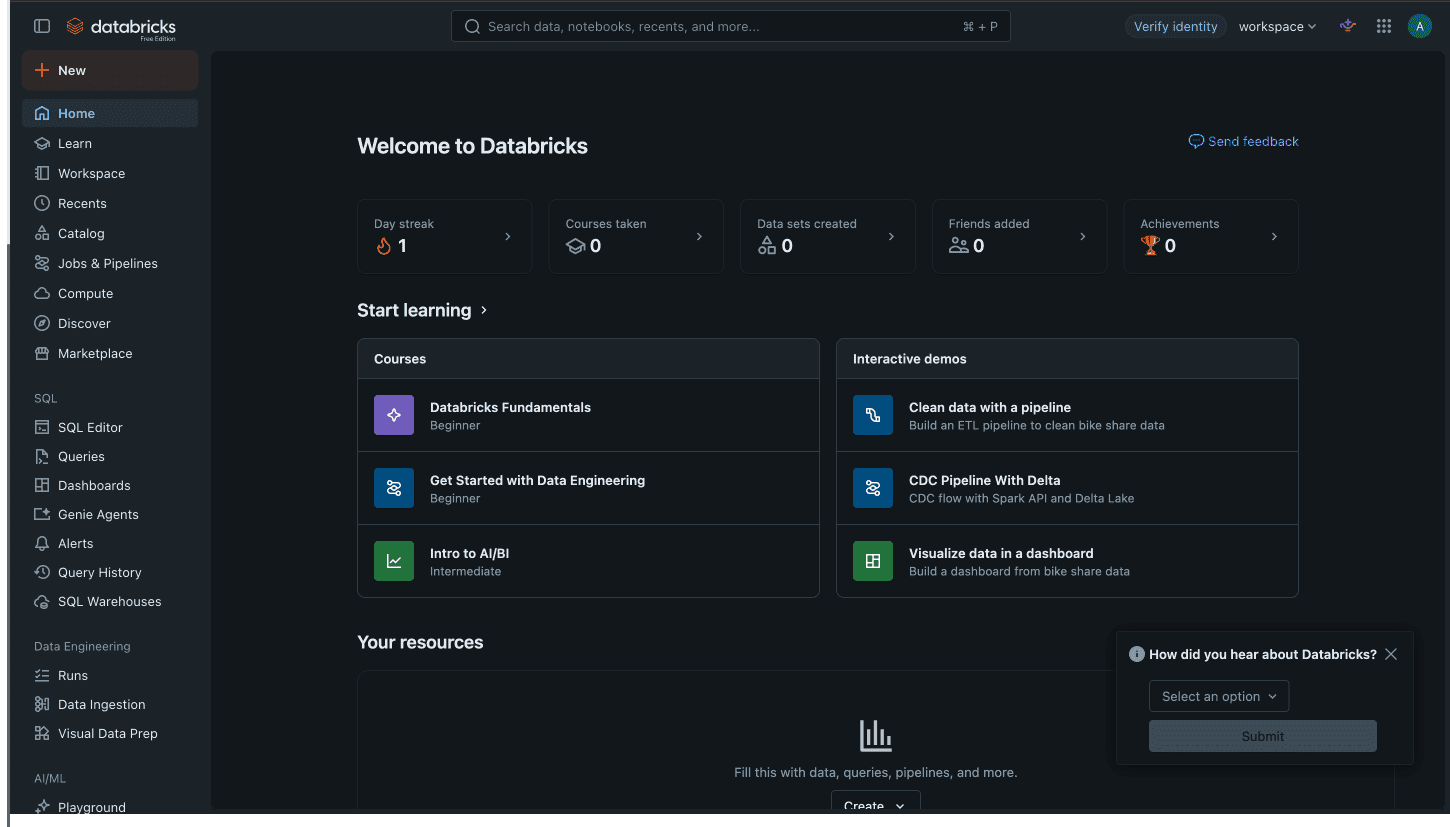
Step 1: Sign-in to your account and Create a Notebook
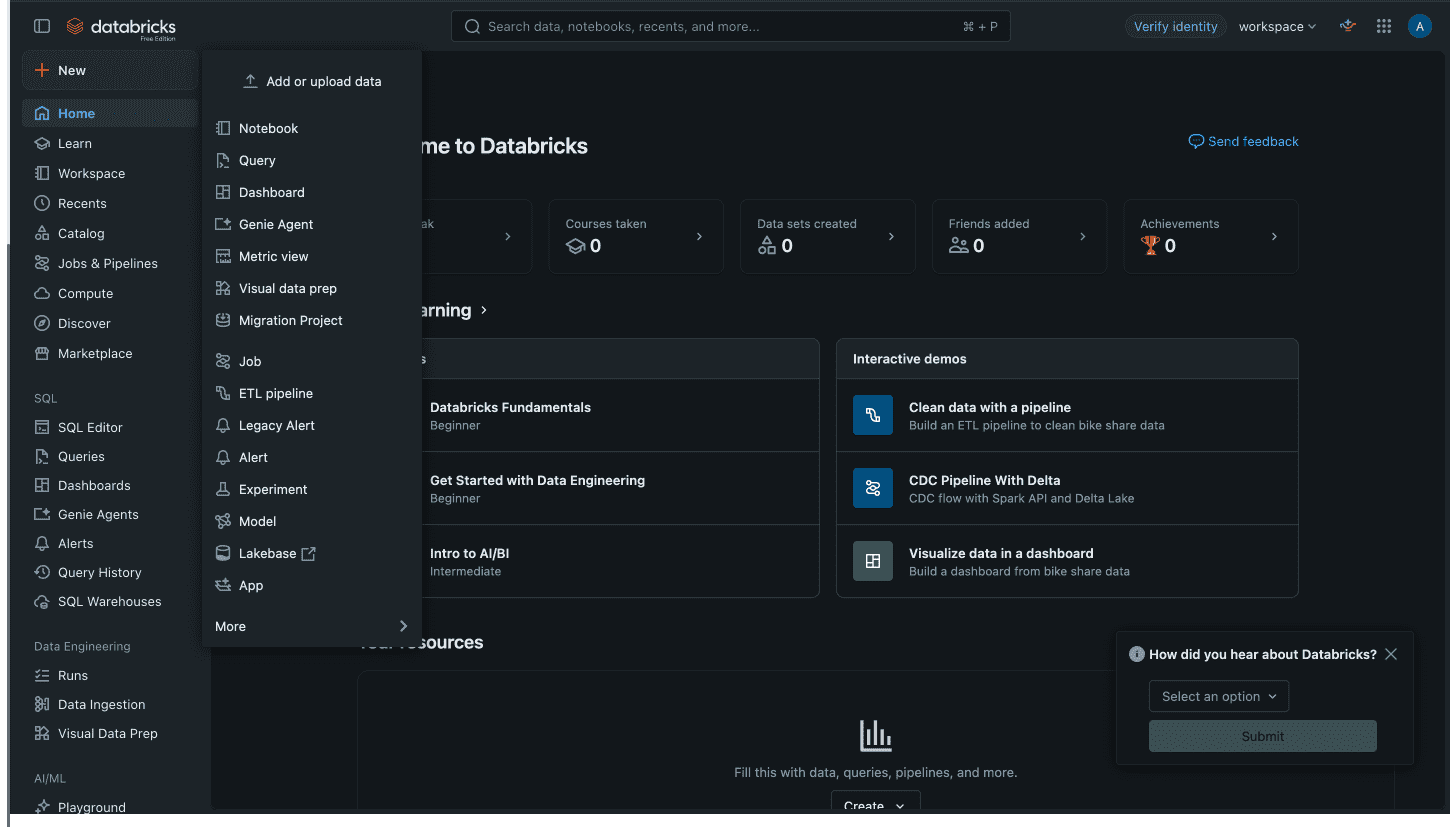
Step 2: Create a Notebook
Create a new Databricks notebook to write and execute Spark code.
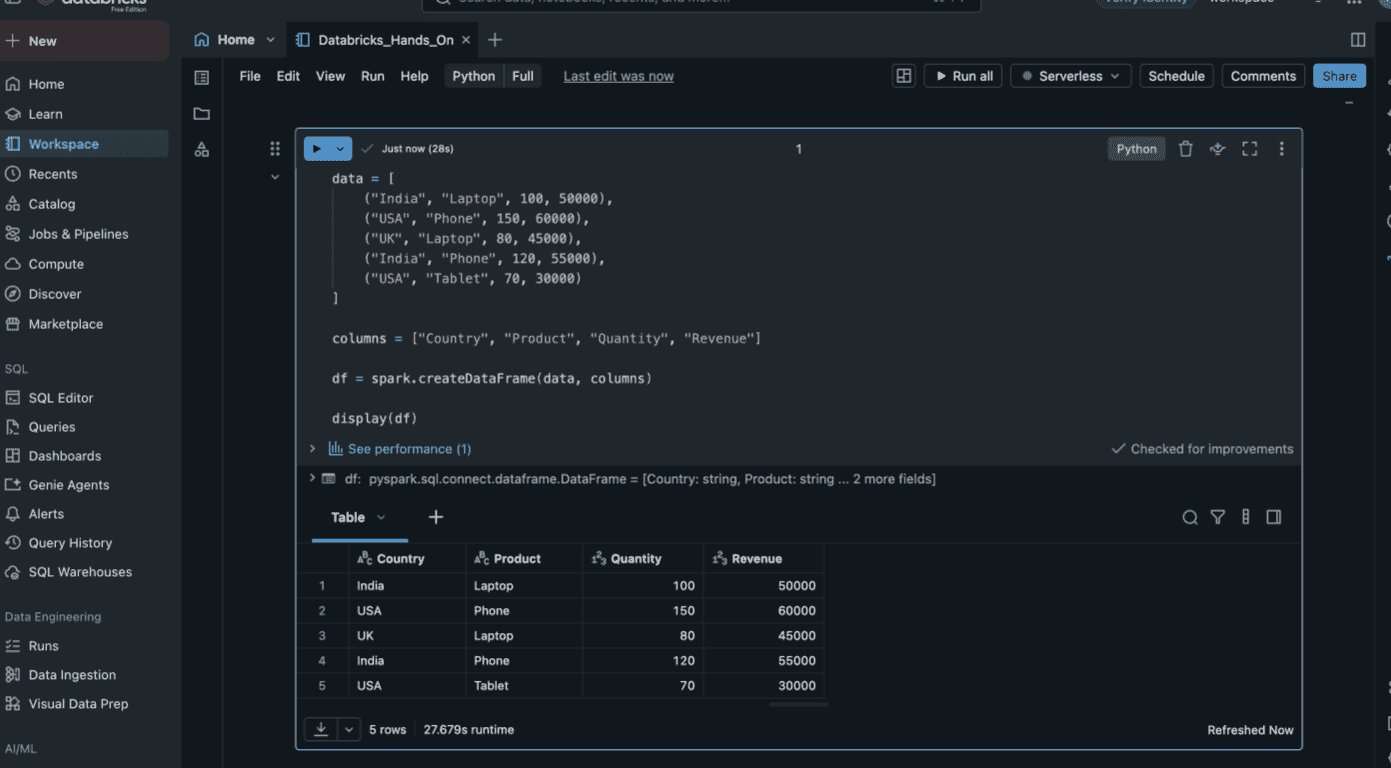
Step 3: Create a sample Data
Create a Spark DataFrame using sample sales data and display it.
data = [
    ("India", "Laptop", 100, 50000),
    ("USA", "Phone", 150, 60000),
    ("UK", "Laptop", 80, 45000),
    ("India", "Phone", 120, 55000),
    ("USA", "Tablet", 70, 30000)
]

columns = ["Country", "Product", "Quantity", "Revenue"]

df = spark.createDataFrame(data, columns)

display(df)
Step 4: Process the Data
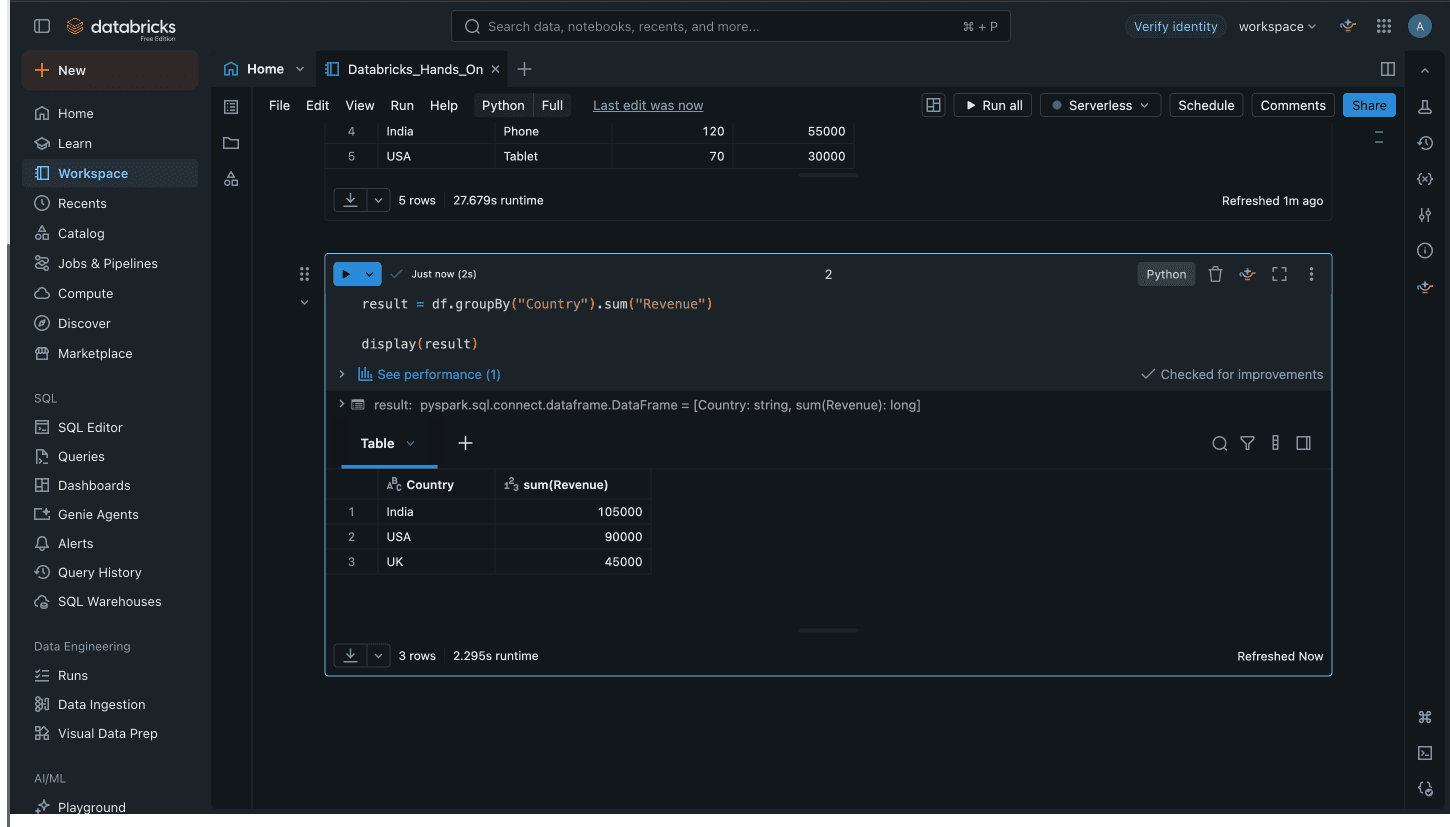
Use Spark to group, and aggregate the data to generate useful results.
result = df.groupBy("Country").sum("Revenue")

display(result)
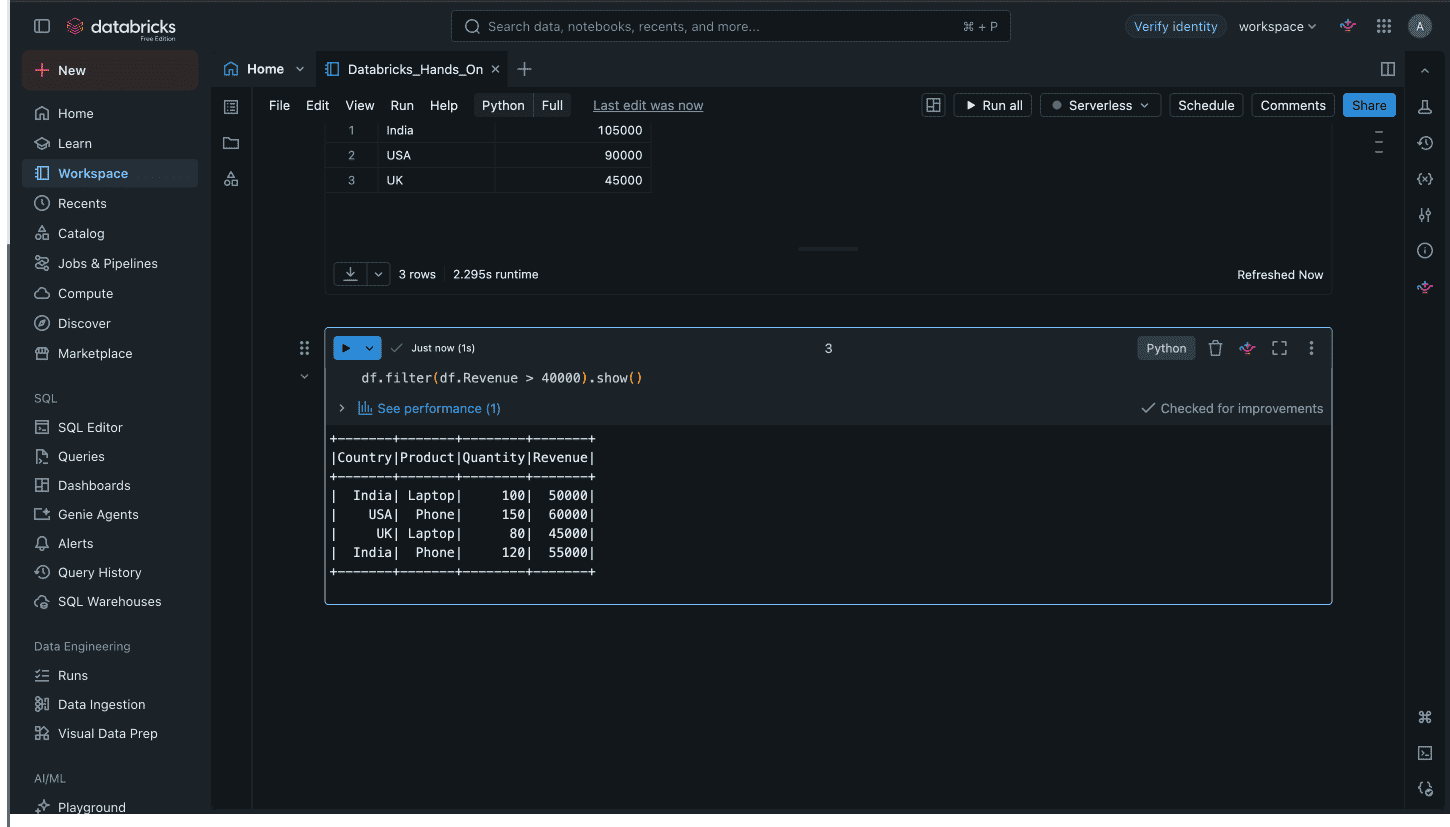
You can also demonstrate filtering in this manner.
df.filter(df.Revenue > 40000).show()
Step 5: Create Delta Table
Save the processed DataFrame as a Delta table to enable reliable storage, transactions, and data versioning.
df.write.mode("overwrite").saveAsTable("sales_data")
We can verify it by:
SELECT * FROM sales_data;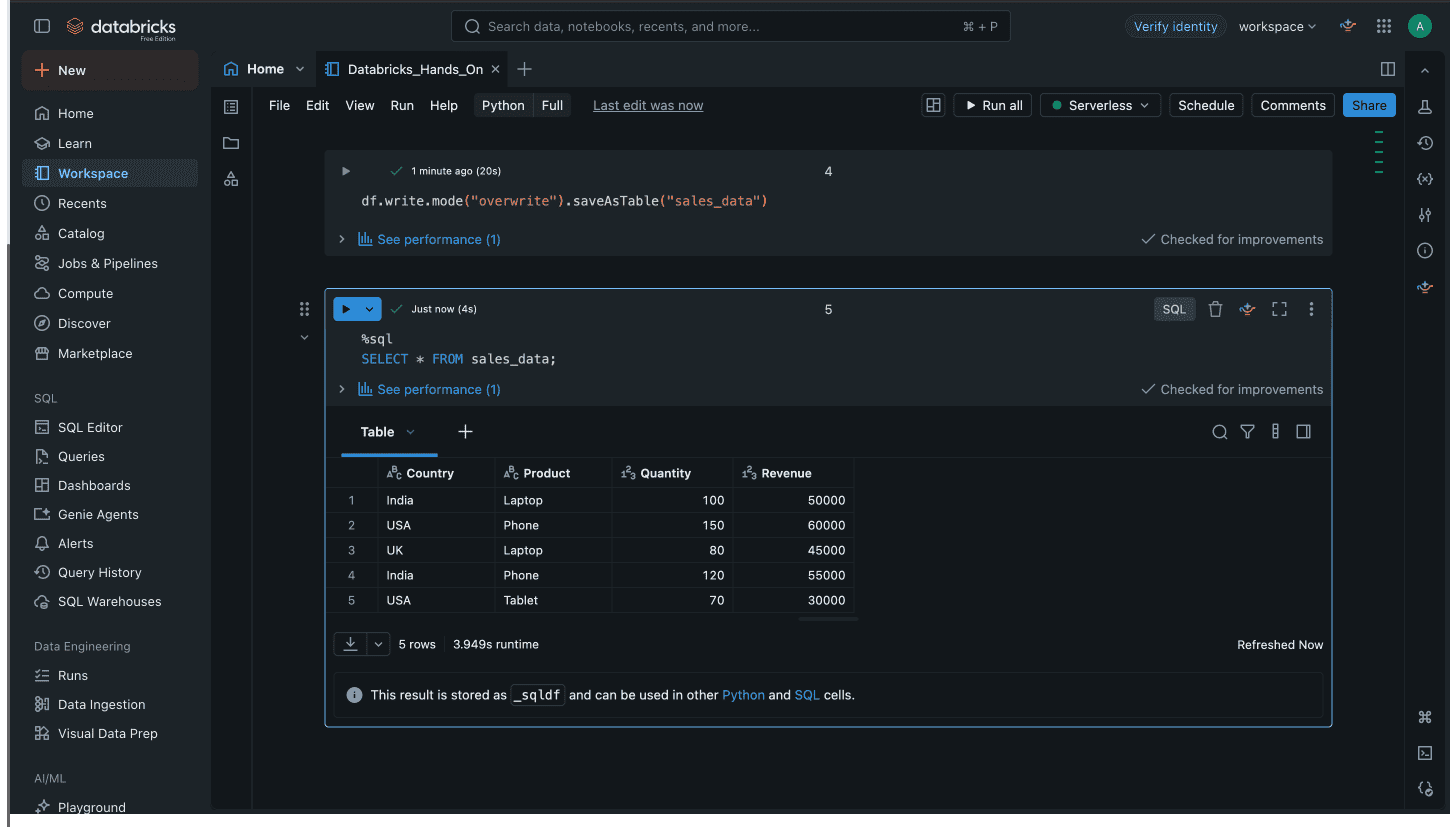
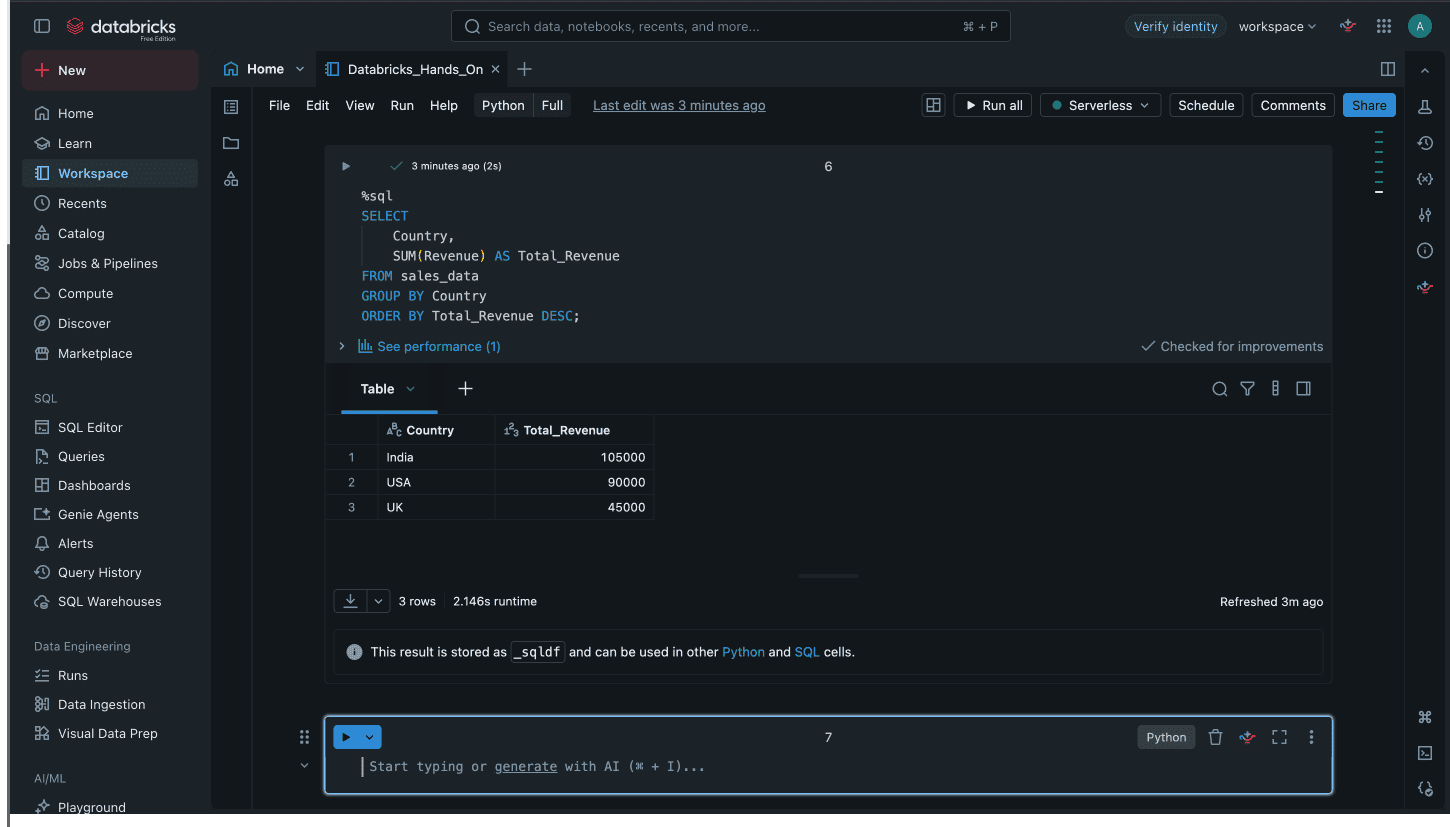
Step 6: Run SQL Analytics
Use SQL to query and analyze the Delta table and generate useful business insights.
SELECT
    Country,
    SUM(Revenue) AS Total_Revenue
FROM sales_data
GROUP BY Country
ORDER BY Total_Revenue DESC;
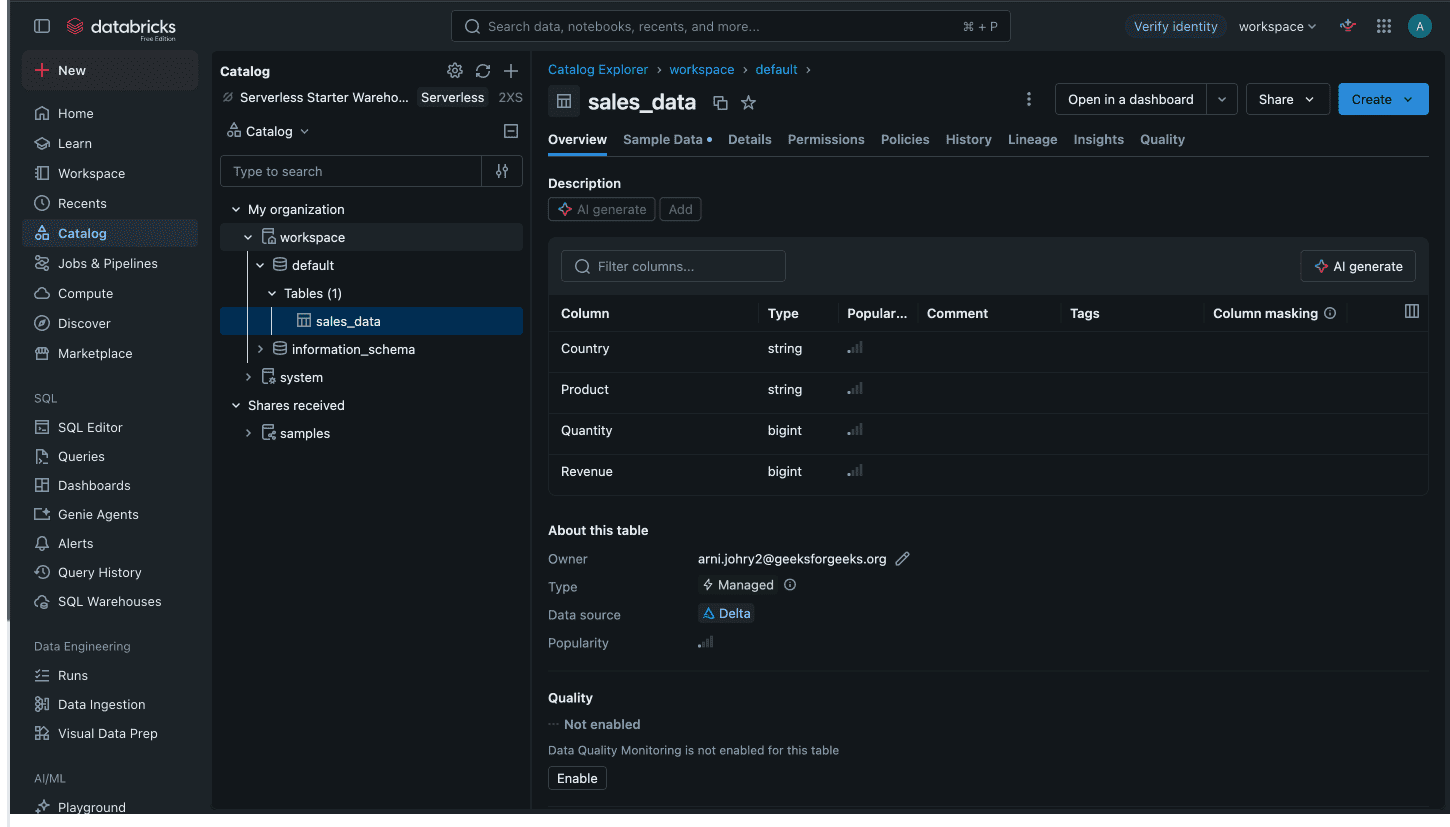
Step 7: View Unity Catalog
Open Catalog → Workspace →Default → sales_data to view the table and its metadata in Unity Catalog.
Advantages
- Combines data engineering, analytics, BI, and machine learning in one platform.
- Uses Apache Spark for fast, distributed processing of large datasets.
- Handles both traditional batch workloads and real-time streaming data.
- Serverless compute and managed services reduce the need to manage underlying infrastructure.
- Provides tools and frameworks for building, training, and deploying machine learning and AI workloads.
