

Kubernetes DNS provides stable DNS names for Services and Pods, allowing applications to communicate using names instead of changing IP addresses.
- Kubernetes creates DNS records for Services and Pods.
- Every Service in the cluster is assigned a DNS name.
- Pods can use DNS names instead of IP addresses to access Services.
- Pods are configured to use the Kubernetes DNS Service to resolve names.
- A Pod’s DNS search list includes its namespace and cluster domain by default.
Namespaces of Services
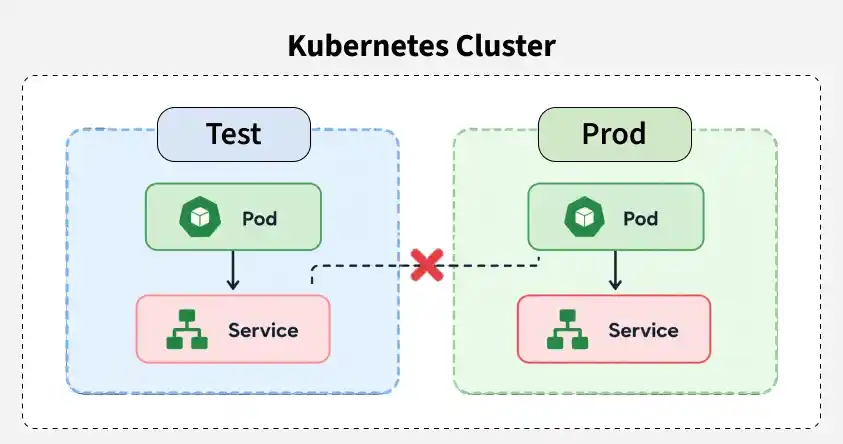
Kubernetes DNS uses the Pod's namespace to resolve Service names. When a Service is in a different namespace, its namespace must be specified in the DNS query.
- A Pod can access a Service using its Service name, such as
data. - The namespace must be included, such as
data.prod. - Example A Pod in the
testnamespace accessing thedataService in theprodnamespace should usedata.prod.
DNS Records
DNS records map domain names to IP addresses and help route network traffic to the correct services.
- A Record Maps a domain to an IP address.
- MX Record Specifies mail servers for a domain.
- CNAME Record Creates an alias for another domain.
Note: For learning in detail about DNS Records you can refer to this article. Domain Name System (DNS)
DNS in Kubernetes
Kubernetes provides an internal DNS service that allows Pods and Services to communicate using DNS names instead of IP addresses.
- Service DNS Each Service is automatically assigned a unique DNS name.
- Stable Access Applications can access Services even when Pod IP addresses change.
- Pod Communication Pods can discover and communicate with Services using DNS names.
CoreDNS
CoreDNS is the default DNS server in modern Kubernetes clusters that handles DNS resolution for Services and Pods.
- Used as the default DNS server in Kubernetes.
- Resolves DNS names for Services and Pods.
- Updates DNS records when cluster resources change.
- Supports a flexible plugin-based architecture.
- Uses the Corefile for DNS configuration and customization.
Kube-DNS
Kube-DNS was the original DNS server used by Kubernetes for Service and Pod discovery. It has been replaced by CoreDNS in modern Kubernetes clusters.
- Allowed applications to communicate using DNS names.
- Automatically created and managed DNS records.
- CoreDNS replaced Kube-DNS with improved flexibility and extensibility.
Kube-DNS Vs CoreDNS
The following are the difference between kube-DNS and CoreDNS:
Features | Kube DNS | CoreDNS |
|---|---|---|
Architecture | kube-DNS is based on skyDNS that is mainly trained for kubernetes cluster | CoreDNS is a general purpose DNS server that comes with modular design |
Extensibility | It has limited extensibility and cusomization options | It is highly extensible through using middleware plugins |
Performance | It's performance has optimized for kubernetes workloads for having efficient service discovery | It has efficient performance with configurable caching. |
Flexibility | It is mainly designed for k8s environments only. | It can be suitable for the various environments and usecases. |
Adoption | It is widely adoptable within the kubernetes ecosystem. | It has gaining the popular outside the k8s as well. |
Corefile Configuration
The Corefile is a configuration file that is used for DNS servers. It contains the definition and configurations regarding how CoreDNS should operates. It includes which plugins to use, their order and configuraiton parameters. Its simple syntax and modular design facilitates users to use coreDNS to their specific needs.
.:53 {
    kubernetes cluster.local
    forward . /etc/resolv.conf
    cache 30
    reload
}
DNS for Services And Pods
DNS for services and pods are vital for communication within the cluster for having communication with their names.
- DNS For Services enables the support of establishing communication between the services through their names.
- It will map the name of service with respecitve their IP address and lets to have communication with names instead of IP addresses.
- DNS For Pods facilitatest intra-cluster communication of pods with their hostnames instead of having with their IP addresses.
- It lets pods can communicate with each other using these hostnames without the needing to known their IP addresses directly with providing abstraction in networking.
Kubernetes Service DNS
Every Kubernetes Service is automatically assigned a DNS name, allowing applications to communicate using service names instead of IP addresses. The fully qualified domain name (FQDN) of a Service follows this format:
<service-name>.<namespace>.svc.cluster.localFor example, a Service named nginx in the default namespace can be accessed using:
nginx.default.svc.cluster.localPods within the same namespace can simply use the Service name (for example, nginx) instead of the full DNS name. When a Pod sends a DNS query, CoreDNS resolves the Service name to its corresponding ClusterIP, enabling reliable service discovery even if the backing Pods are recreated or their IP addresses change.
Types of DNS Services
The types of DNS Services are listed as follows
1. A/AAAA Records
Kubernetes assigns A or AAAA DNS records to Services based on their IP address family.
- Resolves a Service name to its IPv4 ClusterIP.
- Resolves a Service name to its IPv6 ClusterIP.
- A Service can be accessed using a name such as
my-svc.my-namespace.svc.cluster-domain.example. - The type of record depends on whether the Service uses IPv4 or IPv6.
.jpg)
2. SRV Records
SRV records provide DNS information for named ports of Kubernetes Services, including Headless Services.
- Each named port gets an SRV record.
- The record resolves to the port number and Service DNS name.
- Format:
_port-name._port-protocol.service.namespace.svc.cluster-domain.example - Use Case: Helps applications discover Services and their named ports through DNS.
.jpg)
Features of Kubernetes DNS
Kubernetes DNS simplifies communication between applications by providing automatic name resolution for Services and Pods. Some of its key features are:
- Creates DNS records for Services and Pods automatically.
- Supports Services with the same name in different namespaces.
- Enables communication using DNS names instead of Pod IPs.
- Updates DNS records automatically when cluster resources change.
- Resolves individual Pod IPs for headless Services.
Customizing DNS Service
- Customization of DNS service in a network involves in configuring the DNS servers that will be suitable for specific needs.
- It may include in setting up the custom domain names, integrating with external DNS providers.
- By implementing DNS based security measures like DNS filtering facilitates with optimizing the performance of the DNS resolution.
- It facilitates with ensuring effiicient and secure resolutions of domain names across the network infrastructure.
Steps to Configure DNS for A Cluster
The following are the steps for configuring DNS for a Kubernetes Cluster:
- Select the DNS solution like CoreDNS or kube-DNS on considering its comptability with the kuberentes version and the specific reqirements.
- Deploy the chosen DNS add-on to the kubernetes cluster using appropriate deployment method such as YAML manifests or package managers like Helm.
- Try to modify the configuration file of the DNS server as per the requirements that suits for the cluster's requirements. It involves in adjusting the DNS policies, specifying the custom DNS providers or configuring additional plugins.
- If the using the DNS server is CoreDNS then update the corefile for defining the DNS zones, plugins, and upstream resolvers as per needed. Make ensure that the desired changes are reflected on DNS behaviour for the cluster.
- Now, test the configurations by resolving its domain names from within the cluster and ensuring that the DNS querires are properly routed to the DNS service.
- By regularly maintaining the DNS performances, we can resolve any issues promptly. Maintaince of DNS configurations by updating it respective to the cluster evolves is recommended practice.
