

Kubernetes provides different storage options for applications running inside Pods. Container filesystems are temporary by default, so data stored inside a container can be lost when the container is replaced.
Kubernetes Volume
A Kubernetes Volume provides storage that can be mounted inside one or more containers of a Pod. Unlike a container's writable filesystem, a Volume can provide storage that is shared between containers and, depending on the volume type, can survive container restarts.
The behavior and lifecycle of a Volume depend on its type. For example:
emptyDirprovides temporary storage for a Pod.hostPathmounts a directory from the node's filesystem.- Persistent storage can be provided through a PersistentVolume and PersistentVolumeClaim.
- CSI-based storage can connect Kubernetes with external storage systems.
Types of Kubernetes Volumes
Kubernetes supports different types of Volumes depending on the application's requirements. Some commonly used Volume types are:
| Volume Type | Purpose |
|---|---|
emptyDir | Temporary storage shared by containers in a Pod |
hostPath | Mounts a directory from the Kubernetes node |
| PersistentVolume | Represents persistent storage available to the cluster |
| CSI | Connects Kubernetes with external storage through CSI drivers |
For production applications, persistent storage is generally managed using PersistentVolumes, PersistentVolumeClaims, and StorageClasses.
Storage Integration
Kubernetes can integrate with different storage systems through storage plugins and the Container Storage Interface (CSI).
Container Storage Interface (CSI)
The Container Storage Interface (CSI) provides a standard interface for integrating storage systems with Kubernetes. CSI drivers allow Kubernetes to work with storage provided by cloud platforms, network storage systems, and other storage providers.
Common examples include:
- AWS EBS
- Azure Disk
- Google Persistent Disk
- NFS-based storage
- Other third-party storage systems
CSI-based storage is commonly used with StorageClasses and dynamic provisioning.
NFS Storage
- Network File System (NFS) provides network-based file storage that can be accessed by multiple systems.
- Kubernetes can use NFS storage through the appropriate storage configuration or CSI driver.
- NFS is useful when applications require shared file storage, particularly for workloads that need multiple Pods or nodes to access the same files.
PersistentVolume (PV)
A PersistentVolume (PV) is a cluster-level storage resource in Kubernetes. A PV represents storage that can be used by applications independently of a particular Pod.
PVs can be:
- Statically provisioned by an administrator.
- Dynamically provisioned using a StorageClass.
A PV can represent storage provided by different backends, such as:
- AWS EBS
- Azure Disk
- Google Persistent Disk
- NFS
- Local storage
- Other CSI-supported storage systems
The PV contains information about the storage capacity, access modes, reclaim policy, and storage implementation.
Usability
- Without persistent storage, application data may be lost when containers or Pods are replaced.
- PVs provide a separate storage layer that can be consumed by applications without requiring the application to know the details of the underlying storage system.
PersistentVolumeClaim (PVC)
A PersistentVolumeClaim (PVC) is a request for storage made by a user or application. Instead of directly configuring a Pod with the details of the underlying storage, the application requests storage through a PVC.
A PVC can specify requirements such as:
- Storage capacity
- Access mode
- StorageClass
For example, a PVC can request:
2Giof storageReadWriteOnceaccess- A specific StorageClass
Kubernetes then attempts to find or dynamically create a suitable PersistentVolume.
PersistentVolumeClaim Access Modes
PVCs can specify different access modes depending on the storage system being used.
| Access Mode | Description |
|---|---|
| ReadWriteOnce (RWO) | Volume can be mounted as read-write by a single node |
| ReadOnlyMany (ROX) | Volume can be mounted as read-only by multiple nodes |
| ReadWriteMany (RWX) | Volume can be mounted as read-write by multiple nodes |
| ReadWriteOncePod (RWOP) | Volume can be mounted as read-write by a single Pod |
The available access modes depend on the storage backend and its Kubernetes storage driver.
StorageClass
A StorageClass defines a class of storage that can be used for dynamic provisioning. Instead of manually creating a PersistentVolume for every application, a StorageClass can allow Kubernetes to automatically provision storage when a PVC is created.
StorageClasses commonly specify:
- Storage provisioner or CSI driver
- Storage parameters
- Reclaim policy
- Volume binding behavior
StorageClasses are commonly used in cloud and production Kubernetes environments because they simplify storage management.
PV and PVC Working Together
PersistentVolumes and PersistentVolumeClaims separate the storage provider from the application requesting storage. The workflow is:
- An administrator creates a PV or configures a StorageClass.
- An application creates a PVC requesting storage.
- Kubernetes looks for a suitable PV.
- If dynamic provisioning is enabled, Kubernetes can create a PV automatically.
- The PVC becomes bound to the PV.
- The Pod references the PVC.
- Kubernetes mounts the requested storage into the Pod.
This allows applications to use persistent storage without directly managing the underlying storage infrastructure.
PV and PVC Lifecycle
A typical PV and PVC lifecycle can be represented as:
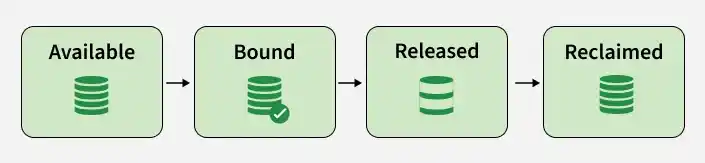
- Available: The PV is available for a PVC to use.
- Bound: A PVC has successfully claimed the PV.
- Released: The PVC has been deleted, but the PV may still contain data or require cleanup depending on its reclaim policy.
- Reclaimed: The storage is either retained for manual recovery or removed according to the configured reclaim policy.
PV Reclaim Policy
The reclaim policy determines what happens to a PersistentVolume after its associated PVC is deleted.
Retain
The Retain policy keeps the PV and its associated storage after the PVC is deleted. This is useful when the data is important and should be preserved for manual recovery or reuse.
Delete
The Delete policy allows dynamically provisioned storage to be deleted when the associated PVC is deleted. This is commonly used when the storage should be automatically cleaned up with the application's storage claim.
Note:
Recycleis deprecated and should not be recommended for new Kubernetes configurations.
Creating a Pod YAML File with PV and PVC
In this example, the storage is created in three stages: PersistentVolume → PersistentVolumeClaim → Pod
The PersistentVolume provides the storage, the PVC requests that storage, and the Pod mounts the PVC.
Step 1: Create a PersistentVolume
Create a file named my_pv.yml:
apiVersion: v1kind: PersistentVolumemetadata:name: mypvspec:capacity:storage: 2GiaccessModes:- ReadWriteOncepersistentVolumeReclaimPolicy: RetainhostPath:path: /mnt/data
Apply the configuration:
kubectl apply -f my_pv.yml
The Retain reclaim policy is used so that the storage is preserved after the PVC is deleted.
Note: This
hostPathexample is intended for a single-node learning environment.
Step 2: Check the Status of the PV
Check the PersistentVolume:
kubectl get pv
To view detailed information:
kubectl describe pv mypvThe PV should initially show the Available status until a matching PVC claims it.
Step 3: Create a PersistentVolumeClaim
Create a file named my_pvc.yml:
apiVersion: v1kind: PersistentVolumeClaimmetadata:name: mypvcspec:accessModes:- ReadWriteOnceresources:requests:storage: 2Gi
Apply the configuration:
kubectl apply -f my_pvc.yml
The PVC requests 2Gi of storage with ReadWriteOnce access.
Step 4: Check the Status of the PVC
Check the PVC:
kubectl get pvc
You can also check the details of the PVC:
kubectl describe pvc mypvcThe PVC should become Bound when Kubernetes successfully associates it with the PersistentVolume.
You can also verify the PV:
kubectl get pvThe PV should now show the Bound status.

Step 5: Create a Pod Using the PVC
Create a file named my_pod.yml:
apiVersion: v1kind: Podmetadata:name: my-podspec:containers:- name: my-containerimage: nginx:latestvolumeMounts:- name: my-persistent-storagemountPath: /usr/share/nginx/htmlvolumes:- name: my-persistent-storagepersistentVolumeClaim:claimName: mypvc
Apply the configuration:
kubectl apply -f my_pod.yml
The Pod uses the PVC named mypvc, which is bound to the PersistentVolume.
Step 6: Check the Status of the Pod
Check the Pod:
kubectl get podsTo view detailed information:
kubectl describe pod my-podThe Pod should reach the Running state.
You can also verify the PVC and PV:
kubectl get pvckubectl get pv
Step 7: Test Data Persistence
To demonstrate why persistent storage is useful, create a file inside the mounted volume:
kubectl exec my-pod -- sh -c 'echo "Persistent Kubernetes Storage" > /usr/share/nginx/html/index.html'Read the file:
kubectl exec my-pod -- cat /usr/share/nginx/html/index.htmlThe output should be:

Now delete the Pod:
kubectl delete pod my-podCreate the Pod again:
kubectl apply -f my_pod.ymlCheck that the new Pod is running:
kubectl get podsFinally, read the file again:
kubectl exec my-pod -- cat /usr/share/nginx/html/index.htmlThe data should still be available because it was stored in the mounted persistent storage rather than only in the container's writable filesystem.

Verify the PV and PVC Relationship
Run:
kubectl get pvkubectl get pvckubectl get pods
This demonstrates how Kubernetes separates application storage requests from the underlying storage resource.
Best Practices
1. Use StorageClasses for Dynamic Provisioning
- Use StorageClasses to automatically provision persistent storage.
- Avoid manually creating PVs for every application in production.
- Use the appropriate CSI driver for the storage platform.
2. Choose an Appropriate Reclaim Policy
- Use
Retainwhen important data must be preserved after PVC deletion. - Use
Deletewhen storage should be automatically cleaned up. - Avoid
Recycle, as it is deprecated.
3. Request Only the Required Storage
- Define realistic storage requirements in PVCs.
- Avoid requesting significantly more storage than the application needs.
- Monitor storage usage regularly.
4. Use Appropriate Access Modes
- Select the access mode supported by the storage backend.
- Use
ReadWriteOncefor workloads that require read-write access from a single node. - Use
ReadWriteManywhen multiple nodes need shared read-write access and the storage backend supports it.
5. Avoid hostPath for Production Persistent Storage
- Use
hostPathmainly for local development and learning. - Use a StorageClass and appropriate CSI driver for production environments.
- Make sure the storage backend supports the application's availability and access requirements.
6. Monitor Persistent Storage
- Regularly check PV and PVC status.
- Remove unused PVCs and storage resources when they are no longer required.
- Monitor storage capacity and application usage.
7. Use Meaningful Names and Labels
- Use meaningful names for PVs, PVCs, and StorageClasses.
- Add labels and annotations where they help identify and manage storage resources.
- Keep storage configurations consistent across environments.
