

Bit Manipulation works directly with the binary representation of numbers using bitwise operators.
- Operators such as AND, OR, XOR, and NOT manipulate individual bits.
- It is used for checking bits, counting set bits, and finding unique or missing elements.
- It helps improve efficiency in programming and coding problems.
Theoretical Questions for Interviews on Bit Manipulation
These questions cover the fundamental concepts, operators, techniques, and common applications of Bit Manipulation.
1. What is Bit Manipulation?
Bit manipulation refers to performing operations directly on the individual bits of a number using bitwise operators.
- It works with binary representation of data.
- Common operations include AND, OR, XOR, NOT, left shift, and right shift.
- It is commonly used for efficient calculations, masking, and setting or clearing bits.
2. What is the purpose of the bitwise AND operator?
The bitwise AND (&) operator compares corresponding bits of two numbers and returns 1 only when both bits are 1.
- It is commonly used to check, clear, or mask specific bits.
- For example, x & 1 checks whether x is odd or even.
3. What is the significance of the bitwise OR operator?
The bitwise OR (|) operator compares corresponding bits and returns 1 if at least one of the bits is 1.
- It is commonly used to set specific bits.
- It can combine bit patterns by turning selected bits to 1.
4. What does the XOR operator do and where is it used?
The bitwise XOR (^) operator compares corresponding bits and returns 1 when the bits are different and 0 when they are the same.
- It is used to toggle specific bits without affecting other bits.
- It is useful for finding a unique element when every other element appears twice.
- It is also used in bit masking and swapping values in some cases.
5. What does the bitwise NOT operator do?
The bitwise NOT (~) operator flips every bit of a number, changing 1 to 0 and 0 to 1.
- It is a unary operator, so it works on a single operand.
- It is commonly used to invert or toggle all bits of a number.
- For a number x, ~x is equal to -(x + 1) in two's complement representation.
6. What is the difference between bitwise and logical operators?
Bitwise operators work on individual bits, while logical operators work on conditions and return a Boolean result.
| Bitwise Operators | Logical Operators |
|---|---|
| Operate on individual bits. | Operate on Boolean conditions. |
| Examples: &, |, ^, ~ | Examples: &&, ||, ! |
| Used for bit manipulation. | Used for decision-making and conditions. |
| Return a value based on the bitwise operation. | Return true or false. |
7. How can you check whether a number is even or odd using Bit Manipulation?
The least significant bit (LSB) of a number determines whether it is even or odd.
- Use the bitwise AND operator (&) with 1.
- If n & 1 is 0, the number is even.
- If n & 1 is 1, the number is odd.
8. How do you check whether a specific bit is set?
A specific bit can be checked using the bitwise AND (&) operator with a mask.
- Create a mask by shifting 1 to the required bit position: 1 << k.
- Perform n & (1 << k).
- If the result is non-zero, the bit is set (1); otherwise, it is unset (0).
9. How do you set a specific bit in a number?
A specific bit can be set to 1 using the bitwise OR (|) operator.
- Create a mask using
1 << k, wherekis the bit position. - Perform
n | (1 << k). - This sets the
k-th bit to1without changing the other bits.
10. How do you clear a specific bit in a number?
A specific bit can be cleared by setting it to 0 using the bitwise AND (&) operator.
- Create a mask using ~(1 << k), where k is the bit position.
- Perform n & ~(1 << k).
- This clears the k-th bit without changing the other bits.
11. How do you toggle a specific bit in a number?
Toggling a bit means changing it from 0 to 1 or from 1 to 0.
- A specific bit can be toggled using the bitwise XOR (^) operator.
- Create a mask using 1 << k, where k is the bit position.
- Perform n ^ (1 << k).
- This changes the k-th bit without affecting the other bits.
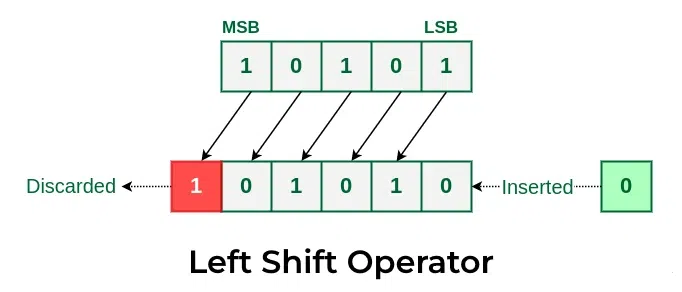
12. What is the result of left and right bit shifts?
Bit shifts move the bits of a number to the left or right by a specified number of positions.
- Left shift (<<): Moves bits to the left and fills the rightmost bits with 0.
- Right shift (>>): Moves bits to the right and discards the rightmost bits.
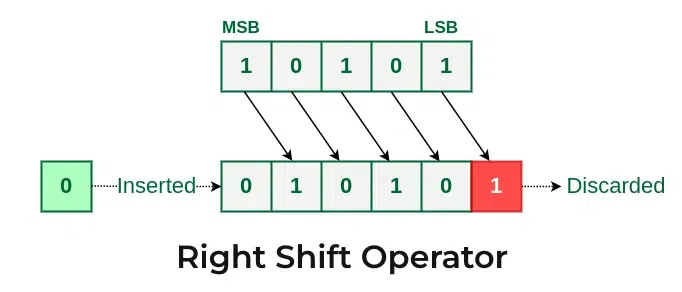
- A left shift by k positions generally multiplies a number by 2^k, while a right shift generally divides it by 2^k.
13. How can you check if a number is a power of two?
A power of two has exactly one set bit (1) in its binary representation.
- Use the expression n & (n - 1).
- Subtracting 1 from n changes its only set bit to 0 and all bits after it to 1.
- Therefore, n & (n - 1) becomes 0 only when n has exactly one set bit.
- Also, n must be greater than 0.
- For example, 8 is 1000 and 7 is 0111. So, 8 & 7 gives 0000, meaning 8 is a power of two.
14. How can you count the number of set bits in a number?
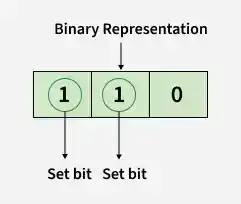
The number of set bits means the count of 1s in the binary representation of a number.
- Repeatedly use n & (n - 1) to remove the rightmost set bit.
- Increment the count after each operation.
- Continue until n becomes 0.
- The final count gives the number of set bits.
15. What is the purpose of n & (n - 1)?
The expression n & (n - 1) removes the rightmost set bit (1) from the binary representation of n.
- It is commonly used to count set bits efficiently.
- It helps check whether a number is a power of two.
- If n & (n - 1) == 0 and n > 0, then n is a power of two.
- For example, 12 is 1100, and 12 & 11 gives 1000.
16. How can you find the rightmost set bit of a number?
The rightmost set bit is the first 1 bit from the right in the binary representation of a number.
- Use the expression n & -n to isolate the rightmost set bit.
- For example, 12 is 1100 in binary.
- 12 & -12 gives 0100, which represents the rightmost set bit.
- This is useful in bit manipulation and algorithms involving set bits.
17. How can you swap two numbers using XOR?
Two numbers can be swapped without using a temporary variable by using the XOR (^) operator. XOR has the property that x ^ x = 0 and x ^ 0 = x, which allows the original values to be recovered.
- First, perform a = a ^ b to combine the values of a and b.
- Then, perform b = a ^ b to recover the original value of a.
- Next, perform a = a ^ b to recover the original value of b.
- Thus, the values of a and b are swapped without using extra storage.
For example, let a = 5 (0101) and b = 3 (0011).
- a = a ^ b -> 0101 ^ 0011 = 0110 -> a = 6
- b = a ^ b -> 0110 ^ 0011 = 0101 -> b = 5
- a = a ^ b -> 0110 ^ 0101 = 0011 -> a = 3
After these operations, a = 3 and b = 5.
18. How can you find the only non-repeating element in an array?
The XOR (^) operator can find the only non-repeating element when every other element appears exactly twice.
- XOR the corresponding elements of the array.
- Since x ^ x = 0 and x ^ 0 = x, all repeating elements cancel each other.
- The remaining value is the non-repeating element.
- For example, in [4, 1, 2, 1, 2], XORing all elements gives 4.
19. How can you find two non-repeating elements in an array?
The XOR (^) operator can find two non-repeating elements when every other element appears exactly twice.
- XOR all elements to get x ^ y, where x and y are the two non-repeating elements.
- Find the rightmost set bit using (x ^ y) & -(x ^ y).
- Use this bit to divide the elements into two groups and XOR each group separately.
- The two resulting values are the two non-repeating elements.
- For example, in [2, 3, 2, 4, 4, 5], the non-repeating elements are 3 and 5.
20. What are the important properties of XOR?
XOR (^) has several properties that make it useful in bit manipulation and algorithmic problems.
- Self-inverse: x ^ x = 0
- Identity: x ^ 0 = x
- Commutative: x ^ y = y ^ x
- Associative: (x ^ y) ^ z = x ^ (y ^ z)
- Different bits: XOR gives 1 when the corresponding bits are different and 0 when they are the same.
21. How can you check if two numbers have opposite signs using Bit Manipulation?
The sign of an integer is represented by its most significant bit. The XOR operator can be used to compare the sign bits of two numbers.
- Perform a ^ b.
- If the result is negative, a and b have opposite signs.
- If the result is non-negative, they have the same sign.
- This works because the sign bit becomes 1 only when the sign bits of a and b are different.
22. How can you determine whether a number is divisible by 3 using Bit Manipulation?
A number can be checked for divisibility by 3 using the difference between the sums of bits at odd and even positions.
- Count the set bits at odd and even positions.
- Find the difference between the two counts.
- If the difference is divisible by 3, the original number is also divisible by 3.
- This method uses bit manipulation instead of the % operator.
23. How can you determine whether the k-th bit is set without modifying the number?
The k-th bit can be checked using the bitwise AND (&) operator without modifying the original number.
- Create a mask using 1 << k.
- Perform n & (1 << k).
- If the result is non-zero, the k-th bit is set (1); otherwise, it is not set (0).
- For example, for n = 10 (1010) and k = 3, 10 & (1 << 3) gives 1000, so the 3rd bit is set.
24. How can Bit Manipulation be used to generate all subsets of a set?
Bit Manipulation can generate all subsets by representing each subset as a binary mask.
- For a set of n elements, there are 2^n possible subsets.
- Use numbers from 0 to 2^n - 1 as masks.
- Each bit in a mask represents whether the corresponding element is included (1) or excluded (0).
- For example, for {A, B, C}, mask 101 represents the subset {A, C}.
Bit Manipulation Coding Questions
These coding problems cover Bit Manipulation techniques, ranging from basic bit operations to advanced problems involving bitmasking, XOR, and binary representations.
Easy Problems
- Binary Representation
- Turn off the rightmost set bit
- Check if K-th Bit Set
- Set the K-th Bit
- Modulus division by 2's Power
- Odd Occurring Number
- Power of two
- The only set bit
- Add Bit Strings
- Check for Integer Overflow
- XOR without using XOR
- Check for Equal
- Check for opposite signs
- Swap Two Numbers
- Russian Peasant
Medium Problems
- Most Significant Set Bit
- Rightmost Set Bit
- Count Set Bits
- Swap Bits
- Rotate Bits
- Smallest of Three
- Minimum without branching
- Smallest power of 2 greater than or equal to n
- Program to find parity
- Check if binary is palindrome
- Generate n-bit Gray Codes
- Check for Sparse
- Euclid when % and / are costly
- Square without using *, / and pow()
- Cyclic Redundancy Check and Modulo-2 Division
- Set Bits in a Range
- Check for Bleak
- Gray to Binary and Vice Versa
Hard Problems
- Next higher with same set bits
- Karatsuba Algorithm for fast Multiplication
- Max Subarray XOR
- Longest Sequence of 1’s in Binary with One Flip
- Closest Smaller and greater with same set bits
- Bitmasking and Dynamic Programming
- Compute the Parity
- XOR Encryption by Shifting Plaintext
- Count pairs with at least one digit common
- Floating to Binary
- Booth’s Multiplication Algorithm
- Pairs with Pandigital Concatenation
- n-th number whose binary is a palindrome
- Two non-repeating in an array of repeating
