

An Expense Tracker in Java is a console-based application used to record and manage daily expenses. In this project, we use Java classes, collections, file handling and date-time APIs to build an Expense Tracker from scratch.
- It supports adding, viewing, editing, deleting and filtering expenses.
- It calculates total and category-wise expenses and generates monthly reports.
- Expense records are stored in a text file so that they remain available after restarting the application.
Technologies Used
- Java
- ArrayList for storing expenses
- LocalDate for expense dates
- YearMonth for monthly reports
- File Handling for storing expense data
- Scanner for taking user input
Features of Expense Tracker
The Expense Tracker provides the following options:
- Add Expense
- View All Expenses
- View Total Expenses
- Delete Expense
- Edit Expense
- Filter by Category
- Monthly Report
- Category-wise Totals
- Save and load expenses using a text file
Working of Expense Tracker
The Expense Tracker manages expense records through a menu-driven flow and saves every change to a file for future use.
- Start the Application: The program starts from the main() method and creates an ExpenseManager object.
- Load Saved Expenses: The loadExpenses() method reads previously stored records from expenses.txt and adds them to the expense list.
- Display Menu: The program displays options for adding, viewing, editing, deleting and analyzing expenses.
- Select an Option: The user enters a menu number, and the switch statement identifies the selected operation.
- Perform the Operation: The corresponding method executes the selected task, such as adding an expense, displaying expenses, editing a record or generating a report.
- Save Changes: Whenever an expense is added, edited or deleted, the saveExpenses() method updates expenses.txt with the latest records.
- Display Menu Again: After completing an operation, the program returns to the main menu and waits for the next choice.
- Exit the Application: When the user selects option 9, the program closes the Scanner and terminates the application.
Project Structure
Create a project named Expense tracker with the following structure:
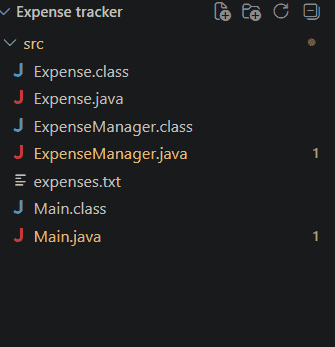
Steps To Create the Project
Step 1: Create Expense Class
The Expense class represents an individual expense. It stores the expense ID, amount, category, description and date.
import java.time.LocalDate;

public class Expense {
    private final int id;
    private double amount;
    private String category;
    private String description;
    private LocalDate date;

    public Expense(int id, double amount, String category,
                   String description, LocalDate date) {
        this.id = id;
        this.amount = amount;
        this.category = category;
        this.description = description;
        this.date = date;
    }

    public int getId() {
        return id;
    }

    public double getAmount() {
        return amount;
    }

    public String getCategory() {
        return category;
    }

    public String getDescription() {
        return description;
    }

    public LocalDate getDate() {
        return date;
    }

    public void setAmount(double amount) {
        this.amount = amount;
    }

    public void setCategory(String category) {
        this.category = category;
    }

    public void setDescription(String description) {
        this.description = description;
    }

    public void setDate(LocalDate date) {
        this.date = date;
    }

    public String toFileString() {
        return id + "|" + amount + "|" + category.replace("|", "/") + "|"
                + description.replace("|", "/") + "|" + date;
    }

    @Override
    public String toString() {
        return String.format(
            "ID: %d | Amount: ₹%.2f | Category: %s | Description: %s | Date: %s",
            id, amount, category, description, date
        );
    }
}
Explanation: The class uses fields to store expense information and getter and setter methods to access and update the values. The toFileString() method converts an expense into a format suitable for file storage.
Step 2: Create ExpenseManager Class
The ExpenseManager class handles the main operations of the application. It maintains the list of expenses and provides methods for adding, editing, deleting, filtering and calculating expenses.
import java.io.IOException;
import java.nio.file.Files;
import java.nio.file.Path;
import java.nio.file.Paths;
import java.time.LocalDate;
import java.time.YearMonth;
import java.util.ArrayList;
import java.util.Comparator;
import java.util.List;

public class ExpenseManager {

    private final List<Expense> expenses
        = new ArrayList<>();
    private int nextId = 1;
    private final Path filePath = Paths.get("expenses.txt");

    public ExpenseManager() { loadExpenses(); }

    public void addExpense(double amount, String category,
                           String description,
                           LocalDate date)
    {

        Expense expense = new Expense(
            nextId++, amount, category, description, date);

        expenses.add(expense);
        saveExpenses();

        System.out.println("Expense added successfully.");
    }

    public boolean deleteExpense(int id)
    {

        boolean removed = expenses.removeIf(
            expense -> expense.getId() == id);

        if (removed) {
            saveExpenses();
        }

        return removed;
    }

    public Expense findExpense(int id)
    {

        for (Expense expense : expenses) {
            if (expense.getId() == id) {
                return expense;
            }
        }

        return null;
    }

    public boolean updateExpense(int id, double amount,
                                 String category,
                                 String description,
                                 LocalDate date)
    {

        Expense expense = findExpense(id);

        if (expense == null) {
            return false;
        }

        expense.setAmount(amount);
        expense.setCategory(category);
        expense.setDescription(description);
        expense.setDate(date);

        saveExpenses();
        return true;
    }

    public void showExpenses()
    {

        if (expenses.isEmpty()) {
            System.out.println("No expenses found.");
            return;
        }

        System.out.println("\n----- All Expenses -----");

        expenses.stream()
            .sorted(Comparator.comparing(Expense::getDate)
                        .reversed())
            .forEach(System.out::println);
    }

    public void showByCategory(String category)
    {

        boolean found = false;

        System.out.println("\n----- Category: " + category
                           + " -----");

        for (Expense expense : expenses) {

            if (expense.getCategory().equalsIgnoreCase(
                    category)) {

                System.out.println(expense);
                found = true;
            }
        }

        if (!found) {
            System.out.println(
                "No expenses found for this category.");
        }
    }

    public double getTotalExpense()
    {

        double total = 0;

        for (Expense expense : expenses) {
            total += expense.getAmount();
        }

        return total;
    }

    public void showTotal()
    {

        System.out.printf("Total Expense: ₹%.2f%n",
                          getTotalExpense());
    }

    public void showMonthlyReport(YearMonth month)
    {

        double total = 0;
        int count = 0;

        System.out.println(
            "\n----- Monthly Report: " + month + " -----");

        for (Expense expense : expenses) {

            if (YearMonth.from(expense.getDate())
                    .equals(month)) {

                System.out.println(expense);
                total += expense.getAmount();
                count++;
            }
        }

        if (count == 0) {

            System.out.println(
                "No expenses found for this month.");
        }
        else {

            System.out.println("Number of expenses: "
                               + count);

            System.out.printf("Monthly Total: ₹%.2f%n",
                              total);
        }
    }

    public void showCategoryTotals()
    {

        if (expenses.isEmpty()) {
            System.out.println("No expenses found.");
            return;
        }

        java.util.Map<String, Double> totals
            = new java.util.TreeMap<>(
                String.CASE_INSENSITIVE_ORDER);

        for (Expense expense : expenses) {

            totals.merge(expense.getCategory(),
                         expense.getAmount(), Double::sum);
        }

        System.out.println(
            "\n----- Category-wise Totals -----");

        for (var entry : totals.entrySet()) {

            System.out.printf("%s: ₹%.2f%n", entry.getKey(),
                              entry.getValue());
        }
    }

    private void saveExpenses()
    {

        List<String> lines = new ArrayList<>();

        for (Expense expense : expenses) {
            lines.add(expense.toFileString());
        }

        try {
            Files.write(filePath, lines);
        }
        catch (IOException e) {
            System.out.println("Could not save expenses: "
                               + e.getMessage());
        }
    }

    private void loadExpenses()
    {

        if (!Files.exists(filePath)) {
            return;
        }

        try {

            List<String> lines
                = Files.readAllLines(filePath);

            for (String line : lines) {

                if (line.isBlank()) {
                    continue;
                }

                String[] parts = line.split("\\|", -1);

                if (parts.length != 5) {
                    continue;
                }

                int id = Integer.parseInt(parts[0]);

                double amount
                    = Double.parseDouble(parts[1]);

                String category = parts[2];
                String description = parts[3];

                LocalDate date = LocalDate.parse(parts[4]);

                expenses.add(
                    new Expense(id, amount, category,
                                description, date));

                nextId = Math.max(nextId, id + 1);
            }
        }
        catch (Exception e) {

            System.out.println(
                "Could not load saved expenses: "
                + e.getMessage());
        }
    }
}
Explanation: ExpenseManager uses an ArrayList to maintain expense records. File handling methods save the records to expenses.txt and load them when the application starts.
Step 3: Create Main Class
The Main class provides the menu and takes input from the user. It calls the required operation according to the selected menu option.
import java.time.LocalDate;
import java.time.YearMonth;
import java.time.format.DateTimeParseException;
import java.util.Scanner;

public class Main {

    private static final Scanner sc = new Scanner(System.in);

    public static void main(String[] args) {

        ExpenseManager manager = new ExpenseManager();

        while (true) {

            printMenu();

            int choice =
                    readInt("Enter your choice: ");

            switch (choice) {

                case 1 -> addExpense(manager);

                case 2 ->
                        manager.showExpenses();

                case 3 ->
                        manager.showTotal();

                case 4 ->
                        deleteExpense(manager);

                case 5 ->
                        editExpense(manager);

                case 6 ->
                        filterByCategory(manager);

                case 7 ->
                        monthlyReport(manager);

                case 8 ->
                        manager.showCategoryTotals();

                case 9 -> {

                    System.out.println(
                            "Thank you for using Expense Tracker."
                    );

                    sc.close();
                    return;
                }

                default ->
                        System.out.println(
                                "Invalid choice. Please select 1-9."
                        );
            }
        }
    }

    private static void printMenu() {

        System.out.println(
                "\n========== EXPENSE TRACKER =========="
        );

        System.out.println("1. Add Expense");
        System.out.println("2. View All Expenses");
        System.out.println("3. View Total Expenses");
        System.out.println("4. Delete Expense");
        System.out.println("5. Edit Expense");
        System.out.println("6. Filter by Category");
        System.out.println("7. Monthly Report");
        System.out.println("8. Category-wise Totals");
        System.out.println("9. Exit");

        System.out.println(
                "======================================"
        );
    }

    private static void addExpense(
            ExpenseManager manager) {

        double amount =
                readPositiveDouble(
                        "Enter amount: "
                );

        String category =
                readRequiredText(
                        "Enter category: "
                );

        String description =
                readRequiredText(
                        "Enter description: "
                );

        LocalDate date =
                readDate(
                        "Enter date (YYYY-MM-DD) or press Enter for today: ",
                        true
                );

        manager.addExpense(
                amount,
                category,
                description,
                date
        );
    }

    private static void deleteExpense(
            ExpenseManager manager) {

        int id =
                readInt(
                        "Enter expense ID to delete: "
                );

        if (manager.deleteExpense(id)) {

            System.out.println(
                    "Expense deleted successfully."
            );

        } else {

            System.out.println(
                    "Expense with ID "
                    + id
                    + " not found."
            );
        }
    }

    private static void editExpense(
            ExpenseManager manager) {

        int id =
                readInt(
                        "Enter expense ID to edit: "
                );

        Expense existing =
                manager.findExpense(id);

        if (existing == null) {

            System.out.println(
                    "Expense with ID "
                    + id
                    + " not found."
            );

            return;
        }

        System.out.println(
                "Current expense:"
        );

        System.out.println(existing);

        double amount =
                readPositiveDouble(
                        "Enter new amount: "
                );

        String category =
                readRequiredText(
                        "Enter new category: "
                );

        String description =
                readRequiredText(
                        "Enter new description: "
                );

        LocalDate date =
                readDate(
                        "Enter new date (YYYY-MM-DD): ",
                        false
                );

        if (manager.updateExpense(
                id,
                amount,
                category,
                description,
                date)) {

            System.out.println(
                    "Expense updated successfully."
            );
        }
    }

    private static void filterByCategory(
            ExpenseManager manager) {

        String category =
                readRequiredText(
                        "Enter category: "
                );

        manager.showByCategory(category);
    }

    private static void monthlyReport(
            ExpenseManager manager) {

        String value =
                readRequiredText(
                        "Enter month (YYYY-MM): "
                );

        try {

            YearMonth month =
                    YearMonth.parse(value);

            manager.showMonthlyReport(month);

        } catch (DateTimeParseException e) {

            System.out.println(
                    "Invalid month. Use YYYY-MM."
            );
        }
    }

    private static int readInt(
            String prompt) {

        while (true) {

            System.out.print(prompt);

            try {

                return Integer.parseInt(
                        sc.nextLine().trim()
                );

            } catch (NumberFormatException e) {

                System.out.println(
                        "Please enter a valid number."
                );
            }
        }
    }

    private static double readPositiveDouble(
            String prompt) {

        while (true) {

            System.out.print(prompt);

            try {

                double value =
                        Double.parseDouble(
                                sc.nextLine().trim()
                        );

                if (value > 0) {
                    return value;
                }

                System.out.println(
                        "Amount must be greater than 0."
                );

            } catch (NumberFormatException e) {

                System.out.println(
                        "Please enter a valid amount."
                );
            }
        }
    }

    private static String readRequiredText(
            String prompt) {

        while (true) {

            System.out.print(prompt);

            String value =
                    sc.nextLine().trim();

            if (!value.isEmpty()) {

                return value.replace("|", "/");
            }

            System.out.println(
                    "This field cannot be empty."
            );
        }
    }

    private static LocalDate readDate(
            String prompt,
            boolean allowToday) {

        while (true) {

            System.out.print(prompt);

            String value =
                    sc.nextLine().trim();

            if (allowToday && value.isEmpty()) {
                return LocalDate.now();
            }

            try {

                return LocalDate.parse(value);

            } catch (DateTimeParseException e) {

                System.out.println(
                        "Invalid date. Use YYYY-MM-DD."
                );
            }
        }
    }
}
Explanation: The program starts by creating an ExpenseManager object and displaying the menu. A switch statement processes the selected option and invokes the corresponding operation.
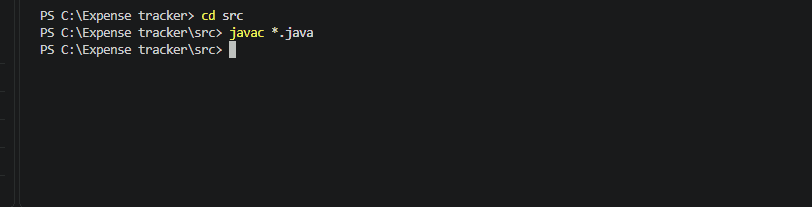
Compile the Program
After creating all three Java files, open the terminal in the src directory.
javac *.java
If the command finishes without an error, the Java files have been compiled successfully.
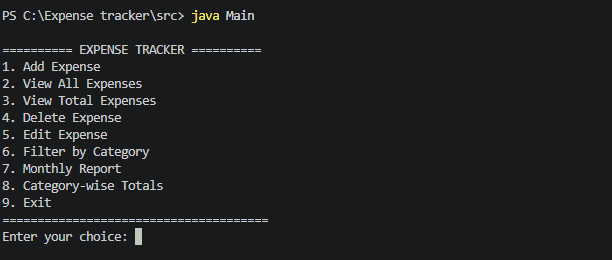
Run the Program
Run the application using:
java Main
The Expense Tracker menu is displayed in the terminal.
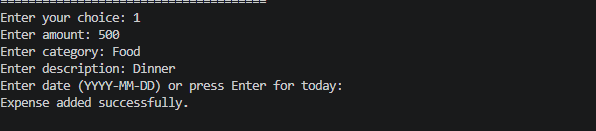
Add an Expense
Select option 1 to add an expense. Enter the amount, category, description and date.
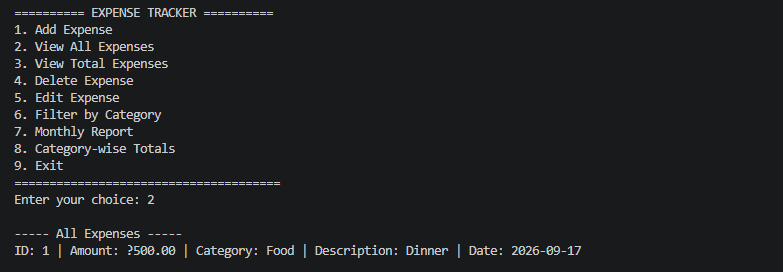
View All Expenses
Select option 2 to display all stored expenses. Each record shows its ID, amount, category, description and date.
View Total Expenses
Select option 3 to calculate the total amount of all stored expenses.
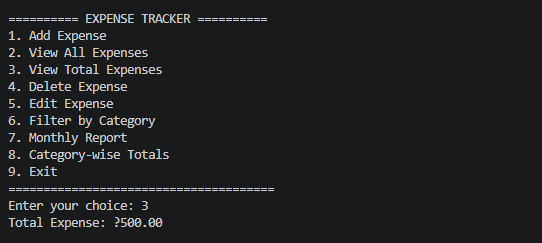
The program adds the amount of every expense and displays the resulting total.
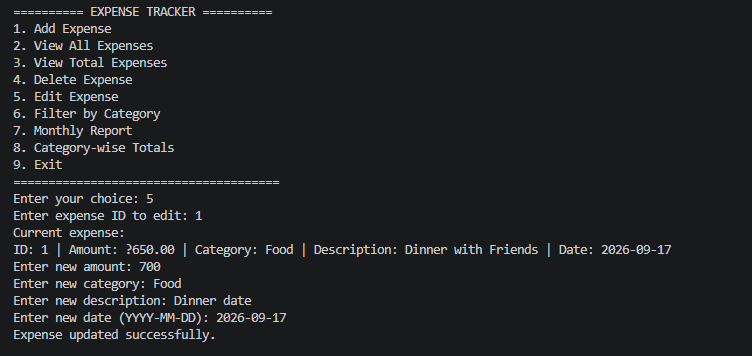
Edit an Expense
Select option 5 to edit an existing expense. The program first asks for the expense ID and then displays the current record before taking the new details.
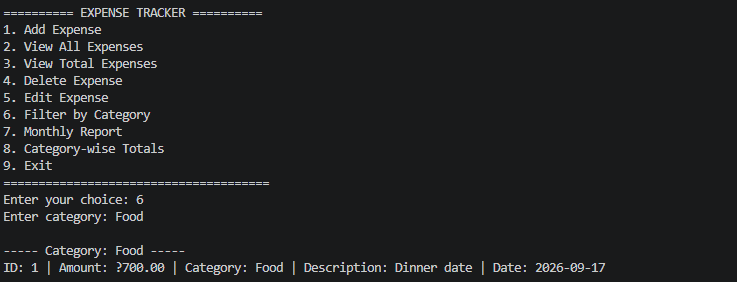
Filter Expenses by Category
Select option 6 and enter a category to display matching expenses.
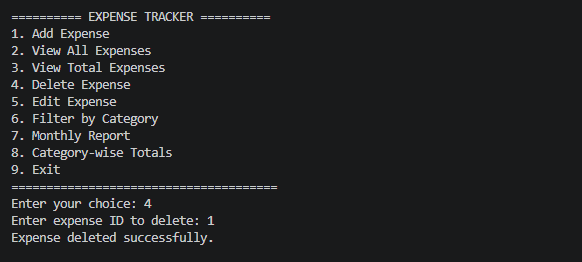
Delete an Expense
Select option 4 and enter the ID of the expense to delete.
Monthly Report
Select option 7 and enter a month in YYYY-MM format.
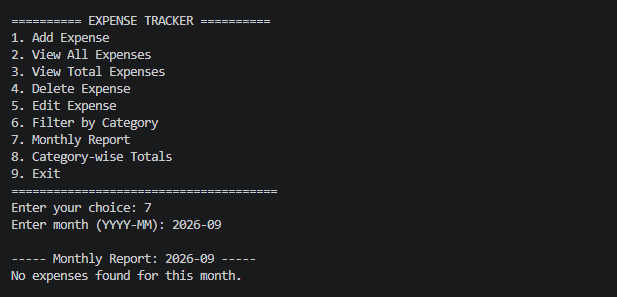
The YearMonth class is used to compare the month and year of each expense with the requested month.
Save Expenses to a File
The application stores the expenses in a file named expenses.txt. The saveExpenses() method writes the current expense list to the file whenever an expense is added, edited or deleted.
The loadExpenses() method reads the file when the application starts and restores the previously saved expenses.
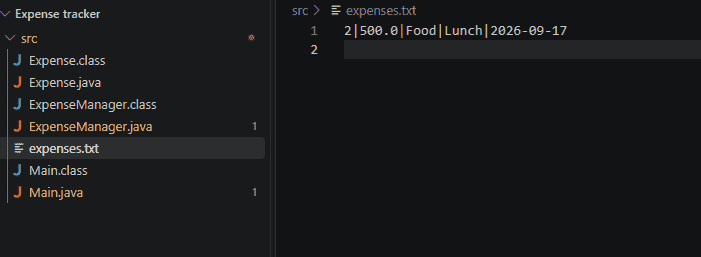
This file-based approach allows the expense records to remain available after the application is closed.
