

The ServerSocket class in the java.net package is used to create server-side applications that listen for incoming TCP client connections. It listens on a specified port and creates a Socket when a client connection is accepted.
- The accept() method waits for and accepts an incoming client connection.
- The returned Socket is used to exchange data with the connected client.
Server-Side Programming
Working of server-side programming using ServerSocket class.
import java.io.DataInputStream;
import java.net.ServerSocket;
import java.net.Socket;

public class MyServer {
    public static void main(String[] args)
    {

        try (ServerSocket serverSocket = new ServerSocket(6666)) {

            System.out.println(
                "Server started. Listening on port 6666...");

            try (Socket socket = serverSocket.accept();
                 DataInputStream input
                 = new DataInputStream(
                     socket.getInputStream())) {

                System.out.println("Client connected!");

                String message = input.readUTF();
                System.out.println("Message: " + message);
            }
        }
        catch (Exception e) {
            System.out.println("Server Error: " + e);
        }
    }
}
Output:
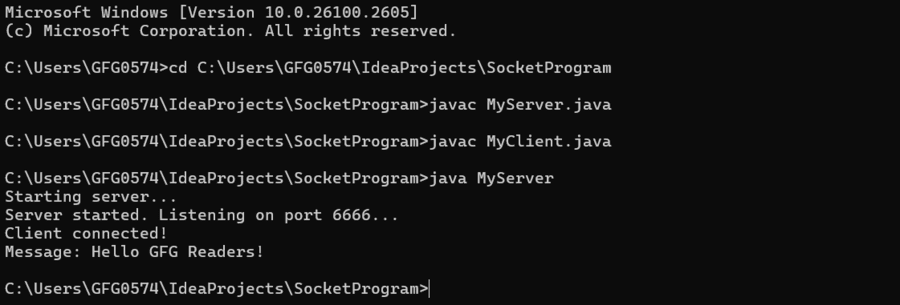
Explanation: In the above example, it demonstrates a basic server-side implementation using the ServerSocket class. It listens on port 6666, accepts a client connection, reads a message sent by the client, and then closes the connection.
Client-Side Programming
The client side uses the Socket class to establish a TCP connection with the server. ServerSocket is used on the server side to listen for and accept incoming connections.
import java.io.*;
import java.net.*;

public class MyClient {

    // Main driver method
    public static void main(String[] args) {

        // Try block to check if exception occurs
        try {

            // Creating Socket class object and
            // initializing Socket
            Socket s = new Socket("localhost", 6666);

            DataOutputStream d = new DataOutputStream(
                s.getOutputStream());

            // Message to be displayed
            d.writeUTF("Hello GFG Readers!");

            // Flushing out internal buffers,
            // optimizing for better performance
            d.flush();

            // Closing the connections

            // Closing DataOutputStream
            d.close();
            // Closing socket
            s.close();
        }

        // Catch block to handle exceptions
        catch (Exception e) {

            // Print the exception on the console
            System.out.println(e);
        }
    }
}
Output:
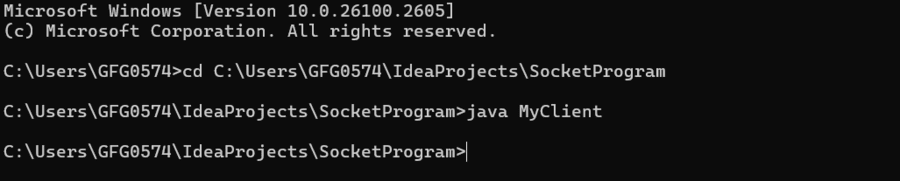
Explanation: In the above example, it demonstrates a basic client-side implementation using the Socket class. It connects to a server at localhost on port 6666, sends a message "Hello GFG Readers!", and then closes the connection.
Methods of Java ServerSocket
| Method | Description |
|---|---|
accept() | Waits for an incoming connection and returns a Socket for communicating with the client. |
bind(SocketAddress endpoint) | Binds the ServerSocket to the specified local address. |
bind(SocketAddress endpoint, int backlog) | Binds the server socket to the specified address with the requested maximum backlog. |
close() | Closes the server socket. |
getChannel() | Returns the ServerSocketChannel associated with this socket, if one exists. |
getInetAddress() | Returns the local address to which the server socket is bound. |
getLocalPort() | Returns the local port on which the server socket is listening. |
getLocalSocketAddress() | Returns the local socket address to which the server socket is bound. |
getReceiveBufferSize() | Returns the value of the SO_RCVBUF option. |
getReuseAddress() | Checks whether SO_REUSEADDR is enabled. |
getSoTimeout() | Returns the current SO_TIMEOUT value. |
isBound() | Checks whether the server socket is bound. |
isClosed() | Checks whether the server socket is closed. |
setPerformancePreferences(int connectionTime, int latency, int bandwidth) | Sets performance preferences for the server socket. |
setReceiveBufferSize(int size) | Sets the proposed receive buffer size for sockets accepted by this ServerSocket. |
setReuseAddress(boolean on) | Enables or disables the SO_REUSEADDR option. |
setSoTimeout(int timeout) | Sets the timeout for accept() operations in milliseconds. |
toString() | Returns a string representation of the server socket. |
Legacy setSocketFactory() API
The ServerSocket.setSocketFactory(SocketImplFactory) method belongs to Java's older socket implementation mechanism. It was designed to let an application install a custom SocketImplFactory that controls how server socket implementations are created.
- The method is deprecated and should not be used in new Java applications.
- A socket implementation factory could be installed only once for an application, making it inflexible for modern designs.
- Modern applications generally rely on the standard ServerSocket implementation rather than replacing the underlying socket implementation globally.
- When a factory-based approach is required, ServerSocketFactory provides a higher-level abstraction for creating server sockets.
For example, a server socket can be created using ServerSocketFactory:
import java.net.ServerSocket;
import javax.net.ServerSocketFactory;

public class Geeks {
    public static void main(String[] args) throws Exception {

        ServerSocketFactory factory =
                ServerSocketFactory.getDefault();

        try (ServerSocket server =
                     factory.createServerSocket(5000)) {

            System.out.println(
                    "Server is listening on port 5000");
        }
    }
}
Output:
Server is listening on port 5000Here, ServerSocketFactory.getDefault() obtains the default factory, and createServerSocket(5000) creates a ServerSocket that listens on port 5000.
Note: ServerSocketFactory is not a direct replacement for every capability of the deprecated setSocketFactory() mechanism. It is a higher-level factory abstraction that is more appropriate when an application needs controlled creation of server sockets.
