

Exports allow you to share functions, classes, variables, and other declarations between modules in JavaScript and TypeScript.
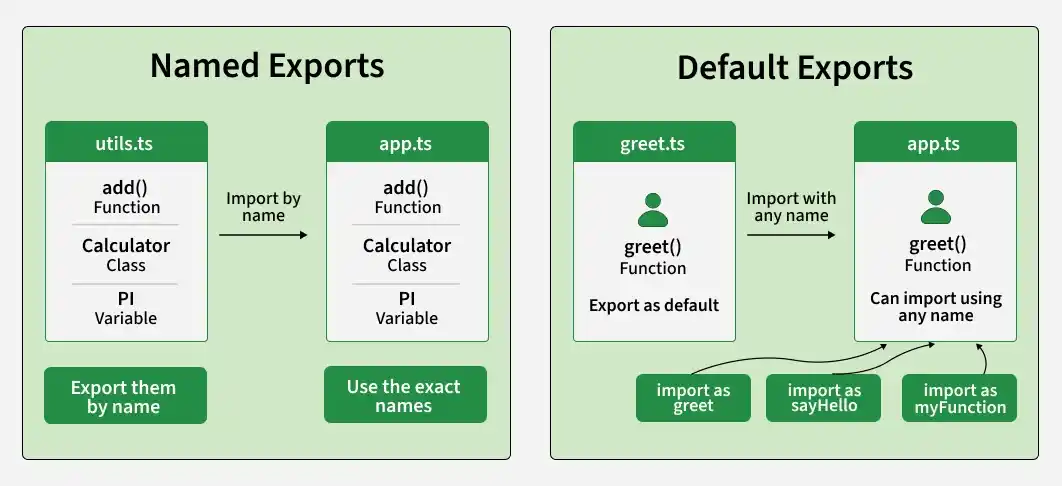
- Named exports are imported using their exported names.
- Default exports can be imported using any name.
- TypeScript supports the same import and export syntax as JavaScript while also allowing type annotations.
Named Exports
Named exports allow multiple declarations to be exported from a module using specific names.
export function add(a: number, b: number): number {
    return a + b;
}

export function subtract(a: number, b: number): number {
    return a - b;
}
import { add, subtract } from "./math";

console.log(add(2, 3));
console.log(subtract(5, 2));
For JavaScript: Remove the type annotations (: number) from the example.
Output:
5
3
- add and subtract are exported using named exports.
- They are imported using their exact exported names inside {}.
- A module can have multiple named exports.
Default Exports
A default export is used to export one primary declaration from a module.
export default function add(a: number, b: number): number {
    return a + b;
}
import addFunction from "./math";

console.log(addFunction(2, 3));
Output:
5- add is exported as the default export.
- Default exports are imported without curly braces.
- The imported declaration can be given any name.
Named and Default Exports Together
A module can contain multiple named exports along with one default export.
export function square(x: number): number {
    return x * x;
}

export function double(x: number): number {
    return x * 2;
}

export default function greet(name: string): string {
    return `Hello, ${name}!`;
}
import greet, { square, double } from "./utils";

console.log(greet("Alen"));
console.log(square(4));
console.log(double(5));
Output:
Hello, Alen!
16
10
- greet is the default export.
- square and double are named exports.
- Default and named exports can be imported together.
Named exports vs Default exports
Named exports | Default exports |
|---|---|
Use the export keyword. | Use the export default syntax. |
A module can have multiple named exports. | A module can have only one default export. |
Imported using curly braces {}. | Imported without curly braces. |
Imported using the exported name. | Can be imported using any name. |
Useful when a module provides multiple related declarations. | Useful when a module has one primary declaration. |
Note: The export and import behavior is the same in JavaScript and TypeScript. TypeScript additionally allows type annotations and compile-time type checking.
