JavaScript provides different ways to check whether an HTML element contains a specific CSS class. This is useful when applying conditional styling or executing logic based on an element's classes.
- Use classList.contains() for a simple and modern solution.
- Use className, split(), and indexOf() to check classes manually.
- Both approaches return whether the specified class exists on the element.
Approach 1: Using classList.contains() Method
The classList.contains() method checks whether an element contains a specified class. It returns true if the class exists and false otherwise.
Syntax:
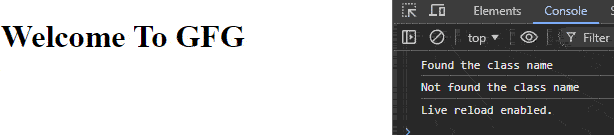
element.classList.contains("class-name");Example: Checks whether the element contains the main and myClass classes.
<!DOCTYPE html>
<html lang="en">

<head>
    <meta charset="UTF-8">
    <meta name="viewport" content="width=device-width,
    initial-scale=1.0">
    <title>Using classList.contains() Method</title>
</head>

<body>
    <h1 id="main" class="main">Welcome To GFG</h1>

    <script>
        let elem = document.getElementById("main");

        let isMainPresent = elem.classList.contains("main");

        if (isMainPresent) {
            console.log("Found the class name");
        } else {
            console.log("Not found the class name");
        }

        let isMyclassPresent =
            elem.classList.contains("myClass")

        if (isMyclassPresent) {
            console.log("Found the class name");
        } else {
            console.log("Not found the class name");
        }
    </script>
</body>

</html>
Output:

Approach 2: Using className, split(), and indexOf()
The className property returns all class names of an element as a string. The string can be split into an array, and indexOf() can then check whether a specific class exists.
Syntax
element.className.split(" ").indexOf("class-name") !== -1;Example: This example checks for the main and myClass classes using className, split(), and indexOf().
<!DOCTYPE html>
<html lang="en">

<body>

    <h1 id="main" class="main">
        Welcome To GFG
    </h1>

    <script>
        const elem =
            document.getElementById("main");

        const classes =
            elem.className.split(" ");

        const isMainPresent =
            classes.indexOf("main") !== -1;

        const isMyClassPresent =
            classes.indexOf("myClass") !== -1;

        console.log(isMainPresent);
        console.log(isMyClassPresent);
    </script>

</body>

</html>
Output: