

HTTP methods define the actions a client can perform on resources available on a server. They are used in HTTP requests to retrieve, create, update, or delete data.
- Specify how a client interacts with a server resource.
- Provide standardised ways to perform operations over HTTP.
- Commonly map to CRUD operations such as Create, Read, Update, and Delete.
- Are widely used by web applications and APIs to exchange data.
Common HTTP Request Methods
Different HTTP methods are used for different operations :
| HTTP Method | Purpose | CRUD Operation |
|---|---|---|
| GET | Retrieve a resource | Read |
| POST | Create a new resource | Create |
| PUT | Replace an existing resource | Update |
| PATCH | Partially update a resource | Update |
| DELETE | Remove a resource | Delete |
Note : HTTP methods generally map to CRUD operations, but the mapping can vary depending on how the API is designed.
Implementing HTTP Methods Using Postman
The following examples demonstrate how common HTTP methods are used to interact with server resources using Postman.
1. GET Method: Used to retrieve data from a server. It does not normally include a request body, and parameters can be passed through the URL when needed.
Steps to make a GET Request
- Open Postman and select GET.
- Enter the URL :
https://jsonplaceholder.typicode.com/posts/1- Click Send.
- The response is displayed in JSON format.
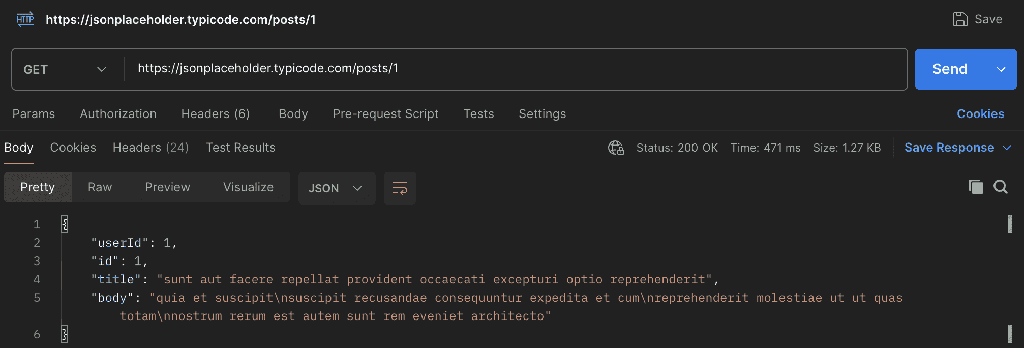
A successful GET request commonly returns a 200 OK status code.
2. POST Method: Used to send data to a server, commonly to create a new resource. The data is generally sent in the request body.
Steps to make a POST Request
- Select POST in Postman.
- Enter the URL :
https://jsonplaceholder.typicode.com/posts- Go to the body tab, choose the content type to JSON and choose the data format as raw.
- Enter the JSON data.
{
  "title": "Introduction to HTTP Methods",
  "body": "HTTP methods define the actions that clients can perform on server resources.",
  "userId": 1
}- Click Send.
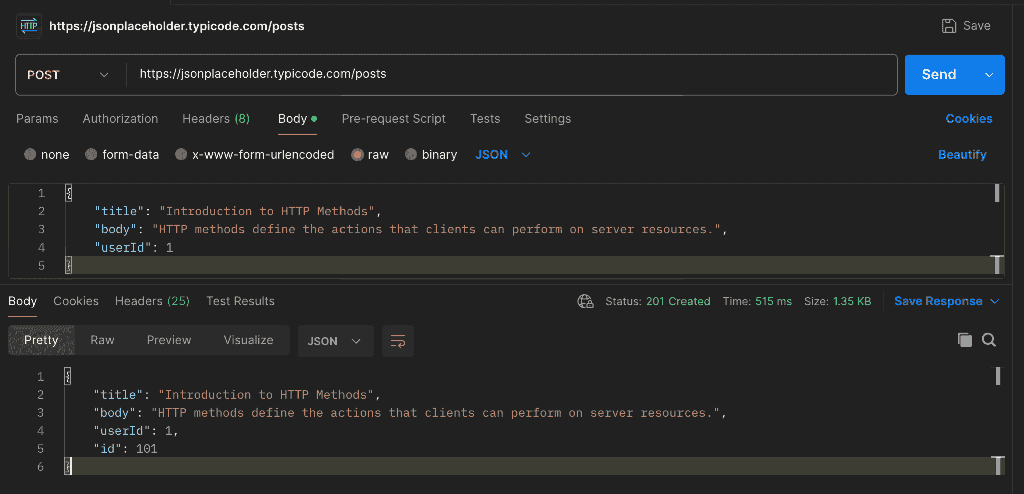
The response contains the submitted data along with the "userId" and a newly generated "Id" for the resource & a successful POST request commonly returns 201 Created.
Note: JSONPlaceholder is a mock API. It simulates creating, updating, and deleting resources for testing and learning purposes, these changes are not permanently stored.
3. PUT Request: Used to replace an existing resource with the representation provided in the request. The request generally contains the complete resource data.
Steps to Make a PUT request
- Select PUT in Postman.
- Enter the URL :
https://jsonplaceholder.typicode.com/posts/1- Go to the body tab, choose the content type to JSON and choose the data format as raw.
- Enter the complete resource data.
{
  "id": 1,
  "title": "Understanding HTTP Methods",
  "body": "HTTP methods allow clients to interact with resources on a server.",
  "userId": 1
}- Click Send.
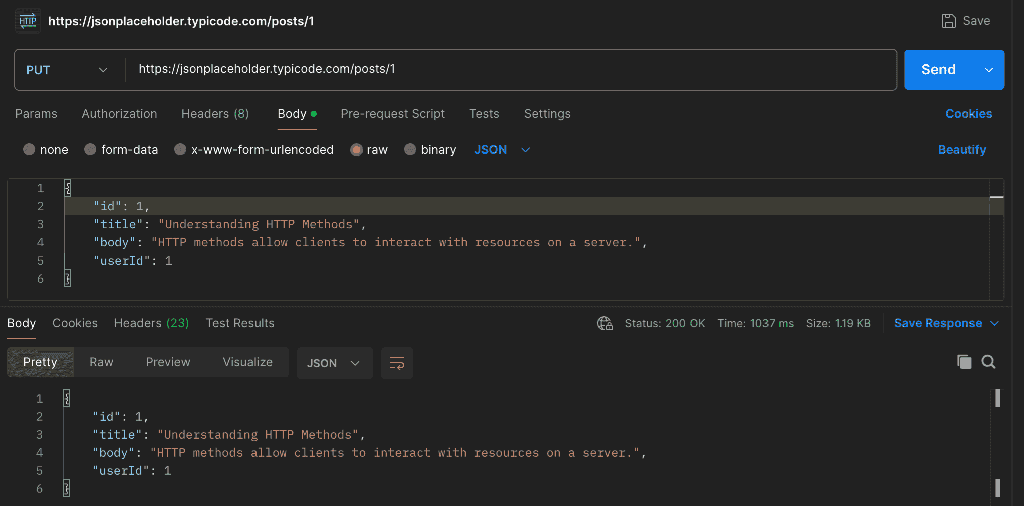
A successful PUT Request commonly returns 200 OK.
4. PATCH Request: Used to partially update an existing resource. Instead of sending the complete resource, the request contains only the fields that need to be changed.
Steps to Make a PATCH request
- Select PATCH in Postman.
- Enter the request URL :
https://jsonplaceholder.typicode.com/posts/1- Then, go to the request body tab, choose JSON as content type and data format as raw.
- Enter only the field that needs to be updated.
{
  "title": "HTTP Methods Made Easy"
}
- Click Send.
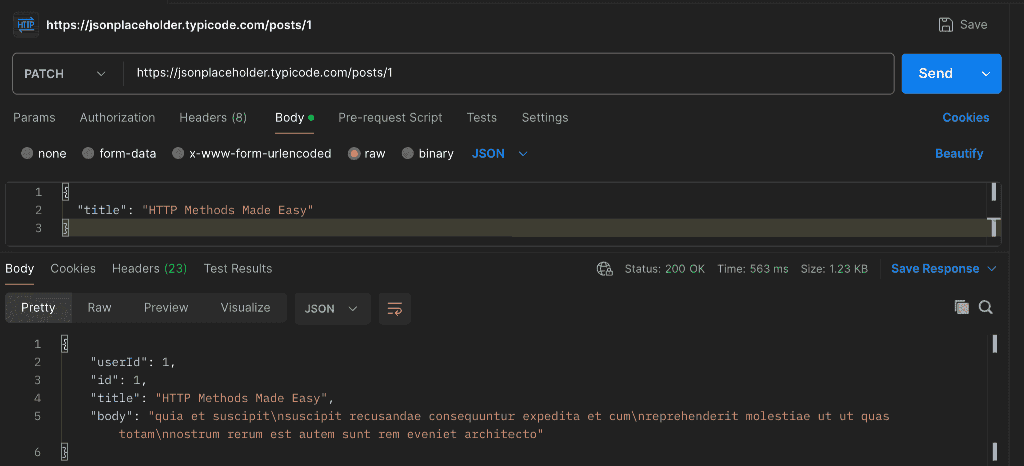
A successful PUT Request commonly returns 200 OK.
5. DELETE Method: Used to request the removal of a specified resource from the server. Unlike POST, PUT, and PATCH, a DELETE request does not require a request body.
Steps to make a DELETE Request
- Select DELETE in Postman
- Enter the request :
https://jsonplaceholder.typicode.com/posts/1- Click Send.
- Check the Response Status.
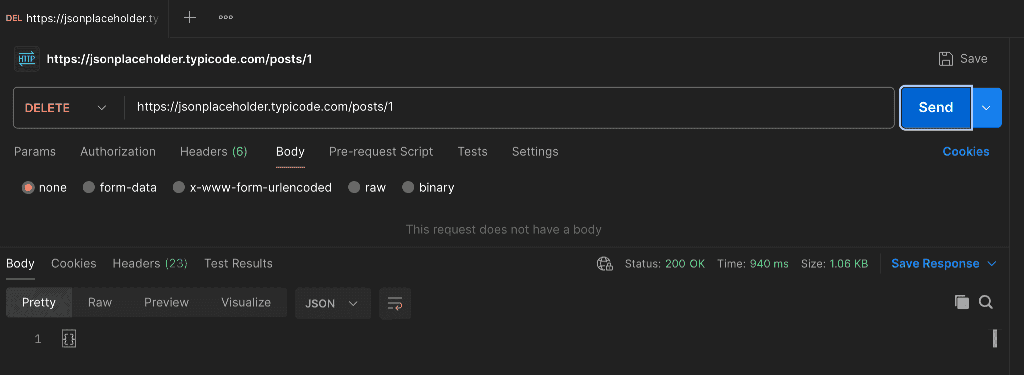
A Successful DELETE request may return 200 OK, 202 Accepted or 204 No Content , depending on how the server handles the operation.
PUT vs. PATCH
The key differences between PUT and PATCH are summarised below:
| PUT | PATCH |
|---|---|
| Replaces the entire resource. | Updates specific parts of a resource. |
| Usually sends the complete resource data. | Send only the fields that need to be changed. |
| Used for complete updates. | Used for partial updates. |
| Example: Update title, body, and user ID. | Example: Update only the title. |
