

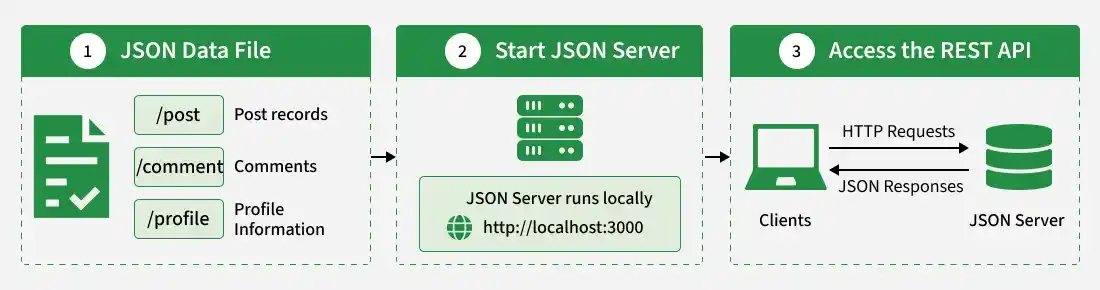
JSON Server is an npm package that creates a mock REST API from a JSON file, allowing developers to build and test frontend applications without implementing a backend from scratch.
- Rapid Prototyping: Creates mock APIs for frontend development.
- HTTP Methods: Supports GET, POST, PUT, PATCH, and DELETE for data operations.
- JSON Data Management: Uses a JSON file to store and manage data.
- API Testing: Helps test API requests and responses during development.
Set Up JSON Server
1. Install JSON Server
Install JSON Server using npm. For a project-specific setup, run:
npm install json-serverYou can also install it globally with npm install -g json-server, but a local installation helps keep the dependency associated with your project.
2. Create a JSON Data File
Create a file named db.json in your project directory and add the following data:
{
  "posts": [
    {
      "id": "1",
      "title": "JSON Server",
      "author": "Alen"
    },
    {
      "id": "2",
      "title": "Node.js",
      "author": "Mark"
    }
  ],
  "comments": [
    {
      "id": "1",
      "body": "Great post!",
      "postId": "1"
    },
    {
      "id": "2",
      "body": "Informative!",
      "postId": "2"
    }
  ],
  "profile": {
    "name": "Alen Ken"
  }
}
This file defines the data resources exposed by JSON Server:
- /posts: Provides access to post records.
- /comments: Provides access to comments.
- /profile: Represents a profile resource. Its available operations depend on the JSON Server version and resource type.
3. Start JSON Server
For the current JSON Server CLI, run:
npx json-server db.jsonThe server starts locally, typically at http://localhost:3000. Check the terminal output for the actual URL and available routes.
For a repeatable project setup, add a script to package.json:
{
  "scripts": {
    "server": "json-server db.json"
  }
}
Then start it with:
npm run serverTest JSON Server Endpoints
Once JSON Server is running, you can test the generated API endpoints using a browser for GET requests or an API client such as Postman for other HTTP methods.
1. Retrieve All Posts
Send a GET request to:
http://localhost:3000/postsThis will return all the posts from the db.json file.
2. Retrieve a Post by ID
Send a GET request to:
http://localhost:3000/posts/1This returns the post with ID of 1.
3. Create a Post
Send a POST request to http://localhost:3000/posts with the following JSON body and the Content-Type: application/json header:
{
  "title": "New Post",
  "author": "Ryan"
}
JSON Server adds the new post to the data file. The generated ID depends on the installed version and configuration.
4. Update a Post
Send a PUT request to:
http://localhost:3000/posts/1Use the following JSON body to replace the post's data:
{
  "id": "1",
  "title": "Updated Post",
  "author": "Lucas"
}
A PUT request replaces the resource, while PATCH updates only the specified fields.
5. Delete a Post
Send a DELETE request to:
http://localhost:3000/posts/1This removes the post with ID 1 from the JSON data file.
Customize JSON Server
1. Define Custom Routes
In versions that support the --routes option, you can create a routes.json file to map a custom endpoint to an existing resource.
For example:
{
  "/articles": "/posts"
}
Start the server with:
json-server db.json --routes routes.jsonYou can then access the posts resource through /articles, depending on the installed version's route configuration.
2. Add Custom Middleware
Middleware lets you run additional logic when requests reach the server, such as logging request methods and URLs. The following example uses the Express-style middleware API available in the JSON Server v0.x interface:
const jsonServer = require("json-server");

const server = jsonServer.create();
const router = jsonServer.router("db.json");
const middlewares = jsonServer.defaults();

server.use(middlewares);

server.use((req, res, next) => {
    console.log("Request received:", req.method, req.url);
    next();
});

server.use(router);

server.listen(3000, () => {
    console.log("JSON Server is running on port 3000");
});
This example applies to versions exposing create(), router(), and defaults(); check the documentation for your installed version before using this API.
Note: JSON Server's newer v1 beta has breaking changes compared with v0.x, including changes to ID handling and pagination. The examples above use the newer CLI style for basic setup, while custom routes and middleware examples may require the v0.x interface. Check the official JSON Server documentation for version-specific instructions.
