

A REST API is an API designed according to the principles of REST architecture. It allows applications to communicate with and manage resources over HTTP using standard HTTP methods.
CRUD represents the four basic operations performed on resources:
- Create: Add a new resource using POST
- Read: Retrieve resources using GET
- Update: Replace or modify a resource using PUT/PATCH
- Delete: Remove a resource using DELETE
For example, an API for managing items can use the following endpoints:
Operation | HTTP Method | Endpoint |
|---|---|---|
Create an article | POST | /articles |
Get all article | GET | /articles |
Get one article | GET | /articles/:id |
Update an article | PUT | /articles/:id |
Partially update an article | PATCH | /articles/:id |
Delete an article | DELETE | /articles/:id |
Implementing CRUD Operations in Express.js
Create an Express.js REST API and implement CRUD operations using HTTP methods.
Step 1: Set Up the Express Project
Open the Terminal and run the following commands to create a new project directory and move into it:
mkdir rest-crud-api
cd rest-crud-api
Initialize the Node.js project:
npm init -yInstall Express.js:
npm install expressStep 2 : Create the Server
Create a file named app.js in the project directory and add:
const express = require("express");

const app = express();
const PORT = 3000;

app.use(express.json());

const articles = [
    {
        id: 1,
        title: "Introduction to REST API",
        content: "REST APIs allow applications to communicate over HTTP."
    },
    {
        id: 2,
        title: "Getting Started with Express.js",
        content: "Express.js is a lightweight framework for building web applications and APIs."
    }
];

app.listen(PORT, () => {
    console.log(`Server running on http://localhost:${PORT}`);
});
The express.json( ) middleware parses JSON data received in request bodies. The articles array stores the initial article data.
Step 3 : Start the Server
Open the Terminal and run the following command to start the server :
node app.jsYou should see :
Server running on http://localhost:3000Now the Express Server is Running.
Note: The article data is stored in memory and is reset whenever the server restarts. A database can be used for persistent storage in a real-world application.
Now, we can implement the CRUD operations.
Step 4: Create an Article Using POST
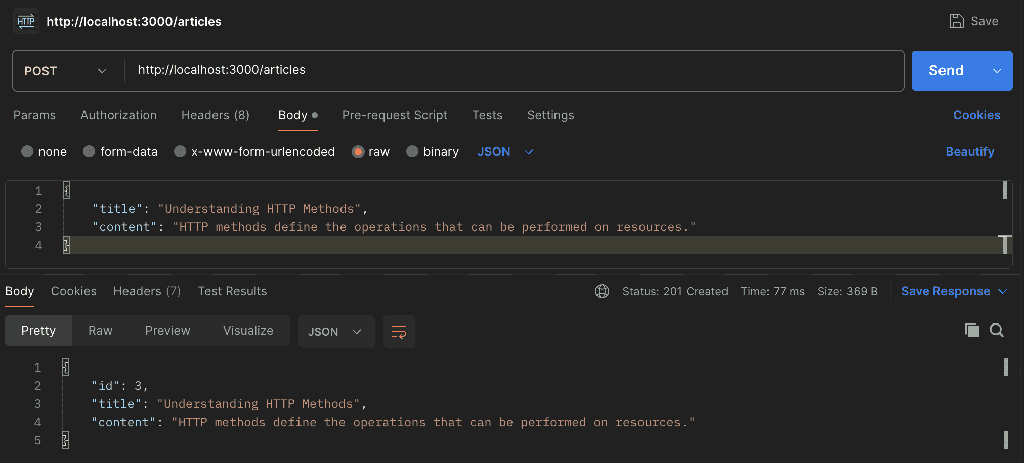
The POST/articles endpoint creates a new article and add it to the articles array.
Define the POST Route: Add the following code to app.js
app.post("/articles", (req, res) => {
    const { title, content } = req.body;

    const newArticle = {
        id: articles.length + 1,
        title,
        content
    };

    articles.push(newArticle);

    res.status(201).json(newArticle);
});
Then, Open Postman to check the route
Select the HTTP method to POST & enter URL :
http://localhost:3000/articlesGo the Body Tab, select raw and JSON as data format :
{
    "title": "Understanding HTTP Methods",
    "content": "HTTP methods define the operations that can be performed on resources."
}
Step 5 : Read Articles Using GET
The GET/articles endpoint retrieves all the articles stored in the articles array.
Define the GET Route: Add the following code to app.js
app.get("/articles", (req, res) => {
    res.json(articles);
});
Then open Postman and Send an GET request & enter URL:
http://localhost:3000/articles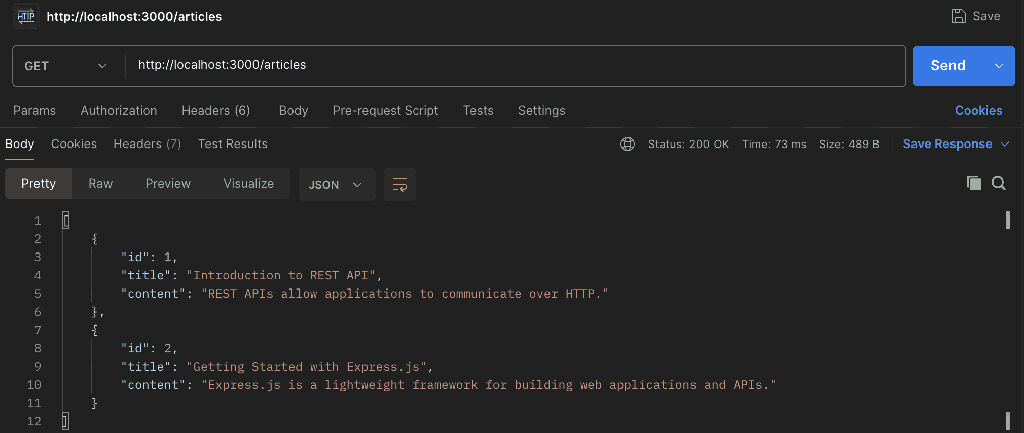
Step 6 : Get a Single Article
The GET/articles/:id endpoint retrieves a specific article using its ID.
Define the GET Route: Add the following code to app.js
app.get("/articles/:id", (req, res) => {
    const id = parseInt(req.params.id);

    const article = articles.find(article => article.id === id);

    if (!article) {
        return res.status(404).json({
            message: "Article not found"
        });
    }

    res.json(article);
});
Then open Postman and create an GET request & enter URL:
http://localhost:3000/articles/1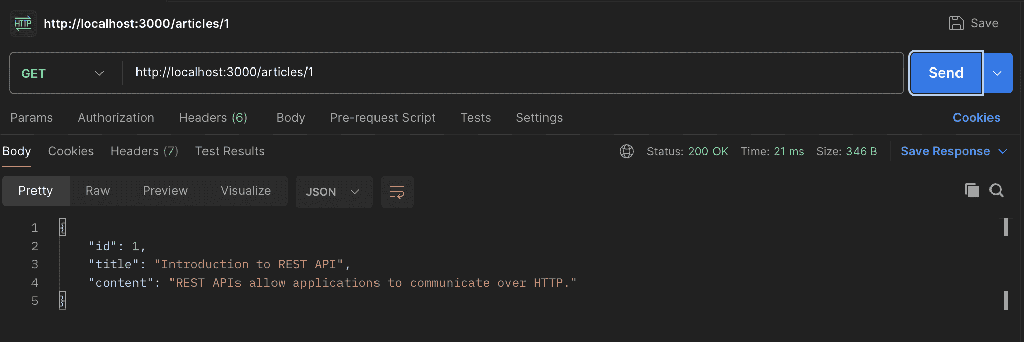
Step 7 : Update a Article using PUT
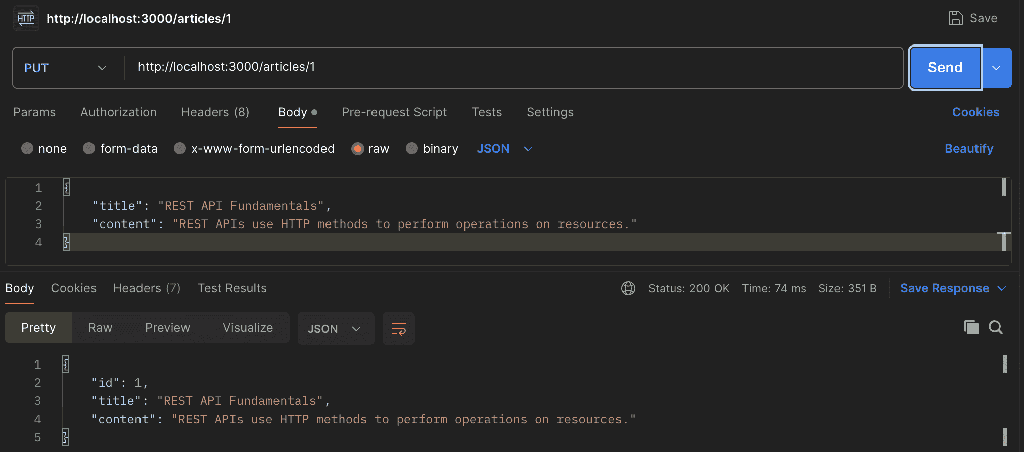
The PUT/articles endpoint updates an existing article.
Define the PUT Route: Add the following code to app.js
app.put("/articles/:id", (req, res) => {
    const id = parseInt(req.params.id);

    const article = articles.find(article => article.id === id);

    if (!article) {
        return res.status(404).json({
            message: "Article not found"
        });
    }

    const { title, content } = req.body;

    article.title = title;
    article.content = content;

    res.json(article);
});
Then open Postman and create an PUT request & enter URL:
http://localhost:3000/articles/1Go the Body Tab, select raw and JSON as data format :
{
    "title": "REST API Fundamentals",
    "content": "REST APIs use HTTP methods to perform operations on resources."
}
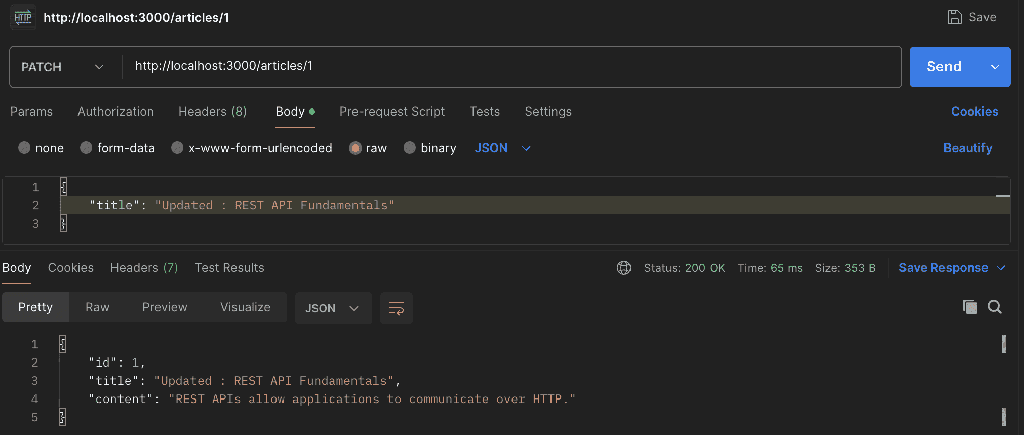
Step 8 : Update an Article Partially using PATCH
The PATCH/articles/:id endpoint updates only the fields provided in the request.
Define the PATCH Route: Add the following code to app.js
app.patch("/articles/:id", (req, res) => {
    const id = parseInt(req.params.id);

    const article = articles.find(article => article.id === id);

    if (!article) {
        return res.status(404).json({
            message: "Article not found"
        });
    }

    const { title, content } = req.body;

    if (title !== undefined) {
        article.title = title;
    }

    if (content !== undefined) {
        article.content = content;
    }

    res.json(article);
});
Then open Postman and create an PATCH request & enter URL:
http://localhost:3000/articles/1Go the Body Tab, select raw and JSON as data format :
{
    "title": "REST API Fundamentals"
}
Step 9 : Delete an Article using DELETE
The DELETE/articles/:id endpoint removes an article from the articles array using its ID.
Define the DELETE Route: Add the following code to app.js
app.delete("/articles/:id", (req, res) => {
    const id = parseInt(req.params.id);

    const index = articles.findIndex(article => article.id === id);

    if (index === -1) {
        return res.status(404).json({
            message: "Article not found"
        });
    }

    const deletedArticle = articles.splice(index, 1);

    res.json({
        message: "Article deleted successfully",
        article: deletedArticle[0]
    });
});
Then open Postman and create an DELETE request & enter URL:
http://localhost:3000/articles/2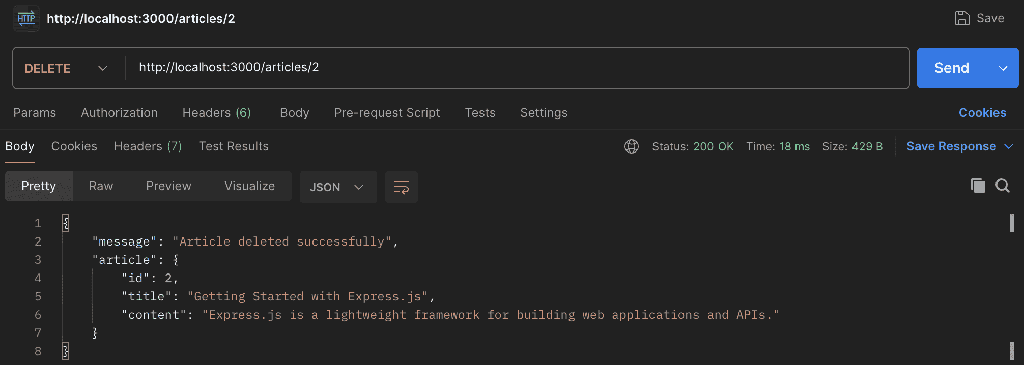
Complete CRUD API Code
The complete app.js file is given below. It includes input validation for required article fields and a nextID counter to generate unique IDs for newly created articles.
const express = require("express");

const app = express();
const PORT = 3000;

// Parse JSON request bodies
app.use(express.json());

// In-memory article data
const articles = [
    {
        id: 1,
        title: "Introduction to REST API",
        content: "REST APIs allow applications to communicate over HTTP."
    },
    {
        id: 2,
        title: "Getting Started with Express.js",
        content: "Express.js is a lightweight framework for building APIs."
    }
];

let nextId = 3;

// Create an article
app.post("/articles", (req, res) => {
    const { title, content } = req.body;

    if (!title || !content) {
        return res.status(400).json({
            message: "Title and content are required"
        });
    }

    const newArticle = {
        id: nextId++,
        title,
        content
    };

    articles.push(newArticle);

    res.status(201).json(newArticle);
});

// Get all articles
app.get("/articles", (req, res) => {
    res.json(articles);
});

// Get an article by ID
app.get("/articles/:id", (req, res) => {
    const id = parseInt(req.params.id);

    const article = articles.find(article => article.id === id);

    if (!article) {
        return res.status(404).json({
            message: "Article not found"
        });
    }

    res.json(article);
});

// Update an article completely
app.put("/articles/:id", (req, res) => {
    const id = parseInt(req.params.id);

    const article = articles.find(article => article.id === id);

    if (!article) {
        return res.status(404).json({
            message: "Article not found"
        });
    }

    const { title, content } = req.body;

    if (!title || !content) {
        return res.status(400).json({
            message: "Title and content are required"
        });
    }

    article.title = title;
    article.content = content;

    res.json(article);
});

// Update an article partially
app.patch("/articles/:id", (req, res) => {
    const id = parseInt(req.params.id);

    const article = articles.find(article => article.id === id);

    if (!article) {
        return res.status(404).json({
            message: "Article not found"
        });
    }

    const { title, content } = req.body;

    if (title !== undefined) {
        article.title = title;
    }

    if (content !== undefined) {
        article.content = content;
    }

    res.json(article);
});

// Delete an article
app.delete("/articles/:id", (req, res) => {
    const id = parseInt(req.params.id);

    const index = articles.findIndex(article => article.id === id);

    if (index === -1) {
        return res.status(404).json({
            message: "Article not found"
        });
    }

    const deletedArticle = articles.splice(index, 1);

    res.json({
        message: "Article deleted successfully",
        article: deletedArticle[0]
    });
});

// Start the server
app.listen(PORT, () => {
    console.log(`Server running on http://localhost:${PORT}`);
});
