

Grouping and aggregation are used to summarize large datasets by dividing records into meaningful groups and calculating statistics for each group. Pandas provides groupby() and aggregation functions to perform these operations efficiently.
- It organizes records based on one or more columns.
- Calculates summaries such as total, average, minimum, maximum, and count.
- Grouped results can be further sorted, filtered, transformed, or reshaped.
- These operations are commonly used to analyze sales, customers, products, regions, and other categories.
Sample Dataset
We will use a small sales dataset throughout the article so that each operation builds on the previous one.
import pandas as pd

data = {
    "Product": [
        "Laptop", "Phone", "Laptop", "Headphones",
        "Phone", "Keyboard", "Headphones", "Laptop"
    ],
    "Category": [
        "Electronics", "Electronics", "Electronics", "Accessories",
        "Electronics", "Accessories", "Accessories", "Electronics"
    ],
    "Region": [
        "North", "South", "North", "East",
        "South", "East", "North", "South"
    ],
    "Quantity": [2, 5, 3, 8, 4, 10, 6, 1],
    "Unit_Price": [60000, 25000, 60000, 3000, 25000, 2000, 3000, 60000],
    "Rating": [4.5, 4.2, 4.7, 4.0, 4.4, 4.1, 4.3, 4.8]
}

df = pd.DataFrame(data)

print(df)
Output
      Category     Product  Quantity  Rating Region  Unit_Price
0  Electronics      Laptop         2     4.5  North       60000
1  Electronics       Phone         5     4.2  South       25000
2  Elect...
Explanation:
- Each row represents a sales record.
- Category and Region are categorical columns that can be used for grouping.
- Quantity, Unit_Price, and Rating contain values that can be summarized.
- We will use the same DataFrame throughout the article.
Aggregating Data
Reduces a collection of values into a summary value. These methods can be applied directly to a Series or DataFrame when an overall summary is required.
- Use aggregation when individual records are not required in the result.
- Different functions answer different analytical questions.
- Aggregation can be performed before or after grouping data.
sum() method
This method calculates the total of numerical values. It is commonly used for quantities, sales, revenue, expenses, and other additive measures.
total_quantity = df["Quantity"].sum()

print("Total Quantity:", total_quantity)
Output
Total Quantity: 39
Explanation:
- sum() adds all values in the selected column.
- Result is a single value.
- It is useful when the overall total is required.
mean()
Calculates the arithmetic average of numerical values. It is useful for understanding the typical value of a dataset.
average_rating = df["Rating"].mean()

print("Average Rating:", average_rating)
Output
Average Rating: 4.375
Explanation:
- mean() adds the values and divides the result by the number of valid observations.
- Missing values are excluded by default.
- It is useful for metrics such as average price, age, rating, or quantity.
median()
This method returns the middle value after the observations are ordered. It is often preferred when extreme values may affect the mean.
median_price = df["Unit_Price"].median()

print("Median Unit Price:", median_price)
Output
Median Unit Price: 25000.0
Explanation:
- median() identifies the middle value of the ordered observations.
- It is less sensitive to extreme values than mean().
min()
This method returns the smallest value in a column.
minimum_quantity = df["Quantity"].min()

print("Minimum Quantity:", minimum_quantity)
Output
Minimum Quantity: 1
Explanation:
- min() identifies the lowest numerical value.
- It can be used to find the smallest quantity, price, rating, or other numerical measurement.
max()
It returns the largest value in a column.
maximum_quantity = df["Quantity"].max()

print("Maximum Quantity:", maximum_quantity)
Output
Maximum Quantity: 10
Explanation:
- max() identifies the highest numerical value.
- It can be used to find the maximum quantity, price, rating, or other numerical measurement.
count()
Counts non-missing values in a column or DataFrame.
rating_count = df["Rating"].count()

print("Number of Ratings:", rating_count)
Output
Number of Ratings: 8
Explanation:
- count() counts only non-null values.
- Missing values are excluded.
std()
This method calculates the standard deviation of numerical values. It describes how much the observations vary around their mean.
price_std = df["Unit_Price"].std()

print("Price Standard Deviation:", price_std)
Output
Price Standard Deviation: 26703.397322652196
Explanation:
- Smaller standard deviation indicates values are closer to the mean.
- Larger value indicates greater variation.
var()
It calculates the variance of numerical values. Variance is the squared measure of deviation from the mean.
price_variance = df["Unit_Price"].var()

print("Price Variance:", price_variance)
Output
Price Variance: 713071428.5714285
Explanation:
- var() measures the overall spread of the values.
- It is mathematically related to standard deviation.
Apply Multiple Aggregations with agg()
This method allows multiple aggregation functions to be applied together. This is useful when a single column needs several summary statistics at once.
result = df["Quantity"].agg(
    ["sum", "mean", "min", "max"]
)

print(result)
Output
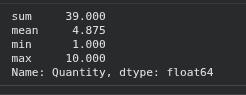
Explanation:
- We get multiple values at once.
- This avoids writing separate statements for every statistic.
Grouping Data
Aggregation becomes more useful when calculations need to be performed separately for different categories. The groupby() method divides the DataFrame into groups based on one or more columns.
- groupby() defines how records should be divided.
- An aggregation function can then be applied to each group.
- Grouping does not change the original DataFrame unless the result is assigned back.
Single Column
It creates a separate group for each unique value in that column.
grouped = df.groupby("Category")

print(grouped["Quantity"].sum())
Output
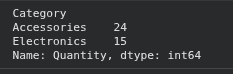
Explanation:
- Category is used to divide the records.
- Quantity is summed independently for each category.
Multiple Columns
Multiple columns can be used when the analysis needs more specific groups. Each unique combination of the selected columns forms a separate group.
result = (
    df.groupby(["Category", "Region"])["Quantity"]
    .sum()
)

print(result)
Output
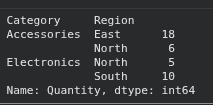
Explanation:
- Category creates the first grouping level.
- Region creates the second grouping level.
- Quantity is summed for every Category and Region combination.
