

Pandas melt() is used to transform a DataFrame from wide format to long format. It converts selected columns into rows while keeping specified identifier columns unchanged. This function is useful for organizing data for analysis and visualization.
Syntax
pandas.melt( frame, id_vars=None, value_vars=None, var_name=None, value_name='value', col_level=None, ignore_index=True )
Parameters:
- frame: DataFrame to be reshaped.
- id_vars: Column or columns to retain as identifiers.
- value_vars: Column or columns to unpivot. If omitted, all columns not specified in id_vars are used.
- var_name: Name of the new column containing the original column names. Defaults to variable.
- value_name: Name of the new column containing the corresponding values. Defaults to value.
- col_level: Specifies the column level to melt when using MultiIndex columns.
- ignore_index: If True, resets the index in the result. If False, retains the original index.
Creating a Sample DataFrame
First, create a DataFrame containing student names, courses and ages.
import pandas as pd

df = pd.DataFrame({
    'Name': ['John', 'Bob', 'Shiela'],
    'Course': ['Masters', 'Graduate', 'Graduate'],
    'Age': [27, 23, 21]
})

print(df)
Output
     Name    Course  Age
0    John   Masters   27
1     Bob  Graduate   23
2  Shiela  Graduate   21
Explanation:
- DataFrame creates a Pandas DataFrame object with rows, columns and index for the given data.
Basic Usage of pandas.melt()
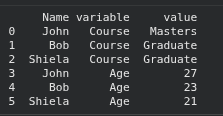
This function converts selected columns into rows while retaining the identifier column. Here, Name remains unchanged, while Course and Age are transformed into variable and value columns.
result = pd.melt(df, id_vars=['Name'],
                 value_vars=['Course', 'Age'])

print(result)
Output:
Explanation:
- id_vars specifies Name as the identifier column that remains unchanged.
- value_vars selects Course and Age for transformation.
- Variable column stores the original column names, while value contains their corresponding values.
Using var_names and value_name
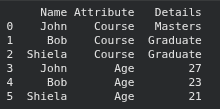
In this example, the pd.melt function is employed to unpivot the 'Course' and 'Age' columns while using 'Name' as the identifier variable.
result = pd.melt(df, id_vars=['Name'],
                 value_vars=['Course', 'Age'],
                 var_name='Attribute',
                 value_name='Details')

print(result)
Output:
Explanation:
- Attribute replaces the default variable column name.
- Details replaces the default value column name.
- The original data and row order remain unchanged apart from the reshaped structure.
Using ignore_index
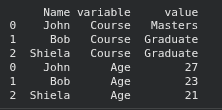
It determines whether the original DataFrame index is retained in the resulting DataFrame. By default, it is True, which creates a new sequential index. Setting it to False preserves the original index labels, repeating them for each melted column.
result = pd.melt(df, id_vars=['Name'],
                 value_vars=['Course', 'Age'],
                 ignore_index=False)

print(result)
Output:
Explanation:
- Original index labels are retained instead of being replaced with a sequential index.
- Index labels repeat for each selected column.
- This is useful when the original row indices need to be preserved for subsequent operations.
