

UPDATE statement in SQLite modifies existing records in a database table. Python provides the sqlite3 module to execute UPDATE queries and change one or more columns according to specified conditions.
Syntax
UPDATE table_name
SET column1 = value1, column2 = value2
WHERE condition;
- UPDATE specifies the table containing the records to modify.
- SET assigns new values to the specified columns.
- WHERE identifies the rows that should be updated.
- Without WHERE, the statement updates every row in the table.
1. Setting Up SQLite Database
Before updating records, create a table and insert sample data. The following example uses an in-memory database so that the examples produce predictable results without modifying an existing database file.
import sqlite3

conn = sqlite3.connect(":memory:")
cursor = conn.cursor()

cursor.execute("""
CREATE TABLE employees (
    id INTEGER PRIMARY KEY,
    name TEXT NOT NULL,
    department TEXT NOT NULL,
    salary INTEGER NOT NULL
)
""")

employees = [
    (1, "Aditi", "HR", 42000),
    (2, "Rahul", "IT", 65000),
    (3, "Neha", "IT", 72000),
    (4, "Rohan", "Sales", 48000)
]

cursor.executemany(
    """
    INSERT INTO employees (id, name, department, salary)
    VALUES (?, ?, ?, ?)
    """,
    employees
)

conn.commit()
Explanation:
- sqlite3 provides the interface between Python and SQLite.
- connect() establishes the database connection.
- CREATE TABLE defines the employees table and its columns.
- executemany() inserts the sample records using parameterized values.
- commit() saves the transaction.
2. Updating Single Column
To change one column for a particular employee, use UPDATE with SET and a condition in WHERE.
Example: Change Aditi's salary to 45,000.
cursor.execute(
    "UPDATE employees SET salary = ? WHERE id = ?",
    (45000, 1)
)

conn.commit()

print(cursor.execute(
    "SELECT * FROM employees WHERE id = ?",
    (1,)
).fetchone())
Output
(1, 'Aditi', 'HR', 45000)
Explanation:
- SET modifies only the salary column.
- WHERE id = ? selects the employee whose ID is 1.
- Other column values remain unchanged.
- fetchone() retrieves the updated record for verification.
3. Updating Multiple Rows Using Condition
UPDATE statement can modify several records that satisfy the same condition.
Example: Increase the salary of employees in the IT department by 2,000.
cursor.execute(
    """
    UPDATE employees
    SET salary = salary + ?
    WHERE department = ?
    """,
    (2000, "IT")
)

conn.commit()

print(cursor.execute(
    """
    SELECT id, name, salary
    FROM employees
    WHERE department = ?
    ORDER BY id
    """,
    ("IT",)
).fetchall())
Output
[(2, 'Rahul', 67000), (3, 'Neha', 74000)]
Explanation:
- WHERE department = ? selects employees belonging to IT.
- SET salary = salary + ? adds 2,000 to each matching salary.
- Both matching records are updated by one SQL statement.
- fetchall() returns all matching records for verification.
4. Updating MUltiple Columns
Multiple columns can be modified in the same UPDATE statement by separating their assignments with commas.
Example: Change Rahul's department to Finance and set his salary to 68,000.
cursor.execute(
    """
    UPDATE employees
    SET department = ?, salary = ?
    WHERE id = ?
    """,
    ("Finance", 68000, 2)
)

conn.commit()

print(cursor.execute(
    "SELECT * FROM employees WHERE id = ?",
    (2,)
).fetchone())
Output
(2, 'Rahul', 'Finance', 68000)
Explanation:
- SET assigns new values to department and salary.
- Commas separate the column assignments.
- WHERE id = ? restricts the operation to Rahul's record.
- Both changes are performed in a single query.
5. Updating All Rows
UPDATE statement does not contain a WHERE clause, SQLite applies the specified changes to every row in the target table. Use this approach only when modifying all records is intentional.
Example: Set the department of every employee to Operations.
cursor.execute(
    "UPDATE employees SET department = ?",
    ("Operations",)
)

conn.commit()
Explanation:
- SET assigns Operations to the department column.
- Absence of WHERE means no rows are excluded.
- Every employee's department is changed, not just one employee's.
- Do not execute this query when only specific records should be modified.
6. Verifying Updated Data
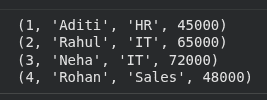
After performing the updates, SELECT can retrieve the complete table to verify the changes.
cursor.execute(
    """
    SELECT id, name, department, salary
    FROM employees
    ORDER BY id
    """
)

for row in cursor.fetchall():
    print(row)
Output
Explanation:
- SELECT retrieves the specified columns.
- ORDER BY id displays the records in ID order.
- fetchall() returns the query results.
- Output confirms that the single-column, multiple-row, and multiple-column updates were applied.
