

A Single Page Application (SPA) is a web application architecture that updates the current page dynamically rather than requesting entirely new pages from the server. When a user interacts with the interface, the SPA fetches only the required data, preventing full page reloads.
- It load once, and after that, only specific content changes without full page reloads.
- Fetch data in the background using APIs (e.g., RESTful or GraphQL APIs) and display it without refreshing the page.
- Update content based on user interactions, such as clicks, form submissions, or navigation within the app, all while maintaining the same page structure
Architecture of SPA
SPAs deliver a seamless user experience by loading a single HTML page and dynamically updating content rather than requesting new pages from the server. The architecture is built on three core pillars:
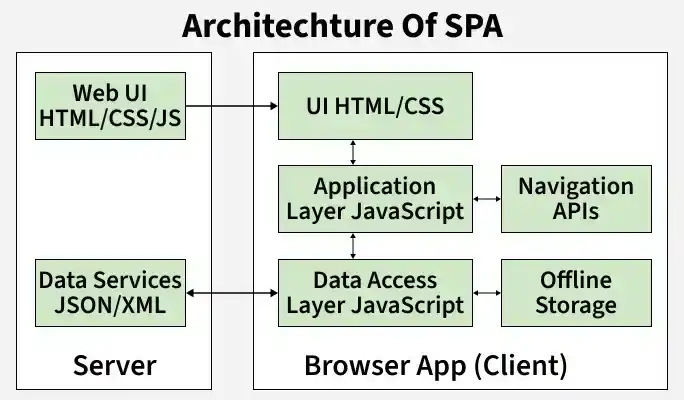
Client-Side (Frontend)
- Dynamic Foundation: HTML and CSS provide the structure, while modern JavaScript frameworks (React, Angular, Vue.js) drive UI rendering and component architecture.
- State & Navigation: Tools like Redux or Vuex manage application state. Client-side routing and the History API handle URL changes instantly without browser refreshes.
- Optimization: Employs lazy loading, code splitting, and service workers to cache assets, enable offline functionality, and minimize initial load times.
Server-Side (Backend)
- API Communication: Robust server environments process business logic and handle authentication, serving raw data to the frontend via RESTful APIs or GraphQL.
- Data Storage: The backend securely stores and retrieves data using either Relational or Non-relational databases.
Development & Build Tools
- Asset Optimization: Automated build tools and bundlers (Webpack, Rollup) package, minify, and optimize the code before it is sent to the browser.
- Version Control: Git tracks codebase changes and ensures smooth collaboration throughout development.
Data Flow
- Initial Load: The browser downloads the foundational HTML, CSS, and JavaScript shell exactly once.
- Dynamic Requests: As the user interacts with the app, the frontend fetches only the required raw data in the background using AJAX or the Fetch API.
- Seamless Updates: JavaScript instantly processes this fetched data to update specific parts of the UI, keeping the application state continuous without full page reloads.
Steps to Build a Simple SPA using React.js
Step 1: Setting Up the Project
First, check you have Node.js and npm installed. Then, create a new React project using 'create-react-app' :
npx create-react-app my-spa
cd my-spa
Step 2: Installing React Router
React Router is used for handling routing in your SPA. Install it using npm:
npm install react-router-domProject Structure
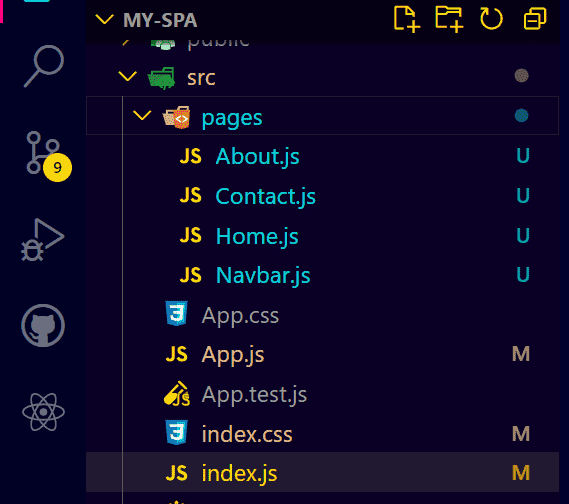
Dependencies
"dependencies": {
    "react": "^18.0.0",
    "react-dom": "^18.0.0",
    "react-scripts": "^5.0.0",
    "react-router-dom": "6.25.1"
  },
/* src/index.css */

body {
  font-family: Arial, sans-serif;
}

h2 {
  color: green;
}

h5 {
  color: green;
}

nav ul {
  list-style-type: none;
  padding: 0;
}

nav ul li {
  display: inline;
  margin-right: 10px;
}
// src/pages/Navbar.js

import React from "react";
import { Link } from "react-router-dom";

const Navbar = () => {
    return (
        <nav>
            <h2>Welcome To GFG</h2>
            <h4>Single Page Application in React.js</h4>
            <ul>
                <li>
                    <Link to="/">Home</Link>
                </li>
                <li>
                    <Link to="/about">About Us</Link>
                </li>
                <li>
                    <Link to="/contact">Contact Us</Link>
                </li>
            </ul>
        </nav>
    );
};

export default Navbar;
// src/pages/About.js

import React from "react";

const About = () => {
    return <h5>This is a About Us Page</h5>;
};

export default About;
// src/pages/Contact.js

import React from "react";

const Contact = () => {
    return <h5>This is a Contact Us Page</h5>;
};

export default Contact;
// src/pages/Home.js

import React from "react";

const Home = () => {
    return <h5>Welcome To Home Page</h5>;
};

export default Home;
// src/App.js

import React from "react";
import { BrowserRouter as Router, Routes, Route } from "react-router-dom";
import Navbar from "./pages/Navbar";
import Home from "./pages/Home";
import About from "./pages/About";
import Contact from "./pages/Contact";

const App = () => {
    return (
        <Router>
            <Navbar />
            <Routes>
                <Route path="/" element={<Home />} />
                <Route path="/about" element={<About />} />
                <Route path="/contact" element={<Contact />} />
            </Routes>
        </Router>
    );
};

export default App;
// src/index.js

import React from "react";
import ReactDOM from "react-dom/client";
import "./index.css";
import App from "./App";

const root = ReactDOM.createRoot(document.getElementById("root"));
root.render(
    <React.StrictMode>
        <App />
    </React.StrictMode>
);
Step 3: Running the Application
This will run the application, and you must be able to navigate between the Home, About, and Contact pages using the Navbar links.
npm startOutput

Benefits of SPAs
- High Performance: Dynamically updates only necessary content instead of full pages, so SPA compared to MPA, drastically reducing load times.
- App-Like UX: Eliminates page reloads and preserves user state for seamless, continuous navigation.
- Reduced Server Load: Operates from a single HTML file and fetches only raw data, minimizing backend requests.
- Developer Efficiency: Uses modular, reusable components to streamline development and maintenance.
- Universal Compatibility: Runs consistently on any device with a modern web browser.
Challenges of SPAs
- SEO Limitations: One of the main challenges of SPAs is search engine optimization (SEO). JavaScript-rendered content is harder for search engines to index effectively.
- Initial Load Times: Large JavaScript files can cause delays in the initial page load.
- Security Concerns: Security is a key point of any web application. SPAs can be vulnerable to cross-site scripting (XSS) attacks if not properly sanitized. Potential vulnerabilities like cross-site scripting (XSS) if not properly handled.
1. Improving SEO
Since SPAs load content dynamically, search engines can struggle to index their pages.-Page Common fixes:
- Prerendering: Generates static HTML for each route at build time, making content easier to index.
- Dynamic Rendering: Serves fully rendered pages to crawlers while regular users get the client-side version.
- Sitemaps & Metadata: Include XML sitemaps and metadata (titles, descriptions, keywords) for every route.
2. Enhancing Security Measures
As SPAs grow in popularity, they become bigger targets for attacks. Key security measures include:
- Secure Authentication: Use OAuth, JWT, and MFA; ensure passwords are hashed and encrypted.
- HTTPS: Encrypts data in transit and prevents man-in-the-middle attacks.
- XSS Protection: Apply CSP headers, sanitize user inputs, and never render untrusted data directly to the page.
Use Cases
SPAs are widely adopted across industries where fast, dynamic, and interactive experiences matter.
- Real-time News: Content updates instantly as new posts or articles are published, without refreshing the page.
- Filtering & Search: Users can filter, sort, and browse products dynamically without reloading the entire catalog.
- Banking Dashboards: Account balances, transactions, and analytics load and update in real time.
- Patient Health Portals: Appointment scheduling, test results, and medical history accessible in a single seamless interface.
Also Read:
