

A Personal Blogging Platform is a web-based application used to manage and publish blog articles efficiently.
- Uses Node.js and Express.js for backend development.
- Uses SQL to store and manage blogging data.
- Uses the MVC (Model-View-Controller) architecture to organize the application.
- Supports article creation, reading, updating and deletion.
- Supports article filtering, user management, comments and likes.
Creating the Blogging Database & Tables
In this part, connect the application to the SQL database, create the required database and tables, define the relationships between them, insert sample data and verify the database setup.
Architecture of Blogging Platform
The architecture of the Blogging Platform API is based on the MVC (Model-View-Controller) design pattern, ensuring clear separation of concerns and scalability.
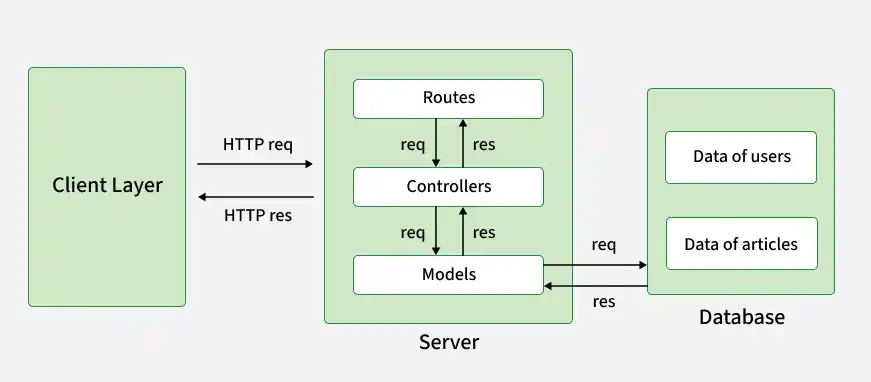
Client Layer
- Represents the users interacting with the system via tools like Postman, web browsers, or frontend applications.
- Sends HTTP requests to the backend server using RESTful methods (GET, POST, PUT, DELETE).
Server Layer
- Routes: Define API endpoints that map user requests to specific controller functions.
- Controllers: Handle the business logic, process user requests and invoke models for database operations.
- Middleware: Handles JSON parsing, error handling and other pre-processing tasks for incoming requests.
- Models: Act as the interface to the database, executing SQL queries for CRUD operations.
Database Layer
Relational Database: Stores persistent data in normalized tables (users, articles, comments, likes).
Relationships:
- users -> articles (One-to-Many): A user can create multiple articles.
- articles -> comments (One-to-Many): An article can have multiple comments.
- articles -> likes (One-to-Many): An article can have multiple likes.
Data Flow
- The client sends a request to a route.
- The route invokes the corresponding controller function.
- The controller processes the request and interacts with the model to fetch or manipulate data in the database.
- The database returns results to the model, which then passes them to the controller.
- The controller sends the final response back to the client.
- This architecture ensures modularity, maintainability and scalability, making it suitable for real-world applications.
Database Design - Blogging Platform
CREATE DATABASE personal_blog;

USE personal_blog;

-- Users Table
CREATE TABLE users (
    id INT AUTO_INCREMENT PRIMARY KEY,
    username VARCHAR(255) NOT NULL UNIQUE,
    email VARCHAR(255) NOT NULL UNIQUE,
    password VARCHAR(255) NOT NULL,
    created_at DATETIME DEFAULT CURRENT_TIMESTAMP,
    updated_at DATETIME DEFAULT CURRENT_TIMESTAMP ON UPDATE CURRENT_TIMESTAMP
);

-- Articles Table
CREATE TABLE articles (
    id INT AUTO_INCREMENT PRIMARY KEY,
    user_id INT NOT NULL,
    title VARCHAR(255) NOT NULL,
    content TEXT NOT NULL,
    tags VARCHAR(255),
    published_at DATETIME DEFAULT CURRENT_TIMESTAMP,
    updated_at DATETIME DEFAULT CURRENT_TIMESTAMP ON UPDATE CURRENT_TIMESTAMP,
    FOREIGN KEY (user_id) REFERENCES users(id) ON DELETE CASCADE
);

-- Comments Table
CREATE TABLE comments (
    id INT AUTO_INCREMENT PRIMARY KEY,
    article_id INT NOT NULL,
    user_id INT NOT NULL,
    content TEXT NOT NULL,
    created_at DATETIME DEFAULT CURRENT_TIMESTAMP,
    FOREIGN KEY (article_id) REFERENCES articles(id) ON DELETE CASCADE,
    FOREIGN KEY (user_id) REFERENCES users(id) ON DELETE CASCADE
);

-- Likes Table
CREATE TABLE likes (
    id INT AUTO_INCREMENT PRIMARY KEY,
    article_id INT NOT NULL,
    user_id INT NOT NULL,
    created_at DATETIME DEFAULT CURRENT_TIMESTAMP,
    FOREIGN KEY (article_id) REFERENCES articles(id) ON DELETE CASCADE,
    FOREIGN KEY (user_id) REFERENCES users(id) ON DELETE CASCADE
);
Output:
Table: users

Table: articles

Table: comments

Table: likes

Project Structure
The project follows the MVC (Model-View-Controller) architecture, which separates the application logic into distinct layers for better organization and maintainability.
- controllers/: Contains the logic for handling requests and responses.
- models/: Defines how data is structured and includes methods to interact with the database.
- routes/: Manages the API endpoints and connects them to corresponding controllers.
- config/: Handles database connection settings.
- app.js: The main entry point of the application.
Blogging Platform Implementation
Here we will explain all the codeand structures of the projects in detail in step wise.
Database Configuration
This step connects the application to the MySQL database using a connection pool for efficient database operations. The dbConfig.js file centralizes database settings and exports a promise-based connection pool used by models to execute SQL queries. This keeps database logic separate and supports the MVC architecture.
config/dbConfig.js
// Importing required modules for database connection
const mysql = require('mysql2');
require('dotenv').config();

// Creating a connection pool for efficient database querying
const pool = mysql.createPool({
    host: process.env.DB_HOST,
    user: process.env.DB_USER,
    password: process.env.DB_PASSWORD,
    database: process.env.DB_NAME
});

// Exporting a promise-based pool for async/await queries
module.exports = pool.promise();
Article Model
The Article Model (models/articleModel.js) handles interactions between the application and the articles table.
- getAllArticles(filters): Fetches articles with optional tag or date filters.
- getArticleById(id): Fetches an article by ID.
- createArticle(data): Adds a new article with user ID, title, content and tags.
- updateArticle(id, data): Updates an existing article.
- deleteArticle(id): Deletes an article by ID.
The model uses MySQL database queries through db.js and keeps database logic separate from application logic following the MVC architecture.
models/articleModel.js
// Importing database connection
const db = require('../config/dbConfig');

// Article Model: Handles all interactions with the 'articles' table
class Article {

  // Retrieve all articles with optional filters for tag and date
  static async getAllArticles(filters = {}) {
    const { tag, date } = filters;

    let query = 'SELECT * FROM articles WHERE 1=1';
    const params = [];

    if (tag) {
      query += ' AND FIND_IN_SET(?, tags)';
      params.push(tag);
    }

    if (date) {
      query += ' AND DATE(published_at) = ?';
      params.push(date);
    }

    const [rows] = await db.execute(query, params);
    return rows;
  }

  // Fetch a specific article by its ID
  static async getArticleById(id) {
    const [rows] = await db.execute(
      'SELECT * FROM articles WHERE id = ?',
      [id]
    );

    return rows[0];
  }

  // Insert a new article into the database
  static async createArticle(data) {
    const { user_id, title, content, tags } = data;

    const [result] = await db.execute(
      `INSERT INTO articles
       (user_id, title, content, tags)
       VALUES (?, ?, ?, ?)`,
      [user_id, title, content, tags]
    );

    return result.insertId;
  }

  // Update an existing article by its ID
  static async updateArticle(id, data) {
    const { title, content, tags } = data;

    await db.execute(
      `UPDATE articles
       SET title = ?, content = ?, tags = ?
       WHERE id = ?`,
      [title, content, tags, id]
    );
  }

  // Delete an article by its ID
  static async deleteArticle(id) {
    await db.execute(
      'DELETE FROM articles WHERE id = ?',
      [id]
    );
  }
}

module.exports = Article;
Article Controller
The Article Controller (controllers/articleController.js) handles incoming article requests and uses the Article Model to perform database operations.
- getAllArticles(req, res): Fetches articles with optional tag or date filters.
- getArticleById(req, res): Fetches an article by ID and returns a 404 error if not found.
- createArticle(req, res): Creates a new article using data from
req.body. - updateArticle(req, res): Updates an existing article using its ID and new data.
- deleteArticle(req, res): Deletes an article by ID.
The controller connects client requests with the Article Model, maintaining separation of concerns in the MVC architecture.
controllers/articleController.js
// Importing the Article model for database operations
const Article = require('../models/articleModel');

// Controller to handle fetching all articles
exports.getAllArticles = async (req, res) => {
  try {
    const filters = req.query; // Extract filters from the query string
    const articles = await Article.getAllArticles(filters);
    res.json(articles); // Respond with the list of articles
  } catch (error) {
    res.status(500).json({ error: 'Failed to fetch articles' });
  }
};

// Controller to fetch a single article by ID
exports.getArticleById = async (req, res) => {
  try {
    const article = await Article.getArticleById(req.params.id);
    if (!article) return res.status(404).json({ error: 'Article not found' });
    res.json(article);
  } catch (error) {
    res.status(500).json({ error: 'Failed to fetch article' });
  }
};

// Controller to create a new article
exports.createArticle = async (req, res) => {
  try {
    const id = await Article.createArticle(req.body); // Create article in database
    res.status(201).json({ message: 'Article created', id });
  } catch (error) {
    res.status(500).json({ error: 'Failed to create article' });
  }
};

// Controller to update an existing article by ID
exports.updateArticle = async (req, res) => {
  try {
    await Article.updateArticle(req.params.id, req.body); // Update the article
    res.json({ message: 'Article updated' });
  } catch (error) {
    res.status(500).json({ error: 'Failed to update article' });
  }
};

// Controller to delete an article by ID
exports.deleteArticle = async (req, res) => {
  try {
    await Article.deleteArticle(req.params.id); // Delete the article
    res.json({ message: 'Article deleted' });
  } catch (error) {
    res.status(500).json({ error: 'Failed to delete article' });
  }
};
Routes
The Routes (routes/articleRoutes.js) define the API endpoints and connect them to the appropriate Article Controller methods.
- GET /: Retrieves all articles with optional tag or date filters.
- GET /:id: Retrieves an article by ID.
- POST /: Creates a new article using data from the request body.
- PUT /:id: Updates an existing article.
- DELETE /:id: Deletes an article by ID.
The Routes module organizes API endpoints and connects them to the controller, providing a clean and scalable API structure.
routes/articleRoutes.js
// Importing the required modules
const express = require('express');
const articleController = require('../controllers/articleController');

const router = express.Router(); // Create a router instance

// Define the routes and map them to controller methods
router.get('/', articleController.getAllArticles); // Fetch all articles
router.get('/:id', articleController.getArticleById); // Fetch a single article by ID
router.post('/', articleController.createArticle); // Create a new article
router.put('/:id', articleController.updateArticle); // Update an article by ID
router.delete('/:id', articleController.deleteArticle); // Delete an article by ID

module.exports = router; // Export the router for use in app.js
Application Entry Point
This step involves setting up the entry point of the application. The app.js file connects all project components and handles middleware, routing and server initialization.This setup provides a structured and scalable API for handling client requests and responses efficiently.
app.js
const express = require('express');
const bodyParser = require('body-parser');
const articleRoutes = require('./routes/articleRoutes'); // Import article routes

const app = express();

// Use body-parser middleware to parse JSON requests
app.use(bodyParser.json());

// Mount the article routes under the /api/articles path
app.use('/api/articles', articleRoutes);

// Start the server and listen on the specified port
const PORT = process.env.PORT || 3000;
app.listen(PORT, () => console.log(`Server running on port ${PORT}`));
