

The res.append() function appends a specified value to an HTTP response header. If the header does not already exist, Express creates it with the specified value. It can be used to add one or multiple values to a response header.
Syntax:
res.append(field [, value])Parameter:
- Field: The name of the HTTP response header to which the value is appended.
- Value: The value to append. It can be a string or an array of strings.
Returns: It returns an Object.
Installation of the express module:
You can visit the link to Install the express module. You can install this package by using this command.
npm install expressAfter installing the express module, you can check your express version in the command prompt using the command.
npm version expressAfter that, you can just create a folder and add a file, for example, index.js. To run this file you need to run the following command.
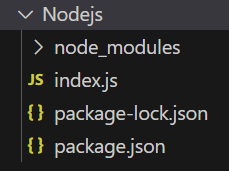
node index.jsProject Structure:
Example 1: Filename: index.js
const express = require('express');
const app = express();
const PORT = 3000;
app.get('/', (req, res) => {
    res.append('Warning', '201 Warning');
    console.log(res.get('Warning'));
    res.send('Response header appended successfully.');
});
app.listen(PORT, () => {
    console.log(`Server listening on PORT ${PORT}`);
});
Steps to run the program:
Run the index.js file using the below command:
node index.jsOutput:
Console Output:
Server listening on PORT 3000Browser Output:
Open your browser and go to http://localhost:3000/, now you see the following output on your browser:

Console Output:

Example 2: Filename: index.js
const express = require('express');
const app = express();
const PORT = 3000;
app.get('/', (req, res) => {
    res.append('Warning', '201 First Warning');
    res.append('Warning', '202 Second Warning');
    console.log(res.get('Warning'));
    res.send('Multiple header values appended successfully.');
});
app.listen(PORT, () => {
    console.log(`Server listening on PORT ${PORT}`);
});
Steps to run the program:
Run the index.js file using the below command:
node index.jsOutput:
Console Output:
Server listening on PORT 3000Browser Output:
Open your browser and go to http://localhost:3000/, now you see the following output on your browser:

Console Output:

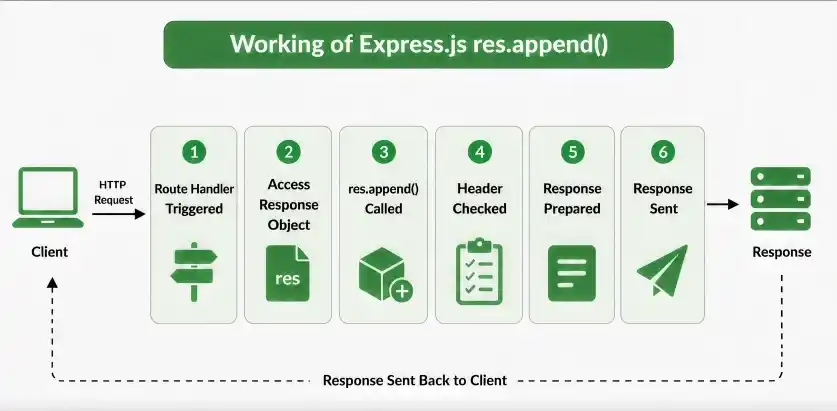
Working of res.append()
- An Express application receives a client request.
- The route handler gets access to the response object through res.
- res.append() adds the specified value to the given response header.
- If the header does not exist, Express creates it.
- If the header already exists, the new value is appended to it.
- The response is then sent to the client with the updated header.
Use Cases of res.append()
- Adding multiple values to an HTTP response header.
- Setting response headers dynamically.
- Adding Link header values for related resources.
- Adding warning or metadata values to response headers.
- Building response headers inside routes or middleware.
