

OAuth 2.0 is an authorization framework that allows users to grant third-party applications secure access to protected resources without sharing their credentials.
- Enables secure access to protected API resources without exposing user credentials.
- Uses access tokens to authorize requests instead of usernames and passwords.
- Commonly used for social logins, third-party integrations, and API authorization.
Working of OAuth 2.0
OAuth 2.0 follows an authorization flow where a user grants permission to a client application to access protected resources. Instead of sharing user credentials, the client receives an access token, which is used to access the resource server.
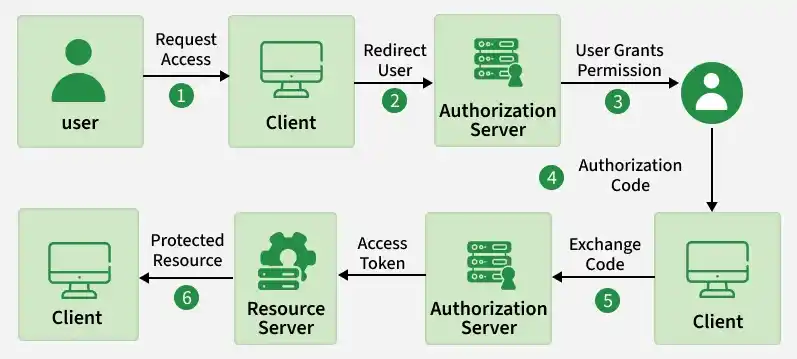
Authorization Flow
- The user initiates a request to access a protected resource.
- The client redirects the user to the authorization server.
- The user authenticates and grants permission to the client.
- The authorization server issues an authorization code.
- The client exchanges the authorization code for an access token.
- The client uses the access token to access protected resources from the resource server.
OAuth 2.0 Components
OAuth 2.0 consists of four main components that work together to authorize access to protected resources.
- Resource Owner: The user who owns the protected resources and grants access to the client.
- Client: The application requesting access to the user's resources.
- Authorization Server: Authenticates the user and issues access tokens after successful authorization.
- Resource Server: Hosts the protected resources and validates access tokens before granting access.
OAuth 2.0 Grant Types
OAuth 2.0 defines different grant types to support various authorization scenarios. The appropriate grant type depends on the type of application and how it accesses protected resources.
Common Grant Types
- Authorization Code: Used by server-side applications to securely obtain an access token after user authorization.
- Authorization Code with PKCE: An extension of the Authorization Code flow designed for public clients, such as mobile and single-page applications (SPAs).
- Client Credentials: Used for server-to-server communication where no user is involved.
- Device Authorization: Enables devices with limited input capabilities, such as smart TVs, to obtain user authorization.
- Refresh Token: Used to obtain a new access token after the current one expires without requiring the user to log in again.
OAuth 2.0 Tokens
OAuth 2.0 uses different tokens to securely authorize access to protected resources. Each token serves a specific purpose in the authorization process.
Authorization Code
A temporary code issued after the user grants permission. The client exchanges this code for an access token.
- Issued after successful user authorization.
- Short-lived and used only once.
- Exchanged for an access token.
Access Token
An access token authorizes the client to access protected resources on behalf of the user.
- Used to access protected APIs.
- Sent with authenticated API requests.
- Short-lived to improve security.
Refresh Token
A refresh token is used to obtain a new access token when the current one expires.
- Used after the access token expires.
- Typically stored securely (such as in an HttpOnly cookie).
- Not sent with every API request.
Implementing OAuth 2.0 in Node.js
This example demonstrates how to implement OAuth 2.0 authentication in a Node.js application using Google as the OAuth provider.
Step 1: Install Required Packages
Install the required dependencies:
npm install express passport passport-google-oauth20 express-sessionStep 2: Configure OAuth Credentials
Create OAuth credentials in the Google Cloud Console and obtain:
- Client ID
- Client Secret
- Redirect URI
Step 3: Configure Passport Strategy
Configure the Google OAuth 2.0 strategy using the client credentials.
import passport from "passport";
import { Strategy as GoogleStrategy } from "passport-google-oauth20";

passport.use(
  new GoogleStrategy(
    {
      clientID: process.env.CLIENT_ID,
      clientSecret: process.env.CLIENT_SECRET,
      callbackURL: "http://localhost:3000/auth/google/callback",
    },
    (accessToken, refreshToken, profile, done) => {
      return done(null, profile);
    }
  )
);
Step 4: Redirect Users for Authentication
Create a route that redirects users to the Google login page.
app.get(
  "/auth/google",
  passport.authenticate("google", {
    scope: ["profile", "email"],
    prompt: "select_account",
  })
);
Step 5: Handle the Callback
Exchange the authorization code for an access token and authenticate the user.
app.get(
  "/auth/google/callback",
  passport.authenticate("google", {
    failureRedirect: "/",
  }),
  (req, res) => {
    res.send(`
      <h2>Authentication Successful 🎉</h2>
    `);
  }
);
Output:
Best Practices
Follow these best practices to securely implement OAuth 2.0 in your applications.
- Use HTTPS: Encrypt all communication between the client and server.
- Prefer Authorization Code with PKCE: Use it for public clients such as mobile apps and SPAs.
- Store Tokens Securely: Store access and refresh tokens securely, preferably in HttpOnly cookies.
- Request Minimum Scopes: Request only the permissions required by your application.
- Validate the state Parameter: Protect against CSRF attacks during the authorization flow.
Common OAuth 2.0 Errors
The following are some common errors you may encounter while implementing OAuth 2.0 authentication.
- Invalid Client: The client ID or client secret is incorrect or not recognized by the authorization server.
- Invalid Redirect URI: The redirect URI does not match the one registered with the OAuth provider.
- Invalid Grant: The authorization code, refresh token, or grant type is invalid or has expired.
- Invalid Scope: The requested scope is invalid, unknown, or not permitted for the client.
- Access Denied: The user denies the authorization request, preventing the client from obtaining an access token.
- Invalid Token: The access token is missing, expired, revoked, or malformed.
