

Build a Course Enrollment Dashboard using React class components. The project will demonstrate how components are created, updated, removed, and how errors in child components can be handled.
The project will use React lifecycle methods to monitor changes in course enrollment and manage the component lifecycle.
Step-by-Step Implementation
1. Create the Basic Course Dashboard
First, create a class component that displays the course name, instructor, and number of enrolled students.
import React, { Component } from "react";

class CourseCard extends Component {
    constructor(props) {
        super(props);

        this.state = {
            students: 25
        };
    }

    addStudent = () => {
        this.setState((prevState) => ({
            students: prevState.students + 1
        }));
    };

    render() {
        return (
            <div style={styles.card}>
                <h2>{this.props.name}</h2>

                <p>Instructor: {this.props.instructor}</p>

                <p>
                    Students Enrolled:{" "}
                    <strong>{this.state.students}</strong>
                </p>

                <button
                    style={styles.button}
                    onClick={this.addStudent}
                >
                    Add Student
                </button>
            </div>
        );
    }
}

class App extends Component {
    render() {
        return (
            <div style={styles.page}>
                <h1>Course Enrollment Dashboard</h1>

                <p style={styles.intro}>
                    Manage course enrollment using React class
                    components.
                </p>

                <CourseCard
                    name="React Development"
                    instructor="Alex Johnson"
                />
            </div>
        );
    }
}

const styles = {
    page: {
        minHeight: "100vh",
        padding: "60px 20px",
        background: "#f4f7fb",
        fontFamily: "Arial, sans-serif",
        color: "#222"
    },

    intro: {
        color: "#666"
    },

    card: {
        maxWidth: "500px",
        margin: "30px auto",
        padding: "25px",
        background: "#fff",
        border: "1px solid #ddd",
        borderRadius: "12px"
    },

    button: {
        padding: "10px 18px",
        border: "none",
        borderRadius: "6px",
        background: "#087f5b",
        color: "#fff",
        cursor: "pointer"
    }
};

export default App;
Output
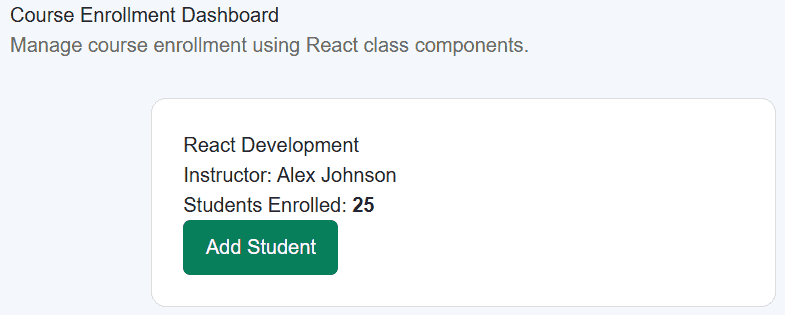
Here, CourseCard stores the number of enrolled students in its state. Clicking Add Student updates that state and displays the new count.
2. Add Mounting and Update Lifecycle Methods
Now use componentDidMount() to detect when the course component is added to the screen.
Use componentDidUpdate() to detect changes to the enrollment count.
import React, { Component } from "react";

class CourseCard extends Component {
    constructor(props) {
        super(props);

        this.state = {
            students: 25,
            lifecycleStatus: "Component created"
        };
    }

    componentDidMount() {
        this.setState({
            lifecycleStatus: "Component mounted"
        });

        console.log("CourseCard mounted");
    }

    componentDidUpdate(prevProps, prevState) {
        if (prevState.students !== this.state.students) {
            console.log(
                `Enrollment changed from ${prevState.students} to ${this.state.students}`
            );
        }
    }

    addStudent = () => {
        this.setState((prevState) => ({
            students: prevState.students + 1,
            lifecycleStatus: "Component updated"
        }));
    };

    render() {
        return (
            <div style={styles.card}>
                <span style={styles.label}>ACTIVE COURSE</span>

                <h2>{this.props.name}</h2>

                <p>Instructor: {this.props.instructor}</p>

                <div style={styles.enrollment}>
                    <span>Students Enrolled</span>
                    <strong>{this.state.students}</strong>
                </div>

                <button
                    style={styles.button}
                    onClick={this.addStudent}
                >
                    Add Student
                </button>

                <p style={styles.status}>
                    Lifecycle: {this.state.lifecycleStatus}
                </p>
            </div>
        );
    }
}

class App extends Component {
    render() {
        return (
            <div style={styles.page}>
                <h1>Course Enrollment Dashboard</h1>

                <p style={styles.intro}>
                    Monitor course enrollment using React
                    lifecycle methods.
                </p>

                <CourseCard
                    name="React Development"
                    instructor="Alex Johnson"
                />
            </div>
        );
    }
}

const styles = {
    page: {
        minHeight: "100vh",
        padding: "60px 20px",
        background: "#f4f7fb",
        fontFamily: "Arial, sans-serif",
        color: "#222"
    },

    intro: {
        color: "#666",
        textAlign: "center"
    },

    card: {
        maxWidth: "500px",
        margin: "30px auto",
        padding: "25px",
        background: "#fff",
        border: "1px solid #ddd",
        borderRadius: "12px",
        boxShadow: "0 5px 18px rgba(0, 0, 0, 0.06)"
    },

    label: {
        fontSize: "12px",
        fontWeight: "bold",
        color: "#087f5b"
    },

    enrollment: {
        display: "flex",
        justifyContent: "space-between",
        padding: "15px 0",
        borderTop: "1px solid #eee",
        borderBottom: "1px solid #eee"
    },

    button: {
        marginTop: "20px",
        padding: "10px 18px",
        border: "none",
        borderRadius: "6px",
        background: "#087f5b",
        color: "#fff",
        cursor: "pointer"
    },

    status: {
        fontSize: "13px",
        color: "#666"
    }
};

export default App;
Output
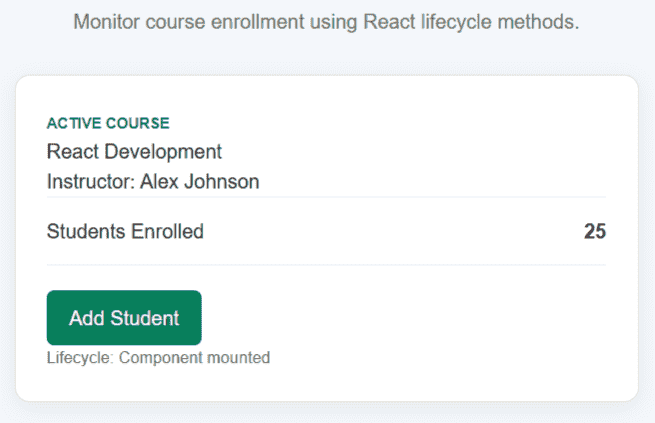
componentDidMount() runs after the component is mounted. When the student count changes, componentDidUpdate() runs after the component updates.
3. Prevent Unnecessary Updates and Handle Unmounting
Next, add shouldComponentUpdate() to decide whether the CourseCard should update.
The dashboard will also include a button to remove or show the course. When the course is removed, componentWillUnmount() runs.
import React, { Component } from "react";

class CourseCard extends Component {
    constructor(props) {
        super(props);

        this.state = {
            students: 25,
            lifecycleStatus: "Component created"
        };
    }

    componentDidMount() {
        this.setState({
            lifecycleStatus: "Component mounted"
        });

        console.log("CourseCard mounted");
    }

    shouldComponentUpdate(nextProps, nextState) {
        return (
            nextState.students !== this.state.students ||
            nextState.lifecycleStatus !== this.state.lifecycleStatus
        );
    }

    componentDidUpdate(prevProps, prevState) {
        if (prevState.students !== this.state.students) {
            console.log(
                `Enrollment changed from ${prevState.students} to ${this.state.students}`
            );
        }
    }

    componentWillUnmount() {
        console.log("CourseCard is being removed");
    }

    addStudent = () => {
        this.setState((prevState) => ({
            students: prevState.students + 1,
            lifecycleStatus: "Component updated"
        }));
    };

    render() {
        return (
            <div style={styles.card}>
                <span style={styles.label}>ACTIVE COURSE</span>

                <h2>{this.props.name}</h2>

                <p>Instructor: {this.props.instructor}</p>

                <div style={styles.enrollment}>
                    <span>Students Enrolled</span>
                    <strong>{this.state.students}</strong>
                </div>

                <button
                    style={styles.button}
                    onClick={this.addStudent}
                >
                    Add Student
                </button>

                <p style={styles.status}>
                    Lifecycle: {this.state.lifecycleStatus}
                </p>
            </div>
        );
    }
}

class App extends Component {
    state = {
        showCourse: true
    };

    toggleCourse = () => {
        this.setState((prevState) => ({
            showCourse: !prevState.showCourse
        }));
    };

    render() {
        return (
            <div style={styles.page}>
                <div style={styles.container}>
                    <h1 style={styles.heading}>
                        Course Enrollment Dashboard
                    </h1>

                    <p style={styles.intro}>
                        Monitor course enrollment using React
                        lifecycle methods.
                    </p>

                    <button
                        style={styles.toggleButton}
                        onClick={this.toggleCourse}
                    >
                        {this.state.showCourse
                            ? "Remove Course"
                            : "Show Course"}
                    </button>

                    {this.state.showCourse && (
                        <CourseCard
                            name="React Development"
                            instructor="Alex Johnson"
                        />
                    )}
                </div>
            </div>
        );
    }
}

const styles = {
    page: {
        minHeight: "100vh",
        padding: "60px 20px",
        background: "#f4f7fb",
        fontFamily: "Arial, sans-serif",
        color: "#222"
    },

    container: {
        maxWidth: "650px",
        margin: "0 auto"
    },

    heading: {
        margin: "0 0 8px",
        textAlign: "center"
    },

    intro: {
        margin: "0 0 25px",
        color: "#666",
        textAlign: "center",
        lineHeight: "1.6"
    },

    toggleButton: {
        display: "block",
        margin: "0 auto 25px",
        padding: "10px 18px",
        border: "1px solid #333",
        borderRadius: "7px",
        background: "#fff",
        color: "#222",
        cursor: "pointer"
    },

    card: {
        padding: "25px",
        background: "#fff",
        border: "1px solid #ddd",
        borderRadius: "14px",
        boxShadow: "0 5px 18px rgba(0, 0, 0, 0.06)"
    },

    label: {
        fontSize: "12px",
        fontWeight: "bold",
        color: "#087f5b"
    },

    enrollment: {
        display: "flex",
        justifyContent: "space-between",
        padding: "15px 0",
        borderTop: "1px solid #eee",
        borderBottom: "1px solid #eee"
    },

    button: {
        marginTop: "20px",
        padding: "10px 18px",
        border: "none",
        borderRadius: "7px",
        background: "#087f5b",
        color: "#fff",
        cursor: "pointer"
    },

    status: {
        marginBottom: 0,
        fontSize: "13px",
        color: "#666"
    }
};

export default App;
Output
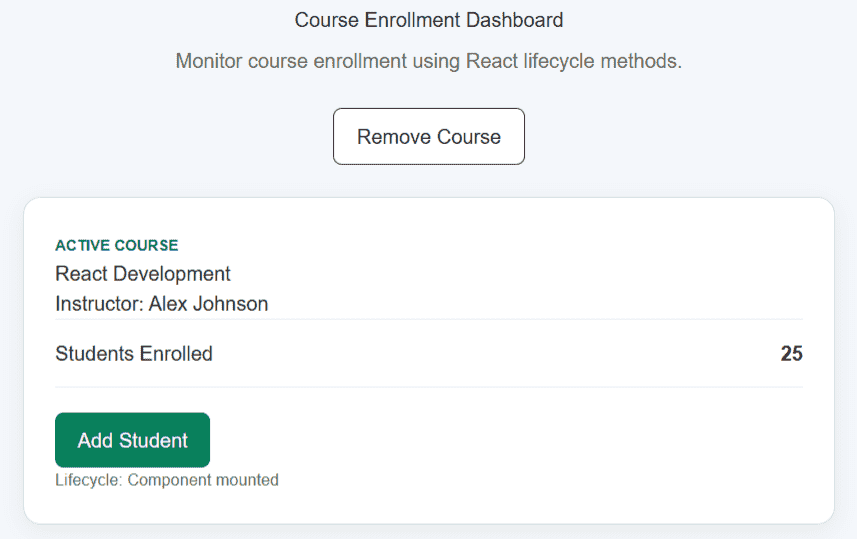
Now clicking Remove Course removes CourseCard from the UI, which causes componentWillUnmount() to run.
The shouldComponentUpdate() method checks the next state before allowing the component to update.
4. Add Error Handling with an Error Boundary
Finally, add an Error Boundary to handle errors that occur while rendering the course component.
import React, { Component } from "react";

class CourseCard extends Component {
    constructor(props) {
        super(props);

        this.state = {
            students: 25,
            lifecycleStatus: "Component created"
        };
    }

    componentDidMount() {
        this.setState({
            lifecycleStatus: "Component mounted"
        });

        console.log("CourseCard mounted");
    }

    shouldComponentUpdate(nextProps, nextState) {
        return (
            nextState.students !== this.state.students ||
            nextState.lifecycleStatus !== this.state.lifecycleStatus
        );
    }

    componentDidUpdate(prevProps, prevState) {
        if (prevState.students !== this.state.students) {
            console.log(
                `Enrollment changed from ${prevState.students} to ${this.state.students}`
            );
        }
    }

    componentWillUnmount() {
        console.log("CourseCard is being removed");
    }

    addStudent = () => {
        this.setState((prevState) => ({
            students: prevState.students + 1,
            lifecycleStatus: "Component updated"
        }));
    };

    render() {
        if (this.props.hasError) {
            throw new Error("Course data could not be loaded.");
        }

        return (
            <div style={styles.card}>
                <div style={styles.icon}>⚛</div>

                <div style={styles.content}>
                    <span style={styles.label}>ACTIVE COURSE</span>

                    <h2 style={styles.title}>
                        {this.props.name}
                    </h2>

                    <p style={styles.instructor}>
                        Instructor: {this.props.instructor}
                    </p>

                    <div style={styles.enrollment}>
                        <span>Students Enrolled</span>

                        <strong style={styles.count}>
                            {this.state.students}
                        </strong>
                    </div>

                    <button
                        style={styles.addButton}
                        onClick={this.addStudent}
                    >
                        Add Student
                    </button>

                    <p style={styles.status}>
                        Lifecycle: {this.state.lifecycleStatus}
                    </p>
                </div>
            </div>
        );
    }
}

class ErrorBoundary extends Component {
    constructor(props) {
        super(props);

        this.state = {
            hasError: false
        };
    }

    static getDerivedStateFromError() {
        return {
            hasError: true
        };
    }

    componentDidCatch(error, info) {
        console.error("Course Error:", error);
        console.error("Error Information:", info);
    }

    render() {
        if (this.state.hasError) {
            return (
                <div style={styles.errorBox}>
                    <h2>Course could not be displayed</h2>

                    <p>
                        Something went wrong while loading the
                        course.
                    </p>
                </div>
            );
        }

        return this.props.children;
    }
}

class App extends Component {
    state = {
        showCourse: true,
        simulateError: false
    };

    toggleCourse = () => {
        this.setState((prevState) => ({
            showCourse: !prevState.showCourse
        }));
    };

    simulateCourseError = () => {
        this.setState({
            simulateError: true
        });
    };

    render() {
        return (
            <div style={styles.page}>
                <div style={styles.container}>
                    <h1 style={styles.heading}>
                        Course Enrollment Dashboard
                    </h1>

                    <p style={styles.intro}>
                        Monitor course enrollment using React
                        class lifecycle methods.
                    </p>

                    <div style={styles.actions}>
                        <button
                            style={styles.toggleButton}
                            onClick={this.toggleCourse}
                        >
                            {this.state.showCourse
                                ? "Remove Course"
                                : "Show Course"}
                        </button>

                        {this.state.showCourse && (
                            <button
                                style={styles.errorButton}
                                onClick={this.simulateCourseError}
                            >
                                Simulate Error
                            </button>
                        )}
                    </div>

                    {this.state.showCourse && (
                        <ErrorBoundary
                            key={this.state.simulateError ? "error" : "normal"}
                        >
                            <CourseCard
                                name="React Development"
                                instructor="Alex Johnson"
                                hasError={this.state.simulateError}
                            />
                        </ErrorBoundary>
                    )}
                </div>
            </div>
        );
    }
}

const styles = {
    page: {
        minHeight: "100vh",
        padding: "60px 20px",
        boxSizing: "border-box",
        background: "#f4f7fb",
        fontFamily: "Arial, sans-serif",
        color: "#222"
    },

    container: {
        maxWidth: "700px",
        margin: "0 auto"
    },

    heading: {
        margin: "0 0 8px",
        textAlign: "center"
    },

    intro: {
        margin: "0 0 25px",
        textAlign: "center",
        color: "#666",
        lineHeight: "1.6"
    },

    actions: {
        display: "flex",
        justifyContent: "center",
        gap: "10px",
        marginBottom: "25px"
    },

    toggleButton: {
        padding: "10px 18px",
        border: "1px solid #333",
        borderRadius: "7px",
        background: "#fff",
        color: "#222",
        cursor: "pointer"
    },

    errorButton: {
        padding: "10px 18px",
        border: "1px solid #c92a2a",
        borderRadius: "7px",
        background: "#fff",
        color: "#c92a2a",
        cursor: "pointer"
    },

    card: {
        display: "flex",
        gap: "20px",
        padding: "25px",
        background: "#fff",
        border: "1px solid #ddd",
        borderRadius: "14px",
        boxShadow: "0 5px 18px rgba(0, 0, 0, 0.06)"
    },

    icon: {
        display: "flex",
        alignItems: "center",
        justifyContent: "center",
        width: "70px",
        height: "70px",
        flexShrink: 0,
        borderRadius: "12px",
        background: "#e7f5ff",
        fontSize: "34px"
    },

    content: {
        flex: 1
    },

    label: {
        fontSize: "12px",
        fontWeight: "bold",
        color: "#087f5b"
    },

    title: {
        margin: "7px 0"
    },

    instructor: {
        margin: "0 0 20px",
        color: "#666"
    },

    enrollment: {
        display: "flex",
        justifyContent: "space-between",
        alignItems: "center",
        paddingTop: "15px",
        borderTop: "1px solid #eee"
    },

    count: {
        fontSize: "20px"
    },

    addButton: {
        marginTop: "20px",
        padding: "10px 18px",
        border: "none",
        borderRadius: "7px",
        background: "#087f5b",
        color: "#fff",
        cursor: "pointer",
        fontSize: "14px"
    },

    status: {
        marginTop: "15px",
        marginBottom: 0,
        fontSize: "13px",
        color: "#666"
    },

    errorBox: {
        padding: "25px",
        background: "#fff4f4",
        border: "1px solid #ffc9c9",
        borderRadius: "12px",
        textAlign: "center"
    }
};

export default App;
Output
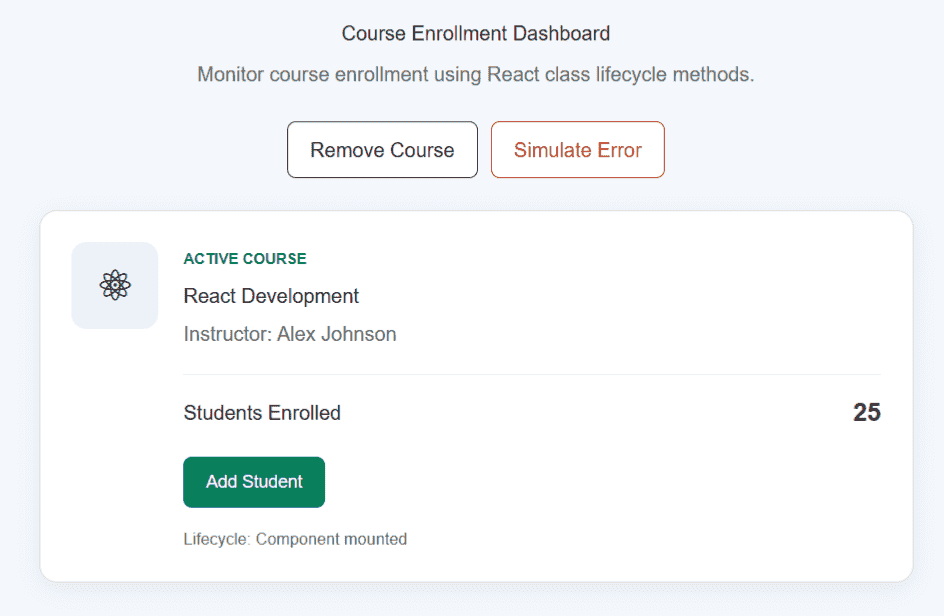
The Simulate Error button makes the child component throw an error during rendering. The ErrorBoundary catches the error and displays a fallback message.
componentDidCatch() also logs the error information to the console.
Final Source Code
The final project is contained in one App.jsx file.
import React, { Component } from "react";

class CourseCard extends Component {
    constructor(props) {
        super(props);

        this.state = {
            students: 25,
            lifecycleStatus: "Component created"
        };
    }

    componentDidMount() {
        this.setState({
            lifecycleStatus: "Component mounted"
        });

        console.log("CourseCard mounted");
    }

    shouldComponentUpdate(nextProps, nextState) {
        return (
            nextState.students !== this.state.students ||
            nextState.lifecycleStatus !== this.state.lifecycleStatus
        );
    }

    componentDidUpdate(prevProps, prevState) {
        if (prevState.students !== this.state.students) {
            console.log(
                `Enrollment changed from ${prevState.students} to ${this.state.students}`
            );
        }
    }

    componentWillUnmount() {
        console.log("CourseCard is being removed");
    }

    addStudent = () => {
        this.setState((prevState) => ({
            students: prevState.students + 1,
            lifecycleStatus: "Component updated"
        }));
    };

    render() {
        if (this.props.hasError) {
            throw new Error("Course data could not be loaded.");
        }

        return (
            <div style={styles.card}>
                <div style={styles.icon}>⚛</div>

                <div style={styles.content}>
                    <span style={styles.label}>ACTIVE COURSE</span>

                    <h2 style={styles.title}>
                        {this.props.name}
                    </h2>

                    <p style={styles.instructor}>
                        Instructor: {this.props.instructor}
                    </p>

                    <div style={styles.enrollment}>
                        <span>Students Enrolled</span>

                        <strong style={styles.count}>
                            {this.state.students}
                        </strong>
                    </div>

                    <button
                        style={styles.addButton}
                        onClick={this.addStudent}
                    >
                        Add Student
                    </button>

                    <p style={styles.status}>
                        Lifecycle: {this.state.lifecycleStatus}
                    </p>
                </div>
            </div>
        );
    }
}

class ErrorBoundary extends Component {
    constructor(props) {
        super(props);

        this.state = {
            hasError: false
        };
    }

    static getDerivedStateFromError() {
        return {
            hasError: true
        };
    }

    componentDidCatch(error, info) {
        console.error("Course Error:", error);
        console.error("Error Information:", info);
    }

    render() {
        if (this.state.hasError) {
            return (
                <div style={styles.errorBox}>
                    <h2>Course could not be displayed</h2>

                    <p>
                        Something went wrong while loading the
                        course.
                    </p>
                </div>
            );
        }

        return this.props.children;
    }
}

class App extends Component {
    state = {
        showCourse: true,
        simulateError: false
    };

    toggleCourse = () => {
        this.setState((prevState) => ({
            showCourse: !prevState.showCourse
        }));
    };

    simulateCourseError = () => {
        this.setState({
            simulateError: true
        });
    };

    render() {
        return (
            <div style={styles.page}>
                <div style={styles.container}>
                    <h1 style={styles.heading}>
                        Course Enrollment Dashboard
                    </h1>

                    <p style={styles.intro}>
                        Monitor course enrollment using React
                        class lifecycle methods.
                    </p>

                    <div style={styles.actions}>
                        <button
                            style={styles.toggleButton}
                            onClick={this.toggleCourse}
                        >
                            {this.state.showCourse
                                ? "Remove Course"
                                : "Show Course"}
                        </button>

                        {this.state.showCourse && (
                            <button
                                style={styles.errorButton}
                                onClick={this.simulateCourseError}
                            >
                                Simulate Error
                            </button>
                        )}
                    </div>

                    {this.state.showCourse && (
                        <ErrorBoundary
                            key={
                                this.state.simulateError
                                    ? "error"
                                    : "normal"
                            }
                        >
                            <CourseCard
                                name="React Development"
                                instructor="Alex Johnson"
                                hasError={this.state.simulateError}
                            />
                        </ErrorBoundary>
                    )}
                </div>
            </div>
        );
    }
}

const styles = {
    page: {
        minHeight: "100vh",
        padding: "60px 20px",
        boxSizing: "border-box",
        background: "#f4f7fb",
        fontFamily: "Arial, sans-serif",
        color: "#222"
    },

    container: {
        maxWidth: "700px",
        margin: "0 auto"
    },

    heading: {
        margin: "0 0 8px",
        textAlign: "center"
    },

    intro: {
        margin: "0 0 25px",
        textAlign: "center",
        color: "#666",
        lineHeight: "1.6"
    },

    actions: {
        display: "flex",
        justifyContent: "center",
        gap: "10px",
        marginBottom: "25px"
    },

    toggleButton: {
        padding: "10px 18px",
        border: "1px solid #333",
        borderRadius: "7px",
        background: "#fff",
        color: "#222",
        cursor: "pointer"
    },

    errorButton: {
        padding: "10px 18px",
        border: "1px solid #c92a2a",
        borderRadius: "7px",
        background: "#fff",
        color: "#c92a2a",
        cursor: "pointer"
    },

    card: {
        display: "flex",
        gap: "20px",
        padding: "25px",
        background: "#fff",
        border: "1px solid #ddd",
        borderRadius: "14px",
        boxShadow: "0 5px 18px rgba(0, 0, 0, 0.06)"
    },

    icon: {
        display: "flex",
        alignItems: "center",
        justifyContent: "center",
        width: "70px",
        height: "70px",
        flexShrink: 0,
        borderRadius: "12px",
        background: "#e7f5ff",
        fontSize: "34px"
    },

    content: {
        flex: 1
    },

    label: {
        fontSize: "12px",
        fontWeight: "bold",
        color: "#087f5b"
    },

    title: {
        margin: "7px 0"
    },

    instructor: {
        margin: "0 0 20px",
        color: "#666"
    },

    enrollment: {
        display: "flex",
        justifyContent: "space-between",
        alignItems: "center",
        paddingTop: "15px",
        borderTop: "1px solid #eee"
    },

    count: {
        fontSize: "20px"
    },

    addButton: {
        marginTop: "20px",
        padding: "10px 18px",
        border: "none",
        borderRadius: "7px",
        background: "#087f5b",
        color: "#fff",
        cursor: "pointer",
        fontSize: "14px"
    },

    status: {
        marginTop: "15px",
        marginBottom: 0,
        fontSize: "13px",
        color: "#666"
    },

    errorBox: {
        padding: "25px",
        background: "#fff4f4",
        border: "1px solid #ffc9c9",
        borderRadius: "12px",
        textAlign: "center"
    }
};

export default App;
Output
