What is Serverless Architecture?
Serverless architecture runs custom code in ephemeral containers that are fully managed by a 3rd party. The custom code is typically a small part of a complete application. It is also called as function. This gives another name for serverless architecture as Function as a Service (FaaS). The container is ephemeral because it may only last for one invocation. The container may be reused but that’s not something you can rely upon. As a developer, you upload the code to FaaS platform, the service then handles all the capacity, scaling, patching and administration of the infrastructure to run your code.
An application built using Serverless Architecture follows the event-driven approach. For example, an activity happened in the application such as a click.
This is very different from a classical architecture where the application code is typically deployed in an application server such as Tomcat or WildFly. Scaling your application means starting additional instances of the application server or spinning up additional containers with the packaged application server. The Load Balancer need to be updated with the new IP addresses. Operating system need to be patched, upgraded and maintained.
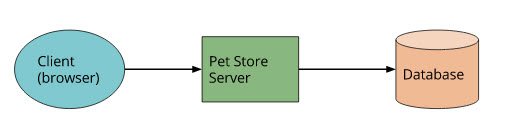
Serverless Architectures explain the difference between the classical programming model and this new serverless architecture.
FaaS platform takes your application is divided into multiple functions. Each function is deployed in FaaS. The service spins up additional compute instances to meet the scalability demands of your application. FaaS platform provides the execution environment and takes care of starting and tearing down the containers to run your function.
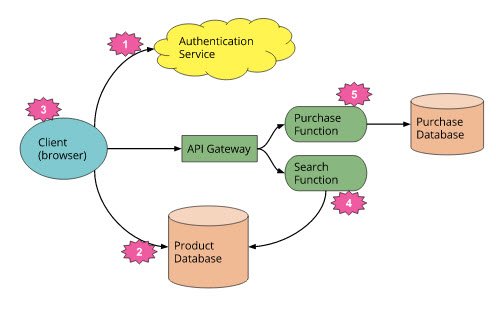
Read Serverless Architectures for more details about these images.
One of the big advantages of FaaS is that you are only charged for the compute time, i.e. the time your code is running. There is no charge when your code is not running.
Another way to look at how Functions are different from VMs and Containers:
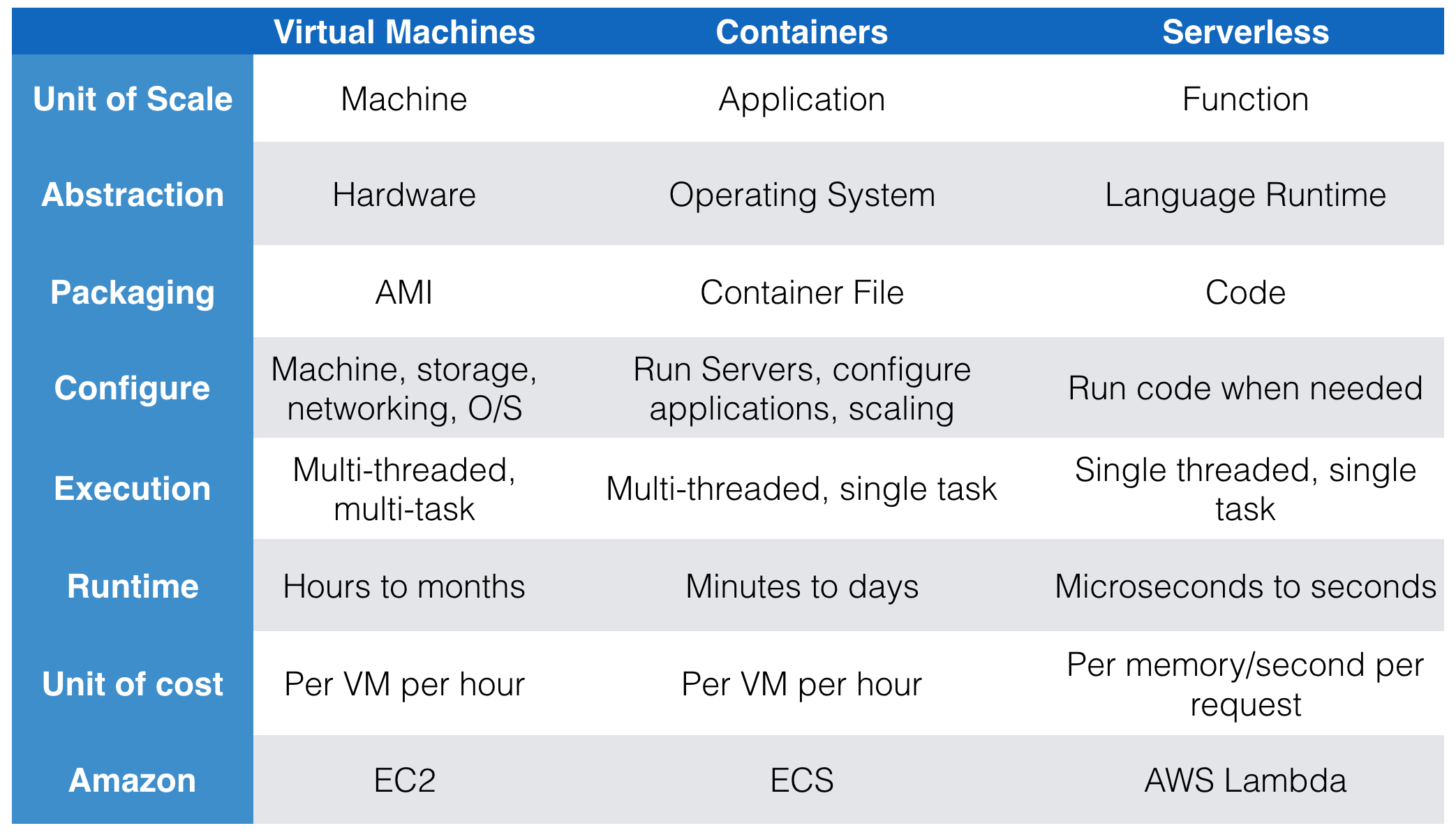
Note that Linux containers instead of Docker containers are used as an implementation for AWS Lambda.
How is FaaS different from PaaS?
As quoted at Serverless Architectures, a quick answer is provided by the following tweet:
If your PaaS can efficiently start instances in 20ms that run for half a second, then call it serverless. https://t.co/S3YzvqFYLR
— Adrian Cockcroft – now @adrianco@mastodon.social (@adrianco) May 28, 2016
In other words most PaaS applications are not geared towards bringing entire applications up and down for every request, whereas FaaS platforms do exactly this.
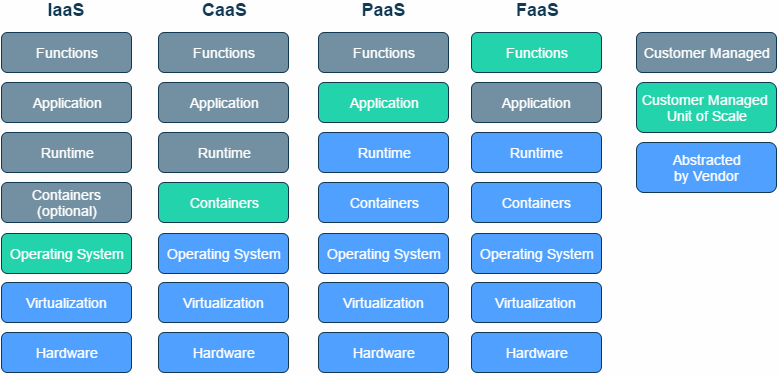
Abstracting the Back-end with FaaS explain the difference with different *aaS offerings. The image from the blog is captured below:
Serverless Architectures also provide great details about what FaaS is and is not.
AWS Lambda, Google Cloud Functions and Azure Functions are some of the options for running serverless applications.
This blog will show how to write your first AWS Lambda function.
What is AWS Lambda?
AWS Lambda is FaaS service from Amazon Web Services. It runs your code on a high-availability compute infrastructure and performs all of the administration of the compute resources, including server and operating system maintenance, capacity provisioning and automatic scaling, code monitoring and logging.
AWS Lambda charges you for the duration your code runs in increments of 100ms. There is no cost associated with storing the Lambda function in AWS. First million requests per month are free and the pricing after that is nominal. Read more details on Lambda pricing. It also provides visibility into performance by providing real time metrics and logs to AWS CloudWatch. All you need to do is write the code!
Here is a quick introduction:
Also check out What’s New in AWS Lambda from AWS ReInvent 2016:
Also checkout Serverless Architectural Patterns and Best Practices from AWS ReInvent 2016:
The code you run on AWS Lambda is called a Lambda Function. You upload your code as a zip file or design it using the AWS Lambda Management Console. There is a built-in support for AWS SDK and this simplifies the ability to call other AWS services.
In short, Lambda is scalable, serverless, compute in the cloud.
AWS Lambda provides several execution environments:
- Node.js – v0.10.36, v4.3.2 (recommended)
- Java – Java 8
- Python – Python 2.7
- .NET Core – .NET Core 1.0.1 (C#)
This blog will show:
- Build a Java application that stores a JSON document to Couchbase
- Use Maven to create a deployment package for Java application
- Create a Lambda Function
- Update the Lambda Function
The complete code in this blog is available at github.com/arun-gupta/serverless/tree/master/aws/hellocouchbase.
Java Application for AWS Lambda
First, lets look at a Java application that will be used for this Lambda function. Programming Model for Lambda Functions in Java provide more details about how to write your Lambda function code in Java.
Our Lambda function will implemented the pre-defined interface com.amazonaws.services.lambda.runtime.RequestHandler. The code looks like:
public class HelloCouchbase implements RequestHandler<Request, String> {

    CouchbaseCluster cluster;
    Bucket bucket;
    LambdaLogger logger;

    @Override
    public String handleRequest(Request request, Context context) {
        SimpleDateFormat dateFormat = new SimpleDateFormat("yyyy-MM-dd HH:mm:ss.SSS");
        String timestamp = dateFormat.format(Calendar.getInstance().getTime());

        logger = context.getLogger();
        logger.log("Request received: %s" + timestamp);
        ButtonDocument buttonDocument = new ButtonDocument();
        buttonDocument.setId(context.getAwsRequestId());
        buttonDocument.setRequestId(context.getAwsRequestId());
        buttonDocument.setTimestamp(String.valueOf(timestamp));

        getBucket().upsert(buttonDocument.toJson());

        return buttonDocument.toString();
    }
handleRequest method is where the function code is implemented. Context provides useful information about Lambda execution environment. Some of the information from the context is stored a JSON document. Finally, Couchbase Java SDK API upsert is used to write a JSON document to the identified Couchbase instance. Couchbase on Amazon EC2 provide complete instructions to install Couchbase on AWS EC2.
Information about the Couchbase server is obtained as:
public CouchbaseCluster getCluster() {
    if (null == cluster) {
        logger.log("env: " + System.getenv("COUCHBASE_HOST"));
        cluster = CouchbaseCluster.create(System.getenv("COUCHBASE_HOST"));
    }
    return cluster;
}
This is once again using Couchbase Java API CouchbaseCluster as a main entry point to the Couchbase cluster. The COUCHBASE_HOSTenvironment variable is passed when the Lambda function is created. In our case, this would point to a single node Couchbase cluster running on AWS EC2. Environment variables were recently introduced in AWS Lambda.
Finally, you need to access bucket in the server:
public Bucket getBucket() {
    while (null == bucket) {
        logger.log("Trying to connect to the database");
        bucket = getCluster().openBucket("serverless", 2L, TimeUnit.MINUTES);

        try {
            Thread.sleep(3000);
        } catch (Exception e) {
            logger.log("Thread sleep Exception: " + e.toString());
            throw new RuntimeException(e);
        }
    }

    return bucket;
}
The bucket name is serverless and all JSON documents are stored in this.
A simple Hello World application may be used for creating this function as well.
Create AWS Lambda Deployment Package
AWS Lambda function needs a deployment package. This package is either a .zip or .jar file that contains all the dependencies of the function. Our application is packaged using Maven, and so we’ll use a Maven plugin to create a deployment package.
The application has pom.xml with the following plugin fragment:
<plugin>
    <groupId>org.apache.maven.plugins</groupId>
    <artifactId>maven-shade-plugin</artifactId>
    <version>2.3</version>
    <configuration>
        <createDependencyReducedPom>false</createDependencyReducedPom>
    </configuration>
    <executions>
        <execution>
            <phase>package</phase>
            <goals>
                <goal>shade</goal>
            </goals>
        </execution>
    </executions>
</plugin>
More details about Maven configuration are available in Creating a .jar Deployment Package Using Maven without any IDE. The maven-shade-plugin allows to create an uber-jar including all the dependencies. The shade goal is tied to the package phase. So the mvn package command will generate a single deployment jar.
Package the application using mvn package command. This will show the output:
[INFO] --- maven-jar-plugin:2.4:jar (default-jar) @ hellocouchbase ---
[INFO] Building jar: /Users/arungupta/workspaces/serverless/aws/hellocouchbase/hellocouchbase/target/hellocouchbase-1.0-SNAPSHOT.jar
[INFO]
[INFO] --- maven-shade-plugin:2.3:shade (default) @ hellocouchbase ---
[INFO] Including com.amazonaws:aws-lambda-java-core:jar:1.1.0 in the shaded jar.
[INFO] Including com.couchbase.client:java-client:jar:2.3.6 in the shaded jar.
[INFO] Including com.couchbase.client:core-io:jar:1.3.6 in the shaded jar.
[INFO] Including io.reactivex:rxjava:jar:1.1.8 in the shaded jar.
[INFO] Replacing original artifact with shaded artifact.
[INFO] Replacing /Users/arungupta/workspaces/serverless/aws/hellocouchbase/hellocouchbase/target/hellocouchbase-1.0-SNAPSHOT.jar with /Users/arungupta/workspaces/serverless/aws/hellocouchbase/hellocouchbase/target/hellocouchbase-1.0-SNAPSHOT-shaded.jar
[INFO] ------------------------------------------------------------------------
[INFO] BUILD SUCCESS
[INFO] ------------------------------------------------------------------------
The target/hello-couchbase-1.0-SNAPSHOT.jar is the shaded jar that will be deployed to AWS Lambda.
More details about creating a deployment package are at Creating a Deployment Package.
Create AWS Lambda Function
Create AWS Lambda Function using AWS CLI. The CLI command in this case looks like:
aws lambda create-function \
--function-name HelloWorld \
--role arn:aws:iam::<account-id>:role/service-role/myLambdaRole \
--zip-file fileb:///Users/arungupta/workspaces/serverless/aws/hellocouchbase/hellocouchbase/target/hellocouchbase-1.0-SNAPSHOT.jar \
--handler org.sample.serverless.aws.couchbase.HelloCouchbaseLambda \
--description "Hello Couchbase Lambda" \
--runtime java8  \
--region us-west-2 \
--timeout 30 \
--memory-size 1024 \
--publish
In this CLI:
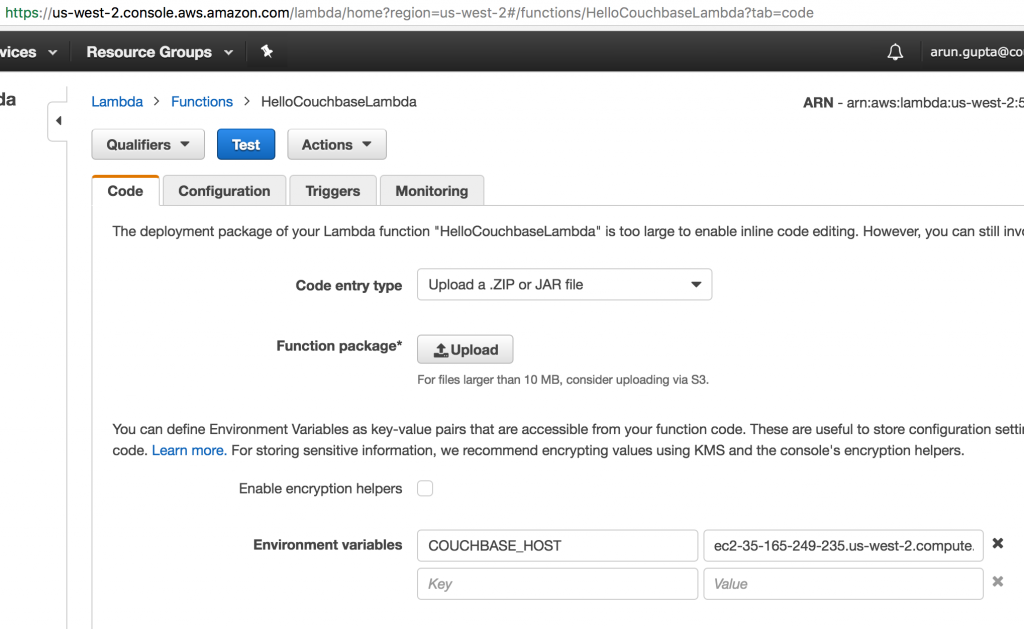
create-functioncreates a Lambda function--function-nameprovides the function name. The function name is case sensitive.--rolespecifies Amazon Resource Name (ARN) of an IAM role that Lambda assume when it executes your function to access any other AWS resources. If you’ve executed a Lambda function using AWS Console then this role is created for you.--zip-filepoints to the deployment package that was created in previous step.filebis an AWS CLI specific protocol to indicate that the content uploaded is binary.--handleris the Java class that is called to begin execution of the function--publishrequest AWS Lambda to create the Lambda function and publish a version as an atomic operation. Otherwise multiple versions may be created and may be published at a later point.
Lambda Console shows:
Test AWS Lambda Function
Test the AWS Lambda Function using AWS CLI.
aws lambda invoke \
--function-name HelloCouchbaseLambda \
--region us-west-2 \
--payload '' \
hellocouchbase.out
It shows the output as:
{
    "StatusCode": 200
}
The output from the command is stored in hellocouchbase.out and looks like:
"{\"id\":\"e6bbe71a-ca4f-11e6-95a7-95f2ed410493\",\"installationId\":null,\"requestId\":\"e6bbe71a-ca4f-11e6-95a7-95f2ed410493\",\"identityId\":null,\"timestamp\":\"2016-12-25 03:12:01.157\"}"Invoking this function stores a JSON document in Couchbase. Documents stored in Couchbase can be seen using Couchbase Web Console. The password is Administrator and password is the EC2 instance id.
All data buckets in this Couchbase instance are shown below:
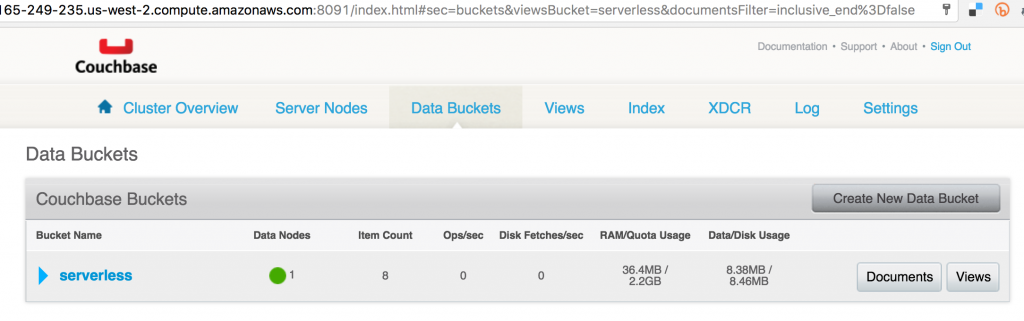
Note that the serverless bucket is manually created.
Clicking on Documents shows details of different documents stored in the bucket:
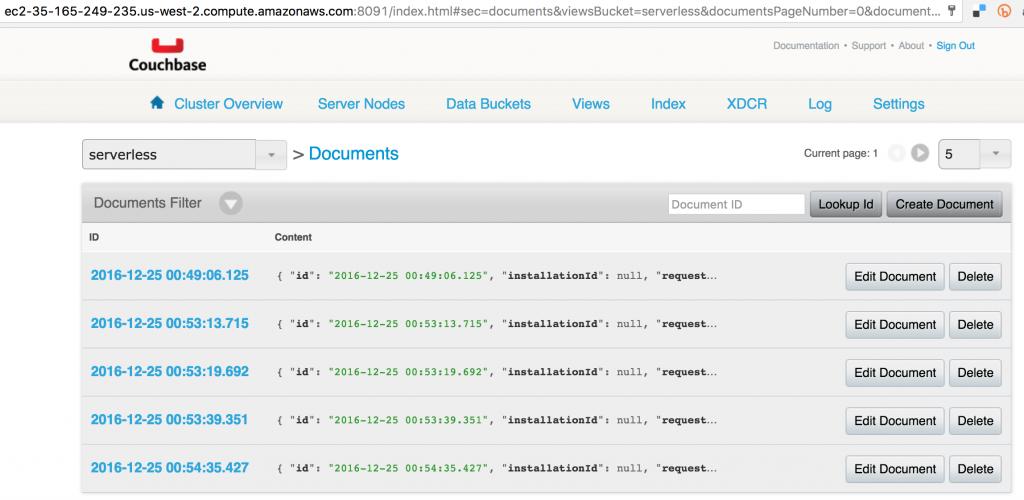
Clicking on each document shows more details about the JSON document:
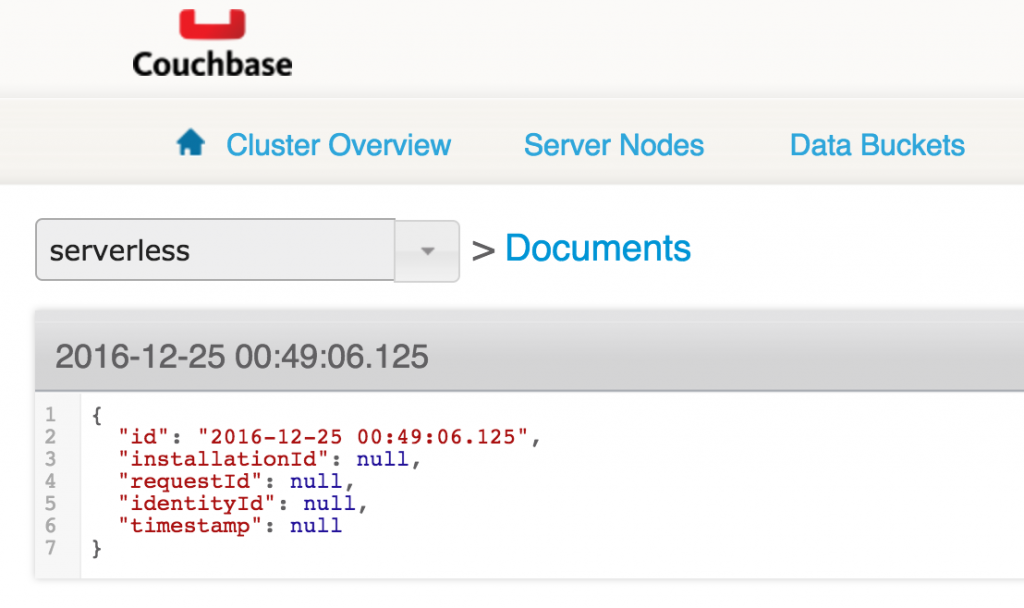
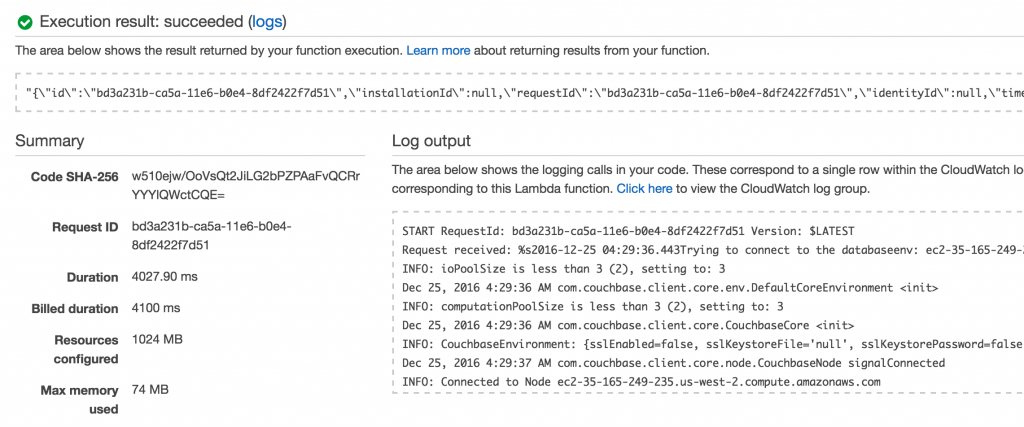
Lambda function can also be tested using the Console:
Update AWS Lambda Function
If the application logic changes then a new deployment package needs to be uploaded for the Lambda function. In this case, mvn package will create a deployment package and aws lambda CLI command is used to update the function code:
aws lambda update-function-code \
--function-name HelloCouchbaseLambda \
--zip-file fileb:///Users/arungupta/workspaces/serverless/aws/hellocouchbase/hellocouchbase/target/hellocouchbase-1.0-SNAPSHOT.jar \
--region us-west-2 \
--publish
Shows the result:
{
    "CodeSha256": "w510ejw/OoVsQt2JiLG2bPZPAaFvQCRrYYYlQWctCQE=",
    "FunctionName": "HelloCouchbaseLambda",
    "CodeSize": 6978108,
    "MemorySize": 1024,
    "FunctionArn": "arn:aws:lambda:us-west-2:<account-id>:function:HelloCouchbaseLambda:8",
    "Environment": {
        "Variables": {
            "COUCHBASE_HOST": "ec2-35-165-249-235.us-west-2.compute.amazonaws.com"
        }
    },
    "Version": "8",
    "Role": "arn:aws:iam::<account-id>:role/service-role/myLambdaRole",
    "Timeout": 30,
    "LastModified": "2016-12-25T04:17:38.717+0000",
    "Handler": "org.sample.serverless.aws.couchbase.HelloCouchbaseLambda",
    "Runtime": "java8",
    "Description": "Java Hello Couchbase"
}
The function can then be invoked again.
During writing of this blog, this was often used to debug the function as well. This is because Lambda functions do not have any state or box associated with them. And so you cannot log in to a box to check out if the function did not deploy correctly. You can certainly use CloudWatch log statements once the function is working.
AWS Lambda References
- Serverless Architectures
- AWS Lambda: How it works
- Couchbase Server Docs
- Couchbase Forums
- Follow us at @couchbasedev
| Reference: | Serverless FaaS with AWS Lambda and Java from our JCG partner Arun Gupta at the Miles to go 3.0 … blog. |