The Upload UI Details I Wish We Had Got Right Sooner
Seven small things, each under a day to fix, and about a year to notice.

The ticket that finally connected everything said a customer had uploaded the same forty files twice. One file in the first batch had failed. Nothing in the interface said which one, so they deleted all forty and started again, which is exactly what I would have done. None of our upload UI problems were big. That is precisely why they survived a year.
“The upload UI details that cost us the most were small: no per-file states in multi-file batches, a progress bar that counted files instead of bytes, silent failures behind a spinner, and retry that re-sent everything. Each fix was under a day of work; noticing them took a year.”
Upload interfaces rarely fail all at once. They fail retail, one missing detail at a time, and each one on its own looks too small to schedule.
Key Takeaways
- Queued, uploading, done, failed and retrying are the minimum honest vocabulary for a batch upload.
- A progress bar that counts files lies whenever file sizes differ, and a bytes-weighted bar does not.
- Errors belong in the failed file’s own row, where they persist, rather than in a toast that vanishes.
- Retry should be scoped to failed files only, since re-sending completed work creates duplicates.
- Each of these fixes took under a day, which made every one of them easy to keep postponing.
Detail 1, Per-File States
The symptom was the ticket above. A batch of forty showed a single spinner and then a single success message, and a partial failure had nowhere to appear. Users learned to distrust the whole thing and re-upload everything, which is a rational response to an interface that will not tell you what happened.
The fix was five states, rendered per row rather than per batch: queued, uploading, done, failed and retrying. That is the minimum honest vocabulary for a batch. Anything less and the interface is summarising away the one fact the user needs.
Search for the best methods to upload multiple files at once and you get concurrency limits and chunking strategies, which are real concerns and are not this one. Whether a batch is usable is decided by whether each file can say what it is doing.
Detail 2, Bytes-Weighted Progress
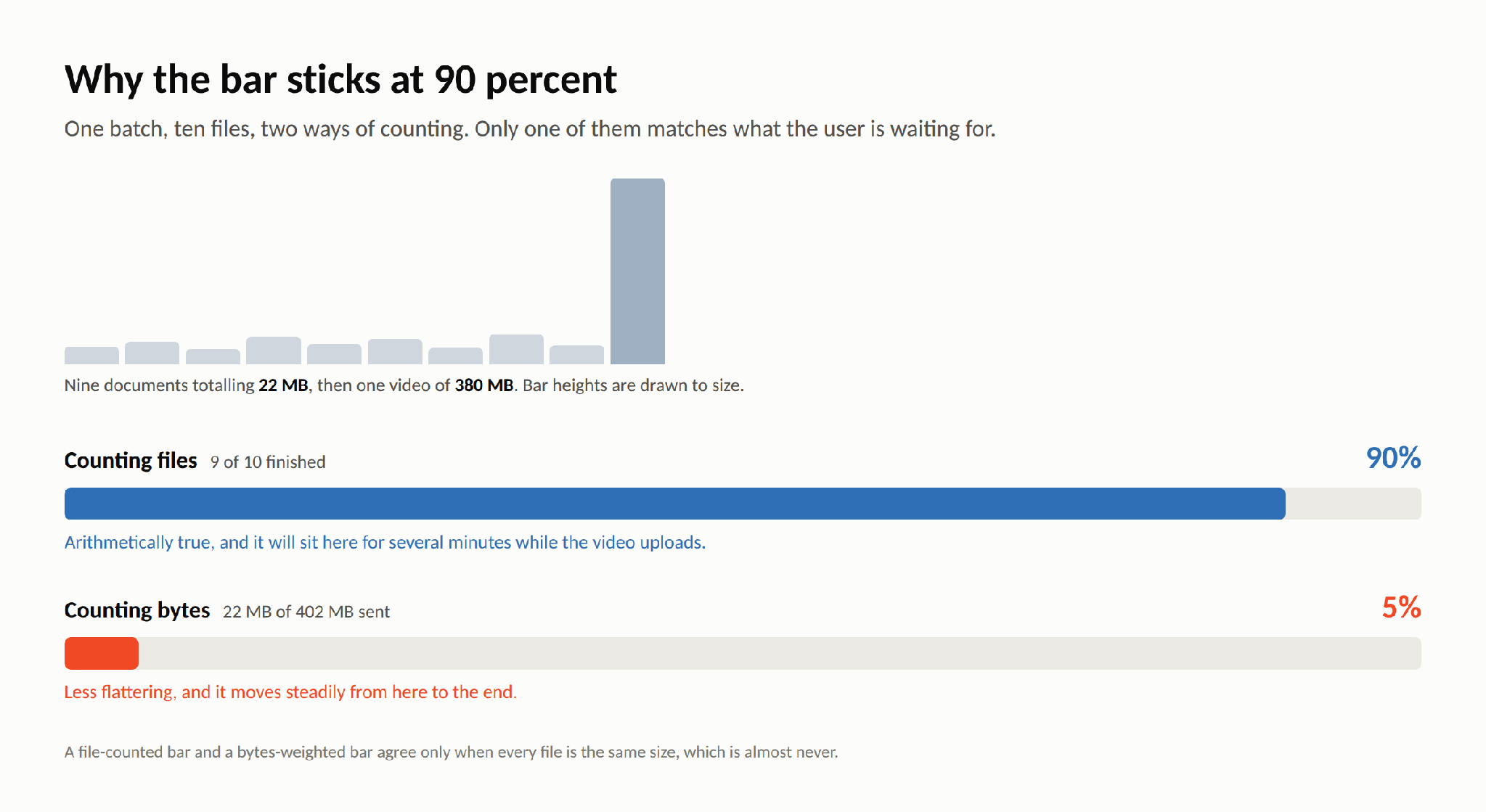
Our bar counted completed files. Nine small documents and one large video meant the bar hit ninety percent in four seconds and then sat there for six minutes. It was arithmetically correct and experientially a lie, and we got tickets calling it frozen.
Weighting by bytes rather than by file count fixed it in an afternoon. The honest number is lower and people complained less, because a bar that moves slowly reads as working while a bar that stops reads as broken.
Detail 3, Errors in the Row
When a file did fail, we announced it in a toast in the corner, which faded after five seconds. If the user was looking at their own file list, at their phone, or at anything other than that corner in that window, the information was gone permanently. The file just sat there looking unfinished.
Errors belong where the file is. The message now lives in the failed row, stays until the row is retried or removed, and says what went wrong in words a person can act on rather than a status code.
Most advice about improving the user experience of a file upload UI is a list of components to add. The more useful principle is about placement. Put every piece of feedback next to the thing it is feedback about, and most of the list stops being necessary.
Detail 4, Surgical Retry
Our retry button re-sent the batch. All of it, including the thirty-nine files that had already arrived. This produced duplicates, which produced a second class of support ticket, which we spent time triaging as a data problem rather than the interface problem it actually was.
Retry now touches only the rows that failed, and each upload carries an idempotency key so that a duplicate request cannot produce a duplicate record even if the user hammers the button. Two changes, one day, and both categories of ticket stopped.
Detail 5, Keyboard and Screen Reader Paths
Our drop zone was a styled div with drag handlers. There was no way to reach it with a keyboard, and a screen reader announced nothing at all, because there was nothing there to announce. Anyone not using a mouse simply could not upload a file, and we had shipped that for over a year without noticing.
The pattern that fixes this is old and well documented: a real file input, visually hidden but focusable, with a properly associated label that the drop zone is styled to look like. The file input element already handles selection, multiple files and accepted types; the styling sits on top of it rather than replacing it. We added live status announcements in the same change, so progress and failures are spoken as well as shown.
One afternoon of work, and an entire group of users went from excluded to served. That is the detail on this list I am least comfortable having taken a year to reach.
Detail 6, React Batch Wiring
This one is narrower and it caused a whole family of strange bugs. We stored per-file state in an array and keyed it by index. Remove a file mid-flight and every index after it shifts, so the progress of one file starts rendering on the row of another. It looks like a race condition and it is really a bookkeeping mistake.
Key by a stable id generated when the file is added, and the problem disappears. It also makes the other details straightforward, because both bytes-weighted progress and failed-only retry are simple reductions over the same collection.
// One row per file, keyed by id. Never by array index.
const [items, setItems] = useState([]);  // { id, file, status, sent, total, error }


const add = (files) => setItems((prev) => [
  ...prev,
  ...files.map((file) => ({
    id: crypto.randomUUID(),
    file, status: 'queued', sent: 0, total: file.size, error: null,
  })),
]);


const patch = (id, next) =>
  setItems((prev) => prev.map((it) => (it.id === id ? { ...it, ...next } : it)));


// Progress by bytes, not by files finished.
const progress =
  items.reduce((n, it) => n + it.sent, 0) /
  Math.max(1, items.reduce((n, it) => n + it.total, 0));


// Retry touches only what failed.
const retryFailed = () =>
  items.filter((it) => it.status === 'failed').forEach(upload);
If you go looking for how to support multiple file uploads in React, most examples stop at the input handler. The shape of the state is what determines whether the other six details are easy or painful to add later.
Detail 7, Adopt Rather Than Rebuild
Detail seven was admitting that a maintained upload UI had already solved one through six. Per-file rows with real states, bytes-weighted progress, errors attached to the file that produced them, retry scoped to failures, and a drop zone with the accessible input already behind it. We had spent a year rediscovering a list that someone else maintains as a product.
This is not an argument against writing your own. It is an argument about what you are choosing when you do. We thought we were choosing control over an interface, and mostly we were choosing to find out about per-file states the slow way, through tickets, one detail at a time, while the actual product waited.
Small Details, Retail Failure
Seven details. Every one of them under a day of work, and every one of them easy to defer precisely because it was under a day of work. There was never a moment when the upload flow was broken enough to schedule; there was only a year of it being slightly wrong in seven places at once.
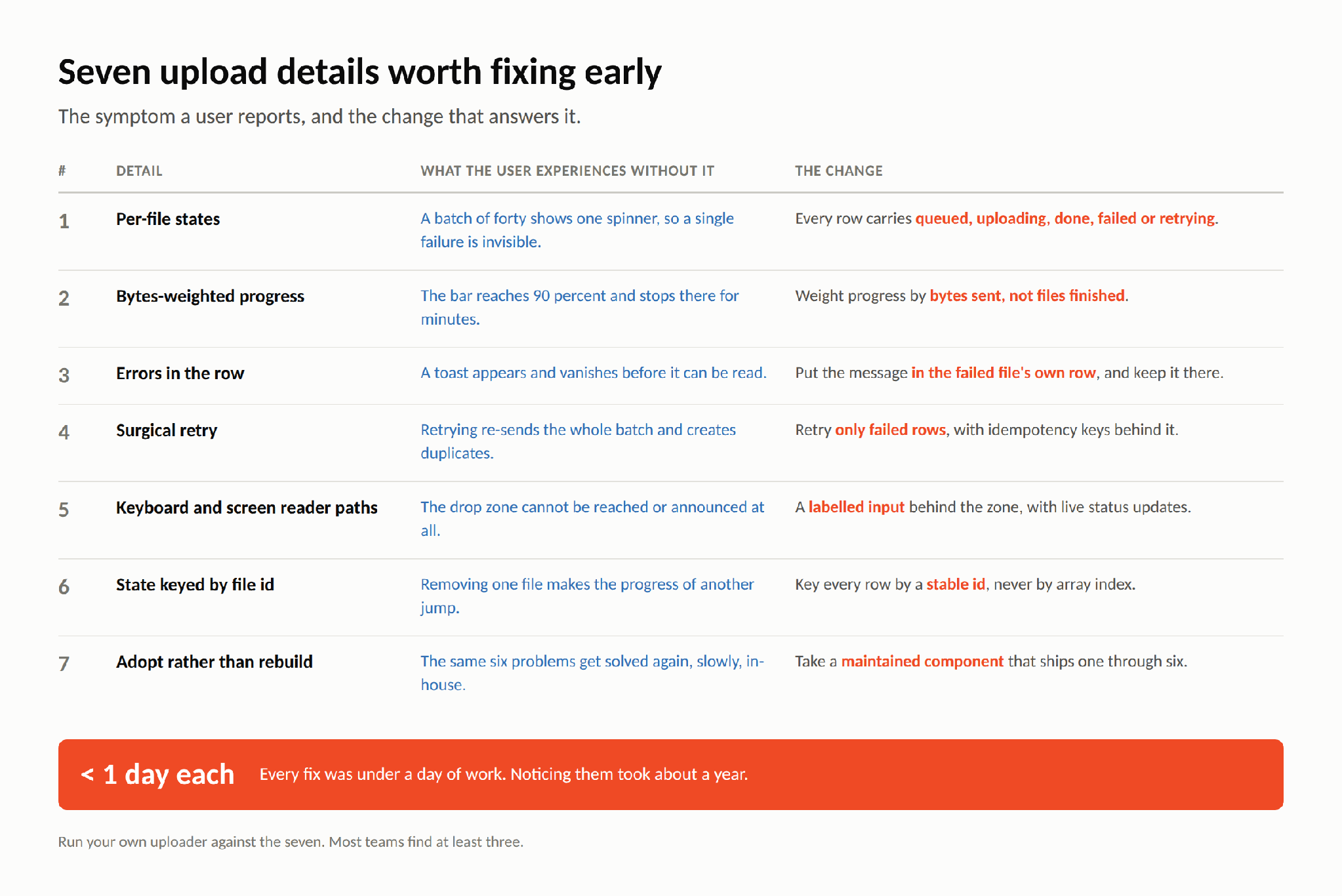
The useful thing to do with this list is not to read it. Open your own uploader, drop in ten files of wildly different sizes, kill one of them mid-flight, then try to finish the job using only a keyboard. Most teams find at least three of the seven in ten minutes, which is roughly how long it should have taken us.
Frequently Asked Questions
What states should each file show in a batch upload?
Queued, uploading, done, failed and retrying. Five states, rendered per file rather than per batch, so a partial failure has somewhere to appear.
Why do upload progress bars stick at 90 percent?
Because they count files rather than bytes. Nine small files and one large one produce ninety percent in seconds and then a long silent wait. Weighting by bytes keeps the bar moving in step with the transfer.
Where should upload errors appear?
In the failed file’s own row, persistently. A toast in the corner disappears before most people read it, and it does not say which of forty files it refers to.
Should retry re-send the whole batch?
No. Retry only the rows that failed, and put an idempotency key behind each upload so a repeated request cannot create a duplicate record.