Repository navigation
Gremlin Error: "Record Not Found" after dropped a vertex. Simple reproducible example. #1328

Description

ArcadeDB Version:
ArcadeDB Server v23.10.1-SNAPSHOT (build 186c0adb0743a94a733a512d31a17901d174f3bb/1695791343005/main)
From Docker Image
OS and JDK Version:
Running on Linux 5.10.102.1-microsoft-standard-WSL2 - OpenJDK 64-Bit Server VM 11.0.20.1 (Temurin-11.0.20.1+1)
Expected behavior
Query remaining vertexes possible after dropped another vertext
Actual behavior
Getting an Error: org.apache.tinkerpop.gremlin.driver.exception.ResponseException: Record #13:0 not found
My first analysis is, that it's happening if you drop a vertex that is having more than one incoming edge.
Steps to reproduce
Run the following gremlin query (Copy & Paste). I use gdotv for fast testing.
g.addV("RG").
  property("name", "r1").
  addV("RG").
  property("name", "r2").as("member2").
  V().
  has("name", "r1").
  addE(":TEST").to("member2").
  addV("RG").
  property("name", "r3").as("member3").
  V().
  has("name", "r1").
  addE(":TEST").to("member3").
  addV("RG").
  property("name", "r4").as("member4").
  V().
  has("name", "r2").
  addE(":TEST").to("member4").
  addV("RG").
  property("name", "r5").as("member5").
  V().
  has("name", "r3").
  addE(":TEST").to("member5").
  V().
  has("name", "r4").
  addE(":TEST").to("member5").
  addV("P").
  property("name", "p1").as("member6").
  V().
  has("name", "r5").
  addE(":TEST").from("member6")
You will have the following graph:

Execute the following gremlin query to remove r4 from r5 and all incoming vertexes with the label P:
g.V().
  has("RG", "name", "r4").
  out().
  has("RG", "name", "r5").
  as('deleteEntry').
  select('deleteEntry').
  sideEffect(in().hasLabel("P").drop()).
  sideEffect(select('deleteEntry').drop()).
  constant('deleted');
The drop itself will execute without an error. But afterwards you are not able anymore to query the database:
Getting an Error: org.apache.tinkerpop.gremlin.driver.exception.ResponseException: Record #13:0 not found
Second Issue (which is linked)
The above delete query is not working if you remove the select part of the query. Maybe this is related to gremlin not sure, but I wanted to add that here.
select('deleteEntry').

Activity
[-]Gremlin Error: "Record Not Found" after dropped a vertex. Small reproducible example.[/-][+]Gremlin Error: "Record Not Found" after dropped a vertex. Simple reproducible example.[/+]lvca commentedon Nov 16, 2023
Thanks @JoJ123 for your detailed report. I'm unable to reproduce your issue. I executed both gremlin queries and after the drop this is what I got (on studio):
And I don't see any error in the console. Do you have a particular query you're executing that returns the error?
JoJ123 commentedon Nov 17, 2023
Hi @lvca,
I tried it also inside the Studio and it's running fine.
Anyway using a UI Tool like gdotv or even the gremlin Node.JS Client the issue is still happening for me.
This is the error log when I'm execution g.V() after the drop, there is not error at all for the drop:
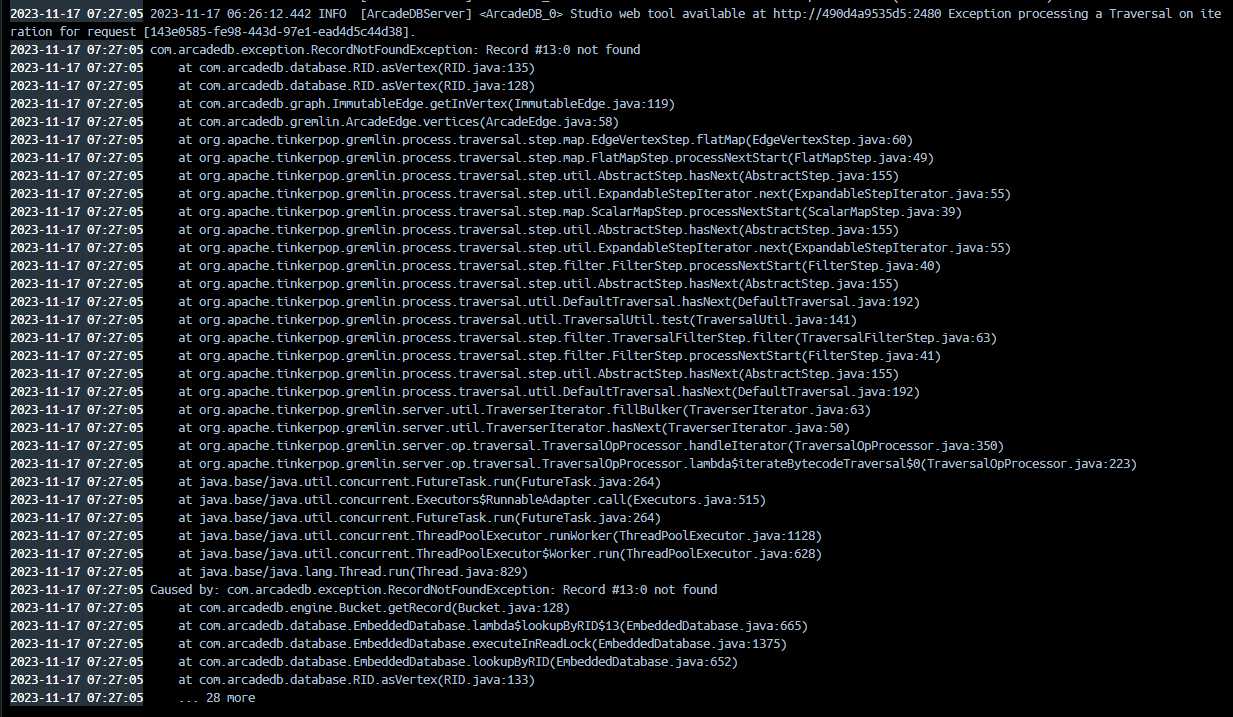
The error is saying record not found and the id of this record is
r5the one the was dropped in the previous call.If I split the query into two queries instead of two
.sideEffectit's also working fine. Maybe it's related to this?lvca commentedon Nov 18, 2023
It's like the vertex was deleted but not the connected edges. I'm going to try with that piece of code using remote gremlin client instead of studio (that execute the whole code server side).
5 remaining items
lvca commentedon May 24, 2024
This issue has been fixed in the latest release.
chore(deps-dev): bump org.codehaus.mojo:versions-maven-plugin from 2.…
chore(deps): bump the github-actions group with 5 updates [skip ci]
chore(deps-dev): bump testcontainers from 12.0.0 to 12.0.1 in /e2e-js…
chore(deps-dev): bump testcontainers from 12.0.0 to 12.0.1 in /e2e-st…
chore(deps-dev): bump org.codehaus.mojo:versions-maven-plugin from 2.…
chore(deps): bump the github-actions group with 5 updates [skip ci]
chore(deps-dev): bump testcontainers from 12.0.0 to 12.0.1 in /e2e-js…
chore(deps-dev): bump testcontainers from 12.0.0 to 12.0.1 in /e2e-st…
build(deps): bump actions/setup-python from 6.3.0 to 7.0.0 [skip ci]