Bootstrap 5 Alerts are flexible components used to display contextual messages such as success, warnings, errors, and general information to users.
Syntax:
<div class="alert alert-type"> Contents of the alert... <div>Types of Bootstrap 5 Alerts
Bootstrap 5 provides eight contextual alert styles:
- .alert-primary: Displays a primary alert message.
- .alert-secondary: Displays a secondary alert message.
- .alert-success: Indicates a successful action or operation.
- .alert-danger: Indicates an error or potentially dangerous action.
- .alert-warning: Displays a warning message.
- .alert-info: Displays general informational content.
- .alert-light: Displays a light-colored alert.
- .alert-dark: Displays a dark-colored alert.
Basic Bootstrap 5 Alerts
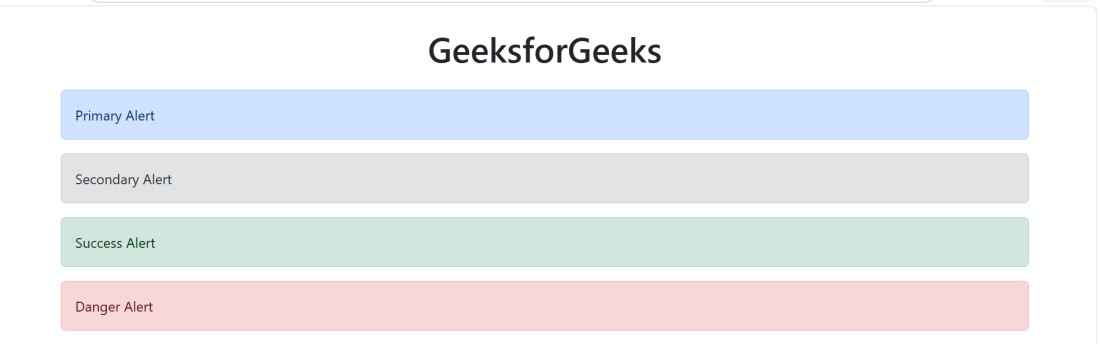
Example: Demonstrates the primary, secondary, success, and danger alert styles.
<!DOCTYPE html>
<html lang="en">
<head>
    <meta charset="UTF-8">
    <meta name="viewport"
          content="width=device-width, initial-scale=1.0">

    <link
        href="https://cdn.jsdelivr.net/npm/bootstrap@5.3.8/dist/css/bootstrap.min.css"
        rel="stylesheet">

    <title>Bootstrap 5 Alerts</title>
</head>

<body>

<div class="container mt-4">
    <h1 class="text-center mb-4">GeeksforGeeks</h1>

    <div class="alert alert-primary" role="alert">
        Primary Alert
    </div>

    <div class="alert alert-secondary" role="alert">
        Secondary Alert
    </div>

    <div class="alert alert-success" role="alert">
        Success Alert
    </div>

    <div class="alert alert-danger" role="alert">
        Danger Alert
    </div>
</div>

</body>
</html>
Output:
Warning, Info, Light and Dark Alerts
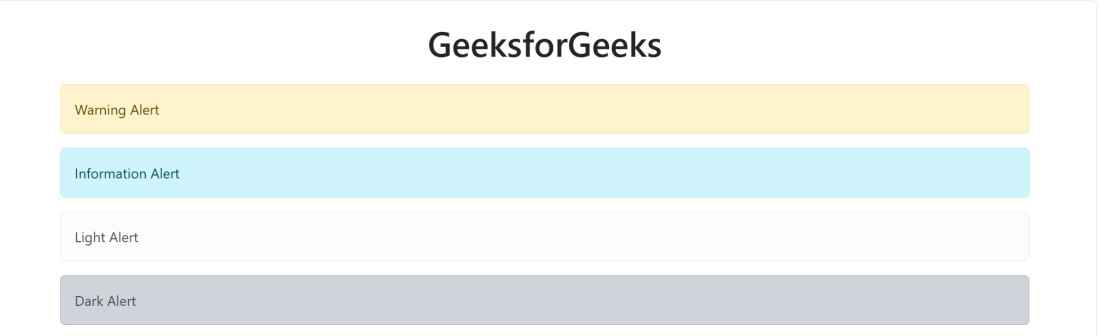
Example: Demonstrates warning, info, light, and dark alert styles.
<!DOCTYPE html>
<html lang="en">
<head>
    <meta charset="UTF-8">
    <meta name="viewport"
          content="width=device-width, initial-scale=1.0">

    <link
        href="https://cdn.jsdelivr.net/npm/bootstrap@5.3.8/dist/css/bootstrap.min.css"
        rel="stylesheet">

    <title>Bootstrap 5 Alerts</title>
</head>

<body>

<div class="container mt-4">
    <h1 class="text-center mb-4">GeeksforGeeks</h1>

    <div class="alert alert-warning" role="alert">
        Warning Alert
    </div>

    <div class="alert alert-info" role="alert">
        Information Alert
    </div>

    <div class="alert alert-light" role="alert">
        Light Alert
    </div>

    <div class="alert alert-dark" role="alert">
        Dark Alert
    </div>
</div>

</body>
</html>
Output: