

Kubernetes is an open-source container orchestration platform used to automate the deployment, scaling, and management of containerized applications. Key capabilities of Kubernetes include:
- Automates application deployment.
- Manages containers across multiple nodes.
- Automatically scales applications based on requirements.
- Provides service discovery and load balancing.
- Restarts failed containers through self-healing mechanisms.
- Helps manage microservices-based applications.
- Supports deployment across cloud, on-premises, and hybrid environments.
Kubernetes was originally developed by Google and is now maintained as an open-source project under the Cloud Native Computing Foundation (CNCF).
Kubernetes Containers
Kubernetes is used to manage containerized applications across a cluster. Containers provide:
- Application portability.
- Process isolation.
- Consistent execution environments.
- Faster application startup.
- Efficient resource utilization.
Kubernetes adds orchestration capabilities on top of containers, such as:
- Load balancing.
- Service discovery.
- Self-healing.
- Horizontal scaling.
- Rolling updates.
Containerization Using Kubernetes
To deploy an application using Kubernetes:
- Build a container image.
- Push the image to a container registry.
- Create Kubernetes resource manifests.
- Deploy the application using
kubectl. - Kubernetes creates and manages the required Pods.
- Expose the application using a Kubernetes Service or Ingress.
A Kubernetes Deployment can be used to maintain multiple replicas of an application.
For example:
apiVersion: apps/v1kind: Deploymentmetadata:name: my-appspec:replicas: 3selector:matchLabels:app: my-apptemplate:metadata:labels:app: my-appspec:containers:- name: my-appimage: my-app:latest
Apply the manifest using:
kubectl apply -f deployment.yamlCheck the deployed Pods:
kubectl get podsKubernetes creates the required Pods and continuously works to maintain the desired number of replicas.
Container Technology
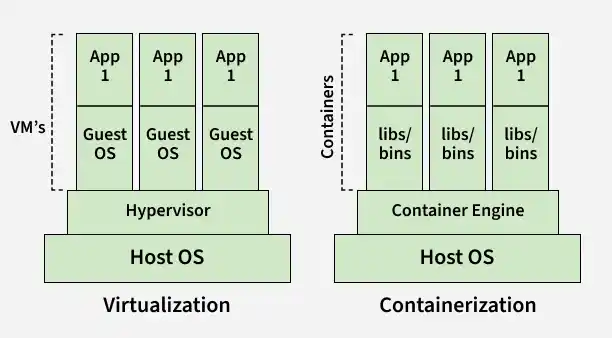
Containerization is a form of OS-based virtualization that creates isolated containers on a shared host operating system.
- Containers share the host OS kernel while remaining isolated from each other.
- They use fewer resources than traditional virtual machines.
- Containers have faster startup times and better resource utilization.
- Unlike VMs, containers do not require a separate guest operating system.
- Containers can run on Linux, Windows, and macOS environments.
- They can run on physical machines, virtual machines, on-premises infrastructure, and cloud platforms.
- Docker is a popular platform for creating and managing containers.
Container Images
- A container image is an executable package that contains an application and all its required dependencies.
- It provides a consistent environment for running applications across different systems.
- Container images are stored in container registries such as Docker Hub, Amazon ECR, and Google Container Registry (GCR).
Container Runtimes
Software components that run and manage containers.
- Provide resource allocation and process isolation.
- Handle starting, stopping, and managing containers.
- Ex: Docker, containerd, CRI-O, and Podman.
- Enable efficient execution and management of containerized applications.
Kubernetes Pods
A Pod is the smallest deployable unit in Kubernetes. It can contain one or more containers that share resources and configuration.
- Pods are ephemeral and can be recreated if they fail.
- A Pod can contain one or more containers.
- Pods can use persistent storage through Persistent Volumes.
- Pods can also use configuration data required by their containers.
- To know more about kubernetes pods refer to Kubernetes – Pods
Architecture of Kubernetes
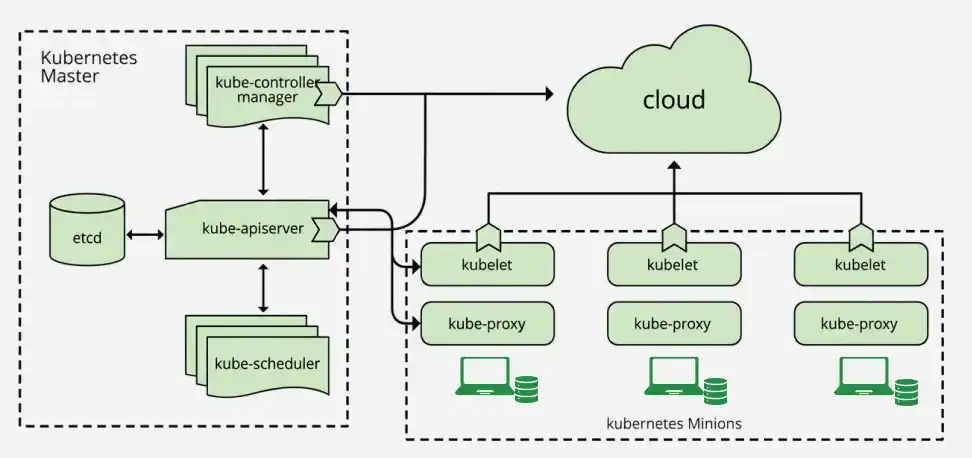
The architecture of Kubernetes includes a master node and one or more worker nodes. The below make in clear understanding of the kubernetes architecture.
Understanding of Master Node
- Kube-apiserver: a frontend of the cluster that allows you to interact with the Kubernetes API and connects to the etcd database.
- Kube-scheduler: schedules pods on specific nodes supported labels, taints, and tolerations set for pods
- etcd: a database, stores all cluster data which includes job scheduling info, pod details, stage information, etc.
- Kube - controller - manager: manages the current state of the cluster
- cloud - controller - manager: interacts with outside cloud manager
Different optional add-ons: DNS, Dashboard, cluster-level resource monitoring, cluster-level logging
Understanding of Worker Node
Worker Nodes run the application workloads in a Kubernetes cluster.
- kubelet: Communicates with the control plane and manages Pods on the node.
- kube-proxy: Handles network communication and routes traffic to the appropriate Pods.
- Container Runtime: Runs and manages containers on the node.
- Network Agent: Provides networking between Pods and other cluster resources.
A Pod is the smallest deployable unit in Kubernetes and can contain one or more containers. The kubelet monitors the Pods and ensures they remain in the desired state.
Installing Kubernetes (Minikube)
Prerequisites
Before starting, make sure the following are installed and running:
- Docker Desktop
- Minikube
- kubectl
Step 1: Check Docker
Verify that Docker is installed:
docker --versionStep 2: Check Minikube
Verify the Minikube installation:
minikube versionIf Minikube is not installed, install it using Homebrew:
brew install minikubeStep 3: Check kubectl
Verify that kubectl is installed:
kubectl version --clientIf kubectl is not installed, run:
brew install kubectlStep 4: Start the Kubernetes Cluster
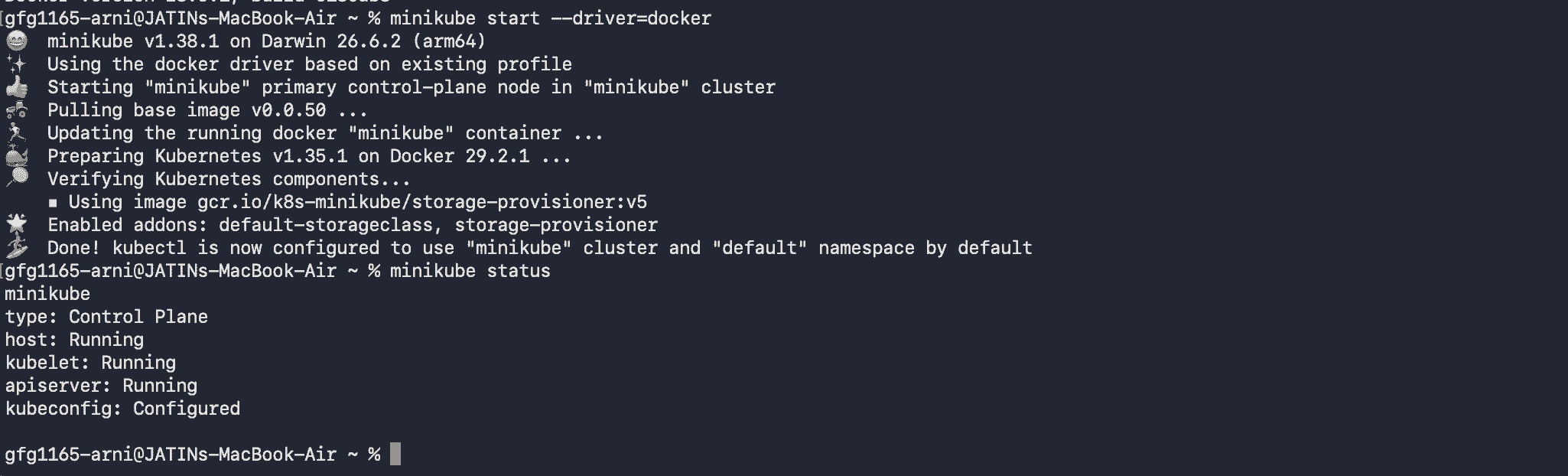
Start Minikube using the Docker driver:
minikube start --driver=dockerCheck the Minikube status:
minikube statusThe output should show that the host, kubelet, and API server are running.
Step 5: Verify the Kubernetes Cluster
Check the Kubernetes nodes:
kubectl get nodesThe Minikube node should have the Ready status.

Step 6: Create an Nginx Pod
Create a Pod using the Nginx container image:
kubectl run nginx --image=nginxCheck the Pod:
kubectl get pods
Step 7: Inspect the Pod
View detailed information about the Pod:
kubectl describe pod nginxLook for the container image:
Image: nginxThis shows that the Nginx container image is being used by the Pod.
Step 8: Check the Container
To view the container name inside the Pod, run:
kubectl get pod nginx -o jsonpath='{.spec.containers[*].name}'
Step 9: Execute a Command Inside the Container
Run the following command to check the Nginx version inside the container:
kubectl exec nginx -- nginx -vThe output will display the installed Nginx version.

Step 10: Expose the Nginx Pod
Create a NodePort Service to expose the Nginx Pod:
kubectl expose pod nginx --type=NodePort --port=80Check the Service:
kubectl get serviceThe output will show the Nginx Service and its assigned NodePort.

Step 11: Access the Nginx Application
Use Minikube to open the exposed Nginx Service:
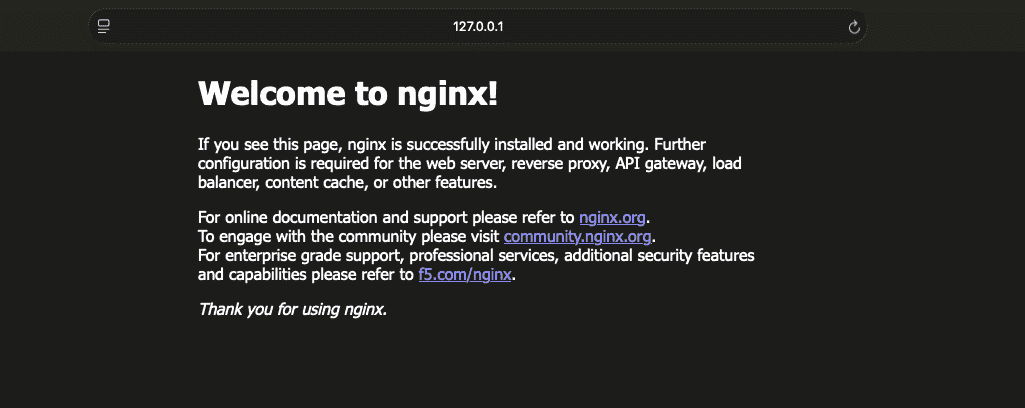
minikube service nginx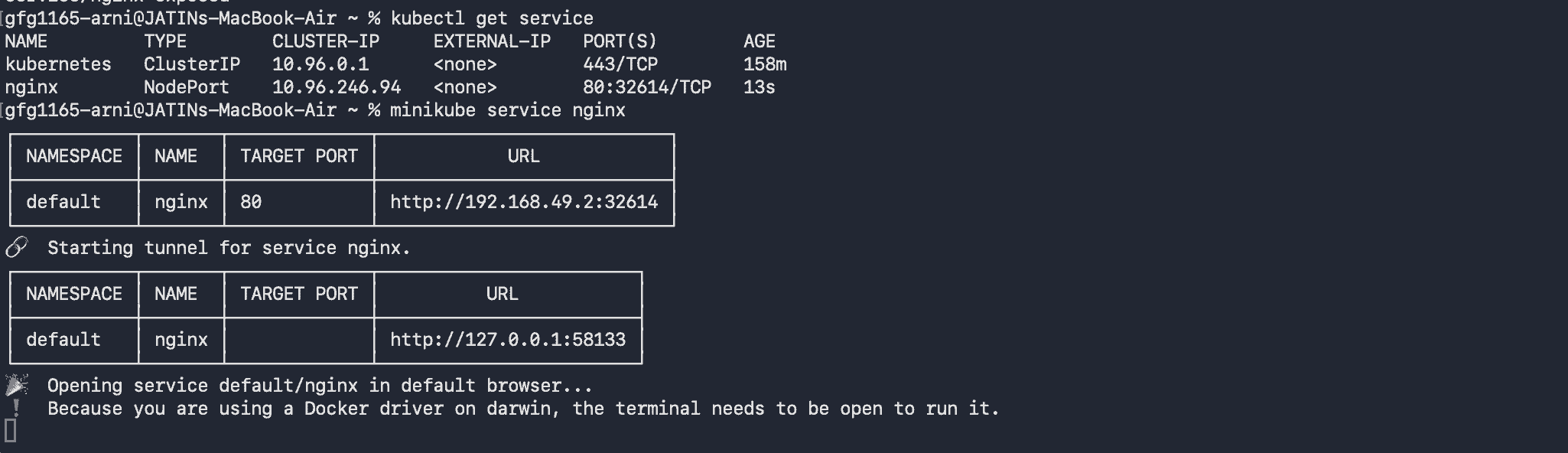
The Nginx welcome page will open in the browser.
Step 12: View Container Logs
To view the logs generated by the Nginx container, run:
kubectl logs nginxStep 13: Delete the Pod
Delete the Nginx Pod:
kubectl delete pod nginx
Verify that the Pod has been deleted:
kubectl get podsBecause the Pod was created directly and is not managed by a Deployment or another controller, Kubernetes does not automatically recreate it.
Step 14: Delete the Service
Delete the Nginx Service:
kubectl delete service nginxVerify that the Service has been removed:
kubectl get servicesStep 15: Stop Minikube
After completing the demonstration, stop the Minikube cluster:
minikube stop
Docker Container vs Kubernetes
The following are the differences between Docker Container and Kubernetes:
| Aspect | Docker Containers | Kubernetes |
|---|---|---|
| Definition | Container management tool for building, running, and managing containers | Container orchestration platform for automating deployment, scaling, and management of containerized applications |
| Purpose | To package applications with their dependencies into containers | To orchestrate and manage containerized applications across a cluster of machines |
| Deployment | Uses Docker CLI or Docker Compose for managing individual containers or multi-container applications | Uses kubectl and manifests (YAML files) for managing containers at scale within clusters |
| Scaling | Manual scaling using Docker CLI commands or Docker Compose | Automated scaling using Kubernetes controllers like Deployments and StatefulSets |
| Networking | Docker networking for linking containers within the same host or network | Advanced networking with built-in service discovery and load balancing |
Kubernetes Ingress vs Kubernetes Services
The following are the differences between kubernetes Ingress and Kubernetes Services:
| Aspect | Kubernetes Ingress | Kubernetes Services |
|---|---|---|
| Definition | Manages external access to services within a cluster | Exposes a set of pods as a network service |
| Purpose | Provides HTTP and HTTPS routing to services based on host and path | Facilitates internal and external connectivity for pods |
| Routing | Supports advanced routing (e.g., URL-based routing, SSL termination) | Basic routing, mainly for internal communication within the cluster |
| Configuration | Requires an Ingress Controller and Ingress resources | Defined using Service resources (ClusterIP, NodePort, LoadBalancer) |
| Load Balancing | Provides application layer (L7) load balancing | Provides network layer (L4) load balancing |
Features
The key features of Kubernetes include:
- Kube-scheduler assigns Pods to suitable nodes based on available resources and policies.
- Supports application scaling and highly available deployments.
- Supports add-ons for networking, service discovery, monitoring, and other requirements.
- New worker nodes can register with the Kubernetes cluster.
- Automatically discovers services and endpoints using DNS or environment variables.
- Persistent Volumes allow applications to retain data across Pod restarts.
- Supports versioned APIs and controlled node maintenance and upgrades.
- Supports health checks, monitoring tools, and logging solutions such as Metrics Server and Prometheus.
- Kubernetes Secrets can store sensitive information and expose it to applications through volumes or environment variables.
Advantages
- Allows for easy scaling of applications by increasing or decreasing the number of replicas of a particular service.
- Provides features such as self-healing and automatic failover, which help ensure that applications remain available even in the event of a node failure.
- Designed to be platform-agnostic, which means that applications can be deployed on any infrastructure, whether it be on-premises, in the cloud, or at the edge.
- Automates many of the tasks associated with deploying and managing applications, such as rolling updates, service discovery, and load balancing.
- Allows for the use of multiple orchestration patterns, such as blue-green deployment, canary releases, and A/B testing, which gives developers more flexibility in how they deploy their applications.
