

Firebase Cloud Storage is a cloud-based storage service for storing and managing files such as images, videos, documents, and other user-generated content. It provides secure file uploads, downloads, and access control for applications.
- Stores files securely in the cloud.
- Provides scalable, secure, and reliable storage for web and mobile applications.
Firebase Cloud Storage Architecture
Firebase Cloud Storage is built on Google Cloud Storage, providing scalable, reliable, and secure storage for files used by Firebase applications. It combines cloud storage with Firebase Authentication and Security Rules for controlled file access.
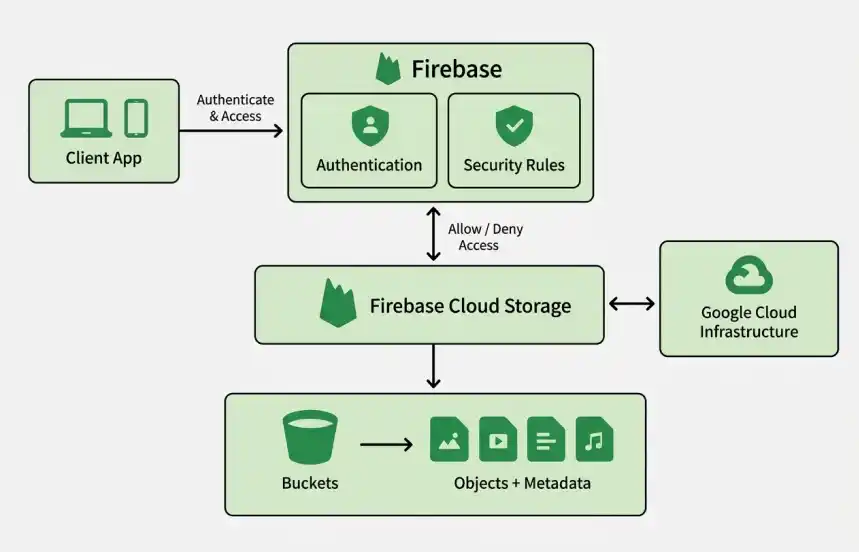
1. Buckets
- Buckets are the main containers where files are stored.
- A Firebase project typically has a default Cloud Storage bucket.
- Buckets can store large amounts of data without requiring manual infrastructure management.
- They can store images, videos, audio, documents, and application-generated files.
2. Objects
- Every uploaded file is stored as an object inside a bucket.
- Objects are identified using a unique name or path.
- Applications can upload, download, update, and delete objects.
- Each object contains the actual file data along with its associated metadata.
3. Metadata
- Metadata describes properties of a stored object, such as its name, size, and content type.
- Helps applications identify whether an object is an image, video, document, or another file type.
- Applications can add additional information based on their requirements.
- Metadata helps applications organize and manage stored objects efficiently.
4. Firebase Authentication
- Authentication identifies users accessing Cloud Storage.
- Supports methods such as email/password, Google, phone authentication, and other providers.
- Security Rules can use the authenticated user's identity to control file access.
- Applications can restrict users to accessing only their own files.
5. Firebase Security Rules
- Rules determine who can access or modify stored files.
- Rules can control file uploads, downloads, updates, and deletions.
- Access can be granted based on a user's authentication status or UID.
- Rules can also consider file paths, types, and sizes.
- Helps prevent unauthorized access to application files.
6. File Upload & Download
- Applications can upload files directly to Cloud Storage using Firebase SDKs.
- Stored files can be retrieved by authorized users or applications.
- Applications can update or delete files when required.
- Cloud Storage is suitable for storing files that are larger than typical database records.
7. File Organization
- Files can be organized using hierarchical paths and naming conventions.
- Applications can create separate paths for individual users.
- Files can be grouped by categories such as images, documents, or videos.
- Consistent paths make it easier for applications to locate and manage files.
8. Scalability & Reliability
- Storage can grow as the application's data requirements increase.
- Google Cloud Storage provides reliable access to stored data.
- Suitable for applications with large numbers of users and files.
- Google handles the underlying storage infrastructure.
9. Google Cloud Storage
- Google Cloud Storage provides the storage infrastructure behind Firebase Cloud Storage.
- Provides durable storage for application data.
- Can integrate with other Google Cloud services when required.
- Firebase provides application-friendly APIs, SDKs, authentication, and security rules on top of the storage service.
Working
Firebase Cloud Storage allows applications to securely upload, store, access, and manage files using Firebase SDKs and APIs.
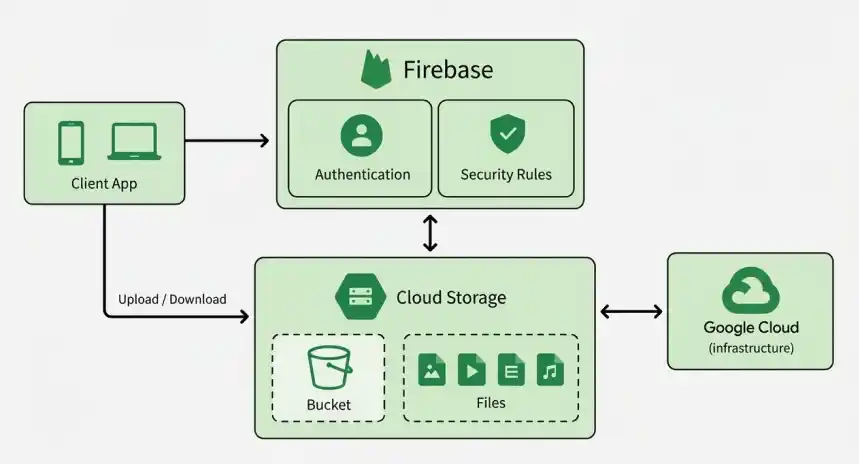
1. Uploading Files
- Applications can upload files directly from web or mobile clients or through server-side code using Firebase SDKs.
- Files are uploaded to a specified Cloud Storage bucket and stored as objects.
- SDKs provide features such as upload progress tracking, pause/resume support, and error handling.
- Applications can also attach metadata to files during or after the upload.
- Firebase Security Rules can control whether a user is allowed to upload a particular file.
2. Downloading Files
- Applications can retrieve stored files using download URLs or Firebase SDK methods.
- Access to files can be restricted using Firebase Security Rules.
- Rules can ensure that only authenticated or authorized users can access specific files.
- Applications can use downloaded files for displaying images, playing videos, serving documents, or other purposes.
3. Managing Files
- Firebase Cloud Storage provides APIs for managing stored objects throughout their lifecycle.
- Applications can list, retrieve, update, and delete files when required.
- Developers can read or modify file metadata, such as content type and custom metadata.
- Files can be organized using paths and naming conventions within buckets.
- File management can be performed from client applications or server-side environments.
4. Security Rules
- Firebase Security Rules determine who can access and modify files stored in Cloud Storage.
- Rules can control operations such as read, write, upload, update, and delete.
- Access decisions can be based on factors such as user authentication, user ID, file path, file type, and file size.
- This allows developers to create user-specific access policies and protect private content.
- Rules are evaluated before allowing a client request to access or modify storage data.
5. Storage Integration
- Firebase Cloud Storage integrates with other Firebase services to support complete application workflows.
- Firebase Authentication can identify users and provide information used by Security Rules.
- Other Google Cloud services can process or interact with stored files when required.
- This allows Cloud Storage to act as the file storage layer for applications that need to handle large amounts of user-generated content.
Comparison with Other Storage Options
| Feature | Firebase Cloud Storage | Amazon S3 | Azure Blob Storage |
|---|---|---|---|
| Provider | Google Firebase / Google Cloud | AWS | Microsoft Azure |
| Storage Model | Object storage | Object storage | Object storage |
| Scalability | Highly scalable | Highly scalable | Highly scalable |
| Firebase Integration | Excellent | Requires additional integration | Requires additional integration |
| Authentication | Firebase Authentication | AWS IAM / Cognito | Azure AD / Entra ID |
| Access Control | Firebase Security Rules | IAM & bucket policies | RBAC & access policies |
| Best Suited For | Firebase-based web & mobile apps | AWS-based applications | Microsoft/Azure-based applications |
| Global Availability | Google Cloud infrastructure | AWS global infrastructure | Azure global infrastructure |
Advantages
- Automatically scales with your application, supporting large volumes of users, user-generated content, and data without manual infrastructure management.
- Provides Firebase Security Rules for access control and integrates with Firebase Authentication to manage user identity. Data is encrypted both in transit and at rest.
- Easily integrates with Firebase services such as Firebase Authentication, Firestore, and Realtime Database, as well as other Google Cloud services.
- Uses Google Cloud's global infrastructure to provide reliable access, high availability, and low-latency performance.
Best Practices
- Use structured folder paths (e.g.,
/users/{uid}/files/). - Restrict access using authentication-based rules.
- Avoid public read/write access in production.
- Use metadata for efficient caching.
- Monitor storage usage regularly.
