

Text based adventure games allow players to explore stories by typing commands instead of clicking buttons. Here, we build a simple game where a player navigates a fictional forest and makes choices that affect the outcome. To understand this, we combine basic game design concepts with Natural Language Processing (NLP) using the SpaCy library.
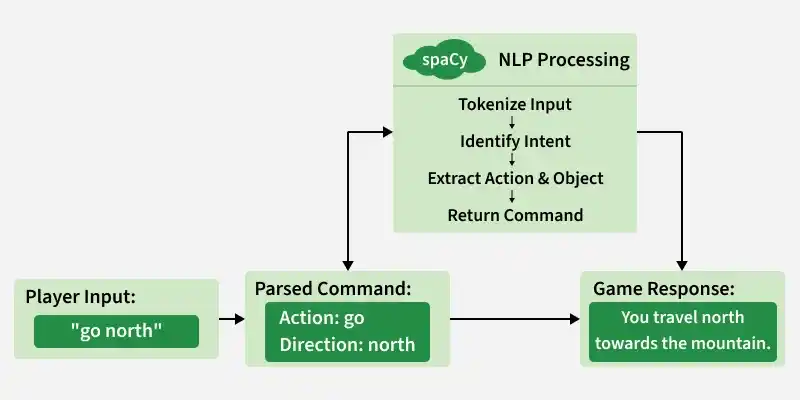
To build this game, we focus on the following main elements:
- Natural Language Processing (NLP): Helps the system understand player commands by detecting actions and important words.
- SpaCy Library: Analyzes the typed text by breaking it into words and identifying verbs and nouns to understand the command.
- Game Design Logic: Creates different paths (north, south, east, west) where player choices decide what happens next.
- Class Based Structure: Uses a Python class to manage the game state, process input and control the flow of the story.
Implementing Text Based Adventure Game with SpaCy
Step 1: Install Required Libraries
Run the following commands in your command prompt
pip install spacy
python -m spacy download en_core_web_sm
Step 2: Setting Up SpaCy
We begin by loading the SpaCy model, which enables natural language understanding. This allows us to:
- Tokenize user input
- Identify verbs and nouns
- Perform lemmatization (convert verbs to base form)
- Use dependency parsing for better intent detection
import spacy
nlp = spacy.load("en_core_web_sm")
Step 3: Designing the Game World
We create a class Game that will contain all the game logic. The constructor initializes the starting state and loads the SpaCy model.
class Game:
    def __init__(self):
        self.state = "start"
        self.nlp = spacy.load("en_core_web_sm")
Step 4: Parsing User Input
We define a method to process player input. This method checks if important keywords are present and returns the base form of the word.
    def parse_input(self, input_text):
        doc = self.nlp(input_text.lower())

        keywords = [
            'north', 'east', 'west', 'south',
            'inspect', 'ignore',
            'explore', 'avoid',
            'swim', 'build',
            'enter', 'move'
        ]

        for token in doc:
            if token.lemma_ in keywords:
                return token.lemma_

        return None
Step 5: Starting the Game
The start method introduces the story and asks the player to choose a direction.
    def start(self):
        print("You are an adventurer searching for a legendary treasure hidden in an ancient forest.")
        print("You stand at the forest entrance with paths leading north, east, west, and south.")

        choice = self.parse_input(input("Which way do you go? ").strip())

        if choice == 'north':
            self.north_path()
        elif choice == 'east':
            self.east_path()
        elif choice == 'west':
            self.west_path()
        elif choice == 'south':
            self.south_path()
        else:
            print("Invalid choice. Try again.")
            self.start()
Step 6: Handling Each Path
Each direction has its own method. These methods present a scenario and determine the outcome.
North path
    def north_path(self):
        print("You walk north and encounter a giant ancient oak tree.")
        print("Do you inspect it or ignore it?")

        choice = self.parse_input(input("Type inspect or ignore: ").strip())

        if choice == 'inspect':
            print("You discover a magical fruit that gives you strength!")
            self.end_game("win")
        elif choice == 'ignore':
            print("A cursed spirit appears and chases you away.")
            self.end_game("lose")
        else:
            print("Invalid choice. Try again.")
            self.north_path()
East path
    def east_path(self):
        print("You head east and find an abandoned village.")
        print("Do you explore it or avoid it?")

        choice = self.parse_input(input("Type explore or avoid: ").strip())

        if choice == 'explore':
            print("You fall into a hidden trap.")
            self.end_game("lose")
        elif choice == 'avoid':
            print("A villager guides you safely through the forest.")
            self.end_game("win")
        else:
            print("Invalid choice. Try again.")
            self.east_path()
West path
    def west_path(self):
        print("You reach a raging river.")
        print("Do you swim across or build a raft?")

        choice = self.parse_input(input("Type swim or build: ").strip())

        if choice == 'swim':
            print("The current is too strong. You drown.")
            self.end_game("lose")
        elif choice == 'build':
            print("You build a raft and cross safely.")
            self.end_game("win")
        else:
            print("Invalid choice. Try again.")
            self.west_path()
South Path
    def south_path(self):
        print("You find the entrance to a dark cave.")
        print("Do you enter or move on?")

        choice = self.parse_input(input("Type enter or move: ").strip())

        if choice == 'enter':
            print("You find the legendary treasure!")
            self.end_game("win")
        elif choice == 'move':
            print("You decide to leave and abandon your quest.")
            self.end_game("lose")
        else:
            print("Invalid choice. Try again.")
            self.south_path()
Step 7: Ending the Game
After the outcome, the game displays a result and asks if the player wants to play again.
    def end_game(self, result):
        if result == "win":
            print("Congratulations! You completed your quest successfully!")
        else:
            print("Game Over. Better luck next time.")

        self.play_again()

    def play_again(self):
        choice = input("Do you want to play again? (yes/no): ").strip().lower()

        if choice == "yes":
            self.start()
        else:
            print("Thank you for playing!")
Step 8: Running the Game
Create an object of the Gameclass and start it.
game = Game()
game.start()
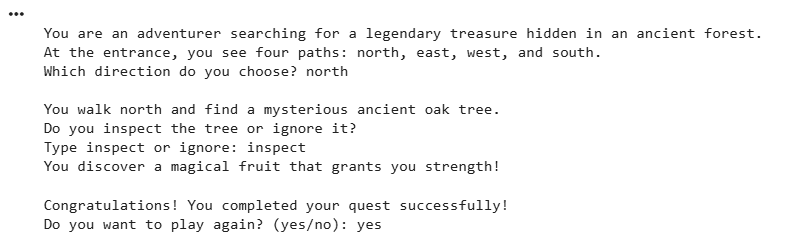
Output:
Download the full code from here
