

Haystack is an open source Python framework for building flexible search systems and question answering pipelines. It combines modern NLP models with traditional and neural retrieval methods to help you find precise answers in large collections of unstructured text. Developed by deepset, Haystack makes it easy to create semantic search engines, chatbots and virtual assistants using state of the art transformers.
Table of Content
Key Features
- Modular Pipeline Architecture: Haystack is designed around pipelines made of modular nodes. This allows you to build flexible, reusable search or QA workflows that can be easily customized for different tasks.
- Neural and Keyword Retrieval: Supports both sparse retrieval and dense retrieval. You can combine both methods to balance speed and relevance.
- State of the Art Readers: Includes pre trained transformer models to extract exact answers from text. Readers can perform extractive QA by pinpointing the most relevant span within documents.
- Flexible Document Stores: Haystack supports various backends for storing and indexing documents such as Elasticsearch, OpenSearch, FAISS, Milvus and even simple in memory stores for small projects.
- Scalability and Performance: Handles large scale document collections with support for sharding, distributed retrieval and scalable vector databases. You can use GPUs to accelerate inference with deep models.
How to Install Haystack?
Step 1: Install Haystack Library
pip install farm-haystack
Step 2: Check Installation
from haystack.document_stores import InMemoryDocumentStore

document_store = InMemoryDocumentStore()
print("Haystack installed and working!")
Output:
Haystack installed and working!
How does it Work
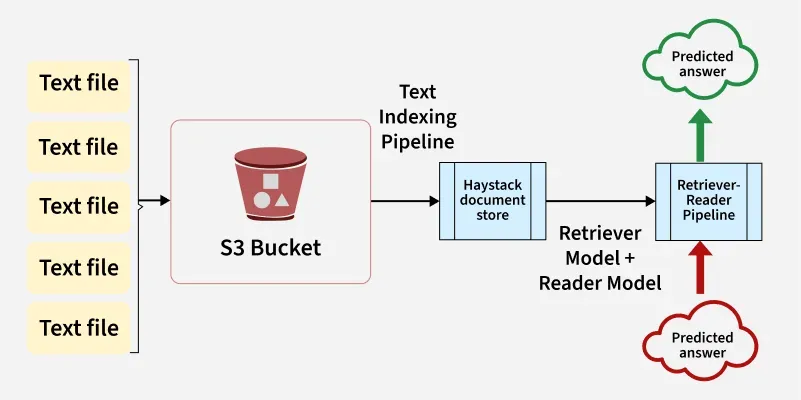
- Haystack works by combining traditional search techniques with modern NLP to find precise answers in large amounts of text.
- Firstly it stores all your documents in a backend like Elasticsearch or FAISS. When you ask a question a Retriever quickly filters out the most relevant documents using keyword or semantic search.
- Then a Reader usually a transformer model like BERT scans these documents and extracts the exact answer span or generates a natural response.
- All of this happens through a flexible Pipeline that connects these components and returns the final answer to the user often through a simple API.
- This smart combination makes search faster, more accurate and context aware compared to basic keyword search alone.
Modules
We have listed some of the most commonly used modules of Haystack:
| Module | Description | Example |
|---|---|---|
| DocumentStore | Stores your text data and indexes it for retrieval. Supports Elasticsearch, FAISS, Milvus, InMemory etc. | ElasticsearchDocumentStore, FAISSDocumentStore |
| Retriever | Quickly filters relevant documents from the entire store. Supports keyword and dense retrieval. | BM25Retriever, DensePassageRetriever |
| Reader | Uses transformer models to extract the exact answer span from retrieved docs. | FARMReader, TransformersReader |
| Generator | Generates free form answers instead of extracting spans. Useful for generative QA. | RAGenerator, OpenAIAnswerGenerator |
| Ranker | Re orders retrieved documents to improve answer relevance. | SentenceTransformersRanker |
| Pipelines | Orchestrates retrievers, readers and other nodes into a complete workflow. | ExtractiveQAPipeline, GenerativeQAPipeline |
| PreProcessor | Cleans and splits large documents into smaller passages for better indexing and retrieval. | PreProcessor |
| Evaluation | Tools for benchmarking retrievers and readers with metrics like precision and recall. | EvalDocuments, EvalAnswers |
Some Examples
1. Setting up the environment and API Keys
- This snippet sets up environment variables for API keys needed to authenticate requests to OpenAI and Tavily services.
- By storing keys in environment variables like OPENAI_API_KEY and TAVILY_API_KEY the code keeps sensitive information secure and accessible to other parts of the application that require these credentials.
import os
from typing import List, Any, Dict
import requests

os.environ["OPENAI_API_KEY"] = "sk-..."
os.environ["TAVILY_API_KEY"] = "tvly-..."
2. Preparing the knowledge base
- This code creates a list of Document objects from the Haystack library, each containing a short fact about Mars.
- These documents can be used as input data for search, indexing or retrieval pipelines such as the one you set up earlier for embedding and storing knowledge about Mars exploration.
from haystack.dataclasses import Document

docs: List[Document] = [
    Document(content="Mars is the fourth planet from the Sun and is known as the Red Planet."),
    Document(content="NASA's Perseverance rover landed on Mars in February 2021 to search for signs of ancient life."),
    Document(content="Mars has two moons named Phobos and Deimos."),
    Document(content="The atmosphere on Mars is mostly carbon dioxide with very low pressure compared to Earth."),
    Document(content="Several missions, including rovers and orbiters, have been sent to study Mars since the 1960s."),
]
3. Building the document store pipeline
- This code sets up a Haystack pipeline to index documents with embeddings. It creates an in memory document store that uses cosine similarity for embedding comparisons.
- The pipeline has two components: an OpenAI based embedder that generates vector embeddings for documents and a writer that saves these embedded documents into the document store.
- Finally it runs the pipeline to embed and store the provided documents (docs) for later retrieval or search.
from haystack.document_stores.in_memory import InMemoryDocumentStore
from haystack.components.embedders import OpenAIDocumentEmbedder
from haystack.components.writers import DocumentWriter
from haystack import Pipeline

document_store = InMemoryDocumentStore(embedding_similarity_function="cosine")

indexing_pipeline = Pipeline()
indexing_pipeline.add_component("embedder", OpenAIDocumentEmbedder(model="text-embedding-3-small"))
indexing_pipeline.add_component("writer", DocumentWriter(document_store=document_store))
indexing_pipeline.connect("embedder", "writer")

indexing_pipeline.run({"embedder": {"documents": docs}})
4. Creating the RAG Tool
- This code defines a RagSearcher class for semantic search using embeddings. It initializes an OpenAI text embedder to convert input text into vector embeddings and an in memory retriever that searches a document store for the top k most similar documents based on those embeddings.
- The run method generates an embedding for the input query and retrieves relevant documents. Finally it wraps this in a ComponentTool named "rag_search" for easy use designed here for searching a Mars exploration knowledge base.
class RagSearcher:
    def __init__(self, document_store, top_k: int = 3):
        self.text_embedder = OpenAITextEmbedder(model="text-embedding-3-small")
        self.retriever = InMemoryEmbeddingRetriever(document_store=document_store, top_k=top_k)

    @component.output_types(documents=List[Document])
    def run(self, text: str) -> Dict[str, Any]:
        emb_out = self.text_embedder.run(text=text)
        docs_out = self.retriever.run(query_embedding=emb_out["embedding"])
        return {"documents": docs_out["documents"]}

rag_tool = ComponentTool(
    component=RagSearcher(document_store),
    name="rag_search",
    description="Semantic search over the Mars exploration knowledge base."
)
5. Creating a Web Search Tool
- This code defines a class TavilyWebSearch that performs live web searches using the Tavily API. The run method sends a search query and retrieves up to top_k results including a direct answer if available.
- It wraps the response into Document objects with metadata for use in downstream applications. Finally it creates a ComponentTool named "web_search" for easy integration with other tools or frameworks.
class TavilyWebSearch:
    def __init__(self, api_key: str, top_k: int = 3):
        self.api_key = api_key
        self.top_k = top_k

    def run(self, query: str):
        resp = requests.post(
            "https://api.tavily.com/search",
            json={
                "api_key": self.api_key,
                "query": query,
                "max_results": self.top_k,
                "include_answer": True,
            },
            timeout=15,
        )
        resp.raise_for_status()
        data = resp.json()

        docs: List[Document] = []
        if answer := data.get("answer"):
            docs.append(Document(content=answer, meta={"source": "tavily:direct_answer"}))

        for hit in data.get("results", []):
            docs.append(
                Document(
                    content=hit["content"],
                    meta={"title": hit["title"], "url": hit["url"]},
                )
            )
        return {"documents": docs}

web_tool = ComponentTool(
    component=TavilyWebSearch(api_key=os.environ["TAVILY_API_KEY"], top_k=3),
    name="web_search",
    description="Live web search via Tavily.",
)
Applications
- Enterprise Search Engines: Use Haystack to build smart internal search systems that help employees find relevant information from huge collections of documents, knowledge bases, reports or company wikis going beyond simple keyword matching by understanding meaning and context.
- Question Answering Systems: Develop systems that answer natural language questions directly from unstructured text sources like FAQs, manuals or policy documents.
- Chatbots and Virtual Assistants: Integrate Haystack pipelines into chatbots to provide more accurate and context aware responses by retrieving and reading relevant passages from a large database of support articles or guides.
- Semantic Search Engines: Improve website or application search functionality by enabling semantic search so users can find relevant results even if they use different words than the original text.
Advantages
- Modular and Flexible Architecture: Haystack is designed as a collection of interchangeable components like retrievers, readers and rankers. This modularity allows developers to customize the pipeline to suit specific needs whether it's a simple keyword search or a complex multi stage neural search system.
- State of the Art NLP Models Integration: Haystack seamlessly integrates transformer-based models for tasks such as extractive question answering and dense vector embeddings. This leads to significantly improved search relevance and the ability to understand semantic meanings rather than just keyword matching.
- Support for Multiple Retrieval Techniques: It supports both traditional sparse retrieval methods through Elasticsearch and modern dense vector retrieval methods using embeddings. This flexibility helps users choose the best approach based on their data size, latency requirements and hardware constraints.
- Scalability and Production Readiness: Haystack supports scalable document stores like Elasticsearch, FAISS and Milvus which can handle millions of documents efficiently. Its design also supports distributed deployment, enabling use in real world enterprise scenarios.
Disadvantages
- Steep Learning Curve: To fully leverage Haystack, users need to understand NLP concepts like transformers, embeddings and retrieval methods. Setting up and tuning the pipeline requires some expertise compared to simpler keyword based search tools.
- Resource Intensive: Transformer models, especially for reading and dense retrieval require significant computational resources, including GPUs for real time performance. This can be costly and may pose challenges for smaller organizations or projects with limited hardware.
- Setup and Infrastructure Overhead: Integrating and maintaining components involves additional infrastructure setup, monitoring and maintenance. Users unfamiliar with these systems might face initial hurdles during deployment.
