

The DAX WINDOW function retrieves rows within a specified range relative to a current row or a partition's boundaries. It can be used to calculate moving totals, moving averages and other measures across ordered rows.
Dataset
The following example uses the Fact Internet Sales sample dataset, which contains sales data for online transactions.
.png)
DAX WINDOW Function
The WINDOW function returns a table containing rows within a specified range of a relation or partition.
Syntax:
WINDOW ( from[, from_type], to[, to_type][, <relation> or <axis>][, <orderBy>][, <blanks>][, <partitionBy>][, <matchBy>][, <reset>] )
Parameters
1. from: Indicates where the window starts. Its behavior depends on from_type:
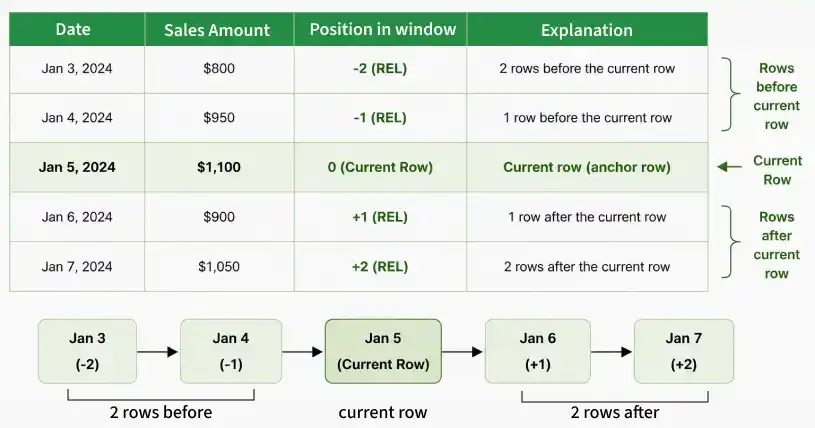
- REL, negative values move backward and positive values move forward from the current row.
- ABS, Positive values specify the position from the beginning of the partition (1-based; 0 is treated as 1), while negative values specify the position from the end (-1 is the last row).
2. from_type: Changes how the from parameter behaves. ABS (absolute) and REL are two possible values (relative). REL is the default.
3. to: Specifies the ending position of the window. The row at this position is included.
4. to_type: Specifies how the to parameter is interpreted. It accepts REL or ABS, with REL as the default.
5. relation: An optional table expression from which rows are retrieved. All columns used in orderBy and partitionBy must come from this relation. If omitted:
- orderBy must be specified explicitly.
- The orderBy and partitionBy columns must come from the same table.
- The default relation is based on ALLSELECTED() applied to the columns specified in orderBy and partitionBy.
6. orderBy: An optional ORDERBY() clause specifying how rows are sorted within each partition. If omitted:
- relation must be specified explicitly.
- All columns in relation not already included in partitionBy are used for ordering by default.
7. blanks: Blank handling specified within an individual ORDERBY() expression takes precedence over the blanks setting in WINDOW.
8. partitionBy: An optional PARTITIONBY() clause specifying the columns used to divide the relation into partitions. If omitted, the relation is treated as a single partition.
9. matchBy: An optional MATCHBY() clause specifying the columns used to identify the current row. It helps distinguish rows when the columns used for ordering do not uniquely identify them.
10. reset: An optional parameter available only in visual calculations that specifies whether and at which level of the visual hierarchy the calculation resets.
- It accepts NONE (default), HIGHESTPARENT, LOWESTPARENT, a column reference or an integer.
- Positive integers count from the highest level, while negative integers count relative to the current level.
- When reset is used, orderBy and partitionBy cannot be specified.
Example:
Moving 5-Row Sales =
SUMX(
WINDOW(
-2, REL,
2, REL,
ALLSELECTED(DimDate[Date]),
ORDERBY(DimDate[Date], ASC)
),
CALCULATE(SUM(FactInternetSales[SalesAmount]))
)
The window includes up to five rows: two preceding rows, the current row and two following rows. SUMX calculates the total sales across these rows.
Behavior & Limitations
- Identifying the Current Row: WINDOW uses matching outer values to identify the current row. Without MATCHBY(), it uses the columns in orderBy and partitionBy for matching. With MATCHBY(), the MATCHBY() and PARTITIONBY() columns identify the current row.
- Unique Row Identification: If the specified ordering columns do not uniquely identify each row and MATCHBY() is omitted, WINDOW attempts to add the minimum number of columns needed. If it cannot identify rows uniquely, an error is returned.
- Empty Table: WINDOW returns an empty table if a required matching value is absent from the relation, the window falls entirely outside the partition or the starting position is after the ending position.
- Absolute Positions: When both from_type and to_type are ABS, missing outer values for relevant columns can cause WINDOW to evaluate multiple combinations of values. Multiple corresponding outer columns can cause an error.
- Calculated Columns: If WINDOW is used in a calculated column on the same table as the relation and orderBy is omitted, an error is returned.
- Window Boundaries: A starting position before the first row is adjusted to the first row. An ending position beyond the last row is adjusted to the last row.
