

Power BI uses fact tables to store main transactional or measurable data and dimension tables to provide descriptive context for that data. They are connected through common key columns to support analysis and reporting.
Fact tables and dimension tables are also commonly referred to as data tables and lookup tables, respectively.
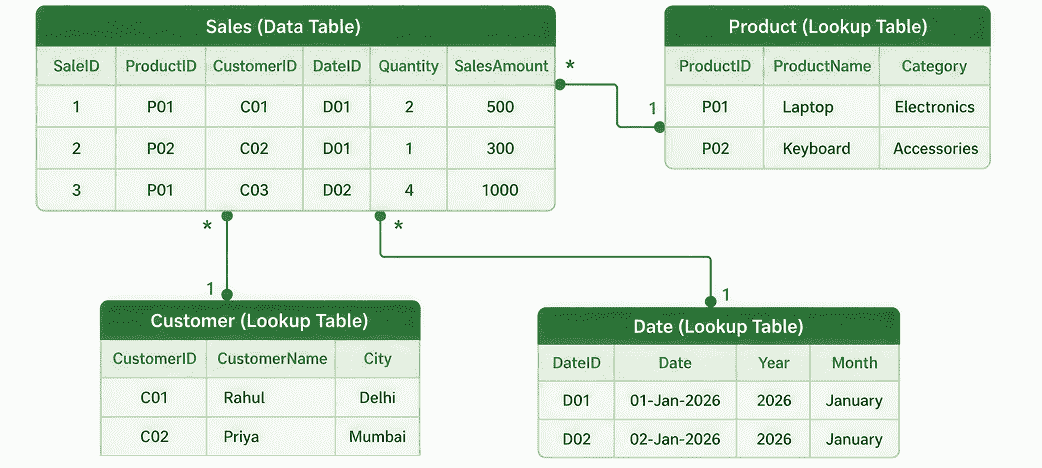
Fact Tables
Fact tables store detailed records of business transactions, events or measurements used for analysis in Power BI. They typically contain measurable values along with key columns that connect them to related dimension tables.
For example, a Sales fact table may contain SaleID, ProductID, Quantity, SalesAmount and other transaction-related fields.
Characteristics
- Detailed records: Usually contain individual transactions, events or observations.
- Measurable values: Often include values such as quantity, sales, cost, profit or salary.
- Key columns: May contain IDs that connect records to dimension tables.
- Large volume: Generally contain more rows because each transaction or event can form a separate record.
- Calculations: Provide the values used in aggregations, measures and other DAX calculations.
Dimension Tables
Dimension tables store descriptive information about the entities represented in a fact table. They commonly contain attributes such as product names, customer details, categories, locations or dates.
A dimension table can contain both text and numeric attributes. For example, a Product dimension table may contain ProductID, ProductName, Category and Price.
Characteristics
- Descriptive attributes: Provide additional information about products, customers, dates, locations or other entities.
- Unique keys: Typically contain a key that uniquely identifies each entity.
- Fewer rows: Usually contain fewer rows than the related fact table because each entity is generally represented once.
- Filtering and grouping: Their attributes can be used to filter, categorize and group data in reports.
- Reusable information: A dimension table can provide context for analyzing one or more related fact tables.
Example: Creating & Connecting Tables
Fact and dimension tables can be imported or created in Power BI using different methods. The important step for this article is to establish relationships between them using their common key columns.
1. Import or Create Tables
Power BI allows you to:
- Import data from different sources such as Excel, CSV, databases and other supported sources using Home > Get Data.
- Create tables using options such as Enter Data or DAX.
- Transform and prepare data using Power Query before loading it into the model.

2. Create a Relationship
Once the fact and dimension tables are available, open Model view to connect them.
For example: Product[ProductID] : Sales[ProductID]
Here, ProductID uniquely identifies products in the Product dimension and is used in the Sales fact table to identify the product associated with each transaction.
A common relationship between a dimension table and a fact table is one-to-many (1:*):
- 1 : Dimension table
- * : Fact table
For example, one product can appear in multiple sales records.
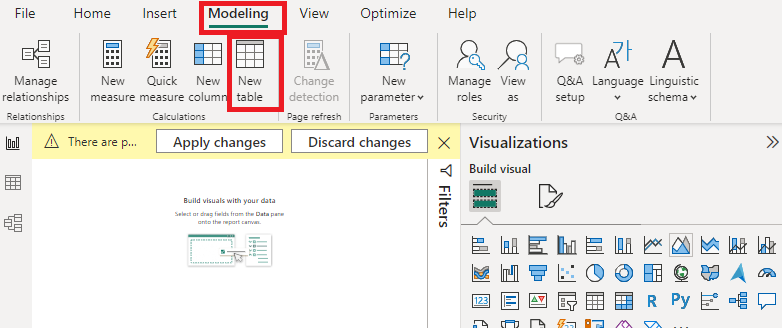
You can create the relationship by dragging the matching field from one table to the corresponding field in the other table or through Modeling > Manage relationships.
3. Verify the Relationship
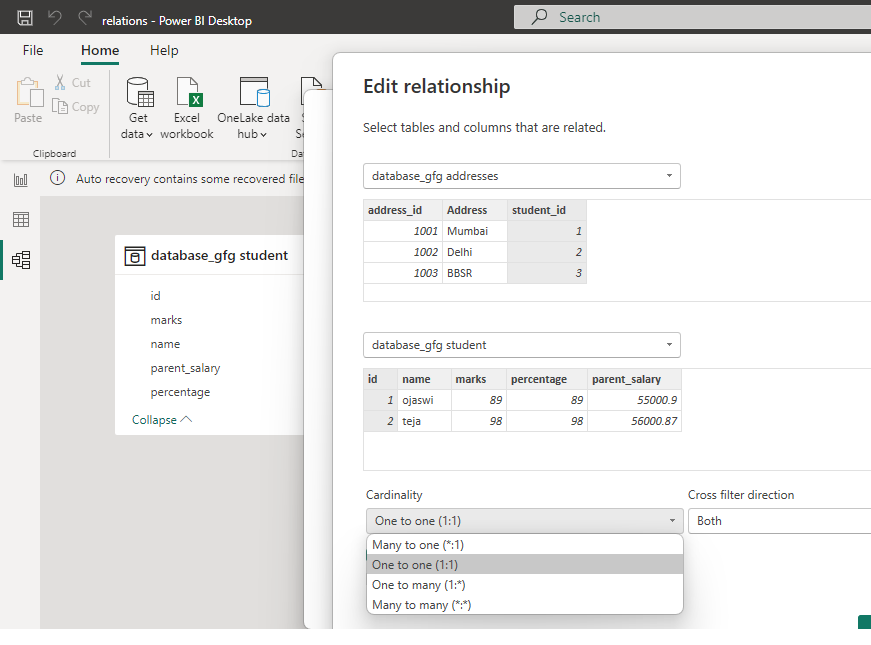
After creating the relationship, check its:
- Cardinality, such as One-to-many (1:*).
- Cross-filter direction, which is typically Single for a standard dimension-to-fact relationship.
- Key columns, ensuring that the dimension-side key uniquely identifies each entity.
The resulting relationship allows fields from the dimension table to filter and group the data in the related fact table.
Other Table Operations
Power BI also provides features for formatting tables, adding or modifying columns, applying filters and sorting, using DAX and publishing reports. These are separate Power BI topics and can be explored in their respective articles.
Benefits
1. Better Data Organization: Separating transactional data from descriptive information creates a structured and easier-to-understand data model.
2. Easier Filtering and Grouping: Dimension attributes can be used to filter and group the data stored in fact tables.
For example, sales can be analyzed by:
- Product category
- Customer city
- Sales region
- Month or year
3. Reduced Data Repetition: Descriptive information can be maintained in dimension tables instead of being repeatedly stored with every transaction. For example, the Sales fact table can store only ProductID, while product name and category are maintained in the Product dimension table.
- More Flexible Analysis: The same fact table can be analyzed from different perspectives using related dimensions such as product, customer, location or time.
- Easier Data Modeling: Separating facts and dimensions makes relationships and the overall structure of a Power BI data model easier to understand and maintain.
Fact Tables vs. Dimension Tables
| Feature | Fact Tables | Dimension Tables |
|---|---|---|
| Purpose | Store transactions, events and measurable values | Store descriptive information |
| Examples | Sales orders, Transactions | Product, Customer, Date |
| Rows | Usually represent individual transactions | Usually represent individual entities |
| Key Columns | Usually contain foreign keys | Usually contain unique keys |
| Values | Often contain numeric measurements | Can contain text and numeric attributes |
| Used For | Calculations and aggregation | Filtering and grouping |
| Relationship | Usually on the many side | Usually on the one side |
| Role | Main data being analyzed | Provides context for analysis |
