

JSON (JavaScript Object Notation) is a widely-used, lightweight data format for representing structured data.
- Used Extensively : Used in APIs, configuration files, and data exchange between servers and clients.
- Text-based: JSON is a simple text format, making it lightweight and easy to transmit.
- Human-readable: It uses key-value pairs, making the structure easy to understand.
- Language-independent: While it is derived from JavaScript, JSON is supported by many programming languages including Python, Java, PHP, and more.
- Supported Data structures: Represents data as objects, arrays, strings, numbers, booleans, and null.
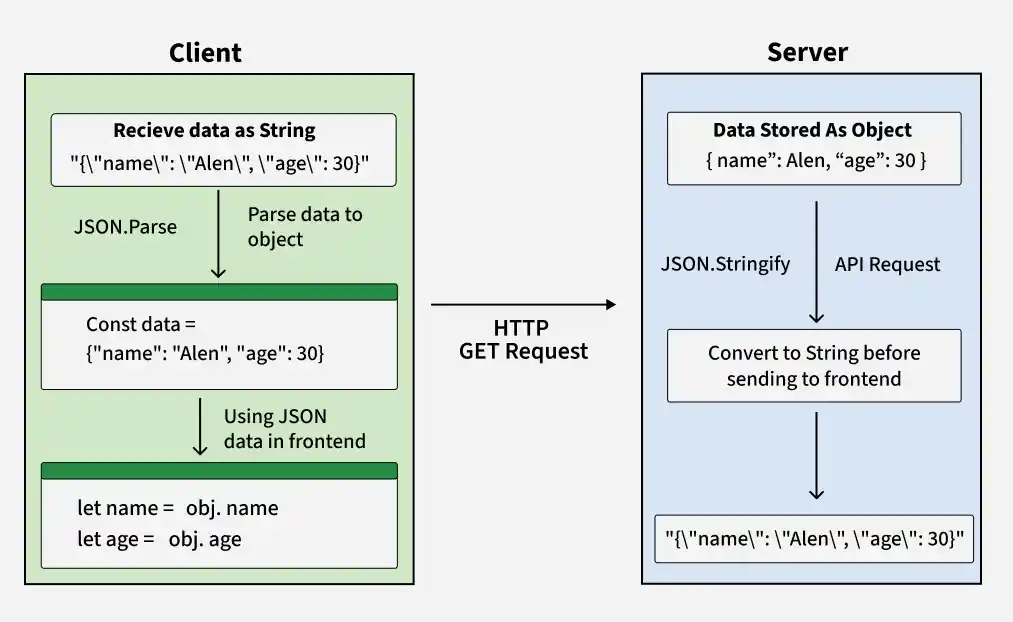
JSON Data Flow: From Server to Client
JSON vs XML
When it comes to data formats, JSON and XML are the two most common choices. JSON is generally preferred for web applications due to its smaller size, ease of use, and better performance. Here's a quick comparison:
Working of JSON Data Flow in Web Applications
JSON enables data exchange between the client (frontend) and server in a web application. It allows different technologies to communicate using a common data format.
- Server Side: Data is converted into a JSON string and sent to the client through an API response.
- Client Side: The received JSON data is parsed into a native object, allowing the application to access and use individual values.
Example JSON String Received from Server
{"name":"Alen", "age":30}This JSON data contains:
- name: "Alen"
- age: 30
JSON Structure
The basic structure of JSON consists of two primary components:
- Objects: These are enclosed in curly braces {} and contain key-value pairs.
- Arrays: Arrays are ordered lists enclosed in square brackets [].
Parsing JSON in Different Programming Languages
Although the JSON data is the same, each language uses its own method or library to parse it.
#include <iostream>
#include <string>
#include <nlohmann/json.hpp>
using namespace std;

using json = nlohmann::json;

int main() {
    string json_s = R"({"name": "Alen", "age": 30})";
    json obj = json::parse(json_s);
    string name = obj["name"];
    int age = obj["age"];
    cout << "Name: " << name << ", Age: " << age << endl;
    return 0;
}
#include <stdio.h>
#include <stdlib.h>
#include <jansson.h>

int main() {
    const char *json_s = "{\"name\": \"Alen\", \"age\": 30}";
    json_error_t error;
    json_t *root = json_loads(json_s, 0, &error);
    if (!root) {
        fprintf(stderr, "Error: on line %d: %s\n", error.line, error.text);
        return 1;
    }
    const char *name = json_string(json_object_get(root, "name"));
    int age = json_integer_value(json_object_get(root, "age"));
    printf("Name: %s, Age: %d\n", name, age);
    json_decref(root);
    return 0;
}
import org.json.JSONObject;

public class Main {
    public static void main(String[] args) {
        String json_s = "{\"name\": \"Alen\", \"age\": 30}";
        JSONObject obj = new JSONObject(json_s);
        String name = obj.getString("name");
        int age = obj.getInt("age");
        System.out.println("Name: " + name + ", Age: " + age);
    }
}
import json

json_s = '{"name": "Alen", "age": 30}'

obj = json.loads(json_s)
name = obj["name"]
age = obj["age"]

print(f"Name: {name}, Age: {age}")
using System;
using Newtonsoft.Json;

public class Program {
    public static void Main() {
        string json_s = "{\"name\": \"Alen\", \"age\": 30}";
        dynamic obj = JsonConvert.DeserializeObject(json_s);
        string name = obj.name;
        int age = obj.age;
        Console.WriteLine("Name: " + name + ", Age: " + age);
    }
}
const json_s = '{"name": "Alen", "age": 30}';

const obj = JSON.parse(json_s);
const name = obj.name;
const age = obj.age;

console.log(`Name: ${name}, Age: ${age}`);
Fundamentals
Methods and Operations
- JSON parse()
- JSON stringify()
- Convert Map to JSON in JavaScript
- Convert JSON Object to CSV in JavaScript
- Convert Blob Data to JSON in JavaScript
- Convert Excel to JSON in JavaScript
JSON API Integration
- Working with JSON in Fetch API
- Create A REST API With JSON Server
Tools and Setup
JSON in Programming Languages
- JSON with Python
- Working With JSON Data in Python
- Read, Write and Parse JSON using Python
- Working with JSON Data in Java
- Read and Write JSON Files in Java
- Parse JSON in Java
- What is JSON-Java (org.json)?
JSON Formats and Comparisons
Advanced Concept
Reference and Interview Preparation
Applications of JSON
- APIs: JSON is the most commonly used format for API responses due to its lightweight nature.
- Configuration Files: Many software systems use JSON files for storing configuration data.
- Databases: Some NoSQL databases, like MongoDB, store data in JSON-like formats.
- Data Transfer: JSON is widely used for transferring data between servers and clients, especially in web development.
