

Test Automation Best Practices are a set of guidelines that help teams create reliable, maintainable, and efficient automated test suites. Following these practices improves software quality, reduces maintenance efforts, and accelerates software delivery.
- Design stable, reusable, and maintainable test scripts.
- Automate repetitive and high-value testing activities.
- Continuously improve automation processes as applications evolve.
Why Test Automation Best Practices Are Important
Following proper automation practices helps teams build effective automation solutions that improve testing efficiency and software reliability.
- Improves test accuracy by creating stable and consistent automated tests.
- Reduces maintenance effort through proper framework design and coding standards.
- Saves time by automating repetitive testing tasks.
- Detects defects early through continuous testing.
- Increases test coverage across different features and environments.
- Supports faster and more reliable software releases.
Example: An e-commerce application automates login, product search, checkout, and payment tests using a CI/CD pipeline, allowing automated execution after code changes and providing faster feedback on software quality.
Prerequisites for Successful Test Automation
Before implementing test automation, ensure the required resources, processes, and environment are prepared for effective execution.
- Clear Test Requirements: Define stable requirements and acceptance criteria before automation.
- Suitable Test Cases: Select repetitive, stable, and high-priority scenarios for automation.
- Automation Tool Selection: Choose tools that support application technology, platforms, and team skills.
- Automation Framework: Set up a scalable framework with reusable components and proper structure.
- Stable Test Environment: Configure an environment similar to production for accurate testing.
- Test Data Management: Prepare reusable and independent test data for automated execution.
- Skilled Team: Ensure team members have knowledge of testing, programming, and automation tools.
- Version Control Setup: Use tools like Git to manage automation code and track changes.
- Reporting and Logging: Implement reports, logs, and error tracking for result analysis.
- Application Stability: Start automation when core application features are stable.
- Management Support: Provide sufficient time, resources, and budget for automation activities.
Test Automation Best Practices
1. Select the Right Test Cases
Description: Choose stable, repetitive, and high-priority test cases that provide the greatest value through automation.
- Prioritize regression, smoke, and critical business workflow tests.
- Avoid automating unstable, one-time, or frequently changing scenarios.
2. Choose the Right Automation Tool
Description: Select an automation tool that aligns with your project's technology, requirements, and team expertise.
- Consider browser, platform, and programming language support.
- Evaluate scalability, integrations, and community support.
3. Integrate Test Automation Early (Shift Left Testing)
Description: Introduce test automation early in the development lifecycle to detect defects sooner and reduce fixing costs.
- Automate tests during development instead of after release.
- Integrate automated tests into the CI/CD pipeline.
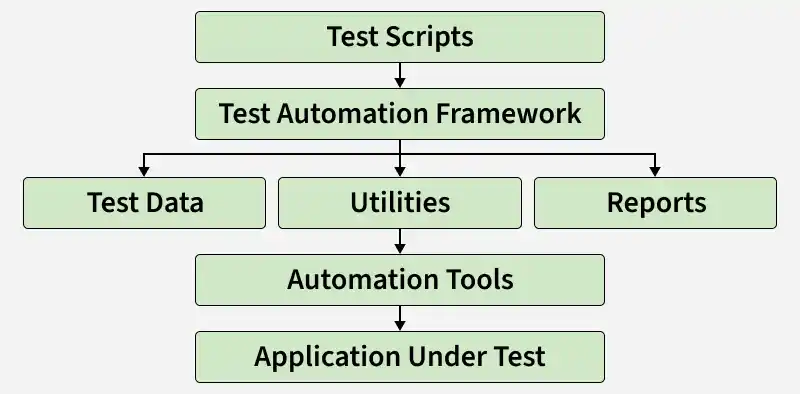
4. Build a Maintainable Test Framework
Description: Create a modular and reusable automation framework that is easy to maintain and scale.
- Follow design patterns such as Page Object Model (POM).
- Reuse common components, libraries, and utilities.
5. Keep Test Scripts Simple and Readable
Description: Write clean, organized, and easy-to-understand test scripts for better maintainability.
- Follow consistent coding standards and naming conventions.
- Eliminate duplicate or unnecessary code.
6. Use Reliable Test Data
Description: Maintain accurate and reusable test data to ensure consistent and reliable test execution.
- Store test data separately from test scripts.
- Use realistic datasets that reflect production scenarios.
7. Integrate with CI/CD Pipeline (Continuous Testing)
Description: Execute automated tests during every build or deployment to enable continuous testing.
- Run tests automatically after each code commit.
- Provide rapid feedback to developers.
8. Execute Tests in Parallel
Description: Run multiple automated tests simultaneously to reduce execution time and improve efficiency.
- Execute tests across multiple browsers or machines.
- Shorten the overall testing cycle.
9. Use Version Control
Description: Manage automation scripts using version control systems to track changes and support collaboration.
- Use Git or similar version control tools.
- Maintain separate branches for development and releases.
10. Use Explicit Waits Instead of Fixed Delays
Description: Synchronize test execution with application behavior using explicit waits for greater stability.
- Wait only for required conditions to be met.
- Avoid using fixed delays such as
sleep().
11. Handle Test Failures Effectively
Description: Capture detailed failure information to simplify debugging and issue resolution.
- Take screenshots automatically when tests fail.
- Store logs and error messages for analysis.
12. Perform Regular Test Maintenance
Description: Update automation scripts regularly to keep them aligned with application changes.
- Update object locators and test data.
- Remove obsolete or duplicate test cases.
13. Execute Tests Across Multiple Browsers and Environments
Description: Validate application behavior across different browsers, devices, operating systems, and environments.
- Perform cross-browser and cross-platform testing.
- Verify consistent application behavior everywhere.
14. Conduct Code Reviews and Team Collaboration
Description: Review automation code regularly and encourage collaboration among development, QA, and DevOps teams.
- Follow coding standards and best practices.
- Share knowledge through peer reviews.
15. Monitor Test Execution and Reports
Description: Analyze test execution results to identify failures and improve automation quality.
- Track pass/fail rates and execution trends.
- Identify flaky tests and performance bottlenecks.
16. Continuously Improve the Automation Suite
Description: Continuously optimize and expand the automation suite as the application evolves.
- Add automation for new features and enhancements.
- Refactor existing scripts to improve performance and maintainability.
Common Mistakes to Avoid in Test Automation
- Automating every test case instead of focusing on valuable scenarios.
- Choosing automation tools without evaluating project requirements.
- Ignoring regular maintenance of automation scripts.
- Writing complex and difficult-to-maintain test scripts.
- Using hard-coded test data instead of reusable datasets.
- Relying on fixed delays instead of dynamic waits.
- Ignoring failed tests without analyzing root causes.
Benefits of Test Automation Best Practices
- Improves software quality and reliability.
- Reduces regression testing time.
- Increases test coverage and accuracy.
- Minimizes manual testing effort.
- Supports faster software delivery.
- Reduces long-term automation maintenance costs.
Improves collaboration between QA and development teams.
