

Load Testing is a type of performance testing that evaluates how a system performs under expected user load. It helps ensure the application remains stable, responsive, and efficient when multiple users access it simultaneously.
- Checks response time, speed, and system stability under normal and peak load
- Identifies bottlenecks, crashes, and performance issues
- Ensures the system can handle expected number of concurrent users
Working of Load Testing
The diagram illustrates how load testing evaluates an application's performance when multiple users access it simultaneously.
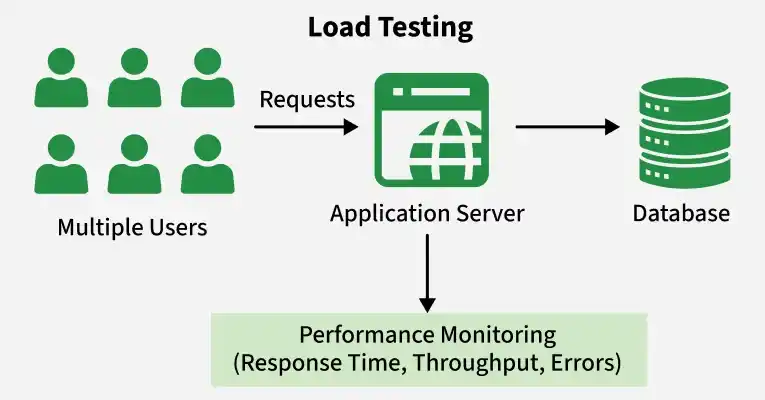
- Step 1: Multiple Users: Virtual users simulate real-world traffic.
- Step 2: Send Requests: Users send concurrent requests to the application server.
- Step 3: Process Requests: The application server processes requests and interacts with the database.
- Step 4: Monitor Performance: Response time, throughput, and errors are measured.
- Step 5: Analyze Results: Testers identify bottlenecks and verify whether the system handles the expected load efficiently.
Example: An e-commerce website is tested with 10,000 users during a sale to check if it can handle heavy traffic without crashing.
Common Load Testing Scenarios
Load testing uses different workload patterns to evaluate application performance under expected traffic conditions. Common scenarios include:
- Baseline Load Testing: Establishes a performance reference under a known workload to compare results after code, database, or infrastructure changes.
- Expected Load Testing: Tests the application under normal production traffic, such as 5,000 concurrent users, to verify performance requirements.
- Incremental Load Testing: Gradually increases workload to identify performance degradation, rising response times, and resource bottlenecks.
- Peak Load Testing: Tests the highest expected workload during events such as festival sales, ticket bookings, or product launches to verify system stability.
Objectives of Load Testing
Load testing aims to ensure that the system performs efficiently under expected and increasing user loads.
- Evaluate application behavior under expected user or request load.
- Verify acceptable response times for important transactions.
- Measure throughput and error rate.
- Identify performance bottlenecks.
- Observe CPU, memory, database, and network utilization.
- Validate performance under anticipated peak workloads.
- Support capacity planning and scalability decisions.
- Detect degradation that appears during sustained workload.
When to Perform Load Testing
Load testing should be performed at different stages of the software development lifecycle to ensure applications can handle expected workloads. Key scenarios include:
- Before Product Release: Verifies that the application can handle expected production traffic while meeting performance requirements.
- After Major Changes: Evaluates performance after introducing new features, database updates, architectural changes, or significant code modifications.
- Before High-Traffic Events: Ensures the system can handle anticipated traffic spikes during sales, product launches, ticket bookings, or marketing campaigns.
- After Infrastructure Changes: Validates performance after changes to servers, cloud instances, databases, load balancers, networks, or caching infrastructure.
Load Testing Process
The load testing process involves a series of steps to evaluate system performance and identify potential issues under different load conditions.
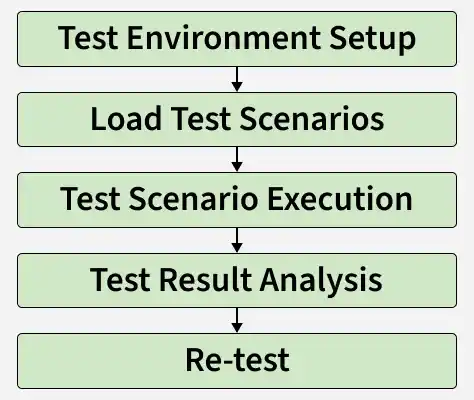
- Test Environment Setup: Create a dedicated environment similar to production (servers, network, database). This ensures accurate and realistic test results without affecting real users.
- Create Test Scenarios: Define user activities like login, search, transactions, etc. Prepare test data and decide number of users, load levels, and execution conditions.
- Execute Tests: Run the load test using tools with multiple virtual users. Monitor system behavior, response time, server load, and error rates during execution.
- Analyze Results: Examine collected data to find bottlenecks, slow responses, or failures. Identify root causes and suggest performance improvements.
- Re-test if Needed: After fixing issues, perform testing again to verify improvements and ensure the system meets performance requirements.
Metrics of Load Testing
Load testing uses various metrics to evaluate application performance, stability, and resource utilization under expected workloads. Key metrics include:
- Response Time: Measures the time taken to process a request and return a response, including network, server, and database delays.
- Response-Time Percentiles: Measures response-time distribution using P50, P90, P95, and P99. For example, P95 = 800 ms means 95% of requests complete within 800 ms.
- Average Response Time: Calculates the mean response time across requests but may hide unusually slow responses.
- Throughput: Measures the amount of work successfully processed per unit of time, such as transactions or requests per second.
- Requests Per Second (RPS): Measures the number of requests processed per second, including successful and failed requests unless otherwise specified.
- Error Rate: Measures the percentage of failed requests, including HTTP errors, timeouts, and connection failures.
- Concurrent Users: Represents the number of users actively interacting with the application simultaneously.
- Resource Utilization: Tracks CPU, memory, disk, network, threads, and database connection usage during testing.
- Saturation: Identifies resources approaching capacity limits, such as exhausted connection pools, full worker threads, or overloaded CPUs.
Monitoring During Load Testing
Monitoring tools track application and system performance during load testing to identify bottlenecks, resource utilization, and potential failures.
- CPU Monitoring: Measures processor utilization to identify CPU bottlenecks under heavy load.
- Memory Monitoring: Tracks memory usage to detect excessive consumption and memory leaks.
- Server Monitoring: Monitors server health, resource utilization, and overall system performance.
- Network Monitoring: Measures bandwidth usage, latency, and network stability during testing.
- Database Monitoring: Tracks query execution time, database connections, and overall database performance under load.
Load Testing Tools
Various tools are used in load testing to simulate user traffic, measure performance metrics, and identify system bottlenecks effectively.
- Apache JMeter: An open-source tool used for load testing web applications, APIs, and servers.
- WebLOAD: A commercial tool that tests web application performance under different user loads.
- NeoLoad: A performance testing tool that simulates virtual users to evaluate application scalability.
- LoadNinja: A cloud-based tool that performs real-browser load testing without extensive scripting.
- Micro Focus LoadRunner: An enterprise-grade tool for large-scale performance and load testing across multiple protocols.
- LoadUI Pro: A commercial tool used to test the performance of APIs and web services under load.
- LoadView: A cloud-based platform that simulates real user interactions to measure application performance.
Challenges of Load Testing
Load testing can present several practical challenges during implementation.
- Creating realistic user workloads and test scenarios.
- Maintaining a production-like testing environment.
- Generating sufficient test data for large-scale testing.
- Identifying the root cause of performance bottlenecks.
- Managing infrastructure costs for high-volume load tests.
Advantages of Load Testing
Load testing provides several benefits for application quality and business reliability.
- Improves application reliability under expected workloads.
- Prevents performance issues before production deployment.
- Supports capacity planning for future business growth.
- Reduces downtime during high-traffic events.
- Improves customer satisfaction through consistent performance.
- Lowers maintenance costs by identifying issues early.
Use Case and Example
- Example: An e-commerce website normally handles 5,000 concurrent users. Before a major festive sale, the team performed load testing using JMeter.
- Solution: They gradually increased the load from 5,000 to 50,000 users. The test revealed that the checkout page response time jumped from 1 second to 8 seconds at 30,000 users, and the error rate rose sharply due to database overload.
After optimizing database queries and adding caching, they re-tested and successfully handled 50,000 users with average response time under 2 seconds. This prevented site slowdowns during the actual sale.
