

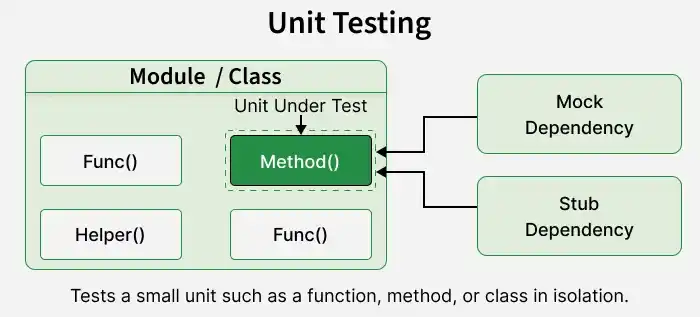
Unit Testing is a software testing technique used to verify individual units of source code, such as methods, functions, or classes, in isolation. It ensures that each unit behaves as expected according to its requirements.
- Focuses on testing small, independent components of an application to verify their functionality.
- Provides quick feedback by identifying errors in individual units during development.
Example: In banking applications, unit testing is used to verify interest calculations, loan eligibility rules, and transaction validation logic.
Characteristics of Unit Testing
Good unit tests should be reliable, easy to maintain, and efficient in verifying individual code components. Key characteristics include:
- Tests individual units with minimal dependency on external systems such as databases or networks.
- Produces consistent results when executed with the same controlled inputs and conditions.
- Executes quickly, allowing developers to run tests frequently during development.
- Focuses on verifying a specific behavior or expected outcome of a code component.
- Can be executed repeatedly under controlled conditions without affecting the results.
- Runs independently without relying on the execution order or results of other tests.
- Uses automated testing frameworks to execute tests consistently with minimal manual effort.
Unit Testing Process
The unit testing workflow includes the following step by step process:
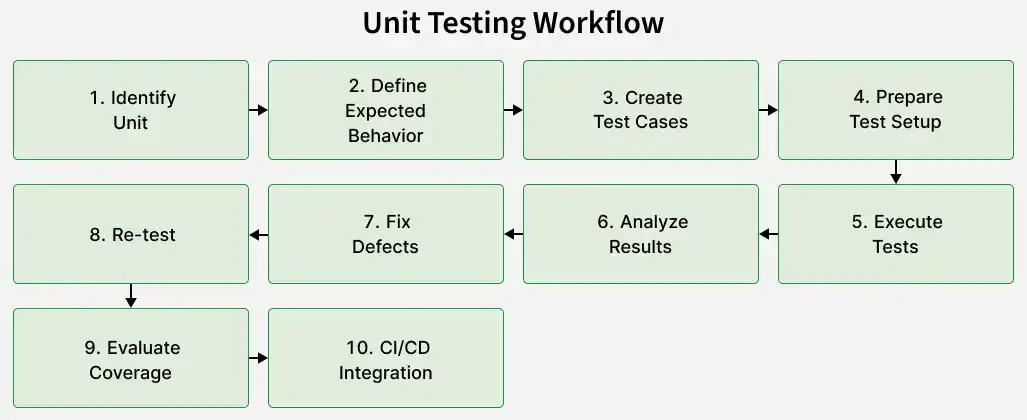
The following steps outline a typical process for performing unit testing effectively.
- Select the function, method, class, or component that needs to be tested.
- Define the expected behavior and output for different input conditions.
- Create test cases for normal inputs, boundary values, invalid data, and exceptional conditions.
- Prepare the required test data, objects, mocks, stubs, and dependencies.
- Run the test cases using an appropriate unit-testing framework.
- Compare the actual results with the expected results to identify failures.
- Fix the defects or incorrect behavior identified during testing.
- Run the tests again to verify the fixes and detect regressions.
- Check code coverage to identify untested areas while keeping assertions meaningful.
- Automate unit tests within the CI/CD pipeline to detect defects early and maintain code quality.
Components of a Unit Test
A unit test consists of several components that help verify whether an individual function or method behaves as expected. The main components are explained below.
1. Test Setup
Test setup prepares the environment and resources required before executing a unit test.
- Initializes the necessary objects, test data, and dependencies.
- Ensures the unit is tested under controlled conditions.
Example: Creating a calculator object before testing its addition method.
2. Test Input
Test input provides the values or conditions used to evaluate the behavior of a unit.
- Includes valid, invalid, and boundary values to test different scenarios.
- Helps verify how the unit responds to different inputs.
Example: Providing 2 and 3 as inputs to an addition method.
3. Test Execution
Test execution involves running the selected function or method with the prepared inputs.
- Calls the unit being tested using the specified input values.
- Captures the actual result for verification.
Example: Executing add(2, 3) to calculate the sum of two numbers.
4. Assertion
An assertion verifies whether the actual result matches the expected outcome.
- Compares the actual output with the expected value.
- Marks the test as failed when the assertion condition is not satisfied.
Example: Checking whether add(2, 3) returns the expected result 5.
5. Test Teardown
Test teardown cleans up temporary resources after test execution, when required.
- Releases resources such as files, database connections, or temporary objects.
- Helps prevent one test from affecting subsequent tests.
Example: Deleting a temporary file created during a unit test.
Implementation Example
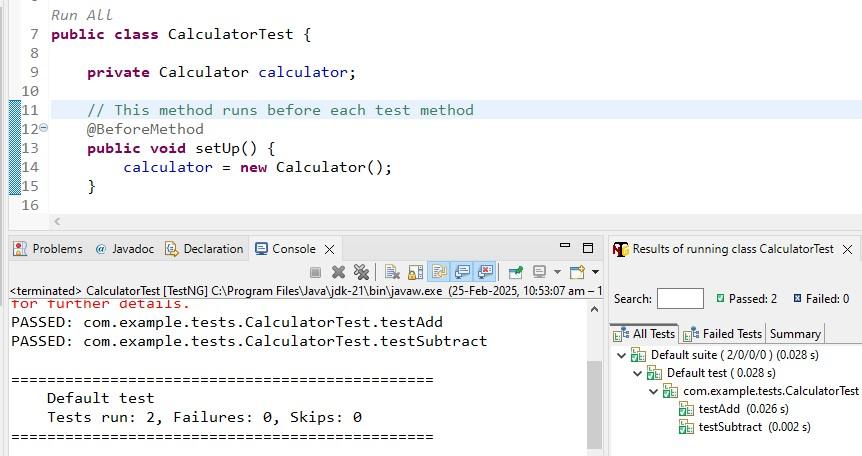
The following example demonstrates unit testing in Java using TestNG.
Step 1: Create the Calculator Class
public class Calculator {

    public int add(int a, int b) {
        return a + b;
    }

    public int subtract(int a, int b) {
        return a - b;
    }
}
Step 2: Create the TestNG Test Class
import org.testng.Assert;
import org.testng.annotations.BeforeMethod;
import org.testng.annotations.Test;

public class CalculatorTest {

    private Calculator calculator;

    @BeforeMethod
    public void setUp() {
        calculator = new Calculator();
    }

    @Test
    public void testAdd() {
        int result = calculator.add(5, 3);
        Assert.assertEquals(result, 8);
    }

    @Test
    public void testSubtract() {
        int result = calculator.subtract(5, 3);
        Assert.assertEquals(result, 2);
    }
}
Output:
Unit Testing Frameworks
Common frameworks include:
| Framework | Description |
|---|---|
| JUnit | Widely used framework for Java unit testing. |
| TestNG | Java testing framework supporting unit and broader test automation. |
| NUnit | Common testing framework for .NET applications. |
| MSTest | Microsoft testing framework for .NET applications. |
| pytest | Popular testing framework for Python applications. |
| Jest | JavaScript testing framework commonly used with JavaScript and React applications. |
| Google Test | C++ testing framework for writing and executing unit tests. |
Unit Testing Techniques
Unit tests can be designed using different testing approaches based on how much knowledge of the internal code is used. Common approaches include:
| Technique | Description |
|---|---|
| White-Box Testing | Tests internal code structure, including branches, conditions, loops, exception paths, and implementation logic. |
| Black-Box Testing | Validates a unit's behavior using inputs and expected outputs without considering internal implementation details. |
| Gray-Box Testing | Uses partial knowledge of internal code while validating external behavior to design effective test cases. |
Unit Testing in CI/CD
Unit tests are commonly integrated into CI/CD pipelines to automate testing, detect defects early, and validate code changes.
- Unit tests run automatically when code is committed, pull requests are created, or builds are triggered.
- Test failures help identify code issues before changes reach later testing or deployment stages.
- Builds can be stopped from progressing when required unit tests fail.
- Developers receive quick feedback about code changes and test results.
- Re-running unit tests helps detect regressions caused by new code modifications.
Advantages of Unit Testing
- Helps detect defects early in development, reducing the effort required to fix them.
- Provides quick feedback to developers by identifying errors in individual components.
- Makes code refactoring safer by detecting regressions after changes.
- Encourages modular, maintainable, and independently testable code design.
- Documents expected code behavior through automated and repeatable test cases.
- Supports CI/CD pipelines by automatically verifying code changes during development.
Limitations of Unit Testing
- Focuses on individual units and does not verify the complete behavior of an application.
- Cannot independently detect integration issues between different modules, services, or external systems.
- Requires additional development time to write, update, and maintain effective test cases.
- Poorly designed or incomplete tests may miss important defects and create false confidence in code quality.
- Cannot fully detect UI, usability, performance, security, or end-to-end workflow issues.
- Excessive mocking can make tests differ from real production behavior.
