

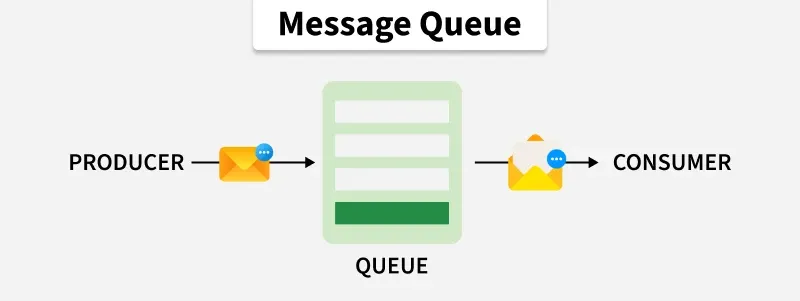
Message queues enable asynchronous communication between system components by temporarily storing messages between producers and consumers. They help decouple services so producers and consumers can operate independently and process workloads at different rates.
- Improves scalability by allowing multiple consumers to process queued work.
- Helps absorb traffic spikes by buffering messages between services.
Example: In an e-commerce system, after an order is placed, the Order Service can publish work to a message queue. Payment, inventory, or notification processing can then happen asynchronously without making the user wait for all downstream tasks to complete.
Message Structure
A message commonly contains two logical parts:
- Headers/Metadata: Information such as message ID, timestamp, content type, routing information, correlation ID, or other broker-specific metadata.
- Body/Payload: The actual data or instruction being transmitted, such as JSON, text, binary data, or serialized objects.
Components of a Message Queue
A message queue system consists of components that work together to enable asynchronous communication between applications or services.
- Message Producer: An application or service that creates and sends messages to a queue for processing.
- Message Queue: Stores messages temporarily and acts as a buffer between producers and consumers until messages are processed or removed according to the configured policy.
- Message Consumer: An application or service that retrieves and processes messages from the queue. Multiple consumers can process different messages concurrently.
- Message Broker (Optional): An intermediary that manages message routing, storage, and delivery between producers and consumers. Some brokers also support filtering and message transformation.
Working of Message Queue
A message queue enables asynchronous communication between producers and consumers. The working process involves the following steps:
- Step 1: Sending Messages: The producer creates a message containing data or instructions and sends it to the message queue.
- Step 2: Queuing Messages: The queue temporarily stores messages until they are delivered to consumers. Message ordering depends on the queue implementation and configuration.
- Step 3: Consuming Messages: Consumers retrieve and process messages independently of producers. Multiple consumers can process messages concurrently.
- Step 4: Acknowledgment: In systems that support acknowledgments, consumers confirm successful processing. Unacknowledged messages may be retried or redelivered, depending on the configuration.
Example: A simple example of a message queue is an email inbox. When you send an email, it is placed in the recipient's inbox. The recipient can then read the email at their convenience. This email inbox acts as a buffer between the sender and the recipient, decoupling them from each other.
Message Ordering
Message queues do not always guarantee strict First-In-First-Out (FIFO) ordering. Message order depends on the messaging system, configuration, and processing behavior.
- Ordering Factors: Broker implementation, partitioning, multiple consumers, message priority, retries, and parallel processing can affect message order.
- Ordering Guarantees: Some systems support FIFO ordering under specific conditions, while others maintain order only within a partition, session, or message group.
Importance of Message Queues
Message queues help address several challenges in distributed systems by enabling asynchronous communication, improving scalability, and reducing dependencies between services.
- Asynchronous Communication: Allows producers to send messages without waiting for consumers to complete processing, improving responsiveness.
- Decoupling: Enables applications and services to operate independently, improving flexibility and maintainability.
- Scalability: Handles increasing workloads by distributing messages across multiple consumers and scaling messaging infrastructure where supported.
- Reliability: Supports features such as message persistence, retries, acknowledgments, and dead-letter queues to reduce message loss and improve fault tolerance.
- Workflow Management: Enables asynchronous workflows such as order processing, payment processing, and notification delivery.
Messaging Models
Two common messaging models are Point-to-Point and Publish-Subscribe.
1. Point-to-Point Messaging
In a point-to-point model, producers send messages to a queue and consumers compete to process them.
A message is generally processed by one consumer from the consumer group or queue, depending on the broker's delivery semantics.
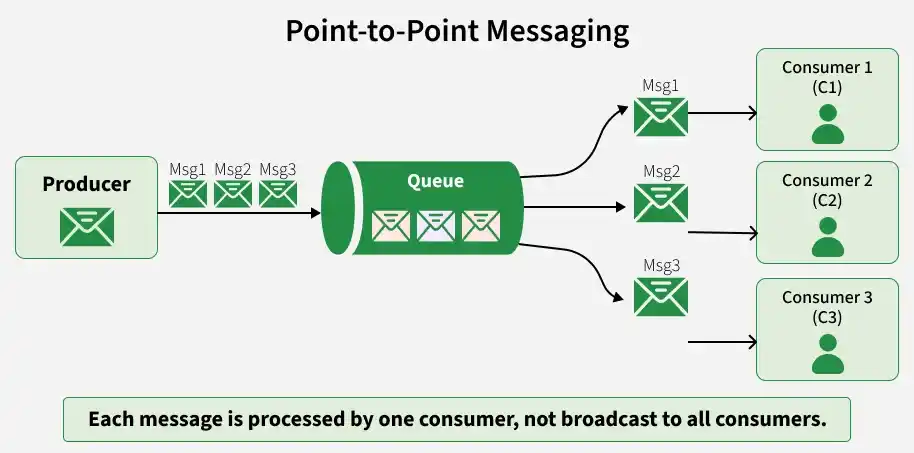
The consumers compete for messages rather than all receiving the same message.
Example: Consider an image-processing queue containing three images. Multiple workers can process different messages concurrently
- Worker A: Processes Image 1.
- Worker B: Processes Image 2.
- Worker C: Processes Image 3.
Common Use Cases
Background jobs, order processing, image or video processing, and email delivery.
Acknowledgment Behavior
In acknowledgment-based systems, consumers confirm successful message processing before the broker marks the message as completed.
- Successful Processing: The consumer acknowledges the message, allowing the broker to remove or mark it as processed.
- Failed Processing: If acknowledgment is not received, the message may be retried or redelivered, depending on the queue configuration.
2. Publish-Subscribe Messaging
Publish-Subscribe uses topics or channels, not simply one queue delivering a message to every consumer. A publisher sends an event to a topic, and independent subscribers or subscriptions receive copies according to the messaging system's semantics.
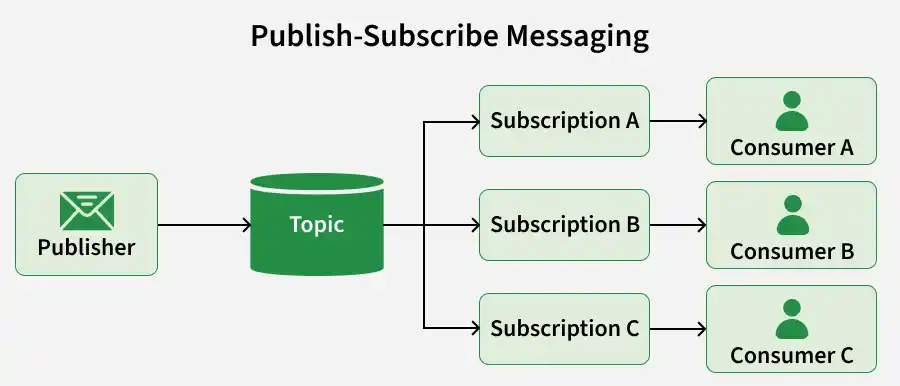
Each subscription can often maintain its own delivery state.
Example: When an OrderCreated event is published to a topic, multiple subscribers can independently receive and process it
- Inventory Service: Updates stock availability.
- Notification Service: Sends order confirmation.
- Analytics Service: Records order data for reporting.
Common Use Cases
Event-driven architectures, notifications, analytics pipelines, audit logging, real-time updates, and event streaming.
Message Routing
Messaging systems use different routing mechanisms to deliver messages to appropriate queues or subscribers. Common types include:
- Direct Routing: Sends messages to a specific queue using a queue name, address, or routing key.
- Topic-Based Routing: Publishes messages to a topic and delivers them to matching subscriptions.
- Content-Based Routing: Routes messages based on message attributes or payload content, depending on broker support.
Scalability
Messaging systems can scale to handle increasing message volumes and processing workloads. Common techniques include:
- Consumer Scaling: Adds multiple consumers to process messages concurrently, with the broker or queue distributing messages without typically requiring an external load balancer.
- Partitioning: Divides messages across partitions to increase parallel processing and distribute workloads.
- Broker Scaling: Adds broker nodes to increase storage capacity, throughput, and availability, depending on the platform.
Reliability and Failure Handling
Message queue systems use mechanisms to manage processing failures, support reliable message delivery, and prevent failed messages from disrupting normal operations.
- Acknowledgments: Consumers confirm successful processing, while unacknowledged messages may be retried or redelivered depending on broker configuration.
- Dead Letter Queue (DLQ): Stores messages that fail processing after configured retry attempts, allowing investigation and possible reprocessing.
- Message Prioritization: Allows higher-priority messages to be processed before lower-priority ones, potentially affecting FIFO ordering.
Message Queue Implementation
Message Queues can be implemented in a variety of ways, but they typically follow a simple pattern:
- Producer: An application that sends messages to a queue.
- Message Broker: A server that stores and forwards messages between producers and consumers.
- Consumer: An application that receives messages from a queue.
Problem Statement:
In a real-world scenario, you might want to consider using a dedicated message queue service like RabbitMQ or Apace Kafka for distributed systems.
Here's a step-by-step guide to implement a basic message queue in C++:
Step 1: Define the Message Structure:
Start by defining a structure for your messages. This structure should contain the necessary information for communication between different parts of your system.
struct Message {
    int messageType;
    std::string payload;
    // Add any other fields as needed
};
public class Message {
    public int messageType;
    public String payload;
    // Add any other fields as needed
}
class Message:
    def __init__(self, messageType, payload):
        self.messageType = messageType
        self.payload = payload
    # Add any other fields as needed
class Message {
    constructor(messageType, payload) {
        this.messageType = messageType;
        this.payload = payload;
    }
    // Add any other fields as needed
}
Step 2: Implement the Message Queue:
Create a class for your message queue. This class should handle the operations like enqueue and dequeue.
#include <queue>
#include <mutex>
#include <condition_variable>

class MessageQueue {
public:
    // Enqueue a message
    void enqueue(const Message& message) {
        std::unique_lock<std::mutex> lock(mutex_);
        queue_.push(message);
        lock.unlock();
        condition_.notify_one();
    }

    // Dequeue a message
    Message dequeue() {
        std::unique_lock<std::mutex> lock(mutex_);
        // Wait until a message is available
        condition_.wait(lock, [this] { return !queue_.empty(); });

        Message message = queue_.front();
        queue_.pop();
        return message;
    }

private:
    std::queue<Message> queue_;
    std::mutex mutex_;
    std::condition_variable condition_;
};
import java.util.LinkedList;
import java.util.Queue;
import java.util.concurrent.locks.Condition;
import java.util.concurrent.locks.Lock;
import java.util.concurrent.locks.ReentrantLock;

class MessageQueue {
    private Queue<Message> queue = new LinkedList<>();
    private Lock lock = new ReentrantLock();
    private Condition condition = lock.newCondition();

    // Enqueue a message
    public void enqueue(Message message) {
        lock.lock();
        try {
            queue.add(message);
            condition.signal();
        } finally {
            lock.unlock();
        }
    }

    // Dequeue a message
    public Message dequeue() throws InterruptedException {
        lock.lock();
        try {
            while (queue.isEmpty()) {
                condition.await();
            }
            return queue.poll();
        } finally {
            lock.unlock();
        }
    }
}
import queue
import threading

class MessageQueue:
    def __init__(self):
        self.queue = queue.Queue()
        self.lock = threading.Lock()
        self.condition = threading.Condition(self.lock)

    # Enqueue a message
    def enqueue(self, message):
        with self.lock:
            self.queue.put(message)
            self.condition.notify_one()

    # Dequeue a message
    def dequeue(self):
        with self.lock:
            while self.queue.empty():
                self.condition.wait()
            return self.queue.get()
class MessageQueue {
    constructor() {
        this.queue = [];
        this.mutex = new Promise(resolve => this.resolveMutex = resolve);
    }

    // Enqueue a message
    async enqueue(message) {
        await this.mutex;
        try {
            this.queue.push(message);
        } finally {
            this.resolveMutex();
        }
    }

    // Dequeue a message
    async dequeue() {
        await this.mutex;
        try {
            while (this.queue.length === 0) {
                await new Promise(resolve => this.resolveWait = resolve);
            }
            return this.queue.shift();
        } finally {
            this.resolveMutex();
        }
    }
}
Step 3: Create Producers and Consumers
Implement functions or classes that act as producers and consumers. Producers enqueue messages, and consumers dequeue messages.
// Producer function
void producer(MessageQueue& messageQueue, int messageType, const std::string& payload) {
    Message message;
    message.messageType = messageType;
    message.payload = payload;

    messageQueue.enqueue(message);
}

// Consumer function
void consumer(MessageQueue& messageQueue) {
    while (true) {
        Message message = messageQueue.dequeue();
        // Process the message
        // ...
    }
}
// Producer function
public void producer(MessageQueue messageQueue, int messageType, String payload) {
    Message message = new Message();
    message.setMessageType(messageType);
    message.setPayload(payload);

    messageQueue.enqueue(message);
}

// Consumer function
public void consumer(MessageQueue messageQueue) {
    while (true) {
        Message message = messageQueue.dequeue();
        // Process the message
        // ...
    }
}
# Producer function
def producer(message_queue, message_type, payload):
    message = Message()
    message.message_type = message_type
    message.payload = payload

    message_queue.enqueue(message)

# Consumer function
def consumer(message_queue):
    while True:
        message = message_queue.dequeue()
        # Process the message
        # ...
// Producer function
function producer(messageQueue, messageType, payload) {
    let message = { messageType: messageType, payload: payload };

    messageQueue.enqueue(message);
}

// Consumer function
function consumer(messageQueue) {
    while (true) {
        let message = messageQueue.dequeue();
        // Process the message
        // ...
    }
}
Step 4: Use the Message Queue
Create instances of the message queue, producers, and consumers, and use them in your program.
#include <iostream>
#include <queue>
#include <mutex>
#include <condition_variable>
#include <thread>
#include <string>

class MessageQueue {
private:
    std::queue<std::string> messages;
    std::mutex mtx;
    std::condition_variable cv;

public:
    void send(const std::string& message) {
        {
            std::lock_guard<std::mutex> lock(mtx);
            messages.push(message);
        }
        cv.notify_one();
    }

    std::string receive() {
        std::unique_lock<std::mutex> lock(mtx);

        cv.wait(lock, [this]() {
            return !messages.empty();
        });

        std::string message = messages.front();
        messages.pop();

        return message;
    }
};

int main() {
    MessageQueue mq;

    std::thread consumer([&mq]() {
        std::string message = mq.receive();
        std::cout << "Consumer received: "
                  << message << std::endl;
    });

    std::thread producer([&mq]() {
        mq.send("Hello, World!");
    });

    producer.join();
    consumer.join();

    return 0;
}
import java.util.concurrent.BlockingQueue;
import java.util.concurrent.LinkedBlockingQueue;

public class Main {
    public static void main(String[] args)
            throws InterruptedException {

        BlockingQueue<String> queue =
                new LinkedBlockingQueue<>();

        Thread producer = new Thread(() -> {
            try {
                queue.put("Hello, World!");
            } catch (InterruptedException e) {
                Thread.currentThread().interrupt();
            }
        });

        Thread consumer = new Thread(() -> {
            try {
                String message = queue.take();
                System.out.println(
                    "Consumer received: " + message
                );
            } catch (InterruptedException e) {
                Thread.currentThread().interrupt();
            }
        });

        consumer.start();
        producer.start();

        producer.join();
        consumer.join();
    }
}
import queue
import threading

message_queue = queue.Queue()

def producer():
    message_queue.put("Hello, World!")

def consumer():
    message = message_queue.get()
    print("Consumer received:", message)
    message_queue.task_done()

producer_thread = threading.Thread(target=producer)
consumer_thread = threading.Thread(target=consumer)

consumer_thread.start()
producer_thread.start()

producer_thread.join()
consumer_thread.join()
class MessageQueue {
    constructor() {
        this.messages = [];
        this.waitingConsumers = [];
    }

    send(message) {
        if (this.waitingConsumers.length > 0) {
            const resolve = this.waitingConsumers.shift();
            resolve(message);
        } else {
            this.messages.push(message);
        }
    }

    receive() {
        if (this.messages.length > 0) {
            return Promise.resolve(this.messages.shift());
        }

        return new Promise((resolve) => {
            this.waitingConsumers.push(resolve);
        });
    }
}

async function main() {
    const mq = new MessageQueue();

    const consumer = mq.receive().then((message) => {
        console.log("Consumer received:", message);
    });

    mq.send("Hello, World!");

    await consumer;
}

main();
Output
Producer 1 sending: Hello, World!
Consumer received: Hello, World!
