

Web servers and application servers are essential components in system design that handle user requests and deliver responses efficiently. A web server manages client communication, while an application server processes business logic and dynamic operations.
- Web Server: Handles client connections, serves static resources, and may route requests to backend applications.
- Application Server: Runs application logic, processes dynamic requests, and coordinates access to databases and external services.
Web Server
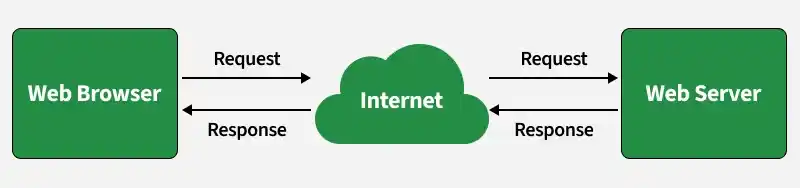
A web server is software that accepts HTTP or HTTPS requests and returns resources or responses to clients such as browsers, mobile applications, or other services. It may run on a physical machine, virtual machine, container, or cloud instance.
Role of Web Servers
Web servers play a crucial role in handling client requests and delivering web content efficiently and securely.
- Handling Client Requests: Web servers receive and process incoming HTTP/HTTPS requests from clients (browsers) and route them to the appropriate resources or services.
- Serving Static and Dynamic Content: They directly serve static content (HTML, CSS, images) and work with application servers to generate and deliver dynamic content.
- Load Balancing: Some web-server and reverse-proxy software can distribute incoming traffic across multiple backend servers. Load balancing may also be handled by dedicated or cloud load balancers.
- Content Delivery & Caching: Some web servers and reverse proxies can cache eligible content to reduce response time and backend load.
- TLS Termination: Some web servers and reverse proxies can terminate TLS connections, centralizing certificate handling and reducing TLS processing on backend services.
Example: When a user opens a website, a web server may directly serve static files such as HTML, CSS, and images. Requests that require business logic may be forwarded to an application service.
How a Web Server Works
A web server receives client requests and returns suitable responses using HTTP or HTTPS.
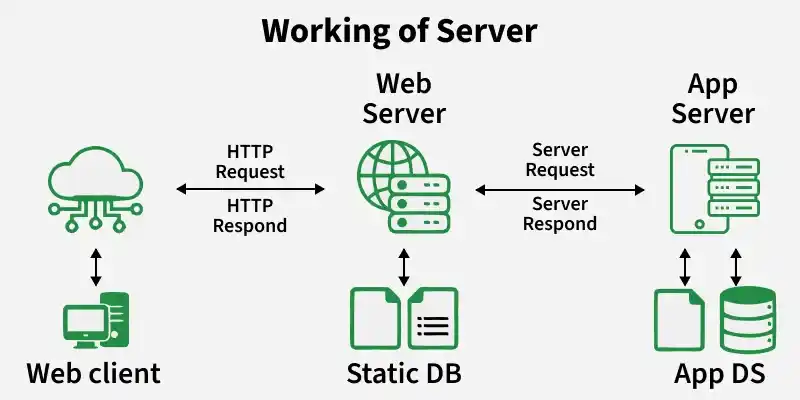
A typical flow is:
- A client sends an HTTP/HTTPS request.
- The web server receives and processes the request.
- If the requested resource is static, the server may return it directly.
- If application logic is required, the request may be forwarded to an application server, runtime, or backend service.
- The backend processes the request and may interact with databases or external services.
- The result is returned to the web server or directly to the client depending on the architecture.
- The response is sent back to the client.
Example: A product image may be served directly by the web server, while a product-search request may be processed by backend application code that queries a database.
Static and Dynamic Content Handling
Web servers can serve both static and dynamic content depending on application requirements. These are content-handling approaches, not separate types of web servers.
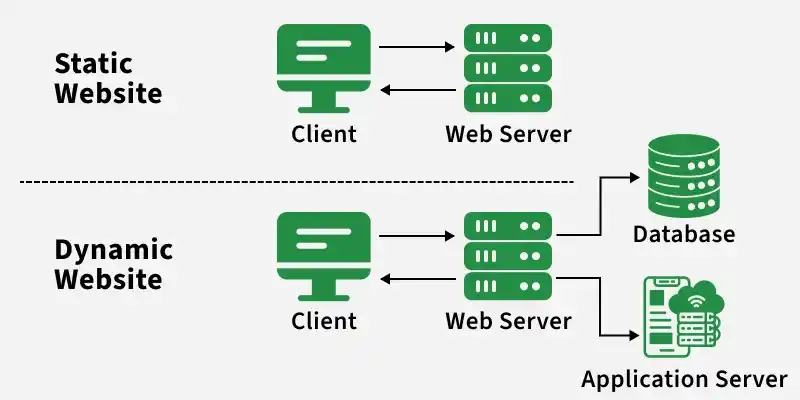
- Static Content: Includes HTML, CSS, JavaScript, images, and documents that are served largely as stored. It is generally faster to deliver and easier to cache.
- Dynamic Content: Includes personalized dashboards, search results, account information, and social feeds generated or modified based on user input, database data, or application state.
Protocols Commonly Used by Web Servers
Web servers use standard communication protocols to exchange data with clients over the internet.
- HTTP: Transfers web requests and responses between clients and servers.
- HTTPS: Uses TLS encryption to secure HTTP communication and protect data in transit.
- HTTP/2 and HTTP/3: Modern HTTP versions that improve communication efficiency through features such as multiplexing and optimized transport.
Examples of Web Servers
Common web-server products include:
- Apache HTTP Server: An open-source web server that supports static content, virtual hosting, TLS, and reverse proxying.
- NGINX: A high-performance web server commonly used for static content delivery, reverse proxying, caching, and load balancing.
- Microsoft IIS: A web server for Windows environments that supports HTTP/HTTPS hosting and integration with Microsoft application technologies.
Application Server
An application server provides an environment for executing application logic and processing dynamic operations.
Role of Application Server
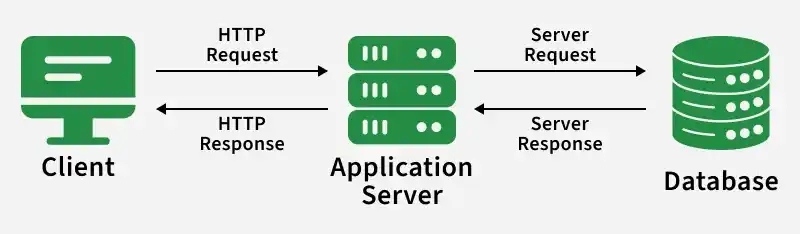
An application server processes client requests, executes business logic, and communicates with databases or external services to generate dynamic responses.
- Business Logic: Executes application rules, calculations, and workflows.
- Request Processing: Handles client requests and generates appropriate responses.
- Database Interaction: Retrieves, stores, and updates application data.
- Security: Enforces authentication, authorization, and access controls.
- Integration: Communicates with external APIs, messaging systems, and other services.
- Transaction Management: Coordinates operations to maintain data consistency.
Example: In a banking application, the application layer may verify login credentials, retrieve account information, process transactions, and return results to the client.
How an Application Server Works
A typical request flow is:
- A client sends a request.
- A web server, gateway, or proxy may receive the request first.
- The request is forwarded to the application code.
- The application executes the required business logic.
- The application may communicate with databases, caches, message queues, external APIs, or other services.
- A response is generated.
- The response is returned to the client.
Examples of Application Servers
Common application servers include:
- WildFly: An open-source Jakarta EE application server for deploying enterprise Java applications.
- Oracle WebLogic Server: An enterprise application server supporting transactions, security, clustering, and Java enterprise applications.
- IBM WebSphere Application Server: An enterprise Java application server that supports transaction management, security, and integration.
- Payara Server: A Jakarta EE application server supporting dependency injection, persistence, transactions, and enterprise application deployment.
- GlassFish: An open-source Jakarta EE application server used for developing and running enterprise Java applications.
Web Server Vs Application Server
| Aspect | Web Server | Application Server |
|---|---|---|
| Primary Role | Handles HTTP/HTTPS communication and content delivery | Executes business logic and application workflows |
| Content Handling | Commonly serves static content and routes dynamic requests | Commonly generates dynamic responses |
| Business Logic | Usually limited | Primary responsibility |
| Backend Interaction | May route requests to backend services | Commonly interacts with databases, APIs, caches, and messaging systems |
| Examples | Apache HTTP Server, NGINX, IIS | WildFly, WebLogic, WebSphere |
