

Load balancers distribute incoming traffic across multiple backend servers or resources. Different types are used depending on deployment environment, routing requirements, protocol, scalability needs, and geographic distribution.
- Load balancers may be deployed as hardware appliances, software, or managed cloud services.
- They may operate at different networking layers and use different information to route traffic.
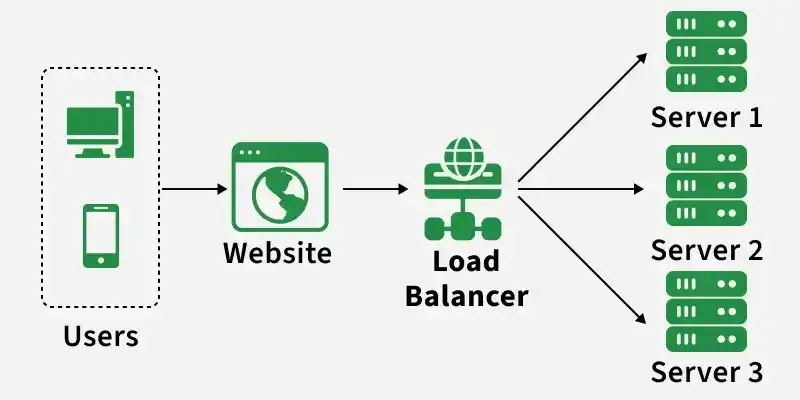
Example: An organization may use a hardware load balancer in an on-premises data center, a software load balancer for internal services, and a managed cloud load balancer for cloud workloads.
Types of Load Balancer
Load balancers can be classified based on how they are deployed and the networking layer at which they operate.
1. Based on Deployment
Hardware Load Balancer
A hardware load balancer is a dedicated physical appliance designed to distribute traffic across multiple backend servers.
It is commonly used in enterprise or data-center environments that require dedicated networking resources and specialized traffic-management capabilities.
Example: F5 BIG-IP appliances.
Advantages
- Dedicated hardware resources
- High throughput depending on appliance capacity
- Advanced traffic-management features
Limitations
- Higher infrastructure cost
- Less flexible than software or managed cloud solutions
- Requires hardware deployment and maintenance
Software Load Balancer
A software load balancer runs on a general-purpose server, virtual machine, container, or similar compute environment.
It provides flexible traffic distribution using configurable routing rules and load-balancing algorithms.
Examples: NGINX and HAProxy.
Advantages
- Flexible and configurable
- Cost-effective for many workloads
- Easy to integrate with modern application environments
Limitations
- Performance depends on available compute and network resources
- Requires configuration, monitoring, and maintenance
Cloud Load Balancer
A cloud load balancer is a managed service provided by a cloud platform to distribute traffic across cloud resources.
The cloud provider manages much of the underlying infrastructure, while users configure listeners, routing rules, health checks, and backend targets.
Example: AWS Elastic Load Balancing.
Advantages
- Integrates with cloud infrastructure
- Can support automatic scaling and health checks
- Reduces infrastructure-management overhead
Limitations
- Ongoing service cost
- Provider-specific features and dependencies
- Configuration and quotas vary by cloud platform
2. Based on OSI Layer
Layer 4 Load Balancer
A Layer 4 load balancer operates at the Transport Layer and routes traffic using connection-level information such as:
- Source and destination IP addresses
- TCP or UDP protocol
- Port numbers
It generally does not inspect application-level information such as URL paths or HTTP headers.
Examples: HAProxy in TCP mode and AWS Network Load Balancer.
Advantages
- Efficient for high-volume connection-based workloads
- Lower application-level processing overhead
- Supports protocols such as TCP and UDP
Limitations
- Limited application-aware routing
- Cannot normally route based on URL paths, headers, or cookies
Layer 7 Load Balancer
A Layer 7 load balancer operates at the Application Layer and can inspect application-level request information before selecting a backend.
Routing decisions may use:
- URL paths
- Hostnames
- HTTP headers
- Cookies
- Request methods
Examples: NGINX HTTP load balancing and AWS Application Load Balancer.
Advantages
- Supports content-aware routing
- Can route requests to different services based on application data
- Can support SSL/TLS termination and session-related routing
Limitations
- Requires more application-level processing than basic Layer 4 routing
- Configuration can become more complex
Global Server Load Balancing (GSLB)
Global Server Load Balancing distributes traffic across servers, regions, or data centers in different geographic locations.
Instead of balancing traffic only within one local environment, GSLB uses mechanisms such as DNS-based routing, health checks, latency measurements, or geographic policies to direct users to an appropriate regional endpoint.
Examples:
- Cloudflare Load Balancing with geographic or dynamic steering
- Amazon Route 53 with latency-based routing
Key Capabilities
- Geographic routing
- Latency-based routing
- Multi-region traffic distribution
- Health-aware endpoint selection
- Regional failover support
Advantages
- Can reduce latency for geographically distributed users
- Supports traffic distribution across multiple regions
- Can help redirect users when a regional endpoint becomes unavailable
Limitations
- More complex to configure than local load balancing
- DNS-based approaches may be affected by DNS caching and propagation behavior
- Requires health monitoring and regional routing policies
