

An anonymous method is a method without a name that is defined using the delegate keyword. It allows developers to write a block of code directly where a delegate is assigned, without creating a separate named method.
- Introduced in C# 2.0 to simplify delegate-based programming.
- Commonly used in event handling, callbacks, and short operations.
- Supports parameters, return values, and access to variables from the enclosing scope.
Example: Program to demonstrate uses an anonymous method to display a message.
using System;

class Geeks {
    static void Main(){
        Action greet = delegate(){
            Console.WriteLine("Hello, Geeks!");
        };

        greet();
    }
}
Output
Hello, Geeks!
Explanation: The anonymous method is assigned to the Action delegate. When greet() is called, it executes the method and displays the message.
Syntax
delegate (parameter_list){
// Statements
};
Here:
- delegate: Keyword used to define an anonymous method.
- parameter_list: Specifies the parameters accepted by the method. It can be omitted when appropriate.
- Method Body: Contains the statements executed when the delegate is invoked..
How Anonymous Methods Work
An anonymous method is assigned to a compatible delegate. When the delegate is invoked, the anonymous method executes.
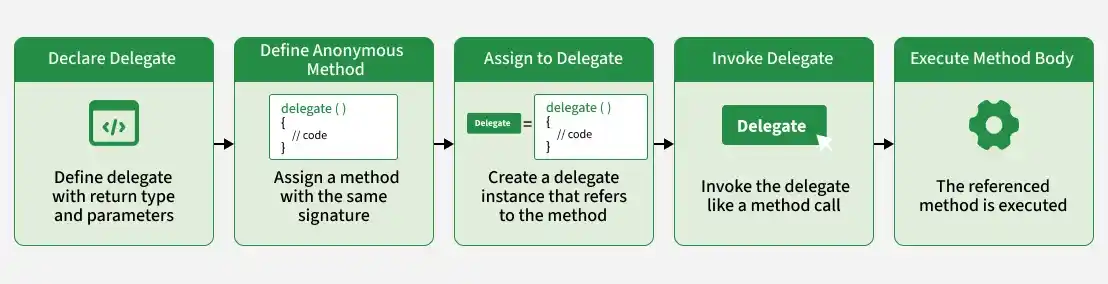
The working process involves the following steps:
- Define a delegate or use a predefined delegate such as Action or Func.
- Create an anonymous method using the delegate keyword.
- Assign the anonymous method to a compatible delegate variable.
- Invoke the delegate to execute the anonymous method's statements.
Examples of Anonymous Methods
1. Anonymous Method with Parameters and Return Value
Example 1: Program to demonstrate an anonymous method with parameters and a return value to add two numbers.
using System;

class Geeks {
    delegate int Operation(int a, int b);

    static void Main()
    {
        // Define an anonymous method to add two numbers
        Operation add = delegate(int a, int b)
        {
            return a + b;
        };

        Console.WriteLine("Sum: " + add(10, 20));
    }
}
Output
Sum: 30
Explanation: The anonymous method is assigned to the Operation delegate. When add(10, 20) is called, it returns the sum of the two numbers
2. Anonymous Method for Event Handling
Example 2: Program to demonstrate using an anonymous method as an event handler.
using System;

class Button {
    public event Action OnClick;

    public void Click(){

        // Raise the event
        OnClick ?.Invoke();
    }
}

class Geeks{
    static void Main(){

        Button btn = new Button();

        // Subscribe an anonymous method to the event
        btn.OnClick += delegate(){

            Console.WriteLine("Button was clicked!");
        };

        btn.Click(); // Trigger the event
    }
}
Output
Button was clicked!
Explanation: The anonymous method is subscribed to the OnClick event. When Click() raises the event, the method executes.
Anonymous Methods Vs Lambda Expressions
Anonymous methods and lambda expressions both define behavior without a named method, but differ in syntax and capabilities.
Feature | Anonymous Methods | Lambda Expressions |
|---|---|---|
Syntax | Uses the delegate keyword | Uses the => operator |
Introduced | C# 2.0 | C# 3.0 |
Method Body | Requires a statement block | Supports expression and statement bodies |
Parameters | Can omit the entire parameter list | Uses lambda parameter syntax |
Expression Trees | Cannot be converted into expression trees | Compatible lambdas can be converted into expression trees |
Readability | More verbose | Generally more concise |
Advantages of Anonymous Methods
- Avoids separate named methods for small operations.
- Simplifies defining event handlers.
- Allows access to variables from the enclosing scope.
- Works with predefined and custom delegates.
Limitations of Anonymous Methods
- Large method bodies can be difficult to understand.
- Less convenient to reuse independently than named methods.
- Can be harder to identify in stack traces.
- Longer than equivalent lambda expressions.
- Cannot be converted into expression trees.
