

Jump statements in C# are used to change the normal flow of program execution by transferring control from one part of the program to another. They are commonly used inside loops, methods, switch statements.
- Help control loop execution and method flow.
- Allow a program to stop, skip, redirect, return.
Example: The following program demonstrates how the break statement terminates a loop when a specified condition is met.
using System;

class Geeks{
    static void Main(){

        for (int i = 1; i <= 5; i++)
        {
            if (i == 3)
                break;

            Console.WriteLine(i);
        }
    }
}
Output
1
2
Explanation: The loop prints 1 and 2. When i becomes 3, the break statement terminates the loop, and control moves to the statement following the loop.
Types of Jump Statements
There are mainly four keywords in the Jump Statements which are mentioned below:
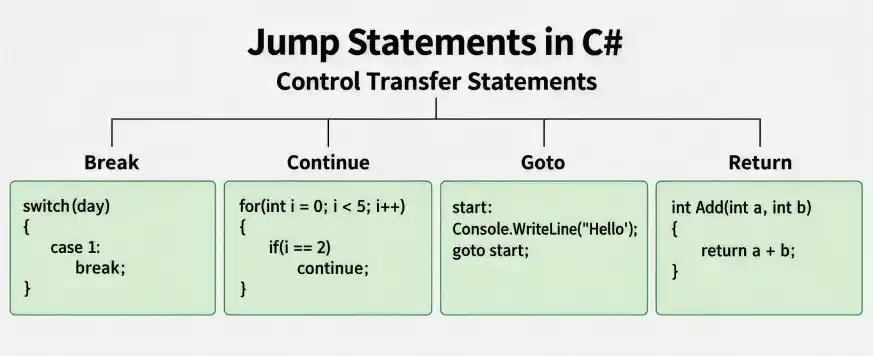
1. Break statement
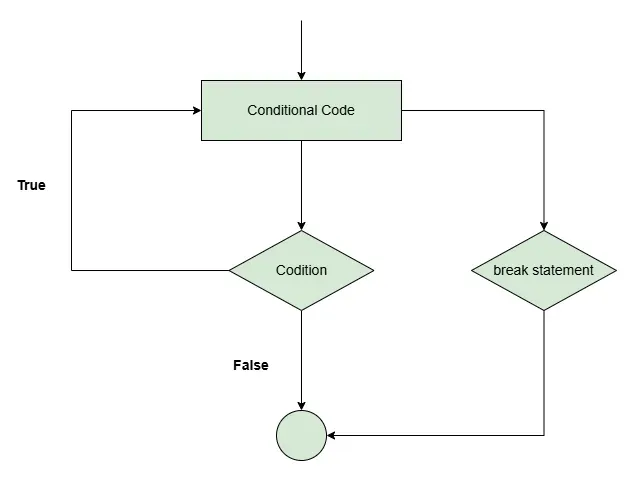
The break statement is used to immediately terminate the nearest enclosing loop or switch statement. After execution, control moves to the first statement after that loop or switch. If it is used inside nested loops, it terminates only the nearest enclosing loop.
// Use of break statement
using System;

class Geeks
{
	static public void Main()
	{
		// GeeksforGeeks is printed only 2 times
		// because of break statement
		for (int i = 1; i < 4; i++)
		{
			if (i == 3)
				break;

			Console.WriteLine("GeeksforGeeks");
		}
     }
}
Output
GeeksforGeeks
GeeksforGeeks
Flowchart
2. Continue Statement
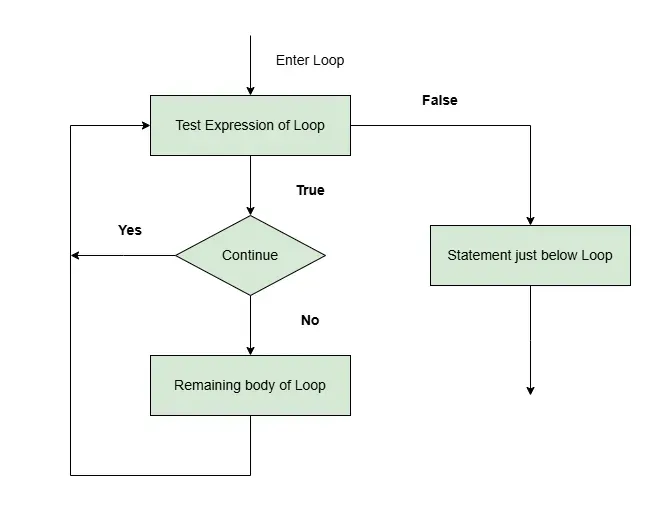
continue statement is used to skip the remaining statements in the loop on a certain condition. After that, it transfers the control to the beginning of the loop. It skips its following statements and continues with the next iteration of the loop.
// Use of continue statement
using System;

class Geeks
{
	public static void Main()
	{
		// This will skip 4 to print
		for (int i = 1; i <= 5; i++)
        {
			// Skip printing when i == 3
            // Control moves to the next iteration
			if (i == 3)
				continue;

			Console.WriteLine(i);
		}
	}
}
Output
1
2
4
5
Explanation: When i becomes 3, the continue statement skips Console.WriteLine(i). The loop then continues with i = 4.
Flowchart
3. Goto Statement
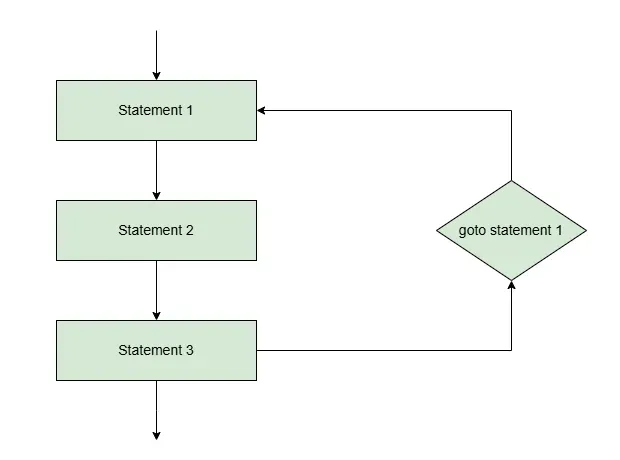
The goto statement transfers program control directly to a labeled statement or another case in a switch statement. It should generally be used carefully because excessive use can make code difficult to read and maintain.
// Use of goto statement
using System;

class Geeks
{
    static public void Main()
    {
        int number = 20;

      	// Switch case statement
        switch (number)
        {
            case 5:
                Console.WriteLine("case 5");
                break;
            case 10:
                Console.WriteLine("case 10");
                break;
            case 20:
                Console.WriteLine("case 20");

                // goto statement transfers
                // control to case 5
                goto case 5;

            default:
                Console.WriteLine("No match found");
                break;
        }
    }
}
Output
case 20
case 5
Explanation: The program first executes case 20. The statement goto case 5 then transfers control directly to case 5.
Flowchart
4. Return statement
Return statement terminates the execution of the method and returns the control to the calling method. It returns an optional value. If the type of method is void, then the return statement can be excluded.
using System;

class Geeks{
    static int Add(int a, int b)
    {
        return a + b;
    }

    static void Main()
    {
        int result = Add(10, 20);

        Console.WriteLine(result);
    }
}
Output
30
Explanation: The Add() method calculates the sum of two numbers. The return statement sends the result back to the Main() method.
Difference Between Jump Statements
The following table summarizes the behavior and primary use of each commonly used jump statement.
Statement | Purpose | Common Usage |
|---|---|---|
break | Terminates a loop or switch statement. | Exiting a loop when a condition is met. |
continue | Skips the remaining statements in the current loop iteration. | Skipping specific values during iteration. |
goto | Transfers control to a label or another switch case. | Explicitly redirecting control within a method. |
return | Terminates a method and optionally returns a value. | Returning calculated results or exiting early. |
Important Points to Remember
- break exits a loop or switch, while continue proceeds to the next loop iteration.
- goto should be used sparingly because unnecessary jumps can reduce code readability.
- return exits the current method, even when used inside a loop.
- Jump statements can affect the execution of nested structures, so their scope and target should be understood carefully.
- The throw statement also transfers control, but it is generally discussed as part of exception handling rather than ordinary loop control.
