

In C#, Operators are special types of symbols which perform operations on variables or values. It is a fundamental part of language which plays an important role in performing different mathematical operations. It takes one or more operands and performs operations to produce a result.
- Operators are used to perform different types of operations such as arithmetic, relational, logical, assignment, and bitwise operations.
- The number of operands required by an operator determines whether it is a unary, binary, or ternary operator.
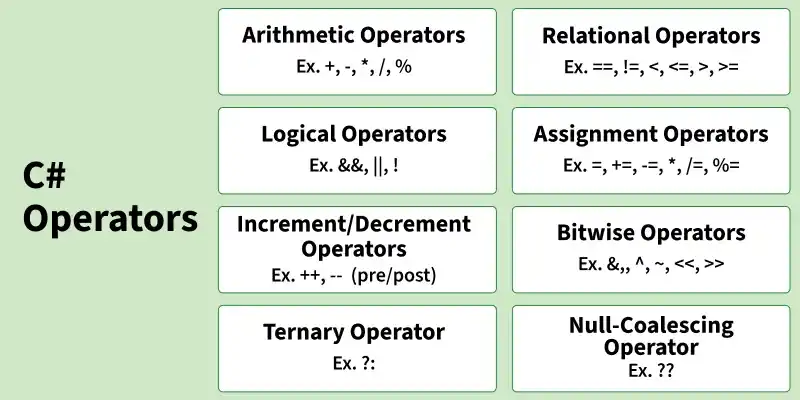
Types of Operators
1. Arithmetic Operators
Arithmetic operators are used to perform basic mathematical operations on numeric values.
- Addition ( + )
- Subtraction ( - )
- Multiplication ( * )
- Division ( / )
- Modulus ( % )
using System;

class GFG
{
    static void Main()
    {
        int a = 20;
        int b = 6;

        // Addition
        Console.WriteLine("Addition: " + (a + b));

        // Subtraction
        Console.WriteLine("Subtraction: " + (a - b));

        // Multiplication
        Console.WriteLine("Multiplication: " + (a * b));

        // Division
        Console.WriteLine("Division: " + (a / b));

        // Modulus
        Console.WriteLine("Modulus: " + (a % b));
    }
}
Output
Addition: 26
Subtraction: 14
Multiplication: 120
Division: 3
Modulus: 2
2. Relational Operators
Relational operators are used to compare values. And we get the answer in either true or false ( boolean). Let's learn about different relation operators.
- Equal to ( == )
- Not equal to ( != )
- Less than ( < )
- Less than or equal to ( <= )
- greater than ( > )
- Greater than or equal to ( >= )
using System;

class GFG
{
    static void Main()
    {
        int a = 10;
        int b = 20;

        // Equal to
        Console.WriteLine("Equal to: " + (a == b));

        // Not equal to
        Console.WriteLine("Not equal to: " + (a != b));

        // Less than
        Console.WriteLine("Less than: " + (a < b));

        // Less than or equal to
        Console.WriteLine("Less than or equal to: " + (a <= b));

        // Greater than
        Console.WriteLine("Greater than: " + (a > b));

        // Greater than or equal to
        Console.WriteLine("Greater than or equal to: " + (a >= b));
    }
}
Output
Equal to: False
Not equal to: True
Less than: True
Less than or equal to: True
Greater than: False
Greater than or equal to: False
3. Logical Operators
Used when multiple conditions and there we can combine these to compare complex conditions.
- Logical AND (&&): returns true when both conditions are true.
- Logical OR ( || ): returns true if at least one condition is true.
- Logical NOT ( ! ): returns true when a condition is false and vice-versa.
using System;

class GFG
{
    static void Main()
    {
        bool a = true;
        bool b = false;

        // Logical AND
        Console.WriteLine("Logical AND: " + (a && b));

        // Logical OR
        Console.WriteLine("Logical OR: " + (a || b));

        // Logical NOT
        Console.WriteLine("Logical NOT: " + (!a));
    }
}
Output
Logical AND: False
Logical OR: True
Logical NOT: False
4. Assignment Operators
Assignment operators are used to assign values to variables. The assignment operator is combined with others to create shorthand compound statements. Common compound operators include:
- += (Add and assign.)
- -= (Subtract and assign.)
- *= (Multiply and assign.)
- /= (Divide and assign.)
- %= (Modulo and assign.)
using System;

class GFG
{
    static void Main()
    {
        int a = 20;

        // Add and assign
        a += 5;
        Console.WriteLine("Add and assign: " + a);

        // Subtract and assign
        a -= 5;
        Console.WriteLine("Subtract and assign: " + a);

        // Multiply and assign
        a *= 2;
        Console.WriteLine("Multiply and assign: " + a);

        // Divide and assign
        a /= 2;
        Console.WriteLine("Divide and assign: " + a);

        // Modulo and assign
        a %= 6;
        Console.WriteLine("Modulo and assign: " + a);
    }
}
Output
Add and assign: 25
Subtract and assign: 20
Multiply and assign: 40
Divide and assign: 20
Modulo and assign: 2
5. Increment/Decrement Operators
Increment and decrement operators are used to increase or decrease the value of a variable by 1.
++ (Increments by 1):
- Post-Increment: Uses value first, then increments.
- Pre-Increment: Increments first, then uses value.
-- (Decrements by 1):
- Post-Decrement: Uses value first, then decrements.
- Pre-Decrement: Decrements first, then uses the value.
using System;

class GFG
{
    static void Main()
    {
        int a = 10;

        // Post-Increment
        Console.WriteLine(a++);
        Console.WriteLine(a);

        // Pre-Increment
        Console.WriteLine(++a);

        int b = 10;

        // Post-Decrement
        Console.WriteLine(b--);
        Console.WriteLine(b);

        // Pre-Decrement
        Console.WriteLine(--b);
    }
}
Output
10
11
12
10
9
8
6. Bitwise Operators
Bitwise operators are used to perform bit-level operations on integer values. It takes less time because it directly works on the bits.
using System;

class Program
{
    static void Main()
    {
        int a = 5;
        int b = 3;

        // Bitwise AND
        Console.WriteLine("AND: " + (a & b));

        // Bitwise OR
        Console.WriteLine("OR: " + (a | b));

        // Bitwise XOR
        Console.WriteLine("XOR: " + (a ^ b));

        // Bitwise NOT
        Console.WriteLine("NOT: " + (~a));

        // Left Shift
        Console.WriteLine("Left Shift: " + (a << 1));

        // Right Shift
        Console.WriteLine("Right Shift: " + (a >> 1));
    }
}
Output
AND: 1
OR: 7
XOR: 6
NOT: -6
Left Shift: 10
Right Shift: 2
7. Ternary Operator
The ternary operator is a shorthand for an if-else statement. It evaluates a condition and returns one of two values depending on whether the condition is true or false.
Syntax
condition ? if true : if false
using System;

class GFG
{
    static void Main()
    {
        int age = 20;

        string result = (age >= 18) ? "Eligible to vote" : "Not eligible to vote";

        Console.WriteLine(result);
    }
}
Output
Eligible to vote
8. Null-Coalescing Operator
The null-coalescing operator (??) is used to provide a default value when a variable is null.
using System;

class GFG
{
    static void Main()
    {
        string name = null;

        string result = name ?? "Guest";

        Console.WriteLine(result);
    }
}
Output
Guest
Operator Associativity
The following table summarizes the associativity of various operators in C#:
Operator Type | Operators | Associativity |
|---|---|---|
Postfix Operators | ++, -- | Left to Right |
Unary Operators | + , - , ! | Right to Left |
Multiplicative Operators | * , / , % | Left to Right |
Additive Operators | + , - | Left to Right |
Shift Operators | << , >> | Left to Right |
Relational Operators | < , > , <= , >= | Left to Right |
Equality Operators | ==, != | Left to Right |
Bitwise operator | & , | , ^ | Left to Right |
Logical Operator | && , || | Left to Right |
Conditional Operator | ?: | Right to Left |
Assignment Operators | =, +=, -=, *=, /=, %=, ... | Right to Left |
Explanation of Associativity
- Left to Right: For operators with left-to-right associativity, expressions are evaluated from the leftmost operator to the rightmost. For example, like a - b + c here the subtraction is performed first because it appears first in the expression
- Right to Left: For operators with right-to-left associativity, such as assignment operators, expressions are evaluated from the rightmost operator to the leftmost. For example, a = b = c here c is assigned to b first then a.
Operator Precedence
Operator precedence is the most important to evaluate any expression because it gives us an idea about how the different operation performs and which one has the higher precedence.
The below table shows the precedence of different operators in C# in ascending order.
Operator | Description |
|---|---|
(), [], . | Parentheses, Array indexing, Member access |
++, --, !, ~ | Unary increment/decrement, logical NOT, bitwise NOT |
*, /, % | Multiplication, Division, Modulus |
+, - | Addition, Subtraction |
==, !=, >, < | Relational operators |
Example:
// Operator Precedence
using System;

class Program
{
    static void Main()
    {
        // * and / have higher precedence than + and -
        int result = 10 + 5 * 2 - 4 / 2;

        // First: 5 * 2 = 10
        // Second: 4 / 2 = 2
        // Finally: 10 + 10 - 2 = 18

        Console.WriteLine("Result is : " + result);
    }
}
Output
Result is : 18Best Practices
- Parentheses: when there are multiple operations you can use () to specify which operation needs to be performed first like (a+b)*c here the operation inside the parentheses is performed first.
- Complex expressions: avoid using multiple operators together.
- Operator overloading: Sometimes It will create ambiguity in the program so make sure to define everything and use only what we need most.
