

Classes and objects form the foundation of Object-Oriented Programming (OOP). They help represent real-world entities and organize code into reusable and manageable components.
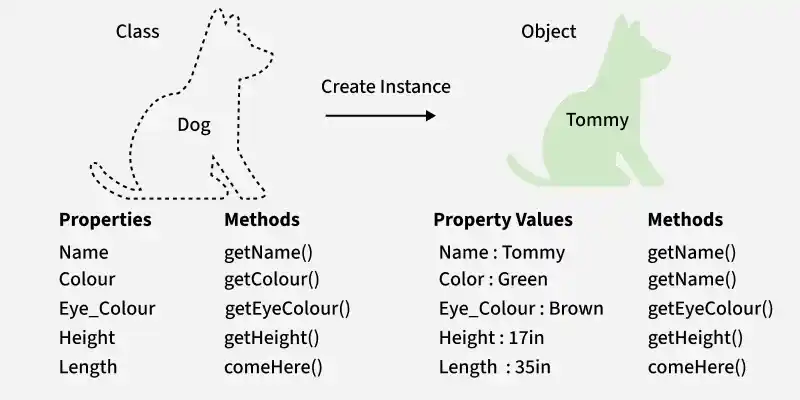
- A class is a blueprint used to create objects that share common properties and behaviors.
- An object is an instance of a class that represents a specific entity.
For example, Dog is a class, while a specific dog like Tommy is an object of that class.
Classes
A class is a user-defined reference type that groups related data and behavior. It can contain fields, properties, methods, constructors, events, and nested types.
- Acts as a template for creating objects with a shared structure.
- Defines the data and operations available to its instances.
Syntax:
class ClassName{
// Fields
// Properties
// Methods
}
Here, class is the keyword used to declare a class, and ClassName represents its name. The access modifier controls the visibility of the class.
using System;

public class Student {
    public int id;
    public string n;

    public Student(int id, string n) {
        this.id = id;
        this.n = n;
    }
}

public class MainClass {
    public static void Main(string[] args) {
        Student s1 = new Student(10, "Alice");
        Console.WriteLine(s1.id);
        Console.WriteLine(s1.n);
    }
}
Output
10
Alice
Explanation: The Student class defines two fields and a constructor that initializes them. In the Main() method, an object s1 is created using the new keyword, and its field values are displayed.
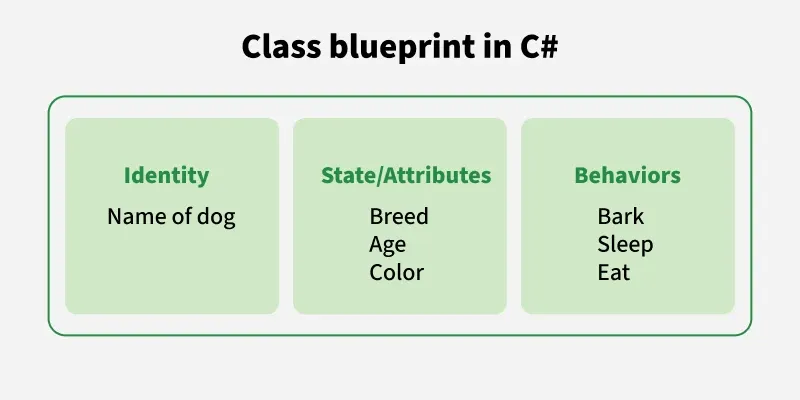
In the above image, blueprint of class Dog is shown:
- Identity: "Name of dog"
- State/Attributes: Breed , Age, Color
- Behaviors/Methods: e.g., Bark, Sleep, Eat
Objects
An object is an instance of a class created to access its data and methods. Each object maintains its own instance state while sharing the structure and behavior defined by its class. An object has three main characteristics:
- State: Values stored in fields or properties.
- Behavior: Actions performed through methods.
- Identity: Distinguishes one object from another, even when they contain identical data.
Objects can represent real-world entities such as customers, products, students, or vehicles.
Note: Classes define the blueprint of state, behavior and identity. Objects are the real instances that actually hold the state, show behavior and carry identity.
Declaration of Object
When an object is created, the class is instantiated. All objects share the class's behavior, but each has its own unique state. A class can have multiple instances. Example:
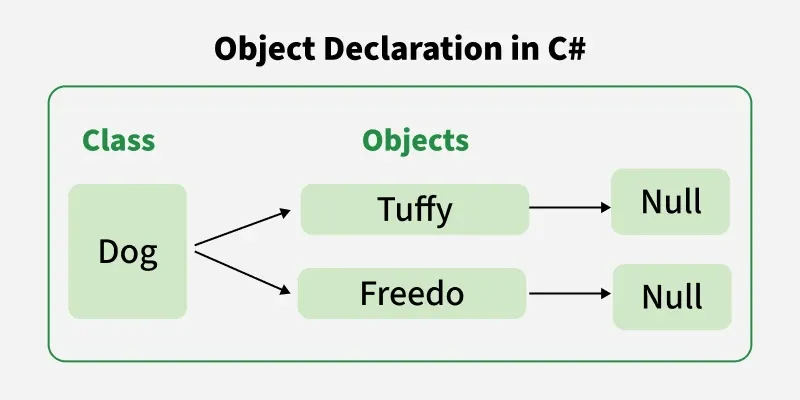
When we declare a reference variable (like Dog tuffy or Dog freedo), no memory for the object is allocated at that time. The variable only holds a null reference until we explicitly create an object using the new keyword.
Initialization of Object
The new keyword instantiates a class by allocating memory for a new object and returning a reference to that memory. The new operator also invokes the class constructor.
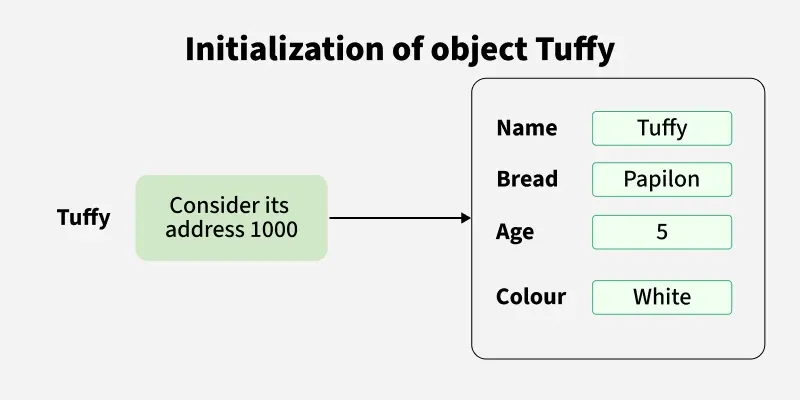
When we create an object of the Dog class and pass the parameters in the constructor. So it allocates memory for these different objects and each object stores its own reference in memory, and the reference variable points to that object, as shown in the image.
using System;

// Class Declaration
public class Dog{

	// Instance Variables
	String name;
	String breed;
	int age;
	String color;

	// Constructor Declaration of Class same name as class
	public Dog(String name, String breed, int age, String color){
		this.name = name;
		this.breed = breed;
		this.age = age;
		this.color = color;
	}

	public String GetName(){
		return name;
	}

	public String GetBreed(){
		return breed;
	}

	public int GetAge(){
		return age;
	}

	public String GetColor(){
		return color;
	}

	public override String ToString(){
		return "my name is: " + name +
			   "\nmy breed is: " + breed +
			   "\nmy age is: " + age;
	}

	public static void Main(String[] args){
		// Creating object
		Dog tuffy = new Dog("tuffy", "papillon", 5, "white");
		Console.WriteLine(tuffy.ToString());
	}
}
Output
my name is: tuffy
my breed is: papillon
my age is: 5
Explanation:
- Dog class defines attributes (name, breed, age, color) and methods.
- A constructor initializes these attributes when an object is created.
- ToString() is overridden to return a formatted string of object details.
- In Main, an object tuffy is created and its details are printed.
