

SortedSet<T> is a generic collection that stores unique elements in sorted order. By default, elements are arranged in ascending order, and the collection uses a self-balancing binary search tree (red-black tree) for efficient operations.
- Stores unique elements in sorted order.
- Supports set operations such as UnionWith(), IntersectWith(), and ExceptWith().
- Provides O(log n) time complexity for Add(), Remove(), and Contains().
Example: Program to demonstrates how to use a SortedSet, add elements, and display integers in ascending order.
using System;
using System.Collections.Generic;

class Geeks{

    static void Main(){

        SortedSet<int> s = new SortedSet<int>();

        // Adding elements
        s.Add(5);
        s.Add(1);
        s.Add(3);
        s.Add(10);

        foreach(var i in s) {
          Console.WriteLine(i);
        }
    }
}
Output
1
3
5
10
Declaration
The SortedSet<T> class belongs to the System.Collections.Generic namespace and is declared by specifying the type of elements it stores.
Syntax
SortedSet<T> setName = new SortedSet<T>();
Here, T represents the type of elements stored in the SortedSet<T>.
Hierarchy of SortedSet<T>
The SortedSet<T> class inherits from Object and implements several collection and enumeration interfaces.
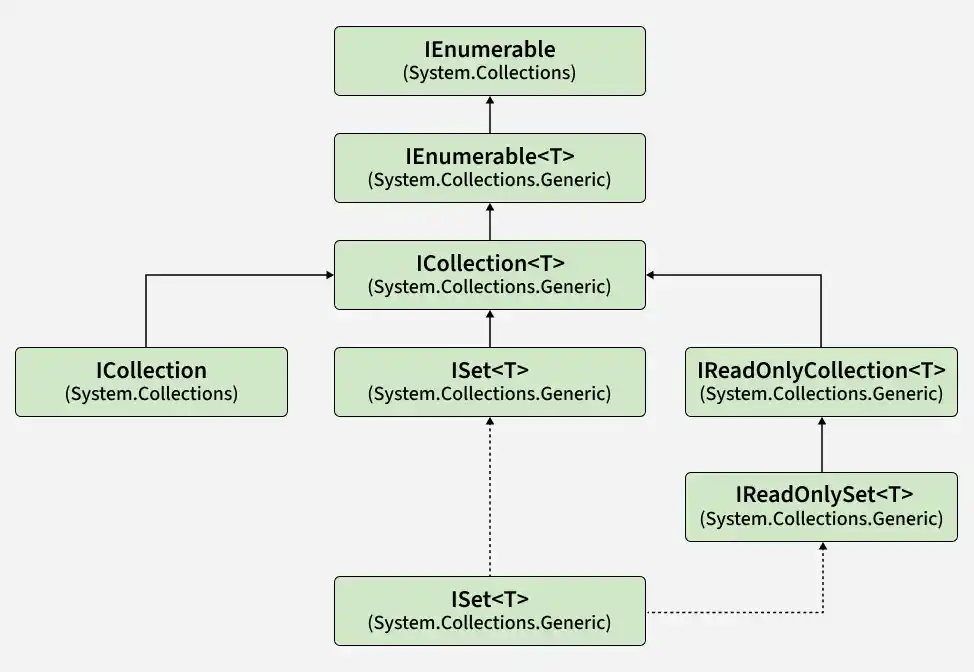
- ISet<T>: Provides set operations and uniqueness-related functionality.
- ICollection<T>: Supports adding, removing, and counting elements.
- IEnumerable<T>: Enables iteration using foreach.
- IReadOnlyCollection<T>: Exposes collection elements and their count without modification through that interface.
- IReadOnlySet<T>: Provides read-only set-related operations in supported .NET versions.
- ICollection and IEnumerable: Provide non-generic collection and enumeration functionality.
Constructors of SortedSet<T>
The SortedSet<T> class provides constructors to create an empty set, initialize it from an existing collection, or specify a custom comparer for sorting.
1. SortedSet()
Creates an empty SortedSet<T> using the default comparer.
SortedSet<int> numbers = new SortedSet<int>();
2. SortedSet(IComparer<T>)
Creates an empty SortedSet<T> that uses the specified comparer to determine the order of elements.
SortedSet<int> numbers = new SortedSet<int>(
Comparer<int>.Create((a, b) => b.CompareTo(a))
);
Here, the comparer stores the elements in descending order.
3. SortedSet(IEnumerable<T>)
Creates a SortedSet<T> from an existing collection. Duplicate elements are automatically removed.
int[] numbers = { 40, 10, 30, 20, 10 };
SortedSet<int> set = new SortedSet<int>(numbers);
4. SortedSet(IEnumerable<T>, IComparer<T>)
Creates a SortedSet<T> from an existing collection and uses the specified comparer to determine the order.
int[] numbers = { 10, 20, 30, 40 };
SortedSet<int> set = new SortedSet<int>(
numbers,
Comparer<int>.Create((a, b) => b.CompareTo(a))
);
The elements are stored in descending order.
Note: The comparer determines both the ordering of elements and whether two elements are considered equal.
Performing Different Operations on SortedSet<T>
The SortedSet<T> class supports operations for adding, accessing, removing, and searching unique elements while maintaining them in sorted order.
1. Adding Elements
The Add() method inserts an element into a sorted set and returns true if the element is added or false if it already exists.
using System;
using System.Collections.Generic;

class Geeks{

    static void Main(){

        // Create an empty SortedSet
        SortedSet<int> numbers = new SortedSet<int>();

        // Add elements using Add()
        numbers.Add(30);
        numbers.Add(10);
        numbers.Add(20);
        numbers.Add(10); // Duplicate ignored

        Console.WriteLine("Using Add():");
        foreach (int n in numbers)
            Console.Write(n + " ");

        // Add elements using collection initializer
        SortedSet<int> values = new SortedSet<int>{
            50, 40, 20, 60
        };

        Console.WriteLine("\nUsing Collection Initializer:");
        foreach (int n in values)
            Console.Write(n + " ");
    }
}
Output
Using Add():
10 20 30
Using Collection Initializer:
20 40 50 60
Explanation:
- Add() inserts elements into the set, while duplicate values are ignored.
- A collection initializer allows multiple elements to be added during initialization.
- Both approaches maintain the elements in ascending order automatically.
2. Accessing Elements
The SortedSet<T> class does not provide direct index-based access. Elements can be accessed using a foreach loop, which iterates through them in sorted order.
using System;
using System.Collections.Generic;

class Geeks{

    static void Main()
    {
        SortedSet<int> numbers = new SortedSet<int>
        {
            4, 2, 5, 1, 3
        };

        foreach (int number in numbers)
        {
            Console.Write(number + " ");
        }
    }
}
Output
1 2 3 4 5
Explanation: The foreach loop accesses each element in the order defined by the set's comparer, which is ascending order for these integers.
Note:
ElementAt()from LINQ can be used when access by position is required, but it does not provide true index-based access likeList<T>.
3. Removing Elements
SortedSet<T> provides methods to remove individual elements, elements matching a condition, or all elements.
- Remove(T): Removes a specific element.
- RemoveWhere(Predicate<T>): Removes elements that match a specified condition.
- Clear(): Removes all elements from the set.
using System;
using System.Collections.Generic;

class Geeks{

    static void Main()
    {
        SortedSet<int> numbers = new SortedSet<int>
        {
            1, 2, 3, 4
        };

        Console.WriteLine("Count before removal: " + numbers.Count);

        // Remove a specific element
        numbers.Remove(1);

        Console.WriteLine("Count after Remove(): " + numbers.Count);

        // Remove elements based on a condition
        numbers.RemoveWhere(number => number % 2 == 0);

        Console.WriteLine("Count after RemoveWhere(): " + numbers.Count);

        // Remove all elements
        numbers.Clear();

        Console.WriteLine("Count after Clear(): " + numbers.Count);
    }
}
Output
Count before removal: 4
Count after Remove(): 3
Count after RemoveWhere(): 1
Count after Clear(): 0
Explanation: Remove() deletes 1, RemoveWhere() removes the remaining even values (2 and 4), and Clear() removes the last element.
4. Checking If an Element Exists
The Contains() method determines whether a specified element exists in the SortedSet<T>.
using System;
using System.Collections.Generic;

class Geeks{

    static void Main()
    {
        SortedSet<int> numbers = new SortedSet<int>
        {
            1, 2, 3, 4
        };

        // Check whether the element exists
        if (numbers.Contains(1))
        {
            Console.WriteLine("Element is available.");
        }
        else
        {
            Console.WriteLine("Element is not available.");
        }
    }
}
Output
Element is available.
Explanation: The value 20 exists in the set, while 50 does not.
Properties of SortedSet<T>
The SortedSet<T> class provides properties to access the number of elements, minimum and maximum values, and the comparer used for sorting.
| Property | Description |
|---|---|
| Count | Gets the number of elements contained in the SortedSet<T>. |
| Comparer | Gets the comparer used to order the elements. |
| Min | Gets the minimum value in the SortedSet<T>. |
| Max | Gets the maximum value in the SortedSet<T>. |
Example: The following example demonstrates the Count, Min, and Max properties.
using System;
using System.Collections.Generic;

class Geeks{

    public static void Main()
    {
        // Create a SortedSet and add elements
        SortedSet<int> numbers = new SortedSet<int>
        {
            30, 10, 50, 20, 40
        };

        // Display the number of elements
        Console.WriteLine("Count: " + numbers.Count);

        // Display the smallest element
        Console.WriteLine("Minimum: " + numbers.Min);

        // Display the largest element
        Console.WriteLine("Maximum: " + numbers.Max);
    }
}
Output
Count: 5
Minimum: 10
Maximum: 50
Methods of SortedSet
The SortedSet<T> class provides methods for adding, removing, searching, comparing, and performing set operations.
| Method | Description |
|---|---|
| Add(T) | Adds an element to the SortedSet<T> and returns a value indicating whether it was added successfully. |
| Clear() | Removes all elements from the SortedSet<T>. |
| Contains(T) | Determines whether the specified element exists in the SortedSet<T>. |
| CopyTo(T[]) | Copies the elements of the SortedSet<T> to an array. |
| ExceptWith(IEnumerable) | Removes all elements from the set that are present in the specified collection. |
| GetEnumerator() | Returns an enumerator that iterates through the elements of the set. |
| GetViewBetween(T, T) | Returns a view of the elements within the specified range. |
| IntersectWith(IEnumerable) | Retains only the elements that are present in both the current set and the specified collection. |
| IsProperSubsetOf(IEnumerable) | Determines whether the current set is a proper subset of the specified collection. |
| IsProperSupersetOf(IEnumerable) | Determines whether the current set is a proper superset of the specified collection. |
| IsSubsetOf(IEnumerable) | Determines whether the current set is a subset of the specified collection. |
| IsSupersetOf(IEnumerable) | Determines whether the current set is a superset of the specified collection. |
| Overlaps(IEnumerable) | Determines whether the current set and the specified collection have any elements in common. |
| Remove(T) | Removes the specified element from the SortedSet<T>. |
| RemoveWhere(Predicate) | Removes all elements that match the specified condition. |
| Reverse() | Returns an enumerable collection that iterates through the elements in reverse order. |
| SetEquals(IEnumerable) | Determines whether the current set and the specified collection contain the same elements. |
| SymmetricExceptWith(IEnumerable) | Keeps only the elements that are present in either collection, but not in both. |
| TryGetValue(T, out T) | Searches for an equal value in the set and returns the value found, if any. |
| UnionWith(IEnumerable) | Adds all unique elements from the specified collection to the current set. |
